Key takeaways
- Credit card reconciliation matches every charge, credit, fee, and payment on a card statement to your general ledger, so card payable equals what you owe the issuer.
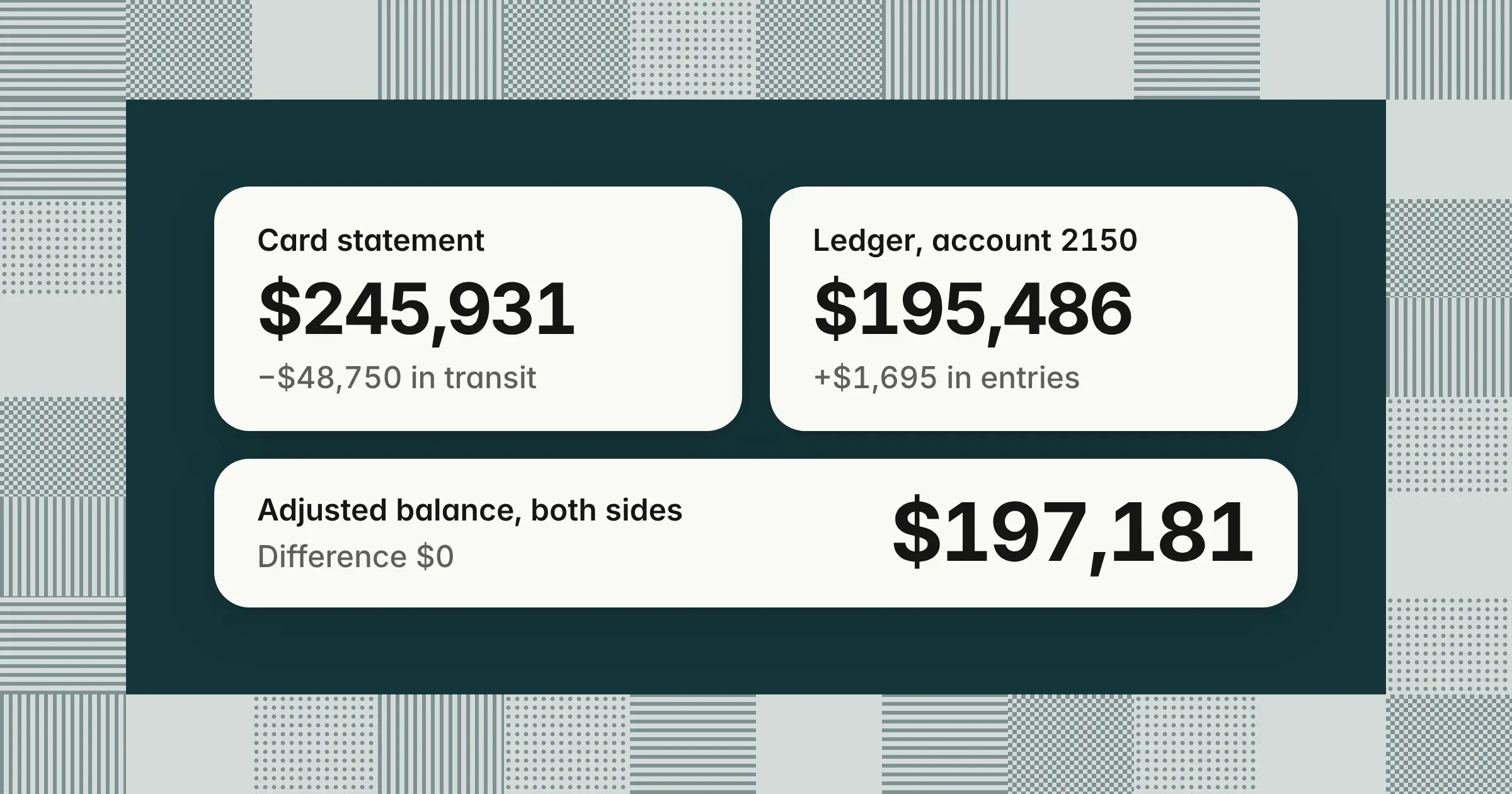
- In the worked example, a $245,931 statement and a $195,486 ledger balance both reach $197,181 after two timing items and four journal entries, for a $0 difference.
- For travel, gift, and listed-property expenses substantiated at actual cost, 26 CFR 1.274-5(c)(2)(iii) generally requires documentary evidence, such as a receipt, for lodging away from home and for any other expense of $75 or more, so set receipt deadlines that land before close.
Credit card reconciliation is matching each transaction on a credit card statement to your accounting records and resolving every difference until the card payable balance equals the statement. Getting it right gives you an accurate card liability, catches duplicate and personal charges, and keeps expenses in the month they happened. This guide covers the 7-step process, a worked example with journal entries, the statement cutoff, and missing receipts. It also gives menu paths for five accounting systems, merchant payouts, and a free Excel and Google Sheets template.
What is credit card reconciliation?
Credit card reconciliation is matching every charge, credit, fee, and payment on a card statement to your general ledger, then explaining each difference until card payable equals what the issuer says you owe. It's one type of account reconciliation, the monthly proof that a balance sheet account is right.
The card account is a liability, so an unreconciled balance can hide duplicate charges, personal spending, missing receipts, and expenses booked to the wrong month. That's why credit card reconciliation matters: it protects the accuracy of both your balance sheet and your expense lines. In the broader sense, a credit reconciliation proves any credit account, such as a card or a credit line, against the lender's statement.
- Card payable accountThe liability account in your general ledger, such as 2150 Corporate card payable, that holds what you owe the card issuer
- Statement balanceThe amount the issuer says you owe on the statement closing date
- Timing item vs adjustmentA timing item, such as a payment in transit, clears on its own next month. An adjustment, such as an unrecorded fee, needs a journal entry.
Corporate card vs merchant card reconciliation
Corporate card reconciliation proves what your company owes a card issuer for employee spending, while merchant card reconciliation proves the card payments customers made to you against processor payouts and bank deposits. Knowing which job you face tells you which documents, accounts, and entries to use.
| What differs | Corporate card reconciliation | Merchant card reconciliation |
|---|---|---|
| What you reconcile | Spending on company-issued cards | Card payments customers make to you |
| Source documents | The issuer's statement, receipts, and expense reports | The processor's payout or settlement report and your bank deposits |
| Ledger account | Card payable, a liability | Card clearing, an asset |
| What creates differences | Missing receipts, duplicates, refunds, fees, personal charges, and miscoding | Processing fees netted from payouts, refunds, chargebacks, and payout timing |
| Typical entry | Debit expense, credit card payable | Debit card clearing, credit sales, then clear it with each payout |
| Who's involved | Accounting, cardholders, and approvers | Accounting, revenue operations, and the processor |
"Credit card payment reconciliation" can mean either job. It covers the payments you send to an issuer and the card payments customers send to you. Corporate credit card reconciliation also depends on who carries the liability. With corporate liability cards, the company pays the issuer and reconciles the statement. With individual liability cards, the employee pays the issuer, and you reconcile their expense reports to what you reimburse.
What should be reconciled to the monthly credit card statement?
Reconcile card payable to the statement balance, then match each statement line to the ledger and its support: receipts and a business purpose for purchases, bank records for payments, and the statement for refunds, fees, and interest. Checking both the total and the lines catches errors that offset each other.
- The balanceCard payable in the GL equals the statement balance, after timing items
- Each chargeMatched to an approved expense report or invoice with a receipt and a business purpose
- PaymentsEach payment on the statement matches a payment from your bank account
- Credits and refundsRecorded against the original expense account
- Fees and interestForeign transaction fees, late fees, annual fees, and interest recorded as expense
- Each cardholderCharges by card agree with each cardholder's expense reports, so personal and duplicate charges can't hide in the total
- Foreign currencyCharges agree in the billing currency, with foreign transaction fees on their own line
Tying each charge to an approved expense report is what people mean by credit card expense reconciliation. The finished summary that shows both sides reaching the same adjusted balance is sometimes called the credit card reconciliation statement.
For international travel, require itemized receipts in the original currency and book the billed amount in your reporting currency. Book foreign transaction fees to bank fees rather than inside the purchase, so travel and software expense isn't overstated. If you claim VAT or GST on foreign purchases, track the recoverable tax separately under your tax rules. If a card bills in a currency other than your reporting currency, revalue the card liability at month-end under your FX policy.
How to do credit card reconciliation: 7 steps
To do a credit card reconciliation, clear last month's open items, gather the statement and support, match each line, classify differences, post adjusting entries, tie out the balances, and get a reviewer's sign-off. Running the same credit card reconciliation procedure every month keeps results consistent across preparers and cardholders.
- Clear last month's reconciling itemsThis is the first step. Confirm that every timing item from last month appears on this statement, and investigate any that don't before you start.
- Gather the statement and supportDownload the statement and the issuer's transaction file, then pull receipts, approved expense reports, and invoices for the same period
- Match each statement line to the ledgerMatch on amount, date, and merchant. With many cards, match by card or cardholder so you can trace each gap to a person.
- Classify each differencePayments and charges in transit are timing items. Missing receipts, duplicates, refunds, fees, interest, and personal charges are adjustments or follow-ups.
- Post adjusting entriesRecord unrecorded charges, credits, fees, and disputes so the ledger shows what you owe
- Tie out the balanceThe adjusted statement balance equals the adjusted ledger balance, with a $0 difference
- Review, sign off, and fileA reviewer who didn't prepare the reconciliation checks each reconciling item and approves it. Keep the statement, support, and reconciliation together so the file is audit-ready.
This corporate credit card reconciliation process runs the same way every month, whether you use a spreadsheet, your ERP's reconcile screen, or a spend platform's statement.
Who prepares the reconciliation and who signs off?
A staff or GL accountant prepares the card reconciliation, and an accounting manager or controller reviews it. Splitting the work this way keeps one person from both spending and approving the record of that spending.
| Role | What they do |
|---|---|
| Cardholder | Submits the receipt, business purpose, and coding for each charge |
| Cardholder's manager | Approves the business purpose of each charge or expense report |
| Preparer (staff or GL accountant) | Matches the statement to the ledger, logs differences, and drafts entries |
| Reviewer (accounting manager or controller) | Checks every open item and entry, then signs the reconciliation |
| Controller | Reviews unresolved items above your review threshold and decides their treatment before close |
Nobody approves their own charges.
Should credit card payable be reconciled monthly?
Yes. Credit card payable is a balance sheet liability, so reconcile it to the issuer's statement every month as part of close. Give it an owner, a due day, and a reviewer on your month-end close checklist. High-volume programs can match transactions weekly and keep the month-end step to the balance tie-out, the open-item review, and sign-off.
What is the best way to reconcile credit cards?
The best way is to match transactions from the issuer's feed during the month and collect receipts at the time of purchase. Month-end is then a tie-out of the statement balance and a review of exceptions. Spreading the work across the month leaves your team with fewer surprises at close.
- Use the issuer's feed or exportImport transactions daily or weekly instead of keying them from a PDF statement
- Capture receipts at purchaseHave cardholders photograph and submit receipts the same day
- Code at the sourceHave cardholders or approvers assign the GL account and business purpose when they submit
How long should a credit card reconciliation take?
The time depends on transaction volume and receipt completeness more than on the number of cards. A statement with every receipt attached and coded reconciles quickly, while chasing missing receipts and disputes is what drags it across the close. Set a due day in your close calendar, such as business day 3–5. Then track open items by owner so the reconciliation doesn't become a bottleneck.
Credit card reconciliation example
In this credit card reconciliation example, a $245,931 statement and a $195,486 ledger balance both reconcile to $197,181 after two timing items and four journal entries, leaving a $0 difference. Working through real numbers shows you which differences need an entry and which clear on their own.
Example
A company with 40 cardholders on one corporate liability card program reconciles its October 2026 statement, which closes on October 31. September's balance of $182,400 was reconciled last month and paid in full on October 10. All amounts are illustrative.
October 2026 card statement
| Line | Amount |
|---|---|
| Previous balance, September 30 | $182,400 |
| Payment received, October 10 | ($182,400) |
| Purchases | $246,315 |
| Credits and refunds | ($420) |
| Fees | $36 |
| Statement balance, October 31 | $245,931 |
What the ledger shows: Account 2150 Corporate card payable has a credit balance of $195,486 on October 31. It started at $182,400, fell by the $182,400 payment on October 10 and a $50,000 payment sent on October 30, and rose by $245,486 of charges posted from approved expense reports.
Matching the statement to the ledger line by line turns up six differences.
| Item | On the statement | In the ledger | Type |
|---|---|---|---|
| 1Payment sent October 30, posted by the issuer November 2 | Not yet | ($50,000) | Timing |
| 2Hotel charge on October 31, on an approved expense report, posted by the issuer November 2 | Not yet | $1,250 | Timing |
| 3Three charges with no receipt or expense report: airline $640, restaurant $385, and software $155 | $1,180 | Not recorded | Adjustment |
| 4Software subscription billed twice on October 14 | $899 twice | $899 once | Adjustment |
| 5Refund for returned office supplies | ($420) | Not recorded | Adjustment |
| 6Foreign transaction fee | $36 | Not recorded | Adjustment |
Credit card reconciliation, October 31, 2026
| Line | Amount |
|---|---|
| Statement balance | $245,931 |
| Less: payment in transit (item 1) | ($50,000) |
| Add: charge in transit (item 2) | $1,250 |
| Adjusted statement balance | $197,181 |
| Ledger balance, account 2150 | $195,486 |
| Add: charges missing receipts (item 3) | $1,180 |
| Add: duplicate charge under dispute (item 4) | $899 |
| Less: unrecorded refund (item 5) | ($420) |
| Add: foreign transaction fee (item 6) | $36 |
| Adjusted ledger balance | $197,181 |
| Difference | $0 |
The statement side is $245,931 − $50,000 + $1,250 = $197,181. The ledger side is $195,486 + $1,180 + $899 − $420 + $36 = $197,181. The statement's $246,315 of purchases also ties: $244,236 of charges already in the ledger, plus the $1,180 missing receipts and the second $899 charge.
Journal entries for the example
Only the four adjustments need journal entries. The two timing items will appear on the November statement, so you tick them off first next month. Total debits and credits are each $2,535.
| Account | Debit | Credit |
|---|---|---|
| 1. Record charges missing receipts | ||
| 6200 Travel | 640 | |
| 6300 Meals | 385 | |
| 6400 Software | 155 | |
| 2150 Corporate card payable | 1,180 | |
| 2. Record the duplicate as a dispute | ||
| 1450 Card disputes receivable | 899 | |
| 2150 Corporate card payable | 899 | |
| 3. Record the refund | ||
| 2150 Corporate card payable | 420 | |
| 6500 Office supplies | 420 | |
| 4. Record the foreign transaction fee | ||
| 6600 Bank fees | 36 | |
| 2150 Corporate card payable | 36 | |
| Total | 2,535 | 2,535 |
- Missing receiptsBook each charge to the expense account its merchant points to and flag it "receipt pending," so the liability and expense are complete at month-end. Booking unclear charges to a suspense account instead is a policy choice; if you use suspense, clear it before the next close.
- Duplicate chargeYou owe the issuer the second $899 until it credits the dispute, so it belongs in card payable. When the credit posts in November, debit 2150 and credit 1450. If the dispute fails, move the $899 to expense or recover it from the merchant.
- RefundCredit the account the original purchase hit, not revenue, so the expense isn't overstated
- Unrecorded feesAnnual fees, late fees, foreign transaction fees, and interest all follow entry 4: debit bank fees or interest expense and credit card payable. Then add recurring fees to your feed rules or checklist so they're captured next month.
- After postingAccount 2150 shows $197,181, which equals the adjusted statement balance. When you pay the statement, debit card payable and credit cash.
What if the card statement closes before month-end?
Reconcile the card account to the statement balance on the closing date, then accrue charges made between that date and month-end so each expense lands in the month it was incurred on an accrual basis. Separating the two keeps the reconciliation tied to a real statement while your income statement stays complete.
Example
Your corporate card statement closes on October 25. Cardholders spend $38,600 from October 26–31: $21,400 of travel, $9,800 of software, $4,150 of meals, and $3,250 of office supplies. You pull those charges from the issuer's transaction export or approved expense reports and accrue them at October 31.
| Account | Debit | Credit |
|---|---|---|
| October 31: accrue unbilled card charges | ||
| 6200 Travel | 21,400 | |
| 6400 Software | 9,800 | |
| 6300 Meals | 4,150 | |
| 6500 Office supplies | 3,250 | |
| 2160 Accrued card charges | 38,600 | |
| November 1: reverse the accrual | ||
| 2160 Accrued card charges | 38,600 | |
| Same expense accounts as above | 38,600 | |
When the charges appear on the November 25 statement, you record them to card payable as usual. The reversal keeps November's expense from counting them twice. The October reconciliation still ties card payable to the October 25 statement balance, with the accrual in its own account. For how to estimate and support entries like this, see accrued expenses.
If your card feed posts charges to card payable as they happen, you don't need the accrual. Reconcile the GL balance as of the statement closing date instead. Or treat charges dated after the closing date as timing items on a month-end reconciliation.
Credit card reconciliation template (Excel and Google Sheets)
A credit card reconciliation template needs a statement side, a ledger side, a reconciling-items log, and a difference cell that must show zero before the preparer and reviewer sign. The free workbook below is prefilled with this guide's October example, so you can see every formula working before you enter your own numbers.
Free credit card reconciliation template
Five tabs: How to use, Summary, Reconciling items log, By cardholder, and Journal entries, with the October example filled in. Opens in Excel and Google Sheets. Free to use and change.
The workbook has five tabs:
- How to useMonthly steps, the sign convention, and the cell colors for inputs, formulas, and checks
- SummaryThe statement side, the ledger side, the difference that must be $0, supporting checks, and preparer and reviewer sign-off
- Reconciling items logDate, card or cardholder, merchant or item, signed amount, type (Timing or Adjustment), side (Statement or Ledger), action and journal entry, owner, status, cleared date, and days open
- By cardholderEach card's statement activity against the expense reports posted to the GL, with any difference explained by the log
- Journal entriesThe adjusting entries and a debits-equal-credits check, which feed the Summary tab's check that card payable after posting equals the adjusted statement balance
Google Sheets: The file uses only SUM, SUMIFS, COUNTIFS, SUMPRODUCT, ABS, IF, and ROUND with named ranges, and it has no macros, Excel Tables, or external links. Open the copy link, or upload the .xlsx to Google Drive and open it with Google Sheets, and the formulas, dropdowns, and checks work the same way.
The formula for a credit card reconciliation
The formula is adjusted statement balance minus adjusted ledger balance, which must equal zero. Each side starts from its own balance and adds its own reconciling items.
- Adjusted statement balanceStatement balance + timing items (a payment in transit is negative, a charge in transit is positive)
- Adjusted ledger balanceGL card payable balance before adjusting entries + adjustments (an unrecorded charge or fee is positive, an unrecorded refund is negative)
- DifferenceAdjusted statement balance − adjusted ledger balance = $0
In the template, the log holds every item with a signed amount, so each side's total is one formula. The statement side is =SUMIFS(LogAmt,LogSide,"Statement",LogStatus,"<>Cleared"), and the ledger side swaps in "Ledger." Items you mark Cleared drop out of the totals.
Summary tab
| Line | Where it comes from | Example |
|---|---|---|
| Statement balance on the closing date | Issuer statement | $245,931 |
| Timing items | Log, side Statement | ($48,750) |
| Adjusted statement balance | Calculated | $197,181 |
| GL card payable balance before adjusting entries | Trial balance or GL detail | $195,486 |
| Adjustments | Log, side Ledger | $1,695 |
| Adjusted ledger balance | Calculated | $197,181 |
| Difference (must be 0) | Calculated | $0 |
Reconciling items log, three rows from the example
| Date | Card or cardholder | Merchant or item | Amount | Type | Side |
|---|---|---|---|---|---|
| Oct 30 | Company account | Payment in transit | (50,000) | Timing | Statement |
| Oct 31 | Card ending 4417 | Hotel | 1,250 | Timing | Statement |
| Oct 14 | Card ending 2093 | Software, duplicate | 899 | Adjustment | Ledger |
| Merchant or item | Action and entry | Owner | Status |
|---|---|---|---|
| Payment in transit | None, clears in November | AP | Open |
| Hotel | None, clears in November | Cardholder | Open |
| Software, duplicate | Dispute filed, JE 2 | Cardholder | Disputed |
If you need a one-page credit card reconciliation form or PDF, print the Summary tab after sign-off and attach the statement. Keep the log open across months until every item shows a cleared date. An item that stays open for two closes is a sign of a missing entry or a dispute nobody is chasing.
How to do credit card reconciliation in Excel
To do credit card reconciliation in Excel, download the statement transactions and your GL card payable detail, match the two, and log every difference with a signed amount. Working from exports instead of a PDF saves retyping and keeps amounts exact.
- Get the statement into ExcelDownload the transactions as a CSV or Excel file from your issuer's portal or card platform, plus the statement's closing balance
- Export the ledger sidePull the card payable account detail for the same period from your accounting system
- Find candidate matchesCount each statement line's occurrence of the same date and amount against the ledger, so two identical charges can't both match one GL entry:
=IF(COUNTIFS(A$2:A2,A2,D$2:D2,D2)<=COUNTIFS(GL!A:A,A2,GL!D:D,D2),"Candidate match","Check"). Flag repeats on date, merchant, and amount with=IF(COUNTIFS(A:A,A2,C:C,C2,D:D,D2)>1,"Possible duplicate",""). A candidate match isn't confirmed until you've looked at it, and every "Check" and "Possible duplicate" line gets reviewed by hand - Log the differencesEnter each unmatched item on the Reconciling items log with its type and side
- Tie out and signConfirm the Difference cell shows $0.00, then sign as preparer and send it for review
Avoid matching on a reference number. The issuer's transaction reference rarely exists in your GL, so amount, date, and merchant are the reliable keys.
How do you reconcile one card statement with many cardholders?
Split the statement by card number, match each cardholder's charges to their approved expense report, and confirm the cardholder totals add up to the statement before you tie the program total to card payable. Reconciling by person first shows you who is holding up the close and keeps personal or duplicate charges from hiding in a large total.
Example
The October statement from the worked example covers 40 cards. Six cards have differences, and the other 34 match their expense reports exactly.
| Card | Statement charges, credits, and fees | Expense reports posted to GL | Difference | Explained by |
|---|---|---|---|---|
| Card ending 2093 | $9,319 | $8,420 | $899 | Duplicate charge |
| Card ending 3301 | $13,236 | $12,560 | $676 | Airline charge with no receipt ($640) and foreign transaction fee ($36) |
| Card ending 4417 | $5,640 | $6,890 | ($1,250) | Hotel charge in transit |
| Card ending 5520 | $4,700 | $4,315 | $385 | Restaurant charge with no receipt |
| Card ending 6684 | $9,900 | $9,745 | $155 | Software charge with no receipt |
| Card ending 7712 | $3,560 | $3,980 | ($420) | Unrecorded refund |
| All other cards (34) | $199,576 | $199,576 | $0 | |
| Total | $245,931 | $245,486 | $445 |
The $245,931 column equals the statement's purchases, credits, and fees ($246,315 − $420 + $36). The $445 total difference is the four ledger adjustments of $1,695 less the $1,250 hotel charge in transit, so nothing is unexplained.
- Unsubmitted or unsupported chargesStay on the log as open items under the cardholder's name
- Personal chargesMove to an employee receivable. If the charge is already in expense, debit employee receivable and credit the expense account; if it isn't in the ledger yet, debit employee receivable and credit card payable.
With a few cards, matching the statement line by line is enough. As the number of cardholders grows, reconcile by cardholder first and track open items by person. The template's By cardholder tab does this split for you.
How do you handle missing receipts on a credit card reconciliation?
Book the charge so the card liability is complete, either to its likely expense account flagged receipt pending or to suspense, then get the receipt from the cardholder or a copy from the merchant. A clear rule keeps missing receipts from piling up at close and keeps your expense records audit-ready.
Tax rules set the floor for your policy. Section 274(d) of the tax code covers travel away from home, gifts, and listed property. For those expenses, 26 CFR 1.274-5(c)(2)(iii) requires documentary evidence, such as a receipt or paid bill, for any lodging while traveling away from home. It also requires it for any other expenditure of $75 or more. Transportation charges are excepted when that evidence isn't readily available. These rules apply when you substantiate actual costs. A qualifying per diem allowance can stand in for proof of the amount of lodging, meals, and incidental expenses, and there are limited exceptions for records lost through circumstances beyond your control (26 CFR 1.274-5T(c)(5) and 1.274-5(g) and (j); IRS Publication 463, for 2025 returns).
Timing has a safe harbor too, under the fixed date method in 26 CFR 1.62-2(g)(2). An expense substantiated within 60 days after it's paid or incurred counts as within a reasonable period for an accountable plan. So does an excess amount returned within 120 days. Set your internal deadlines well inside those limits so receipts arrive before close.
A missing receipt affidavit captures the cardholder, the card's last four digits, the date, merchant, and amount. It adds an itemized description, the business purpose, attendees for meals, and why the receipt is unavailable. The cardholder and the approver both sign it. It gives you a written record for small charges. For lodging or a covered expense of $75 or more, an affidavit alone generally isn't enough, so agree with your tax advisor how your accountable plan treats it. Limit how often each person can use one.
Example
An example schedule for a receipt policy:
| Days after the charge | What happens | Who acts |
|---|---|---|
| 0–5 | Cardholder uploads the receipt and business purpose | Cardholder |
| 6 | Automatic reminder | Accounting or card system |
| 10 | Escalation to the cardholder's manager | Manager |
| 30 | Card limit reduced or card suspended until receipts are in | Accounting |
| Before 60 | Unsupported charge treated as personal and repaid by the cardholder, or handled as your tax advisor directs | Accounting and payroll |
Expense tools can run most of this schedule: they message cardholders after a purchase, match a photographed receipt to the charge, send reminders, and escalate to managers. At month-end, charges still missing support show up as exceptions for your team to book and follow up, reported by cardholder so managers see who is holding up close.
How do Ramp, Brex, and Amex feeds post to the GL, and what still needs reconciling?
Card platforms such as Ramp and Brex sync approved transactions to your ERP as expenses against a card liability or clearing account, and record statement payments from your bank against it (Ramp and Brex NetSuite help pages, checked November 11, 2026). The sync handles capture and coding, but it doesn't prove the balance, so these checks stay with your team at close.
An Amex corporate card reaches your ledger through whichever bank feed or expense tool you connect to it. The card network, whether Amex, Visa, or Mastercard, doesn't change the reconciliation method. The issuer and the program do, because each produces its own statement and data feed. Keep one card payable account per issuer or program and reconcile each one to its own statement.
| What still needs reconciling | Why it breaks | What to do |
|---|---|---|
| Card payable vs the platform's statement | The GL shows what synced, not what the issuer billed | Tie the GL balance to the statement balance every month |
| Failed or unsynced transactions | Missing coding, approvals, or a mapping error blocks the sync | Clear the sync queue before close and reconcile what's left as open items |
| Charges pending at month-end | Transactions not yet approved or synced by the last day | Accrue them, or log them as timing items |
| Repayments in transit | The bank debit and the platform's payment post on different days | Match each repayment to the bank statement and log any in transit |
| Cashback and rebates | Credits on the statement that no expense report carries | Book them per your policy, as a reduction of expense or as other income |
Employee card integration with accounting systems maps each card and transaction to your GL accounts and to dimensions such as department, class, location, and subsidiary. When you compare spend tools for QuickBooks or NetSuite, check two-way sync, failed-sync alerts, and support for your dimensions. Also check whether the tool helps tie card payable to the statement. Coding and sync alone don't finish the reconciliation.
Example
A 200-person SaaS company on Ramp cards and NetSuite treats Ramp as the source of spend and NetSuite as the ledger of record. Before close, the team clears missing receipts and coding, syncs approved transactions, and compares Ramp's statement balance with the card liability account in NetSuite. It investigates unsynced or mismatched items, accrues charges not yet synced at month-end, matches the Ramp repayment to the bank, and gets sign-off.
That's also how spend data supports the month-end close. Coded, approved transactions arrive before month-end, exceptions get reviewed during the month, and the reconciliation at close becomes a tie-out instead of a rebuild.
How to reconcile a credit card in QuickBooks, NetSuite, Xero, Sage Intacct, and Business Central
Every system follows the same steps: choose the card account, enter the statement ending date and balance, match transactions, add fees and missing items, and finish when the difference is zero. Only the menus differ, so the table below names each path and the vendor help article it comes from, checked November 11, 2026.
| System | Where to start | What you enter | When you're done | Vendor help article |
|---|---|---|---|---|
| QuickBooks Online | All apps > Accounting > Reconcile | Ending balance and ending date | Difference is $0.00, then Finish now | Intuit, "Reconcile an account in QuickBooks Online," updated August 5, 2026 |
| NetSuite | Transactions > Bank > Match Bank Data, then Transactions > Bank > Reconcile Account Statement | Statement End Date and Ending Statement Balance | Click Reconcile, then OK | Oracle NetSuite Help Center, "Matching Bank Data" and "Reconciling Transactions," checked November 11, 2026 |
| Sage Intacct | Cash Management > All > Reconciliation > Credit card | Statement ending date and statement ending balance | Amount to reconcile is zero, then Reconcile | Sage Intacct Help, "Begin reconciling an account" and "About reconciling in Sage Intacct," last modified October 23, 2026 |
| Business Central | Search for Bank Account Reconciliation, then New | Bank Account No., Statement Date, and Statement Ending Balance | Totals agree, then Post | Microsoft Learn, "Reconcile Bank Accounts," updated October 26, 2026 |
| Xero | The card account's reconcile screen | Matches or new transactions for each statement line | The Xero balance agrees with the statement | Xero, bank reconciliation product page, checked November 11, 2026 |
Credit card reconciliation in QuickBooks Online
In QuickBooks Online, go to All apps > Accounting > Reconcile, pick the card account, enter the statement's ending balance and ending date, and check off transactions until the difference is $0.00. These steps follow Intuit's "Reconcile an account in QuickBooks Online," updated August 5, 2026.
- Prepare the accountMatch or add every downloaded card transaction in your bank feed. Record each payment to the issuer with Pay down credit card, which Intuit's "Record your payments to credit cards in QuickBooks Online" (updated August 5, 2026) calls the primary method, or as a transfer if both accounts are connected. Either way, it reduces the card balance instead of posting to expense.
- Open ReconcileGo to All apps > Accounting > Reconcile. Intuit's video in the same article uses Settings > Reconcile.
- Choose the accountPick the credit card account and confirm the last statement ending date, so this statement starts the day after it
- Enter the statement detailsType the ending balance and ending date from the card statement. If you use the optional AI-powered reconciliation, upload the statement; Intuit says verification may take up to an hour.
- Check off transactionsTick each transaction that appears on the statement. The difference updates as you go.
- Resolve the differenceCheck that the beginning balance matches the statement, then look for transactions dated after the statement date, duplicates from the bank feed, payments recorded as charges, and missing fees or interest. Select Edit info to correct the ending balance or date.
- Finish and save the reportSelect Finish now, then Done. QuickBooks saves a reconciliation report under History by account on the Reconcile page.
Intuit's video notes that you can finish with a difference, and QuickBooks then creates an adjusting entry for the gap. It advises talking to your accountant first. Treat a forced difference as an open item, not a fix. In QuickBooks Desktop, start from Banking > Reconcile, confirm the statement date, and enter the ending balance plus any unrecorded service charge or interest (Intuit, "Reconcile an account in QuickBooks Desktop," updated August 5, 2026).
To undo a credit card reconciliation in QuickBooks Online, check Intuit's "Undo or remove transactions from reconciliations in QuickBooks Online," published November 10, 2026. Intuit's "Undo an entire reconciliation in QuickBooks Online" (updated August 5, 2026) says primary admins, in-house accountants, and accountant users can undo a full reconciliation. Undoing one period also undoes every reconciliation completed after it and permanently deletes its reconciliation report and attachments, so download them first. To unreconcile one transaction, open the card account's history from the Chart of accounts, clear the R in the checkmark column, save, and reconcile again. Undo only to fix a real error and document why, because it reopens a period your reviewer already signed.
Credit card reconciliation in NetSuite
In NetSuite, go to Transactions > Bank > Match Bank Data and select the credit card account. Match imported card lines to account transactions, then submit the matches. Next, go to Transactions > Bank > Reconcile Account Statement and select the same account. Confirm the Statement End Date and Ending Statement Balance, include the transactions on the Reconcile subtab, and click Reconcile.
Oracle's NetSuite Help Center says the older Reconcile Credit Card Statement page is no longer supported as of NetSuite 2021.1. It also notes that you can reconcile with an amount difference, so confirm the difference is zero before you click Reconcile.
Credit card reconciliation in Sage Intacct
In Sage Intacct, go to Cash Management > All > Reconciliation > Credit card and select the card account. Enter the statement ending date and statement ending balance. Import a statement file or use the bank feed, then match transactions on the Intacct and Bank tabs and create any that are missing. When the Amount to reconcile field is zero, select Reconcile. Sage Intacct Help ("About reconciling in Sage Intacct," last modified October 23, 2026) also notes that reopening a closed reconciliation needs both Reopen and Report permissions.
Credit card reconciliation in Business Central
Microsoft's "Reconcile Bank Accounts" article for Business Central, updated October 26, 2026, has no separate credit card procedure. If you track the card as a bank account, search for Bank Account Reconciliation and choose New. Fill in the Bank Account No., Statement Date, and Statement Ending Balance. Then import the statement or use Suggest Lines, choose Match Automatically, review the matches, and post when the totals agree.
Credit card reconciliation in Xero and other systems
In Xero, you reconcile statement line by statement line: for the card account, match each imported line to an existing Xero transaction, or create one (Xero's bank reconciliation product page, checked November 11, 2026). Code fees and interest as you go, and confirm Xero's balance agrees with the card statement. Odoo and other systems follow the same pattern: match each statement line, add what's missing, and finish at zero.
Merchant credit card reconciliation: Stripe, Square, and Shopify payouts
Merchant credit card reconciliation records card sales gross in a clearing account, clears it with each payout, fee, refund, and chargeback from the processor's report, and checks that the remaining balance equals payouts still in transit. Booking sales gross keeps fees visible as an expense instead of hiding them inside smaller deposits, which is the point of credit card sales reconciliation.
Processors settle in two ways. Many pay out net: Stripe payouts net out refunds, disputes, and fees, Square deducts processing fees before each transfer, and Shopify Payments takes chargebacks from your next payout (vendor help pages, checked November 11, 2026). Some merchant acquirers deposit sales gross and debit fees once a month. Either way, the clearing account absorbs the difference between what you sold and what reached the bank.
Use the payout as the unit. Stripe Docs describe the payout reconciliation report as the way to match each automatic payout to the batch of transactions it settles. Its itemized CSV lists every charge, refund, dispute, and fee in the payout. For manual payouts, Stripe points you to its Balance report instead.
Example
A retailer records $84,500 of gross card sales in October 2026. The processor's payout reports and the bank statement show the following, ignoring sales tax. All amounts are illustrative.
| Line | Amount |
|---|---|
| Gross card sales recorded at the point of sale | $84,500 |
| Less: refunds to customers | ($1,200) |
| Less: chargebacks | ($650) |
| Less: chargeback fees | ($30) |
| Less: processing fees | ($2,432) |
| Net payouts for October | $80,188 |
| Deposited in the bank by October 31 | $77,910 |
| Payout in transit, October 31 batch | $2,278 |
Processing fees here equal an effective rate of about 2.9% of gross sales ($2,432 ÷ $84,500). The entries record sales at gross and clear the account with each deduction and deposit.
| Account | Debit | Credit |
|---|---|---|
| 1. Record card sales | ||
| 1210 Card clearing | 84,500 | |
| 4000 Sales | 84,500 | |
| 2. Record refunds | ||
| 4050 Sales returns and allowances | 1,200 | |
| 1210 Card clearing | 1,200 | |
| 3. Record chargebacks | ||
| 4060 Chargebacks | 650 | |
| 1210 Card clearing | 650 | |
| 4. Record fees ($2,432 processing + $30 chargeback fees) | ||
| 6610 Merchant processing fees | 2,462 | |
| 1210 Card clearing | 2,462 | |
| 5. Record deposits | ||
| 1010 Cash | 77,910 | |
| 1210 Card clearing | 77,910 | |
| Total | 166,722 | 166,722 |
After these entries, card clearing holds $2,278: $84,500 − $1,200 − $650 − $2,462 − $77,910. That equals the October 31 payout in transit, so the account reconciles. Debits and credits are each $166,722. If clearing doesn't equal payouts in transit, look for a missed chargeback or a fee billed monthly instead of netted. A deposit posted to the wrong account causes the same gap. If you win a chargeback dispute, reverse entry 3 for that amount when the funds arrive.
To reconcile Shopify or Square payouts in QuickBooks Online, create a clearing account for each processor and record each day's sales gross into it. Post fees, refunds, and chargebacks from the payout report, and record each payout as a transfer from clearing to your bank account. At month-end, reconcile clearing so it equals payouts in transit. High-volume retailers can run the same check daily against each batch. A missing deposit then shows up within a day instead of at close.
Credit card reconciliation vs bank reconciliation
A bank reconciliation proves your cash balance against the bank statement, while a credit card reconciliation proves your card liability against the issuer's statement and checks that each charge is supported, approved, and coded. The method is the same, so knowing where they differ tells you what extra support a card reconciliation needs.
| What differs | Bank reconciliation | Credit card reconciliation |
|---|---|---|
| Account | Cash, an asset | Card payable, a liability |
| External source | Bank statement | Issuer or card platform statement |
| Question it answers | Is the cash balance right? | Is the card balance right, and is every charge supported? |
| Typical reconciling items | Deposits in transit, outstanding checks, bank fees | Payments in transit, charges in transit, missing receipts, duplicates, refunds, fees |
| Extra support | Bank activity only | Receipts, cardholders, approvals, and expense reports |
The card payment connects the two. It leaves cash on your bank reconciliation and reduces the balance on your card reconciliation. A payment in transit on one often explains a timing item on the other. To do bank and credit card reconciliation together, reconcile the bank account first, then use its confirmed payment dates on the card reconciliation. Credit card bank reconciliation, in the merchant sense, is the same link in reverse: net payouts end up as deposits on the bank reconciliation.
What should a corporate credit card reconciliation policy include?
A corporate credit card reconciliation policy sets who gets a card and the limits, blocked spending, receipt deadlines, approvals, the reconciliation due day and reviewer, personal-charge repayment, dispute reporting, and card cancellation. Writing the rules down gives cardholders, approvers, and reviewers the same standard.
| Policy area | What to set | Example rule |
|---|---|---|
| Eligibility and limits | Who gets a card and the monthly limit | Cards issued by role, with a limit set per cardholder |
| Allowed and blocked spend | Spending categories and blocked merchant types | Block cash advances and merchant types outside your business purpose |
| Receipt deadline | Days to submit a receipt and business purpose | 5 business days after the charge |
| Approvals | Who approves each charge or expense report | The cardholder's manager approves, and no one approves their own charges |
| Reconciliation deadline | When the statement is reconciled and reviewed | Reconciled by business day 3 of close and reviewed by business day 5 |
| Personal charges | How and when they're repaid | Repaid within 30 days of the statement |
| Disputes | How fast unrecognized and duplicate charges are reported | Reported to accounting within 10 days so disputes stay inside the issuer's window |
| Non-compliance | What happens when deadlines are missed | Reminder, then manager escalation, then a reduced limit or suspended card |
| Card lifecycle | When cards are canceled or reviewed | Canceled on the employee's last day, with unused cards reviewed every quarter |
Three controls back up the policy:
- Separate the dutiesThe cardholder, the approver, the reconciler, and the reviewer are different people
- Scan for red flagsSplit purchases that stay under a limit, round-dollar charges, weekend charges, and repeat charges from one merchant
- Track open itemsMissing receipts and disputes older than 30 days go on a list your controller reviews at each close
A progressive suspension policy applies the non-compliance rule in the same order every time: a reminder, manager escalation, a reduced limit or suspended card, and finally recovery of unsupported charges as personal, with every exception documented.
For routine approvals, two levels cover the risk: the cardholder's manager approves the business purpose, and finance reviews coding and policy. Add a higher approver only above a set amount or for restricted categories, because more levels slow the close.
Common credit card reconciliation mistakes
Watch for seven credit card reconciliation mistakes: recording card payments as expenses, double-posting charges, booking refunds as revenue, forcing differences, reconciling only the total, ignoring the cutoff, and netting merchant fees. Each one has a simple fix you can write into your procedure.
| Mistake | What happens | Fix |
|---|---|---|
| Recording a charge from both the card feed and the expense report | Expense and card payable are overstated | Pick one source for posting and match the other to it |
| Recording payments to the issuer as expense | Expense is counted twice | Debit card payable and credit cash |
| Booking refunds as revenue | Revenue and expense are both overstated | Credit the original expense account |
| Forcing a difference to close the reconciliation | Errors stay hidden in an adjustment | Investigate, and log any unresolved amount as an open item |
| Reconciling only the program total | Personal and duplicate charges hide in the total | Reconcile by cardholder, then tie out the total |
| Ignoring the statement cutoff | Expenses land in the wrong month | Accrue charges between the closing date and month-end |
| Recording merchant deposits net of fees | Revenue and fees are both understated | Record sales gross and fees as a separate expense |
Credit card reconciliation software: what it automates and what you still check
Credit card reconciliation software imports card transactions, collects receipts, suggests GL codes, and matches charges to the ledger, while your team still reviews exceptions, ties card payable to the statement, and signs off. Knowing where automation stops helps you decide what to keep in your manual review.
| Manual step | What automation does | What your team still reviews |
|---|---|---|
| Keying statement lines | Imports transactions from the issuer daily | Feed completeness against the statement total |
| Chasing receipts | Sends reminders and matches uploaded receipts to charges | Charges still missing support after the deadline |
| Coding expenses | Suggests GL accounts from merchant and history, and applies rules to recurring merchants | New merchants, price changes, and unusual coding |
| Matching to the ledger | Matches on amount, date, and merchant | Unmatched items and possible duplicates |
| Preparing the reconciliation | Builds the statement and ledger tie-out with reconciling items | Proposed entries, open items, and sign-off |
Automated credit card reconciliation tools, including corporate credit card reconciliation software, fall into two groups. Corporate card platforms and expense tools, such as SAP Concur and Expensify, capture receipts, code transactions, and sync them to your ERP. Close and reconciliation tools, including AI agents, tie card payable to the statement and prepare entries for review. Check which of the two jobs a tool does. For tools compared by the work they do, see best account reconciliation software.
Rules that code recurring merchants, such as software subscriptions or cloud hosting, cut manual work. Review rule-coded items during reconciliation anyway, because a new subscription or a price change can be coded wrongly without anyone noticing. If you reconcile manually, the template above covers the same steps. Either way, keep the preparer and the reviewer different people.
AI tools can take on the matching work: reading statements, pairing transactions with receipts and ledger entries, and flagging duplicates and missing support. A controller still checks five things:
- CompletenessEvery card and statement period was loaded
- ExceptionsEvery unmatched or disputed item is reviewed, rather than only the net difference
- Coding and cutoffGL account, department, and period are right, with receipts and approvals for unusual charges
- EntriesProposed adjusting entries are approved before they post
- Sign-offThe final tie-out of card payable to the statement carries the reviewer's signature
ChatGPT can read a statement export and draft a matching table. A standalone ChatGPT file upload doesn't post to your ledger or provide the required accounting controls, such as an audit trail and a separate preparer and reviewer. Use it to speed up matching, then reconcile in your accounting system, and never paste full card numbers into it.
List the best platforms that unify corporate cards and accounts payable to simplify month-end close
Spend management platforms that combine corporate cards with accounts payable include Ramp, Brex, BILL, Airbase (now part of Paylocity), Spendesk, and Payhawk, based on each vendor's product pages checked November 11, 2026. They bring card spend and vendor bills into one platform for approval and sync. They simplify capture and coding. At month-end, your team still reconciles card payable and AP balances to their statements and gets each reconciliation reviewed.
Choose by where your close stalls. A spend platform helps if the delay is chasing receipts, coding, and approvals. A close or reconciliation tool helps if the cards work but your team spends days proving the GL matches the statements.
When you pay a vendor bill by card, the bill in AP and the charge on the card are the same spend. Record it once by applying the card payment to the bill. The entry debits accounts payable and credits card payable, so no second expense is booked.
What AI answers get wrong about credit card reconciliation
AI answers about credit card reconciliation give a definition and a step list, but in our review on November 11, 2026, none tied both sides to the same adjusted balance with journal entries. The review covered 23 answers from ChatGPT, Gemini, Google AI Mode, and Perplexity, plus 10 Google AI Overviews, and four other patterns showed up:
- The receipt rule mislabeledOne answer called the $75 threshold a "Cohan rule" exception. The threshold comes from 26 CFR 1.274-5(c)(2)(iii), and the Cohan rule, a court doctrine for estimating expenses, doesn't apply to section 274(d) expenses.
- Unbalanced entriesOne answer's Shopify and Square sales entry debited clearing for gross sales and debited fee expense with only one credit to revenue, so debits exceeded credits by the fee
- A blurred cutoff entryOne answer booked $8,000 already billed and $2,000 unbilled as a single $10,000 credit to "card payable or accrued expenses," with no reversal
- Unsourced benchmarksOne answer gave 15–30 minutes per card statement with no source, and others quoted vendor auto-coding rates as fact
How we approach it
Our Close Agent reconciles your card payable accounts to card statements and transactions, including from Ramp and Brex, as a task in your close, and every difference shows its amount, date, source, and reference. It prepares the balanced entry and workpaper, and a named approver approves the exact lines before anything posts to NetSuite, Oracle, SAP S/4HANA, Microsoft Dynamics 365, Business Central, or QuickBooks. If you want card reconciliations prepared before your team starts close, explore our Close Agent.
Share this article