BlogGuide
General ledger vs subledger: AP and AR reconciliation with examples and a free template
22 min read
Key takeaways
- At month-end, the AP and AR aging totals must equal their control accounts in the general ledger as of the same date, and every difference needs a named cause, an owner, and, where needed, a correcting entry.
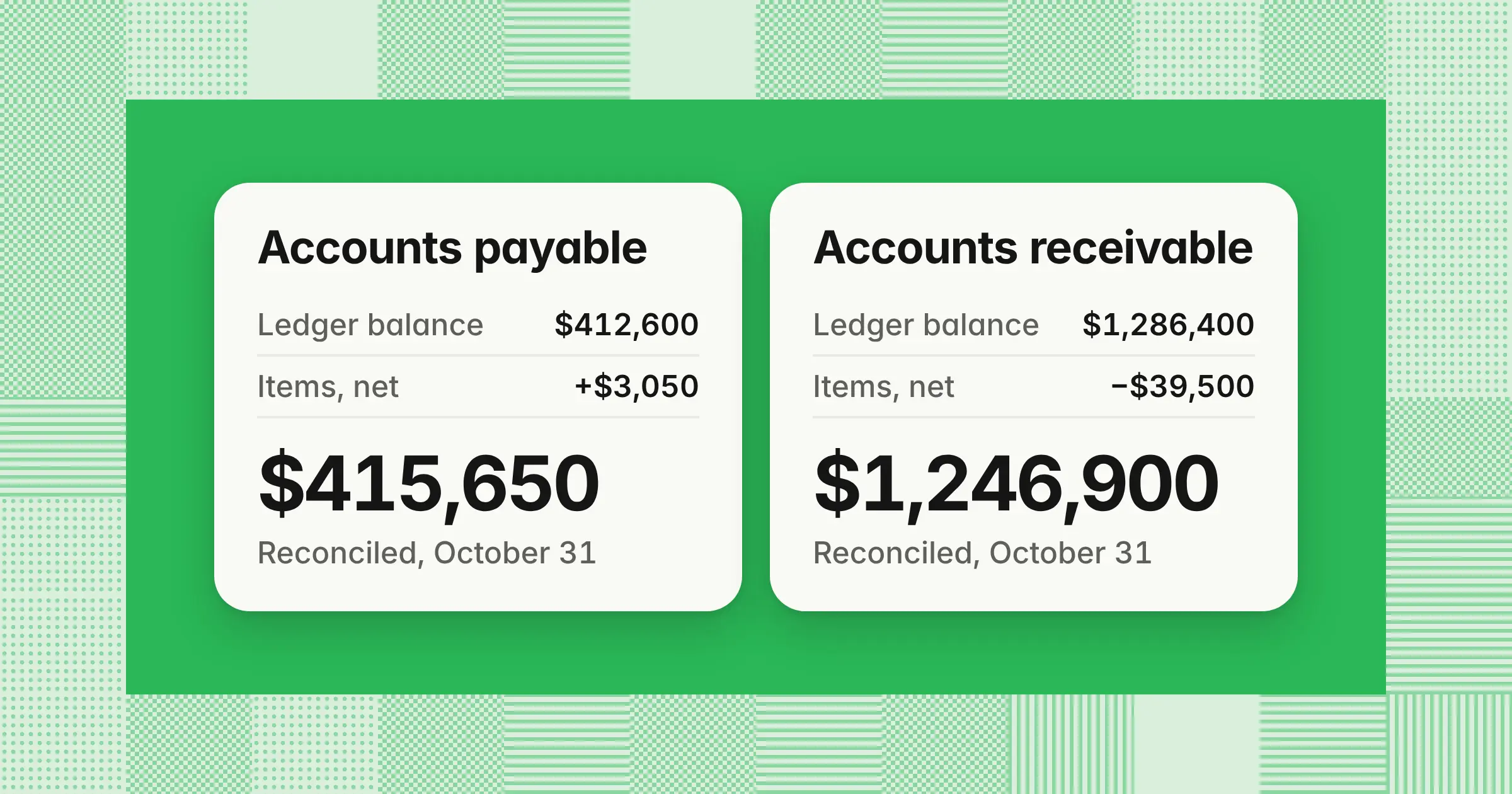
- In the AP example, three adjustments net +$3,050: a $9,250 accrual reclass, a $3,800 unposted batch, and an $8,500 invoice found on a vendor statement. AP goes from $412,600 in the ledger to a reconciled $415,650.
- In the AR example, three adjustments net ($39,500): a $6,500 credit memo, a $9,000 cutoff item, and $24,000 of unapplied cash. AR goes from $1,286,400 to a reconciled $1,246,900 in both ledgers.
The general ledger holds one balance each for accounts payable and accounts receivable. Each subledger holds the vendor or customer detail behind that balance, and AP and AR reconciliation proves the two agree at month-end. Getting it right gives you a balance sheet you can defend, catches one-sided entries before they reach your reporting, and keeps your close audit-ready. This guide works one October close for AP and AR with entries that foot. It also shows where NetSuite, QuickBooks, SAP, and Dynamics break the tie-out, and gives you a free Excel workbook.
What is the difference between the general ledger and a subledger?
The general ledger holds one summary balance per account, such as accounts payable, while a subledger holds the detail behind it: every open bill by vendor or every open invoice by customer. Knowing which ledger owns which detail tells you where to look when they disagree.
- Control accountA general ledger account whose balance is supported by a subledger, so it should change only through that subledger. Accounts payable and accounts receivable are the classic control accounts, and inventory and fixed assets often are too.
- SubledgerThe detailed ledger behind one control account. The AP subledger tracks bills, credits, and payments by vendor, and the AR subledger tracks invoices, credit memos, and receipts by customer.
- Aging reportThe subledger's open items grouped by age, such as current, 1–30 days, and over 90 days. Its total is the number you tie to the control account, which is why you run it at every month-end.
| Aspect | General ledger | Subledger |
|---|---|---|
| What it holds | One balance for every account in the chart of accounts | The transaction detail behind one control account |
| Level of detail | Summary totals and journal entries | Each bill, invoice, payment, and credit by vendor or customer |
| Examples | 2000 Accounts payable, 1200 Accounts receivable | AP aging by vendor, AR aging by customer |
| Main users | Controller, financial reporting, and auditors | AP, billing, collections, and cash application |
| How it changes | Subledger postings plus manual journal entries | Bills, invoices, payments, credits, and cash applications |
| What must tie at period end | The control account balance | The aging total, run as of the same date |
The point of a subledger is to keep high-volume vendor and customer detail out of the general ledger while still tying to it in one number.
Example
At October 31, 2026, a distributor's AP subledger shows open bills totaling $407,150, while its general ledger shows one number for 2000 Accounts payable: $412,600. The $5,450 gap is what the AP reconciliation below explains.
What is AP and AR reconciliation?
AP and AR reconciliation, also called subledger to general ledger reconciliation, proves that your AP and AR aging totals agree with their control accounts at month-end, with every difference explained. It's one type of account reconciliation, and it covers two of your main working capital balances.
- Accounts payable reconciliationTies the AP aging to the AP control account, then checks key vendor balances against their statements. It catches accruals posted to AP, batches that never reached the ledger, and invoices you never entered.
- Accounts receivable reconciliationTies the AR aging to the AR control account and confirms each customer payment is applied to the right invoices. It catches credit memos that didn't sync, receipts posted in the wrong month, and unapplied cash.
The general ledger and subledger reconciliation formula is the same on both sides:
- Adjusted GL balanceGL balance ± ledger-side items
- Adjusted aging totalAging total ± subledger-side items
- Unexplained differenceAdjusted GL balance − adjusted aging total, which should be $0
For a subledger tie-out the target is $0, because both ledgers record the same transactions. A written threshold still helps, as a trigger for which items you investigate first and which go to the controller. It isn't a reason to leave a gap unexplained.
What are the steps in the AP reconciliation process?
The AP reconciliation process has seven steps: close the cutoff, run both reports as of the same date, roll forward last month's balance, compare totals, explain each difference, reconcile key vendor statements, and post corrections for review. Working in this order puts the cheapest checks first.
- Close the cutoffEnter every bill for goods and services received by month-end and every payment released. Accrue receipts with no bill yet to accrued liabilities, not to AP, then close the AP module for the period.
- Run both reports as of the same datePull the AP aging and the GL balance for every account mapped to AP, with the same entity, currency, and accounting basis.
- Roll forward last month's reconciled balanceOpening balance + bills − payments − credits ± manual journal entries should equal the closing GL balance. Start from last month's reconciled number, not from scratch.
- Compare the totalsWrite down the difference before you look at individual items.
- Explain each differenceCheck manual journal entries to the control account first, then unposted batches, items in the wrong period, and a second AP account.
- Reconcile key vendor statementsStart with your largest vendors, any vendor with a dispute, and any vendor showing a debit balance.
- Post corrections and get sign-offPost the entries, rerun both reports, confirm the unexplained difference is $0, and send the reconciliation with its support to a reviewer.
For a month-end reconciliation of accounts payable, steps 1 and 7 are the close tasks: cutoff before you start and a reviewed reconciliation before the period locks. See where they sit with owners and due dates in the month-end close checklist. The signed AP tie-out is also the support for accounts payable in your balance sheet reconciliation.
Example
The distributor's roll-forward for 2000 Accounts payable in October 2026. The manual journal line is the first place to look. Whether those entries show in the aging depends on your system: in NetSuite, journal entries posted to AP appear in the A/P aging under No Vendor, while in many other setups they reach the ledger without touching the aging.
Roll-forward, 2000 Accounts payable, October 2026
| Line | Amount |
|---|---|
| Opening balance, September 30 (last reconciled) | $391,800 |
| Bills posted | $1,202,050 |
| Payments posted | ($1,184,300) |
| Vendor credits posted | ($6,200) |
| Manual journal entries to the control account | $9,250 |
| Closing balance, October 31 | $412,600 |
Accounts payable reconciliation example: AP aging vs the general ledger
In this accounts payable reconciliation example, a misposted accrual and an unposted batch explain a $5,450 gap between a $407,150 AP aging and a $412,600 general ledger balance. An invoice found on a vendor statement then sets the reconciled balance.
Example
A distributor closes October 2026. All amounts are illustrative, and the same numbers are prefilled in the template's AP reconciliation tab.
AP aging, October 31, 2026
| Bucket | Amount |
|---|---|
| Current | $268,400 |
| 1–30 days past due | $96,250 |
| 31–60 days past due | $28,900 |
| 61–90 days past due | $9,600 |
| Over 90 days past due | $4,000 |
| Total | $407,150 |
AP aging vs GL reconciliation, October 31, 2026
| Line | Amount |
|---|---|
| GL balance, 2000 Accounts payable | $412,600 |
| Less: JE-2291, legal fee accrual posted to the AP control account | ($9,250) |
| Add: Batch B-1107, posted in the AP module but not to the general ledger | $3,800 |
| Adjusted GL balance | $407,150 |
| AP aging total | $407,150 |
| Unexplained difference | $0 |
What each item means:
- JE-2291 ($9,250)A month-end accrual for legal fees with no invoice yet was credited to accounts payable instead of accrued expenses. In this company's system, it sits in the ledger but not in the aging, because no vendor bill exists.
- Batch B-1107 ($3,800)Three bills posted in the AP module on October 31, but the matching general ledger batch is still unposted. They're in the aging but not in the ledger.
- INV-7781 ($8,500)The vendor statement check for Vendor 1042 found an October invoice that was never entered. It's missing from both ledgers, so the tie-out can't see it.
Correcting entries, October 31, 2026
| Account | Debit | Credit |
|---|---|---|
| 1. Reclass JE-2291 | ||
| 2000 Accounts payable | $9,250 | |
| 2100 Accrued expenses | $9,250 | |
| 2. Post batch B-1107 | ||
| Expense accounts on the three bills | $3,800 | |
| 2000 Accounts payable | $3,800 | |
| 3. Enter INV-7781 through the AP module | ||
| 1300 Inventory | $8,500 | |
| 2000 Accounts payable | $8,500 | |
| Total | $21,550 | $21,550 |
Entry 1 is the kind of manual entry to a control account worth allowing: a reviewer-approved fix of an earlier mispost. Entry 2 is the system's own batch posting, and entry 3 runs through the subledger, so it moves the aging and the ledger together.
Reconciled AP balances, October 31, 2026
| Step | General ledger | AP aging |
|---|---|---|
| Starting balance | $412,600 | $407,150 |
| Reclass JE-2291 | ($9,250) | |
| Post batch B-1107 | $3,800 | |
| Enter INV-7781 | $8,500 | $8,500 |
| Reconciled balance | $415,650 | $415,650 |
The three adjustments net +$3,050 in the ledger ($3,800 + $8,500 − $9,250), and both sides land on $415,650.
How do you reconcile accounts receivable to the general ledger?
You reconcile accounts receivable by tying the AR aging to the AR control account as of the same date, explaining every difference, and checking unapplied cash and open credit memos on their own. These steps keep receivables and revenue accurate each month.
- Run both reports after billing's last syncPull the AR aging and the GL balance for every account mapped to AR, as of month-end.
- Roll forward last month's reconciled balanceOpening balance + invoices − receipts − credit memos ± manual journal entries should equal the closing GL balance.
- Compare totalsCalculate the difference between the aging and the ledger.
- Check billing and credit memo syncFind invoices and credit memos in billing that never reached the ledger.
- Check cash receipt cutoffCompare receipts applied in the subledger with cash posted to the ledger and with bank deposit dates.
- Clear unapplied cash and creditsMatch each receipt to invoices using remittances and customer statements, and age anything left.
- Document and sign offConfirm the unexplained difference is $0 and send the schedule with support to a reviewer.
If you bill in one system and book in another, such as Stripe and NetSuite, run three checks. Tie billing to the AR subledger, the AR subledger to the control account, and the payment processor's clearing account to the bank. Match records on the billing system's invoice ID, not on customer name or amount. Include unapplied cash and open credit memos in the comparison, whether your system holds them in AR or in a clearing account.
Document the AR reconciliation on one schedule for your controller's review. Show the GL balance, the aging total, and each reconciling item with its reference, amount, cause, owner, and clearing entry. Then show adjusted balances with $0 unexplained, and attach the aging, the GL detail, and the entries. Your reviewer should be able to re-foot the schedule and trace every item to support.
Example
The software company in the next section rolls forward 1200 Accounts receivable for October 2026.
Roll-forward, 1200 Accounts receivable, October 2026
| Line | Amount |
|---|---|
| Opening balance, September 30 (last reconciled) | $1,198,700 |
| Invoices posted | $912,400 |
| Receipts applied to AR | ($812,300) |
| Credit memos posted | ($12,400) |
| Manual journal entries to the control account | $0 |
| Closing balance, October 31 | $1,286,400 |
Accounts receivable reconciliation example: Unapplied cash and credit memos
In this accounts receivable reconciliation example, a credit memo that never synced and a receipt posted in the wrong month explain a $15,500 gap. Applying $24,000 of unapplied cash then brings both ledgers to $1,246,900.
Example
A software company bills customers in its billing system, which holds the AR subledger, and syncs to its ERP. It closes October 2026. All amounts are illustrative, and the same numbers are prefilled in the template's AR reconciliation tab.
AR aging, October 31, 2026
| Bucket | Amount |
|---|---|
| Current | $842,300 |
| 1–30 days past due | $268,700 |
| 31–60 days past due | $96,400 |
| 61–90 days past due | $38,200 |
| Over 90 days past due | $25,300 |
| Total | $1,270,900 |
AR aging vs GL reconciliation, October 31, 2026
| Line | Amount |
|---|---|
| GL balance, 1200 Accounts receivable | $1,286,400 |
| Less: Credit memo CM-311, issued in billing, sync to the ledger failed | ($6,500) |
| Less: Check applied in billing October 31, cash batch posted to the ledger November 2 | ($9,000) |
| Adjusted GL balance | $1,270,900 |
| AR aging total | $1,270,900 |
| Unexplained difference | $0 |
What each item means:
- Credit memo CM-311 ($6,500)Billing issued a credit on October 28 for a pricing error, and the aging shows it. The sync to the general ledger failed, so the ledger still carries the full invoice. Repost it through the integration, dated October 28, rather than keying a manual journal.
- Cutoff item ($9,000)A customer check arrived October 31 and was applied in billing that day, but the cash batch posted to the ledger on November 2, the deposit date. Record the receipt in October. It then shows as a deposit in transit on your October bank reconciliation.
How do you clear unapplied cash?
You clear unapplied cash by matching each receipt to the customer's open invoices, using the remittance or the customer's confirmation, and applying it in the AR subledger. In this setup it doesn't create an aging-to-GL gap, so it needs its own check.
A $24,000 ACH payment from Customer 207 arrived October 30 with no invoice numbers, so cash application posted it to 2150 Unapplied cash. Both the aging and the ledger still show the customer's two invoices as open. Customer 207's remittance, emailed separately, names invoices INV-20311 and INV-20318, both in the 1–30 day bucket, and applying the payment lowers both ledgers by $24,000.
If you present receivables net of unapplied cash on the balance sheet, show that netting on the reconciliation so your reviewer can follow it. Age every receipt that stays unapplied, and give it an owner, so it can't sit unexamined inside receivables at month-end.
Correcting entries, October 31, 2026
| Account | Debit | Credit |
|---|---|---|
| 1. Post credit memo CM-311 | ||
| 4900 Sales returns and allowances | $6,500 | |
| 1200 Accounts receivable | $6,500 | |
| 2. Record the October 31 check in October | ||
| 1000 Cash | $9,000 | |
| 1200 Accounts receivable | $9,000 | |
| 3. Apply Customer 207's payment | ||
| 2150 Unapplied cash | $24,000 | |
| 1200 Accounts receivable | $24,000 | |
| Total | $39,500 | $39,500 |
For entry 2, either move the cash batch into October or post this entry and reverse the November posting, so the receipt isn't counted twice. Entry 3 runs through cash application, so it moves the aging and the ledger together.
Reconciled AR balances, October 31, 2026
| Step | General ledger | AR aging |
|---|---|---|
| Starting balance | $1,286,400 | $1,270,900 |
| Credit memo CM-311 | ($6,500) | |
| October 31 check | ($9,000) | |
| Apply unapplied cash | ($24,000) | ($24,000) |
| Reconciled balance | $1,246,900 | $1,246,900 |
The 2150 Unapplied cash account is back to $0, and the three adjustments net ($39,500) in the ledger.
Why doesn't the AP or AR aging match the general ledger?
Your aging and general ledger disagree when something hit one ledger but not the other, or when you ran the two reports on different dates, periods, or accounting bases. Sorting the gap by cause tells you which ledger to correct.
| Cause | Which side is higher | How to find it | Fix |
|---|---|---|---|
| Manual journal entry to the control account, such as an accrual, reclass, or write-off | The GL, for an AP credit or an AR debit | Filter the control account's GL detail for journal entries | Reverse it and rebook to the right account, or post it through the subledger |
| Unposted batch or failed sync | Either: the subledger holds items the GL is missing | Compare the subledger's batch or sync log with GL postings | Post or repost the batch through the integration |
| Different date, period, or basis | Either | Compare as-of dates, transaction date vs posting period, and cash vs accrual basis | Rerun both reports on the same basis |
| More than one AP or AR account | Either | List every GL account mapped to the subledger | Tie the aging to the total of those accounts |
| Foreign exchange revaluation booked only in the GL | Either | Look for revaluation entries on the control account | Revalue open items in the subledger too, or compare in transaction currency |
| Write-off or bad debt posted only in the GL | The aging, for AR | Match GL write-off entries to customer open items | Write off the invoice in the subledger and reverse the journal |
| Old migration or opening balance difference | Same amount every month | Find the first month it broke | Correct it with support and controller approval |
An AP aging shows open bills, credits, and unapplied payments by vendor. It doesn't show services or goods received without a bill, which belong in accrued liabilities (see accrued expenses). Depending on your system, it may also leave out journal entries posted straight to AP, or group them on a line with no vendor.
Goods received but not invoiced (GRNI) belong in an accrued liabilities or GRNI account, not in the AP control account. If they're posted to AP, the GL runs ahead of the aging by that amount until it's reclassed, as JE-2291 did in the example. Reclass them, reverse the accrual when the bill arrives, and reconcile the GRNI account separately against open receipts.
To resolve AP reconciliation discrepancies, work by category, not line by line. Timing items clear next month, one-sided entries need a correcting entry in the right ledger, and anything still unexplained stays open with an owner. To set up an alert for repeats, run a month-end saved search or report that lists every journal entry posted to a control account.
Where the tie-out breaks in NetSuite, QuickBooks, SAP, and Dynamics
Each ERP breaks the AP and AR tie-out in a different place, so start with the setting or report your system's own help names. Every row below comes from the vendor's help pages, checked November 11, 2026.
| System | Where to look first | What the vendor's help says | What to check |
|---|---|---|---|
| NetSuite | The balance sheet reports by period while the aging reports by date | Oracle NetSuite help, “Reporting Preferences on the Set Preferences Page”: with Report by Period set to Financials Only, balance sheets and trial balances report by period, and aging reports aren't on that list | Set Report by Period to all reports before you compare, so a bill dated October 30 but posted to November lands in the same month on both reports |
| NetSuite | Journal entries posted to AP sit inside the aging | Oracle NetSuite help, “A/P Aging Detail Report”: entries grouped under No Vendor are journal entries | Review the No Vendor group every month: it's where accruals posted to AP hide |
| QuickBooks Online | Aging method and accounting basis | Intuit, “Match your aging reports” (updated August 4, 2026): the aging report defaults to Current, which Intuit names as the usual reason the reports don't match | Set the A/R Aging Summary's aging to Report date, run the balance sheet or trial balance on accrual basis, and use the same dates |
| SAP S/4HANA | Down payments and other special G/L transactions | SAP Learning: subledger postings post automatically to the assigned reconciliation account, amounts can't be posted directly to it, and special G/L transactions post to an alternative reconciliation account | Tie each customer or vendor subledger to its main reconciliation account plus any alternative ones |
| Dynamics 365 Finance | Entries in one ledger but not the other | Microsoft Learn, “Account reconciliation” (updated July 22, 2026): reconciles the general ledger with the AP, AR, tax, and bank subledgers, and a Copilot-powered agent can suggest the most likely action | Work exceptions by type: In subledger not in ledger, In ledger not in subledger, and Amount mismatch |
| Business Central | Posting groups and currencies | Microsoft Learn, “Reconcile Cust. and Vend. Accs. (report)” (updated November 21, 2025): compares net change in the general ledger with customer and vendor ledgers by posting group and highlights differences | Run the report for the period; a difference in one posting group points to the receivables or payables account that broke |
For accounts payable reconciliation in SAP, that means down payments and other special G/L items are the first place to look, not manual journals. NetSuite's period close checklist also has separate Lock A/R and Lock A/P tasks (Oracle NetSuite help, “Locking and Unlocking Accounting Periods”). They let you stop A/R and A/P posting for the period separately from the rest of the ledger.
How do you find the month a difference started?
Run the aging and the GL balance for each prior month-end until they agree, then compare the next month's activity line by line. In that month, look for a migration balance, a one-sided journal, or an edit in a period that should have been closed.
Example
A different team's AP subledger and GL have disagreed by $1,140 since summer. All amounts are illustrative.
| Month-end | AP aging | GL, accounts payable | Aging − GL |
|---|---|---|---|
| May 31 | $356,200 | $356,200 | $0 |
| June 30 | $371,450 | $371,450 | $0 |
| July 31 | $382,910 | $381,770 | $1,140 |
| August 31 | $379,300 | $378,160 | $1,140 |
| September 30 | $368,725 | $367,585 | $1,140 |
The difference first appears in July, so the team compares July's GL detail for the control account with July's subledger activity. A July 14 journal entry wrote off an old vendor balance in the GL without closing the vendor's open bill. The fix is to reverse the journal and write off the bill in the subledger, so both ledgers move together.
What is vendor and customer statement reconciliation?
Vendor statement reconciliation compares a supplier's statement with your AP balance for that supplier and explains each difference, and customer statement reconciliation does the same for what a customer says it owes you. Both catch errors the aging-to-GL tie-out can't see.
Only the vendor's statement shows an invoice you never entered, such as INV-7781 in the AP example. The vendor statement reconciliation, also called an accounts payable reconciliation statement, is a short schedule for each vendor you review.
Example
Vendor 1042, a packaging supplier to the distributor, sends an October 31 statement showing $52,900. Your AP ledger for that vendor shows $36,400.
Vendor statement reconciliation, Vendor 1042, October 31, 2026
| Line | Amount |
|---|---|
| Vendor statement balance | $52,900 |
| Less: Payment in transit, ACH sent October 30, not yet applied by the vendor | ($6,000) |
| Less: Disputed credit DM-118, recorded by you, not accepted by the vendor | ($2,000) |
| Adjusted vendor balance | $44,900 |
| Your AP ledger for Vendor 1042 | $36,400 |
| Add: Unrecorded invoice INV-7781, dated October 29 | $8,500 |
| Adjusted ledger balance | $44,900 |
| Unexplained difference | $0 |
How to treat each item:
- Unrecorded invoice ($8,500)The cartons arrived October 28, so under accrual accounting the liability belongs in October: it follows receipt of the goods (or title transfer under the shipping terms), not the October 29 invoice date. Enter it through the AP module, as entry 3 above. If you had already accrued the receipt as received but not invoiced, reverse that accrual at the same time.
- Payment in transit ($6,000)Your books already show the payment, so no entry is needed. Confirm the vendor applies it on the November statement.
- Disputed credit ($2,000)You recorded debit memo DM-118 because the vendor billed above the contract price. Keep it as an open item with an owner and a follow-up date. If the vendor wins the dispute, reverse it: debit inventory $2,000 and credit accounts payable $2,000.
Customer statements work the same way in reverse. Customer 207's AP team replied to its October statement that it paid two invoices on October 30. That reply is the evidence for applying the $24,000 of unapplied cash.
Customer statement reconciliation, Customer 207, October 31, 2026
| Line | Amount |
|---|---|
| Open invoices for Customer 207 per your AR aging | $61,400 |
| Less: Payment sent October 30, not yet applied by you | ($24,000) |
| Adjusted balance per your books | $37,400 |
| Customer 207's confirmed balance owed to you | $37,400 |
| Unexplained difference | $0 |
What should an AP and AR reconciliation template include?
An AP and AR reconciliation template needs a header, a GL roll-forward, the aging total as of the same date, a reconciling items log, adjusted balances with a $0 unexplained difference, statement checks, correcting entries, and sign-off. The free workbook below has all eight, prefilled with this page's October example.
Download the AP and AR reconciliation template (Excel)
Three tabs: Instructions, AP reconciliation, and AR reconciliation. Prefilled with the October 2026 example from this guide, so it shows real numbers on open. No macros. Free to use and change.
| Section | What goes in it | AP example from the workbook |
|---|---|---|
| Header | Entity, account, period end, escalation age, preparer, reviewer, and dates | 2000 Accounts payable, October 31, 2026 |
| GL roll-forward | Last month's reconciled balance plus this month's activity, checked against the trial balance | $391,800 opening, $412,600 closing |
| Aging buckets | Current, 1–30, 31–60, 61–90, and over 90 days, summed to the aging total | $407,150 |
| Tie-out | GL balance ± ledger-side items, aging total ± subledger-side items, and the unexplained difference | $407,150 and $407,150, $0 unexplained |
| Reconciling items log | One row per item: date, reference, description, side, amount, category, entry needed, owner, age, and status | JE-2291, ledger side, ($9,250) |
| Statement check | One vendor or customer statement, adjusted on both sides to $0 | Vendor 1042, $44,900 on both sides |
| Correcting entries | Each entry with a debit and credit check, and the GL balance after entries | $21,550 debits and credits, $415,650 after entries |
| Sign-off status | Open until the $0 test passes, then Awaiting review until the reviewer's name and date are filled in, then Reconciled and reviewed | Reconciled and reviewed |
The AR tab uses the same layout and adds an unapplied cash check for the 2150 clearing account and a customer statement check. Every total is a formula, and a side column (Ledger, Subledger, or Both) tells the workbook which balance each item adjusts.
These are the core formulas in the accounts payable reconciliation format in Excel, using the workbook's named ranges:
| Line | Formula |
|---|---|
| Ledger-side items | =SUMIFS(AP_ItemAmount,AP_ItemSide,"Ledger") |
| Subledger-side items | =SUMIFS(AP_ItemAmount,AP_ItemSide,"Subledger") |
| Unexplained difference | =ROUND(B33-B36,2) |
| Status | =IF(OR(AP_GL="",COUNT(B23:B27)=0),"Enter balances",IF(B37=0,"Reconciled","Not reconciled")) |
| Sign-off status | =IF(B38<>"Reconciled","Open",IF(AND(AP_Reviewer<>"",D10<>""),"Reconciled and reviewed","Awaiting review")) |
| Age of an item (days) | =IF(B47="","",AP_PeriodEnd-B47) |
| Items past escalation | =COUNTIFS(AP_ItemStatus,"Open",AP_ItemAge,">"&AP_EscalateDays) |
Status reads Enter balances only when the GL balance or every aging bucket is blank, so a true $0 aging still reconciles. The workbook uses only SUM, SUMIFS, COUNT, COUNTIFS, IF, AND, OR, and ROUND, so it calculates the same way in Google Sheets. The Instructions tab doubles as an AP and AR reconciliation checklist, with eight monthly steps from cutoff to sign-off. Print the AP or AR tab to PDF if your audit file needs a static copy.
How often should you reconcile AP and AR, and who should review it?
Reconcile AP and AR to the general ledger every month before the period locks, check unapplied cash weekly, and have someone who didn't prepare the reconciliation review and sign it. A fixed cadence keeps small differences from aging into audit findings.
| Check | How often |
|---|---|
| AP aging vs general ledger | Monthly, at every close |
| AR aging vs general ledger | Monthly, at every close |
| Vendor statements, largest vendors and any with disputes | Monthly |
| Vendor statements, all other active vendors | Quarterly, and at year-end |
| Unapplied cash | Weekly, or daily when receipt volume is high |
| Customer statements, customers with past-due or disputed balances | Monthly |
One person can handle both AP and AR and prepare both reconciliations, as long as someone else reviews them and the preparer doesn't also approve payments. On a one-person team, the controller or owner reviews every reconciliation and approves every payment run.
Restrict manual journal entries to the AP and AR control accounts. Accruals, reclasses, and write-offs should post to other accounts or flow through the subledger, so the control accounts move only with vendor and customer transactions. Where your ERP can't block them, run the month-end search for journals on control accounts and clear each one.
Close the AP and AR modules before the general ledger, so the balances you're reconciling can't change underneath you. For how period locks work in each system, see lock accounting period.
Verify vendor payment details as part of the AP review. The Association for Financial Professionals released its 2026 Payments Fraud and Control Survey on April 14, 2026, based on 465 treasury practitioners at US organizations. In it, 76% of organizations experienced attempted or actual payments fraud in 2025. In the same survey, 74% were affected by business email compromise. Confirm any change to vendor bank details by calling a known contact before the next payment run.
Make the reconciliation a fixed close task with a named preparer and reviewer and the same template every month. Write down your investigation threshold, and escalate any reconciling item that carries into a second month. If you reconcile many entities or accounts, compare tools in best account reconciliation software.
How we approach it
Our Close Agent works payables and receivables as tasks on your close checklist. It ties each AP and AR aging to its control account, lists every reconciling item with its support, and proposes the correcting entries. Each reconciliation goes to a named reviewer, and the period can't lock until it's approved. If you want these reconciliations ready before your team starts the close, explore our Close Agent.
Share this article