TemplatesExcel and Google Sheets
Bank reconciliation template: Free Excel and Google Sheets download with a worked example
12 min read
Key takeaways
- The free bank reconciliation template has five tabs (Instructions, Reconciliation, Reconciling items, Example, and Monthly summary) and calculates in Excel and Google Sheets with no macros.
- Adjusted bank balance = balance per bank + deposits in transit − outstanding checks ± bank errors, and it must equal the adjusted book balance, so the difference cell must show 0.00.
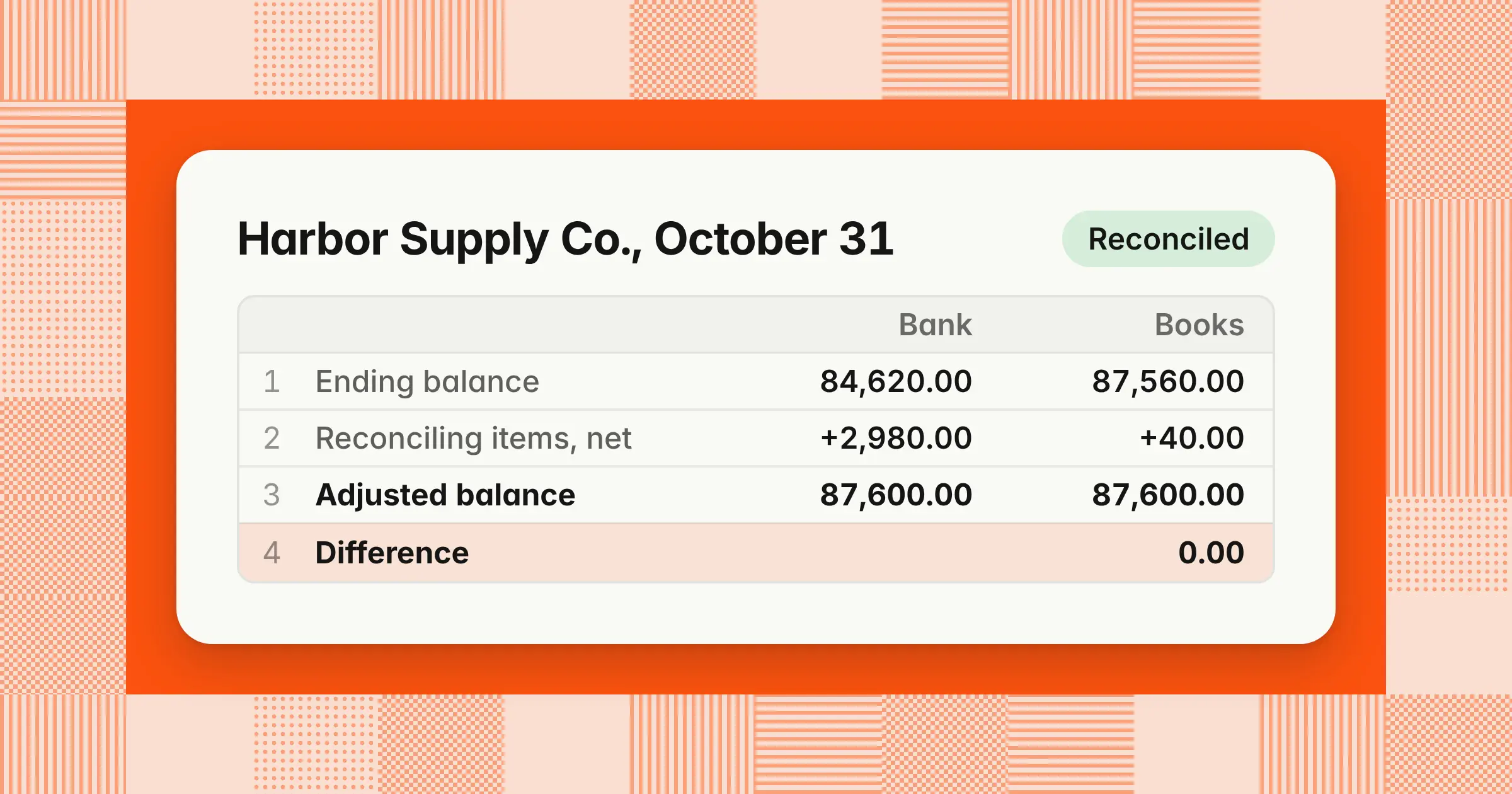
- In the worked example, a $84,620.00 bank balance and an $87,560.00 book balance both reconcile to $87,600.00, and six journal entries add a net $40.00 to cash.
A bank reconciliation template is a spreadsheet that compares your bank statement's ending balance with your general ledger cash balance. It lists every item that explains the gap. This free template gives you a reconciliation statement, a reconciling items log, a filled-in example, and a monthly summary, with a live difference cell that must reach 0.00.
Download the bank reconciliation template (Excel)
Five tabs: Instructions, Reconciliation, Reconciling items, Example, and Monthly summary. Opens in Excel and Google Sheets. Free to use and change.
Using the same template every month gives you an audit-ready record, catches fees and errors early, and keeps your cash balance accurate at close. This page shows how to fill it in, a worked example that reconciles, and the journal entries it produces. It also covers Google Sheets and multiple accounts. For the concepts behind each line, see the guide to bank reconciliation.
What should a bank reconciliation template include?
A bank reconciliation template should include the account details, the balance per bank and balance per books, the reconciling items on each side, both adjusted balances, a difference check, and preparer and reviewer sign-off. Here's where each one sits in the download.
| Tab | What it holds | What you enter |
|---|---|---|
| Instructions | The steps, the nine item types, the sign rules, and Google Sheets notes | Nothing |
| Reconciliation | Account details, the bank side, the book side, the difference, and a status cell | The two ending balances and the account details |
| Reconciling items | One row per item: date, description, type, amount, side, add or less, cleared date, journal entry needed, and reference | Date, description, type, amount, and cleared date |
| Example | The Harbor Supply Co. reconciliation on this page, with its six journal entries | Nothing, or your own test numbers |
| Monthly summary | One row per bank account: adjusted balances, difference, preparer, reviewer, and status | One row per account |
Every total is a formula. The side, the add-or-less sign, and the journal entry flag fill in from the type you pick. That lets the Reconciling items tab work as your bank reconciliation worksheet.
What are the four major parts of a bank reconciliation?
The four major parts of a bank reconciliation are the balance per bank, the adjustments to the bank balance, the balance per books, and the adjustments to the book balance. Both sides must end at the same adjusted cash balance.
The bank reconciliation statement template uses three formulas:
- Adjusted bank balanceBalance per bank + deposits in transit − outstanding checks ± bank errors
- Adjusted book balanceBalance per books + interest earned + bank collections − bank fees − NSF checks − unrecorded payments ± book errors
- DifferenceAdjusted bank balance − adjusted book balance, which must equal 0.00
Bank-side items are timing differences and bank mistakes, so they need no journal entry. Book-side items are activity your ledger hasn't recorded yet, so each one needs an entry before you close the month.
How do you fill in the bank reconciliation template? The 7 steps
You fill in the template in seven steps: enter both ending balances, list deposits in transit, list outstanding checks, add items only the bank has recorded, record errors, confirm the difference is zero, and post the journal entries. The same steps reconcile any business bank account to its general ledger cash account.
- Enter both ending balancesOn the Reconciliation tab, type the statement's ending balance in Balance per bank statement and the general ledger cash balance for the same date in Balance per books.
- List deposits in transitMatch each deposit in your books against the statement. Add each deposit the bank hasn't posted to the Reconciling items tab as a Deposit in transit.
- List outstanding checksMatch each check and payment. Add each check that hasn't cleared as an Outstanding check, with the check number in the description.
- Add items only the bank has recordedInterest, customer payments sent straight to the bank, fees, NSF checks, and autopay or ACH debits each get their own row.
- Record errors on either sideEnter a bank error or book error as a positive amount if the correction raises that balance and a negative amount if it lowers it.
- Confirm the difference is 0.00The status cell turns green and reads Reconciled. If it doesn't, work through the causes in the discrepancies table below.
- Post the entries and sign offPost a journal entry for every row marked Yes in Journal entry needed, then fill in Prepared by and Reviewed by with dates.
Bank reconciliation example in Excel
In this example, Harbor Supply Co.'s bank statement shows $84,620.00 at October 31, 2026, its general ledger shows $87,560.00, and both sides reconcile to an adjusted cash balance of $87,600.00.
Example
Harbor Supply Co. is a distributor reconciling its operating checking account for October 2026. All amounts are illustrative, and the same numbers are pre-filled on the template's Example tab.
Bank reconciliation, Harbor Supply Co., operating checking, October 31, 2026
| Line | Amount |
|---|---|
| Balance per bank statement | $84,620.00 |
| Add: Deposits in transit (October 30 and 31) | 8,630.00 |
| Less: Outstanding checks (#4471, #4473, and #4475) | (6,050.00) |
| Add: Bank error, check #8812 from another account charged in error | 400.00 |
| Adjusted bank balance | $87,600.00 |
| Balance per books (general ledger cash) | $87,560.00 |
| Add: Interest earned | 45.00 |
| Add: Customer ACH payment, invoice 1182 | 1,250.00 |
| Less: Monthly service charge | (35.00) |
| Less: NSF customer check, invoice 1164 | (820.00) |
| Less: Software subscription ACH debit | (310.00) |
| Less: Book error, check #4468 recorded $90.00 too low | (90.00) |
| Adjusted book balance | $87,600.00 |
| Difference | 0.00 |
The arithmetic on each side:
- Bank side$84,620.00 + $8,630.00 − $6,050.00 + $400.00 = $87,600.00
- Book side$87,560.00 + $45.00 + $1,250.00 − $35.00 − $820.00 − $310.00 − $90.00 = $87,600.00
- Net change to the books$1,295.00 of additions − $1,255.00 of deductions = $40.00, which is exactly the gap between $87,560.00 and $87,600.00
Two items need a closer look. The bank charged a $400.00 check from another customer's account to Harbor's account. That understates the bank balance, and the bank makes the correction. Check #4468 was recorded in the books as $1,560.00 but cleared for $1,650.00, so the books understate the payment by $90.00.
How do you list outstanding checks and deposits in transit?
List each outstanding check and deposit in transit on its own row with its date, description, amount, and cleared date. Add deposits in transit to the bank balance and subtract outstanding checks. Here are Harbor's five rows:
| Date | Item | Type | Amount | Cleared |
|---|---|---|---|---|
| 10/30/2026 | Deposit, customer receipts | Deposit in transit | $2,180.00 | 11/02/2026 |
| 10/31/2026 | Deposit, customer receipts | Deposit in transit | $6,450.00 | 11/03/2026 |
| 10/24/2026 | Check #4471, packaging supplier | Outstanding check | $3,250.00 | 11/04/2026 |
| 10/28/2026 | Check #4473, freight carrier | Outstanding check | $1,840.00 | 11/05/2026 |
| 10/30/2026 | Check #4475, office supplies | Outstanding check | $960.00 | Open |
Deposits in transit total $2,180.00 + $6,450.00 = $8,630.00, and outstanding checks total $3,250.00 + $1,840.00 + $960.00 = $6,050.00. Neither type needs a journal entry, because your books already record them.
Next month, start with the rows that have no cleared date. Check #4475 is still open, so it carries into the November reconciliation. A deposit in transit that doesn't appear on the next statement needs follow-up with the bank right away.
What are the reconciling items in a bank reconciliation?
Reconciling items are the transactions that make the bank and book balances differ at the statement date. The template's type list covers nine of them.
| Reconciling item | Side | Add or less | Journal entry? | In the example |
|---|---|---|---|---|
| Deposit in transit | Bank | Add | No | $8,630.00 |
| Outstanding check | Bank | Less | No | $6,050.00 |
| Bank error | Bank | Either | No, the bank corrects it | $400.00 |
| Interest earned | Books | Add | Yes | $45.00 |
| Bank collection (customer ACH, wire, or lockbox payment) | Books | Add | Yes | $1,250.00 |
| Bank fee or service charge | Books | Less | Yes | $35.00 |
| NSF (returned) check | Books | Less | Yes | $820.00 |
| Unrecorded payment (autopay or ACH debit) | Books | Less | Yes | $310.00 |
| Book error | Books | Either | Yes, a correcting entry | $90.00 |
Enter every amount as a positive number except errors. For a bank error or book error, the sign tells the template which way to adjust. Harbor's $90.00 book error goes in as −90.00 because the correction lowers the book balance.
What journal entries come from a bank reconciliation?
Every book-side reconciling item needs a journal entry, and bank-side items need none. In the example, six entries add a net $40.00 to cash and bring the general ledger to the $87,600.00 adjusted balance.
| Account | Debit | Credit |
|---|---|---|
| 1. Interest earned | ||
| Cash | $45.00 | |
| Interest income | $45.00 | |
| 2. Customer ACH payment, invoice 1182 | ||
| Cash | $1,250.00 | |
| Accounts receivable | $1,250.00 | |
| 3. Monthly service charge | ||
| Bank fees | $35.00 | |
| Cash | $35.00 | |
| 4. NSF customer check, invoice 1164 | ||
| Accounts receivable | $820.00 | |
| Cash | $820.00 | |
| 5. Software subscription ACH debit | ||
| Software subscriptions | $310.00 | |
| Cash | $310.00 | |
| 6. Check #4468 correction | ||
| Office supplies | $90.00 | |
| Cash | $90.00 | |
Debits and credits each total $2,550.00. The NSF entry moves the $820.00 back to accounts receivable, because the customer still owes it.
Date each entry October 31, 2026, so the correction lands in the month you're closing. After posting, rerun the general ledger cash balance: it should equal the adjusted balance on the reconciliation.
What causes discrepancies in a bank reconciliation?
When the difference isn't 0.00 after you list every item, look for a missed item, a wrong amount, a wrong sign or side, or a balance from the wrong date. The size of the difference points to which one.
| What you see | Likely cause | What to do |
|---|---|---|
| The difference is divisible by 9 | Transposed digits, such as $1,560.00 for $1,650.00 | Compare each amount with the statement digit by digit |
| The difference equals one item | An item was missed or entered twice | Search both sides for a single item of that amount |
| The difference equals twice one item | An item has the wrong sign or sits on the wrong side | Check the Add or less column for that row |
| Items with an unknown type isn't 0 | A type was typed instead of picked from the list | Pick the type from the dropdown |
| The difference matches an open item from last month | A cleared item was carried forward, or an open one was dropped | Compare with last month's Reconciling items tab |
| Balance per books doesn't match the trial balance | The ledger was run for another date, or entries posted after you ran it | Rerun general ledger cash for the statement end date |
| The same bank transaction appears twice in the books | A bank feed or import loaded it twice | Reverse the duplicate in your accounting system |
How do you make a bank reconciliation statement in Excel?
To make a bank reconciliation statement in Excel, list reconciling items with a type column and total each type with SUMIFS. Then subtract the adjusted book balance from the adjusted bank balance. These are the core formulas in the download's Reconciliation tab:
| Line | Formula |
|---|---|
| Deposits in transit | =SUMIFS('Reconciling items'!$D$5:$D$204,'Reconciling items'!$C$5:$C$204,"Deposit in transit") |
| Outstanding checks | =-SUMIFS('Reconciling items'!$D$5:$D$204,'Reconciling items'!$C$5:$C$204,"Outstanding check") |
| Adjusted bank balance | =SUM(B15:B18) |
| Adjusted book balance | =SUM(B22:B28) |
| Difference | =ROUND(B19-B29,2) |
| Unknown item types | =COUNTIF('Reconciling items'!$E$5:$E$204,"Check type") |
| Status | =IF(OR(B15="",B22=""),"Enter balances",IF(B35>0,"Check item types",IF(B32=0,"Reconciled","Not reconciled"))) |
This bank reconciliation Excel format keeps one row per item, so totals update when you add a row and you never retype a sum. Add a dropdown on the type column (Data > Data Validation > List) so every row uses a type the formulas recognize. ROUND stops a tiny floating-point remainder from showing as a difference. The status only reads Reconciled when both balances are entered, every item has a recognized type, and the difference is zero.
If you'd rather not build your own bank reconciliation template in Excel, the free download has these formulas in place.
How do you use the bank reconciliation template in Google Sheets?
To use the template in Google Sheets, upload the .xlsx file to Google Drive and open it with Google Sheets. You can also choose File > Import in a blank sheet and upload the file. The formulas, the type dropdown, and the status colors carry over.
- Import the fileIn the Import dialog, choose Create new spreadsheet so the five tabs come in together.
- Keep the tab namesThe Reconciliation and Monthly summary formulas refer to Reconciling items and Reconciliation by name.
- Share it for reviewGive your reviewer comment or edit access, and assign the sign-off as a comment so the request sits on the file.
- Save one copy per monthUse File > Make a copy and name it by account and month, such as "Operating checking, October 2026."
- Check the history when numbers changeClick Last edit at the top right to open version history and see who changed the file and when, or right-click a cell and choose Show edit history to see who changed that cell.
The Google Sheets bank reconciliation formulas in this file calculate the same way as in Excel. They use only SUM, SUMIFS, IF, OR, AND, ROUND, and COUNTIF.
Monthly bank reconciliation template for multiple accounts
For multiple bank accounts, keep one copy of the template per account each month. Track every account on the Monthly summary tab, which shows each adjusted balance, difference, reviewer, and status.
- One file per account per monthName each copy by account and month so last month's open items are easy to find
- One summary row per accountRow 1 of the Monthly summary links to the Reconciliation tab, and you type the balances for each other account from its own file
- A strict status ruleAn account shows Reconciled only when its difference is 0.00 and a reviewer's name is filled in, and otherwise it shows Open or Needs review
- A count of open accountsThe summary counts every account still open, so you know what stands between you and sign-off
Reconcile every account at least monthly as part of your close, and reconcile busy operating accounts weekly. A shorter cycle finds an unauthorized check sooner. The Association for Financial Professionals' 2026 Payments Fraud and Control Survey, released April 14, 2026, surveyed 465 treasury practitioners at US organizations. Of those organizations, 76% experienced attempted or actual payments fraud in 2025, and 58% said checks were subject to fraud, more than any other payment method.
What is a bank reconciliation checklist?
A bank reconciliation checklist is the short list of checks a preparer and reviewer confirm before sign-off. It keeps every account reconciled the same way each month.
- StatementThe statement covers the full period, and its ending balance matches Balance per bank statement
- BooksBalance per books is general ledger cash at the same date, after every cash entry for the period has posted
- Last month's itemsEvery open item from last month has either cleared or carried forward
- SupportEvery reconciling item has a date, description, type, and support, such as a deposit slip, the check register, or a bank notice
- ChecksThe difference is 0.00 and Items with an unknown type is 0
- EntriesEvery book-side item has a posted journal entry dated in the period
- Bank errorsEach one is reported to the bank, with the bank's reference noted
- Sign-offThe preparer and reviewer have signed and dated the reconciliation
The bank reconciliation is one task on your month-end close checklist, and it follows the same preparer-and-reviewer pattern as every other account reconciliation.
How do you automate bank reconciliation when a spreadsheet stops being enough?
A spreadsheet stops being enough when you reconcile many accounts, match hundreds of transactions a month, or need a record of who matched what. At that point, let your accounting system's bank feeds and matching rules clear routine transactions, and keep the template for exceptions. Or move to dedicated reconciliation software. The guide to the best account reconciliation software compares the options.
How we approach it
Our Close Agent prepares bank and account reconciliations as tasks on your close checklist. It matches the statement to the ledger, lists reconciling items with support, drafts the entries, and sends the workpaper to a reviewer. If you want reconciliations prepared before your team starts them, explore our Close Agent.
Share this article