TemplatesExcel and Google Sheets
Month-end close calendar template: Free Excel and Google Sheets download with business-day due dates
14 min read
Key takeaways
- The free month-end close calendar template has nine tabs, including a filled-in December 2026 example, and works in Excel and Google Sheets with no macros.
- You type the month you're closing once, and every task gets a real due date, pre-close days included, with weekends and the 2026–2028 US federal holidays skipped.
- Up to three dependencies per task separate Blocked from Waiting. In the December 2026 example, BD1 is Monday, January 4, 2027, and sign-off is Friday, January 8.
A month-end close calendar template is a spreadsheet that turns each close task's business day, such as BD-2 or BD3, into a dated deadline with an owner, a reviewer, and the tasks it waits for. This free template does it from one input, the month you're closing, and flags every task that's blocked, overdue, or due today. You may also see it called an accounting month-end close calendar template, an accounting close schedule template, a month-end close schedule template, a financial close calendar template, or a monthly close calendar template.
Download the month-end close calendar template (Excel)
Nine tabs. Free, no email, no macros.
Print the December 2026 example (PDF)A checklist tells you what to do; the calendar adds when, by whom, and after what. If you still need the task list itself, start with the month-end close checklist.
What's in the month-end close calendar template?
The month-end close calendar template has nine tabs: a setup tab, the working calendar, three views (by person, by day, and by month), a filled-in example, a holiday list, and a team list.
| Tab | What it holds | What you enter |
|---|---|---|
| Start here | Seven setup steps, the close-day counting rule, what each flag means, and Google Sheets notes | Nothing |
| Setup | Close month, Day 0, fiscal year-end month, weekend code, sign-off business day, an as-of override, and the planned sign-off date | The month you're closing and four settings |
| Calendar | Up to 300 tasks with ID, phase, task, frequency, owner, reviewer, close day, due date, cutoff time, three depends-on IDs, status, done and reviewed dates, evidence, notes, flag, and business days late | Your tasks, owners, close days, and daily status |
| My tasks | Every task one person prepares or reviews, sorted by due date | Your name |
| Close days | Tasks due, done, blocked, and overdue on each close day from BD-7 to BD15, plus holidays skipped | Nothing |
| Dates | Day 0, BD-7, BD-3, BD-1, BD1, BD3, sign-off, and BD10 for 26 closes, November 2026 to December 2028 | Nothing |
| Example Dec 2026 | A filled-in December 2026 close, as of BD3 | Nothing, or test dates |
| Holidays | 35 observed US federal holidays with Include? toggles, plus 45 blank rows | Company closures, and No for holidays you work |
| Team & lists | Names, roles, backups, and the dropdown lists | Your people |
Yellow cells are inputs and grey cells are formulas, so nobody types over a due date. The Calendar tab opens with 18 starter tasks for a five-business-day close, with role names as owners. The Close days tab gives you a day-by-day view next to the task list and works as a month-end close timeline template: it shows how many tasks land on each day, so you can spot a crowded BD4 before close starts.
How do you fill in the close calendar template?
You fill in the close calendar template in seven steps, from setting the month to updating status daily.
- Set the monthOn Setup, type any date in the month you're closing in B4. Check the fiscal year-end month, the weekend code, and the sign-off business day, which defaults to BD5.
- Check the holidaysOn Holidays, set Include? to No for any holiday your company works, and add your own closures.
- Add your teamReplace the role names on Team & lists with your people. The Owner, Reviewer, and My tasks dropdowns read this list.
- Add tasksKeep the starter rows or paste your own. If you built a list in the free month-end close checklist generator, paste its tasks into the Calendar tab. The generator's D+1 is the template's BD1, so close days carry over.
- Set timing and handoffsGive each task a close day (-3 for BD-3, 0 for Day 0, 1 for BD1), a cutoff time, one owner, a different reviewer, and up to three task IDs it depends on.
- Share the fileSave it to SharePoint or OneDrive, or share your Google Sheets copy with edit access for the close team.
- Update status dailyEach owner sets Status and Done on as they finish. Use Ready for review until the reviewer signs off, then set Done and Reviewed on.
For a small business, cut the starter list to what one or two people do and set the sign-off day to a business day your reviewer can meet. At a SaaS company, add rows for the usage billing run and the deferred revenue roll-forward. The month-end close process explains the order these tasks follow.
How does the template calculate due dates?
The template stores Day 0, the last calendar day of the month, once and turns each close day into a date with WORKDAY.INTL, which skips weekends and every date on the Holidays tab.
Day 0 counts even when it falls on a weekend. BD1 is the first working day after Day 0, and BD-1 is the last working day of the month. These are the formulas in the download:
| Cell | Formula |
|---|---|
| Day 0 (Setup B5) | =EOMONTH(B4,0) |
| BD n after month end | =WORKDAY.INTL(PeriodEnd,n,Weekend,Holidays) |
| BD n before month end | =WORKDAY.INTL(PeriodEnd+1,-n,Weekend,Holidays) |
| Due date (Calendar J6) | =IF(H6="","",IF(H6=0,PeriodEnd,IF(H6>0,WORKDAY.INTL(PeriodEnd,H6,Weekend,Holidays),WORKDAY.INTL(PeriodEnd+1,H6,Weekend,Holidays)))) |
| In this close? (E6) | =IF(C6="","",IF(D6="Quarterly",IF(MOD(MONTH(PeriodEnd)-FYEMonth,3)=0,"Yes","No"),IF(D6="Annual",IF(MONTH(PeriodEnd)=FYEMonth,"Yes","No"),"Yes"))) |
| Holiday used (Holidays E5) | =IF(OR(A5="",D5="No"),0,A5) |
| Business days late (U6) | =IF(OR(J6="",P6=""),"",IF(P6>J6,NETWORKDAYS.INTL(J6,P6,Weekend,Holidays)-1,-(NETWORKDAYS.INTL(P6,J6,Weekend,Holidays)-1))) |
PeriodEnd, Weekend, FYEMonth, and Holidays are named ranges. Weekend code 1 means Saturday and Sunday off. The +1 in the pre-close formula makes BD-1 land on Day 0 when the month ends on a working day, and on the last working day before it when it doesn't. Holidays you switch off become a 0, which never matches a real date.
If you'd rather build your own, list tasks with a close-day column and use the due date formula above. For business day 3 after month end in any sheet, use =WORKDAY.INTL(EOMONTH(A1,0),3,1,Holidays), where A1 holds any date in the month. The same functions and arguments work in Google Sheets.
Month-end close calendar example: the December 2026 close
In the December 2026 example, Day 0 is Thursday, December 31; New Year's Day moves BD1 to Monday, January 4, 2027; and sign-off lands on BD5, Friday, January 8.
Example
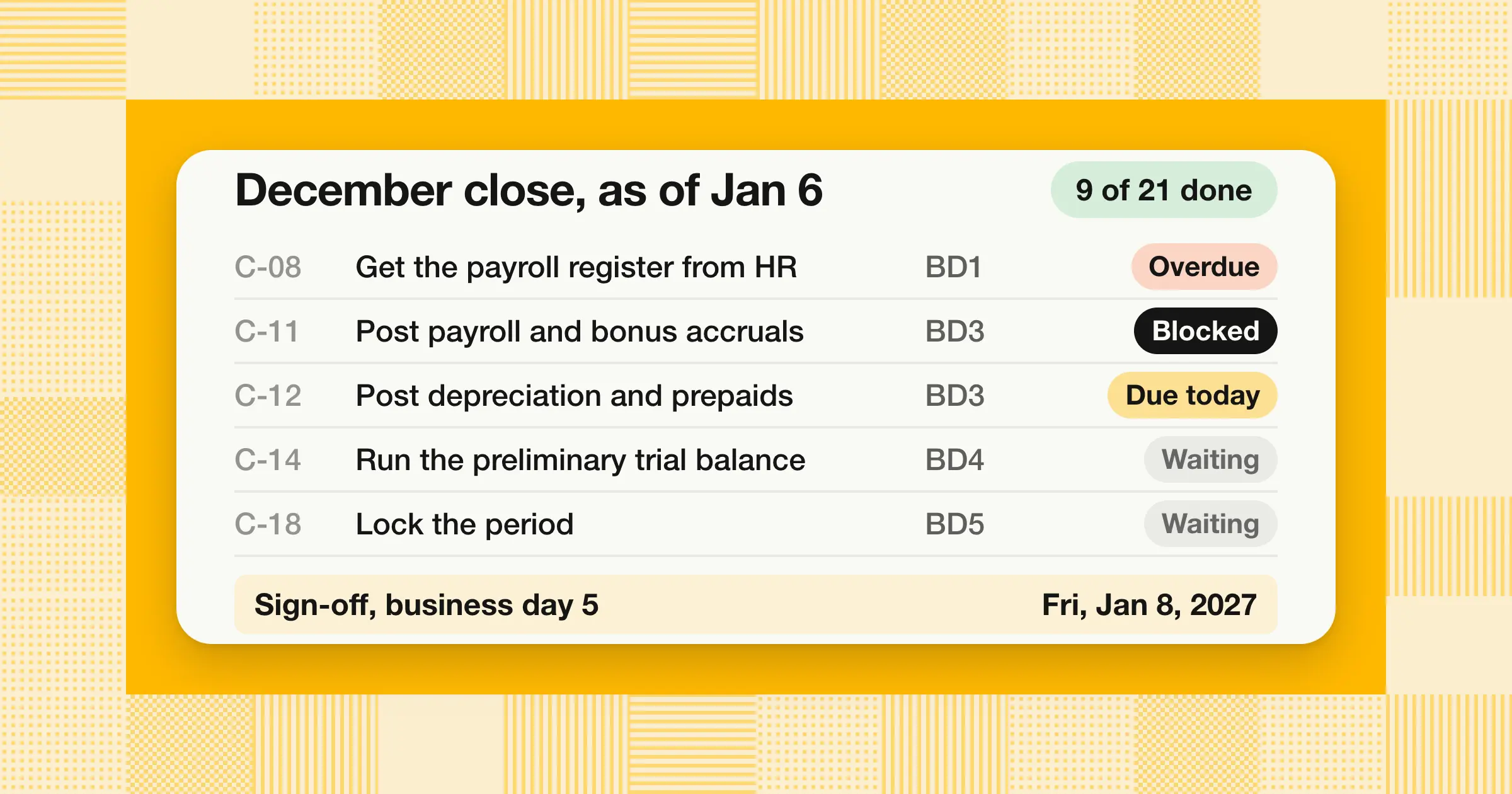
The Example Dec 2026 tab is a five-business-day close for a team of six roles, recorded as of Wednesday, January 6, 2027, which is BD3. The fiscal year ends in December, so the quarter-end and year-end rows are on. The summary reads 21 tasks in this close, 9 done (43%), 1 overdue, 1 blocked, 2 due today, and 8 waiting. These five rows show how one late input moves through the chain:
| Task | Owner, reviewer | Due | Depends on | Status | Flag on Jan 6 |
|---|---|---|---|---|---|
| C-08Get the payroll register and bonus file from HR | Accounting managerController | BD1Mon, Jan 4 | None | In progress | Overdue |
| C-11Post payroll, bonus, and unbilled-cost accruals | AP accountantController | BD3Wed, Jan 6 | C-06, C-08 | Not started | Blocked |
| C-12Post depreciation, prepaid, revenue, and intercompany entries | Senior accountantController | BD3Wed, Jan 6 | C-10 | In progress | Due today |
| C-14Run the preliminary trial balance; explain flux over threshold | Accounting managerController | BD4Thu, Jan 7 | C-11, C-12 | Not started | Waiting |
| C-18Lock the period and send the reporting pack | ControllerCFO | BD5Fri, Jan 8 | C-17 | Not started | Waiting |
C-08 missed its BD1 date, so C-11, which needs the bonus file, shows Blocked on the day it's due. C-14 depends on C-11 and C-12, but neither is past its due date yet, so it shows Waiting.
The Business days late column records planned against actual. It shows 1 on C-04, where two department confirmations arrived a day late, and 0 on the other eight done rows. Pair the BD2 reconciliation row with the free bank reconciliation template so each workpaper links from the Evidence column.
The example doubles as a 5-day close schedule template. To set a different target, change the sign-off business day on Setup, then spread tasks across the extra days. For realistic targets by company size, see How long should month-end close take?
How does the template flag blocked and overdue tasks?
The Flag column compares each task's status, due date, and dependencies with the as-of date and shows one flag. It checks the reasons in a fixed order, so the most urgent one wins.
| Flag | When it shows | What to do |
|---|---|---|
| Done | Status is Done: prepared and reviewed | Nothing |
| Blocked | A task it depends on is past its due date and not done | Chase the late task and warn the owners further down the chain |
| Waiting | A task it depends on isn't done yet but isn't late | Prepare what you can |
| Review overdue | Status is Ready for review and the due date has passed | The reviewer signs off today |
| In review | Status is Ready for review and the task isn't due yet | The reviewer signs off by the cutoff |
| Overdue | Past its due date and not done | The owner sets a new time and checks what it blocks |
| Due today | Due on the as-of date | Finish by the cutoff time |
| Due next business day | Due on the next working day | Plan it today |
| On track | Due later, with nothing in the way | Nothing |
| Not this close | A quarterly or annual task outside a quarter-end or year-end | Nothing |
| Check depends-on ID or Set close day | A depends-on ID isn't in column A, or the close day is blank | Fix the row |
Status stays a manual column and the flag has its own, so the formula never reads its own result and there's no circular reference. Hidden helper columns count each task's dependencies, and Blocked shows when this count of late predecessors is above zero:
| Cell | Formula |
|---|---|
| Late dependencies (X6) | =IF(C6="","",(L6<>"")*COUNTIFS($A$6:$A$305,L6,$E$6:$E$305,"Yes",$O$6:$O$305,"<>Done",$O$6:$O$305,"<>N/A",$J$6:$J$305,"<"&AsOf)+(M6<>"")*COUNTIFS(...same test for M6...)+(N6<>"")*COUNTIFS(...same test for N6...)) |
The open-dependencies column runs the same test without the due-date condition, which is what drives Waiting. The summary row counts each flag, and a reviewer cell turns orange when the reviewer is also the owner. Together, they make the Calendar tab a month-end close tracker as well as a schedule.
The My tasks tab shows the same flags for one person. Pick Controller and switch the source to Example, and you see 15 rows: 4 the controller prepares and 11 they review. That's the controller's review load.
How do you use the close calendar template in Google Sheets?
Upload the .xlsx to Google Drive and open it with Google Sheets to get your own editable version. The due dates and flags calculate the same way in both.
The template uses only functions Google Sheets supports, including WORKDAY.INTL, NETWORKDAYS.INTL, EOMONTH, and COUNTIFS. It avoids XLOOKUP, FILTER, and Excel Tables, so the same file also works in Excel 2010 and later. A few habits help:
- Keep the tab namesThe formulas refer to them by name.
- Give each owner a filter viewChoose Data › Create filter view, filter Owner or Reviewer to one name, and save the view. A filter view changes only your own view, so several people can filter at once (Google Docs Editors Help, "Sort & filter your data," accessed November 8, 2026).
- Get an email when the sheet changesChoose Tools › Notification settings › Edit notifications, then pick Any changes are made and either Email - right away or Email - daily digest. The setting applies only to you (Google Docs Editors Help, "Manage your notifications," accessed November 8, 2026).
- Protect the formula columnsUse Data › Protect sheets and ranges on the grey columns and choose Show a warning, so edits to a formula ask first (Google Docs Editors Help, "Protect, hide & edit sheets," accessed November 8, 2026).
The sheet won't send reminders, so a growing company on a five-day close runs it with one shared copy, a filter view per owner, and a morning look at My tasks and the Blocked and Due today counts.
How do you roll the calendar forward each month?
Change one cell, the close month on Setup, and every due date, flag, and quarter-end or year-end task updates for the new month.
- Save a copy firstName it by period, such as "Close calendar, January 2027," so December's planned and actual dates stay on file.
- Change the monthType any date in the new month in Setup B4.
- Clear last month's progressEmpty Status, Done on, Reviewed on, and Evidence. Keep the Notes that still apply.
- Check the Dates tabIt lists every close from November 2026 to December 2028, so you can send the dated calendar on BD-7.
Quarterly and annual tasks switch on from the fiscal year-end month, so you keep one task list instead of three. With a December year end, replaying the Example tab as January 2027 moves BD1 to Monday, February 1, and BD5 to Friday, February 5. The quarter-end and year-end rows switch to Not this close, leaving 18 tasks.
For a multi-entity group, keep one copy per entity and a parent copy for intercompany matching and consolidation, with each entity's sign-off set a day or two before the group's. The guide to intercompany accounting covers the matching and elimination entries.
Which holidays does the template use?
The template loads the 11 observed US federal holidays the U.S. Office of Personnel Management (OPM) lists for each of 2026, 2027, and 2028, plus Monday, January 1, and Monday, January 15, 2029, checked on OPM's Federal Holidays page on November 8, 2026.
For 2026, those 11 are New Year's Day, Birthday of Martin Luther King Jr., Washington's Birthday, Memorial Day, Juneteenth, Independence Day (observed Friday, July 3), Labor Day, Columbus Day, Veterans Day, Thanksgiving Day, and Christmas Day. OPM lists the observed weekday when a holiday falls on a weekend, so every date in the file is a weekday. These are the effects you'll see in the Dates tab:
- December 2026 closeNew Year's Day on Friday, January 1, stretches the close to 8 calendar days from Day 0 to sign-off.
- December 2027 closeDay 0, Friday, December 31, is itself the observed New Year's Day 2028 holiday, so BD-1 is Thursday, December 30.
- June 2028 closeThe weekend plus Independence Day on Tuesday, July 4, push sign-off to Monday, July 10, which is 10 calendar days after Day 0 and the longest gap from November 2026 to December 2028.
- Columbus Day and Veterans DayIf your company works them, set them to No. That never moves BD1 to BD5 between November 2026 and December 2028, but it moves later close days in the September and October closes of 2027 and 2028.
Add your own closures, such as the Friday after Thanksgiving or December 24, in the blank rows. For a different workweek, change the weekend code on Setup; code 7, for example, means Friday and Saturday off. In several countries, keep one copy per country with its holidays. Before you plan closes in 2029, add the rest of OPM's 2029 list.
Can you print the close calendar or save it as a PDF?
Yes: the Dates and Example tabs are set to print landscape on one page wide, and the December 2026 example is in the download box as a print-ready PDF.
- ExcelOpen the tab and choose File › Print, or File › Save As and pick PDF.
- Google SheetsOpen the tab and choose File › Download › PDF, then pick Current sheet.
- A printable 2027 calendar with US holidaysPrint the Dates tab. It shows each 2027 close's pre-close start, BD1, and sign-off, with a count of holidays before sign-off.
- WordCopy the Dates or Calendar range and paste it into Word as a table. Word won't recalculate, so paste again after you change the month.
How does the template work with QuickBooks Online and NetSuite?
Keep the calendar in the spreadsheet next to your ledger, and use each system's own close controls on the dates the template gives you.
- QuickBooks OnlineOn sign-off day, select the gear icon, then Account and settings › Advanced, and turn on Close the books in the Accounting section. Enter the closing date and choose the security option that adds a password to the warning before anyone changes a closed transaction (Intuit, "Lock your books in QuickBooks Online," updated September 15, 2026). A small business on QuickBooks Online can run the template as is, with the lock as its final row.
- NetSuiteThe Period Close Checklist runs the system steps in order, from Lock A/R and Lock A/P to Close Period. Some steps can't be marked complete until earlier ones are (Oracle NetSuite Help, "Closing Tasks and Their Dependencies," accessed November 8, 2026). Close Manager task records let you assign work, set due dates, and update status. That help page doesn't describe business-day offsets or holiday calendars, so copy the template's Due date column into those records each month (Oracle NetSuite Help, "Close Manager Task Record Overview," accessed November 8, 2026).
- Other ledgersThe same split works with Business Central and other systems: the sheet holds the people and dates, and the ledger holds the period lock.
When does a spreadsheet close calendar stop being enough?
A spreadsheet close calendar usually works for one to three preparers closing one entity. These signs mean it's time for close software:
- More peopleMore than about three preparers update the same file during close week, and statuses fall behind.
- More entitiesSeveral entities or countries each need their own calendar and holiday list.
- RemindersYou need nudges and escalations, not a file someone has to remember to open.
- EvidenceAuditors ask who changed a status and when, and version history isn't enough.
General project tools such as Jira, Asana, ClickUp, Airtable, or Notion add boards and reminders, but they track tasks, not reconciliations or entries. The guide to the best month-end close software compares tools by the work they do.
How we approach it
Our Close Agent works the BD1 to BD4 rows of a calendar like this one: it ties the ledger to bank statements, subledgers, and invoices, surfaces each difference, and prepares accruals and adjusting entries with their workpapers. Every task has a named reviewer, and nothing posts until that reviewer approves it. It reads from and posts approved entries to NetSuite, Oracle, SAP S/4HANA, Microsoft Dynamics 365, Business Central, and QuickBooks, and it reads from Odoo. You can run it as SaaS in a dedicated AWS account we manage for you, in your own AWS account, or on-premises. To see it on your own close days, explore our Close Agent.
Share this article