Empty Spaces is the best month-end close software in 2026 for mid-market and enterprise finance teams because it runs the close and accounts payable on one platform, on top of the ERP you already use. Its agents do the close work, and nothing posts to your ERP until a named approver signs off.
Empty Spaces makes this list's top pick. Here's why we rank it first, and how the other tools compare.
This guide compares Empty Spaces with 9 other close tools on the work each one does, who approves before anything posts, which ERPs it works with, and where it runs, each checked on the vendor's own pages on November 16 to 17, 2026. It also shows which AI close features the main mid-market ERPs ship today, what changes for multi-entity groups and smaller teams, and a one-week test you can run on your own data.
Why Empty Spaces is the best month-end close software
Empty Spaces is the best month-end close software because it does the close work instead of tracking it, and it covers the AP work your close depends on: its agents work each close task, including intercompany across entities and currencies, prepaid schedules, reversing entries, AP accruals, and the AP subledger tie-out, and post approved entries to NetSuite, Oracle, SAP S/4HANA, Dynamics 365, Business Central, or QuickBooks. Empty Spaces has measured an 80% faster month-end close with its agents doing the work.
Most close tools on this list start once the invoices are already in the ledger. That leaves your team chasing missing bills, unmatched receipts, and AP exceptions in the last days of the month. Empty Spaces processes those invoices on the same platform that runs the close, so the AP side of the close is done before the books lock.
Empty Spaces (top pick) and 9 other month-end close tools at a glance, from each vendor's own pages, November 16 to 17, 2026
| Tool | Best for | Close and AP on one platform | Works on top of your ERP | Approval before posting | Runs in your own cloud or on-premises |
|---|---|---|---|---|---|
| Empty Spaces (Top pick) | Mid-market and enterprise teams that want the close and AP done for them, on the ERP they run | Yes: reconciliations, intercompany, multi-currency, prepaid schedules, reversing entries, and variance reporting, plus AP, AP accruals, and the AP subledger tie-out | Reads from and posts to NetSuite, Oracle, SAP S/4HANA, Dynamics 365, Business Central, and QuickBooks. Reads from Odoo | Amount-based tiers. Nothing posts until a named approver signs off | Yes: single-tenant SaaS, your own cloud, private cloud, or on-premises |
| FloQast | Teams that want a standard close checklist before adding AI | No AP product named | Names NetSuite, SAP, Workday, Microsoft, Sage Intacct, and Xero | Journal posting sits in its Close AI package | Not described on the pages checked |
| BlackLine | Large multi-entity groups that want reconciliations centralized across several ERPs | No AP product named on its homepage | Works across ERPs, with Smart Close for SAP | Verity Prepare builds reconciliation packages for human sign-off | Not described on the pages checked |
| HighRadius | Teams already using HighRadius for order-to-cash or treasury | Yes: AP automation alongside Close and Reconciliation | 50+ ERPs and systems, including SAP, Oracle, Microsoft Dynamics, and NetSuite | Rule-based approval hierarchies check entries before final posting, per its journal entry page | Not stated on the pages checked |
| Numeric | NetSuite teams that want reconciliations and flux analysis in one tool | No AP product named. Its cash module reconciles AP | Names NetSuite, QuickBooks Online, Xero, Workday, and Sage Intacct, and sells its modules to run with your existing ERP. Replacing NetSuite with its full platform is a separate option | Entries drafted in its cash module are approved by users | Not described on the pages checked |
| Trintech (Adra and Cadency) | Controls-first teams that want a long-established close vendor | No AP product named | Says Adra works with existing ERPs | Not described on the pages checked | Not described on the pages checked |
| Ledge | Teams that want close tracking first and agents on a higher plan | No AP product named | Entry plan includes 1 ERP and 1 bank integration | Your team reviews and approves in Ledge | Not described on the pages checked |
| Hyphenate | SAP or NetSuite teams that want a continuous close they certify when ready | Yes: procure-to-pay and GL accounting | Names SAP and NetSuite | Approvals route on your rules | Not described on the pages checked |
| Maxima | Large multi-entity accounting teams automating close prep | No AP product named | Names NetSuite, Sage, Workday, and SAP | Never posts without your sign-off, it says | Not described on the pages checked |
| ZoneReconcile | NetSuite teams whose main close task is bank reconciliation | Bank, card, and processor reconciliation only | Inside NetSuite only | Your NetSuite approvals | Runs inside NetSuite |
The rest of this guide explains each row and where each tool leaves work for your team.
What is month-end close software?
Month-end close software, also called financial close software, organizes, automates, or performs the work of closing your books each month, quarter, and year. It connects to your ERP, tracks every close task, and depending on the tool, matches transactions, prepares reconciliations, and drafts journal entries. It works alongside your ERP rather than replacing it.
ISG Research's Financial Close Buyers Guide, published September 5, 2025, describes close management software as "applications that support the timely and efficient completion of close cycle tasks" and expects half of midsize and larger enterprises to use it by 2028.
Close software falls into three groups, and they differ in who does the work. Many vendors sell products in more than one group, so the examples below are specific products and modules, not whole vendors:
| Group | What the software does | What your team still does | Examples on this page |
|---|---|---|---|
| Close management | Tracks the checklist, owners, reviewers, due days, and sign-offs | Prepares every reconciliation and entry | FloQast Close Management, Ledge Track, Numeric's close checklist |
| Close automation | Matches transactions and reconciles accounts that tie, using rules you set | Investigates exceptions and prepares judgment entries such as accruals | BlackLine account reconciliations and transaction matching, Numeric reconciliations, Trintech Adra, ZoneReconcile |
| AI agents | Works close tasks from source data and prepares entries with their support | Reviews and approves the work before it posts | Empty Spaces, BlackLine Verity Prepare, FloQast Close AI, Ledge Execute, HighRadius record-to-report agents, Hyphenate, Maxima |
Close software also overlaps with three neighbors. Reconciliation tools prove each balance sheet account, and consolidation tools such as OneStream, Oracle Financial Consolidation and Close, and Prophix One combine closed entity books into group statements. Reporting tools such as Workiva start after the numbers are final. Many vendors sell two or three of these jobs, so check which ones your quote covers. If you're still mapping what the close involves, start with What is month-end close?
The best month-end close software, reviewed
Empty Spaces leads this list, and the other 9 run from established close platforms to newer agent tools and one NetSuite add-on. Each review covers what the tool is, the niche it fits, and where it falls short of Empty Spaces, from the vendor's own pages on November 16 to 17, 2026.
1. Empty Spaces: Best for mid-market and enterprise teams that want the close and AP done on one platform
Empty Spaces is an AI finance platform that takes close work off your team's hands instead of adding another screen to check. Every piece of close work, from reconciliations and intercompany to prepaids and AP, is set up as a task assigned to an agent. The same platform reads and matches vendor invoices, handles AP accruals, and ties the AP subledger to the GL before the books close. Nothing reaches your ERP until a named approver signs off.
Measured result: Empty Spaces has measured an 80% faster month-end close with its agents doing the work. That's a measured figure, not an estimate.
How it works, step by step
- Connects to what you already run: Connects to your ERP and the systems around it, including Plaid, Ramp, Brex, BILL, Salesforce, and Snowflake. There's no rip-and-replace of your ERP, and you can start read-only while your team gets comfortable
- Sets up the close as tasks: Each piece of close work becomes a task assigned to an agent, so the checklist is work the agents do rather than a list your team works through by hand
- Works the close: The agents run your reconciliations, reconcile intercompany balances across entities, handle multi-currency balances, run prepaid schedules, and prepare reversing entries for accruals that turn around in the next period
- Brings AP into the close: Takes in vendor invoices from email inboxes, Google Drive, PDFs, scanned documents, receipts, and the other software your team uses, runs 2-way and 3-way PO matching, and checks for fraud, duplicate invoices and payments, and wrong or changed sender emails
- Raises exceptions with a severity: Every exception carries a severity, so your team sees what matters first. In AP, each one is routed to the right named person in Slack, Microsoft Teams, or email and followed up until it's closed
- Does the month-end AP work: Handles AP accruals and reconciles vendor statements and the AP subledger to the GL, so the AP balance is tied out before you lock the period
- Routes each entry for approval: Amount-based approval tiers decide who signs off. Nothing posts until a named approver approves it
- Posts and keeps the record: Posts the approved entry to your ERP. Each journal entry keeps a snapshot of who prepared it, who approved it, why, and its full history, and a full activity log records the work for your auditors
- Explains the numbers: Variance analysis and reporting are live, so you can ask a question about the closed month and get a report back
What makes it different
- The close and AP on one platform: AP accruals and the AP subledger tie-out run where the invoices were processed, so you don't reconcile one system against another at month end. Of the 9 other tools here, only HighRadius and Hyphenate pair a close product with AP
- Covers the close work that takes the hours: Reconciliations, intercompany, multi-currency, prepaid schedules, and reversing entries are live in production and run as agent tasks, so the agents take on the entity and schedule work as well as the matching
- Works on top of the ERP you already run: Reads from and posts approved entries to NetSuite, Oracle, SAP S/4HANA, Microsoft Dynamics 365, Business Central, and QuickBooks, all live, and reads from Odoo. That matters most after acquisitions, when entities close on different ERPs and trade with each other in different currencies
- 100% resolution in AP: Every invoice and every exception is either handled automatically or routed to a named person and followed up until it's closed, so nothing is left sitting in an inbox when the close starts
- Controls an auditor can follow: Amount-based approval tiers, a named approver on every posting, exceptions tagged by severity, a full activity log, and each entry's preparer, approver, reason, and history kept on the entry
- Runs where your security team wants it: Single-tenant SaaS, your own cloud, a private cloud, or on-premises, deployed on AWS and Azure, with SOC 2 Type I and Type II reports. It's model-agnostic, and you can bring your own model keys
- Works where your team works: Approvals, exceptions, and follow-ups run in Slack, Microsoft Teams, and email, so approvers don't need another login to keep the close moving
Who it's best for: Mid-market and enterprise finance teams on NetSuite, Oracle, SAP S/4HANA, Dynamics 365, Business Central, or QuickBooks, including groups that run more than one of those ERPs, that want the close and AP done for them with controls an auditor can follow.
Next step: See Empty Spaces close and Empty Spaces accounts payable, or book a working session and run it on your own close.
2. FloQast: Best for teams that want a standard close checklist before adding AI
- What it is: Its Close Management package covers the close checklist, account reconciliations, accounting operations, projects, and an AI Assistant. Its Close AI package adds AI agents, AI matching including three-way matching, automated reconciliations, journal entry posting, anomaly detection, and AI variance explanations. Risk and Compliance is a separate package
- Best for: Teams whose first problem is organizing the close, not removing the preparation work
- Price: Quote only, with no per-user fees, it says
- Where it falls short of Empty Spaces: The agents and journal posting sit in the Close AI package, so a Close Management quote leaves the preparation with your team. It names no AP product, so the invoices behind your AP accruals are processed somewhere else, and the pages checked don't describe running it in your own cloud or on-premises
- Compare: Empty Spaces vs FloQast and FloQast alternatives
3. BlackLine: Best for large multi-entity groups that want reconciliations centralized across several ERPs
- What it is: Account reconciliations, transaction matching, journal entry, intercompany, and financial close and consolidation. Verity Prepare, generally available since BlackLine's July 27, 2026 release, is a multi-agent system that reviews support, matches transactions, flags reconciling items, and produces an "audit-ready reconciliation package for human sign-off"
- Best for: Large groups with many entities, several ERPs, and strict controls
- Price: Not published
- Where it falls short of Empty Spaces: Its homepage names no AP product, so invoice processing and the AP side of the close sit in another tool. Verity Prepare covers reconciliation preparation, and the pages checked don't describe running BlackLine in your own cloud or on-premises
- Compare: Empty Spaces vs BlackLine and BlackLine alternatives
4. HighRadius: Best for teams already running HighRadius for order-to-cash or treasury
- What it is: Record-to-report software with AI transaction matching, journal posting, and balance sheet, bank, and intercompany reconciliation, plus agents for anomaly detection, unbilled revenue accruals, prepaid expenses, and intercompany disputes. Its journal entry page documents close checklist tracking and rule-based approval hierarchies that check entries before final posting. It also sells AP automation, a supplier portal, and vendor payments
- Best for: Companies that already use HighRadius in other parts of finance and want to add the close from the same vendor. It's the closest match to Empty Spaces on this list, since it sells AP and the close together
- Price: Not published. Its record-to-report page describes outcome-based pricing, where you pay when the agents improve agreed KPIs, without publishing the share
- Where it falls short of Empty Spaces: The gaps are narrow. The pages checked don't state whether it runs in your own cloud, a private cloud, or on-premises, and with the gain share unpublished, you can't compare its cost before a quote
5. Numeric: Best for NetSuite teams that want reconciliations and flux analysis in one tool
- What it is: A close checklist, pre-close transaction monitors, automated balance sheet reconciliation, and agentic flux analysis. Its cash management page says it can "Automate 90%+ of your bank, AR, and AP recs," a vendor figure, and posts entries to NetSuite. Numeric sells these as modules that work with your existing ERP, alongside billing and revenue modules. Its ERP Replacement, which replaces NetSuite with its full platform, is a separate offer you can choose, not a requirement
- Best for: NetSuite teams whose main close work is reconciliations and variance analysis
- Price: Not published, based on factors such as transaction volume and seats
- Where it falls short of Empty Spaces: Its pages name NetSuite, QuickBooks Online, Xero, Workday, and Sage Intacct, but not SAP S/4HANA, Oracle, or Dynamics 365. It reconciles AP but names no AP product to process the invoices
- Compare: Empty Spaces vs Numeric and Numeric alternatives
6. Trintech: Best for controls-first teams that want a long-established close vendor
- What it is: Adra is its close automation suite, covering transaction matching, balance sheet reconciliations, close task management, journal entry, and analytics. Cadency, ReconNET, and Frontier sit alongside it in Trintech's product list. Trintech names five agents: Variance Analysis, Flux, Exception Management, Accruals Intelligence, and Data Access
- Best for: Teams that put controls and audit first and want a vendor with a long track record in reconciliation
- Price: Not published
- Where it falls short of Empty Spaces: Its listed use cases don't include AP, and you choose between several products before the demo, since the Adra page doesn't say which company size it's built for. The pages checked don't describe running it in your own cloud or on-premises
- Compare: Empty Spaces vs Trintech and Trintech alternatives
7. Ledge: Best for teams that want close tracking first and agents on a higher plan
- What it is: Its Track plan covers close process management, a tracking dashboard, and CSV uploads, with 1 ERP and 1 bank integration. Execute adds direct integrations, transaction monitors, AI-generated working papers and journal entries, continuous reconciliation, and flux analysis. Enterprise adds API output and an upcoming SOX compliance module
- Best for: Smaller close teams that want to start with tracking and add agents as they grow
- Price: Not published. A single platform fee based on the workflows you automate, with unlimited users and no implementation fee, it says
- Where it falls short of Empty Spaces: The agent work sits on Execute, not the entry plan, and its pricing page names no ERPs. It names no AP product, and its SOX module is still listed as upcoming
- Compare: Empty Spaces vs Ledge
8. Hyphenate: Best for SAP or NetSuite teams that want a continuous close they certify when ready
- What it is: Hyphenate, formerly Maximor, says subledgers, journal entries, and reconciliations "run end to end and land audit-trailed on the GL." Its procure-to-pay agents pull bills from the AP inbox, code them, match them to POs, route approvals, and chase vendors. It also names order-to-cash, treasury, and reporting
- Best for: SAP or NetSuite teams that want agents layered onto their ERP without a migration
- Price: Not published
- Where it falls short of Empty Spaces: Its site names SAP and NetSuite, but not Oracle, Dynamics 365, Business Central, or QuickBooks. Its homepage doesn't describe amount-based approval tiers, what each entry records, or running it in your own cloud or on-premises
9. Maxima: Best for large multi-entity accounting teams automating close prep
- What it is: "Agentic close automation for strategic accounting teams" that prepares workbook schedules, generates and posts journal entries, prepares accruals from your policies, reconciles accounts, and runs flux analysis. It describes the work as "Agent-prepared, accountant-reviewed"
- Best for: Large accounting teams with many entities and systems, which is the scale its site points to
- Price: Not published
- Where it falls short of Empty Spaces: It names no AP product, and its site names NetSuite, Sage, Workday, and SAP, but not Oracle, Dynamics 365, Business Central, or QuickBooks. The pages checked don't describe running it in your own cloud or on-premises
10. ZoneReconcile: Best for NetSuite teams whose biggest close task is bank reconciliation
- What it is: A "100% NetSuite-native" bank reconciliation tool from Zone & Co. It imports bank statements by API or SFTP, card statements, and payment processor statements such as Stripe and PayPal, matches them by rule, flags exceptions, and can create missing NetSuite transactions
- Best for: NetSuite teams that want bank, card, and processor reconciliation inside NetSuite
- Price: Not published. Zone introduces automated bank reconciliation in its AP Operations tier, and P2P Orchestration includes everything in AP Operations
- Where it falls short of Empty Spaces: It covers reconciliation inside NetSuite only, so the rest of the close checklist, accruals, the AP tie-out, and any entity on another ERP stay with your team
Other close tools you'll see: AI answers and buyer guides also name broader finance suites where the close is one module. OneStream combines consolidation, AI-powered account reconciliations, transaction matching, and journal entries across ERPs, for large groups that want close, consolidation, and planning together. Oracle Fusion Cloud EPM offers Account Reconciliation and Financial Consolidation and Close, for groups already on Oracle EPM. SAP Advanced Financial Closing schedules and monitors closing tasks for SAP S/4HANA. Sage Intacct Close Automation is built into Sage Intacct. Prophix One covers close, consolidation, reconciliation, and FP&A. Vena runs close management in a "100% native Excel interface." Workiva covers the reporting end, from the closed numbers to financial statements and disclosures.
Which close software fits your stage, ERP, or situation?
The right close software depends mostly on your ERP, your entity count, and your controls, and less on your industry. For most mid-market and enterprise teams, that points to Empty Spaces. The last three rows are the narrow cases where another tool fits better.
| Stage or situation | What matters most | The fit |
|---|---|---|
| Mid-market on NetSuite, Business Central, or QuickBooks | Entries that post back to the ERP, and fewer hours on reconciliations and AP | Empty Spaces: reads from and posts approved entries to all three |
| Enterprise on Oracle, SAP S/4HANA, or Dynamics 365 | Working on top of a large ERP without a migration | Empty Spaces: reads from and posts approved entries to all three, with no rip-and-replace |
| Several entities or ERPs after acquisitions | One platform across ERPs, and entity books that tie before consolidation | Empty Spaces: one platform across six ERPs, with intercompany and multi-currency live. The multi-entity section below lists what to check |
| Pre-IPO or starting SOX | Approval on every posting, a full history on each entry, and a close short enough for SEC deadlines | Empty Spaces: amount-based approval tiers, the preparer, approver, and reason kept on every entry, and a full activity log |
| AP exceptions hold up the close | Invoices matched, checked, and accrued before the books lock | Empty Spaces: AP and the close on one platform, with every AP exception routed to a named owner |
| Data-sensitive or regulated team | Where the software runs and whose model keys it uses | Empty Spaces: single-tenant SaaS, your own cloud, private cloud, or on-premises, with your own model keys |
| You want to start small and build trust | A start that can't change your ledger | Empty Spaces: start read-only, then switch on posting when your team is ready |
| You're on Sage Intacct, Xero, or Acumatica | Close tools that work with that ledger | These aren't on Empty Spaces' ERP list today, so start with your ERP's own close tools. Sage Intacct Close Automation is built into Sage Intacct |
| Your only close problem is bank reconciliation inside NetSuite | Bank, card, and processor matching without leaving NetSuite | ZoneReconcile |
| Public company building quarterly and annual reports | Controlled reporting after the numbers are final | Workiva, next to your close platform |
Industry mostly changes which accounts are hardest to close: inventory and cost of goods sold for manufacturers and distributors, deferred revenue for subscription businesses, and leases for multi-location operators. Ask each finalist to reconcile your hardest account in the test at the end of this guide.
For a pre-IPO team, SEC deadlines set the close target. Broadridge's 2026 SEC filing calendar lists the 10-Q as due 40 days after quarter-end for large accelerated and accelerated filers and 45 days for non-accelerated filers. The 10-K is due 60, 75, or 90 days after year-end, depending on filer status.
Example: A non-accelerated filer that closes the quarter in 10 business days, about 14 calendar days, has 45 − 14 = 31 days left for the reporting package, the auditor's review, and filing. A 20-business-day close, about 28 calendar days, leaves 45 − 28 = 17.
Which mid-market ERPs use AI agents for month-end close?
As of November 2026, Sage Intacct is the only one of the four main mid-market ERPs with a named Close agent, while NetSuite, Business Central, and Acumatica use AI for matching, flux explanations, and anomaly flags. NetSuite announced an Autonomous Close workspace on October 26, 2026, and Acumatica says its AI close workflows are still in development.
Each feature below comes from the vendor's own site, newsroom, or documentation, checked on November 5, 2026.
| ERP | AI close features the vendor names | What's still left to your team |
|---|---|---|
| Oracle NetSuite | Bank transaction matching uses generative AI to pull richer bank data into the auto-match engine (2026.1 release article, February 10, 2026). The AI transaction matching assistant recommends one likely GL match when several remain, for a person to review before submitting (2026.2 release article, July 15, 2026). Intelligent Flux Analysis drafts explanations of balance changes, and Intelligent Close Manager uses AI to monitor close progress. NetSuite Account Reconciliation adds AI match suggestions with confidence scores. Announced October 26, 2026: an Autonomous Close workspace, one of NetSuite's new AI Workspaces, that NetSuite says "will help businesses move toward a zero-day close." NetSuite says AI Workspaces are available in markets where NetSuite Next is offered (press release, October 26, 2026) | Reviewing suggested matches and flux narratives, preparing accruals and other judgment entries, reconciling balance sheet accounts outside bank matching, and signing off the close |
| Sage Intacct | Close Automation with Sage AI, generally available in the US and UK since Sage's November 13, 2025 announcement, combines Close Workspace, Close Assistant, Subledger Reconciliation Assistant, and Variance Analysis. The Close agent helps manage the month-end close, and Sage says it "doesn't post entries or make changes without your approval." Close Analytics, which shows close bottlenecks and trends, is open to early adopters in the US and UK (February 17, 2026) | Approving what the Close agent proposes, investigating the subledger mismatches and variances it flags, preparing judgment entries, and confirming availability if you close outside the US and UK |
| Microsoft Dynamics 365 Business Central | Bank account reconciliation with Copilot, generally available since October 1, 2024, finds matches that rule-based automatch missed and suggests G/L accounts for leftover lines. Microsoft Learn (updated October 2, 2026) says no proposed match is saved until you keep it. Business Central's named agents, the Payables Agent, Expense Agent, and Sales Order Agent, handle vendor invoices, employee expenses, and sales orders, not the close | Every reconciliation beyond bank, accruals, flux review, the close checklist, and sign-off. Microsoft names no close agent for Business Central |
| Acumatica | AI Anomaly Detection monitors financial and operational data for unusual patterns and ranks them by severity. In the 2026 R2 release (October 2026), AI Assistant can analyze document history to show how balances changed. In development, no date: Acumatica says it is "developing AI-driven workflows for processes such as financial close" (AI page, updated October 13, 2026) | Running the close checklist, preparing reconciliations and entries, and investigating the anomalies it flags |
ERP-native AI mostly suggests matches and drafts explanations for a person to accept. If you're planning around an announced feature, ask for its release date and availability in your market in writing: NetSuite's October 26, 2026 release says its roadmap "is not a commitment to deliver any material, code, or functionality." Empty Spaces reads from and posts to NetSuite and Business Central today, so you can keep the ERP's own bank matching and run the close and AP work on top of it.
Should close software work alongside your ERP or inside it?
Use your ERP's built-in close features if you run one ERP and a few entities with mostly bank reconciliations, and add close software that works on top of the ERP when you run several entities or ERPs, need AP and the close tied out together, or need every posting approved with a full history.
Your ERP records transactions and holds the ledger. Close software works on that ledger to reconcile it, adjust it, and document the evidence before you report.
| ERP-native close features | Close software on top of your ERP | |
|---|---|---|
| Data access | Sees everything in its own ledger, with no connector to maintain | Reads the ERP and adds bank, spend, invoice, and other data from the systems around it |
| Depth of the work | Capabilities vary by ERP and licensed module. Sage Intacct Close Automation, for example, includes close task management, variance analysis, and subledger reconciliation | Reconciliations and entries prepared with their support, and agent tools work the exceptions too |
| Multi-entity and multi-ERP | Works across entities inside the same ERP only | Works across entities and across different ERPs, which matters after acquisitions |
| Setup | Switched on inside the ERP, with no new system to learn | Needs ERP access and account mapping, and a read-only start lowers the risk |
| Who it suits | One ERP, few entities, a short checklist | Several entities or ERPs, an audit or SOX program, or high transaction and invoice volume |
Many teams use both: the ERP's matching for bank lines, and a platform such as Empty Spaces for the rest of the close, AP, and the approval trail.
Which close software is best for multi-entity companies?
For multi-entity companies, the best close software works across every ERP your entities run, ties intercompany and AP balances before consolidation, and keeps approval on every posting. Empty Spaces does this on one platform. Its agents reconcile intercompany balances across entities and currencies, and it reads from and posts to six ERPs, so entities that run on NetSuite, SAP S/4HANA, or Dynamics 365 after an acquisition close together under the same approval tiers.
Check these six things in the demo, using two of your own entities that trade with each other:
| What to check | Why it matters | Question to ask |
|---|---|---|
| Intercompany reconciliation | Both sides of every intercompany balance must agree before you consolidate | Show us a break between two of our entities. How is it found, and who clears it? |
| Eliminations | Intercompany sales, fees, and balances must come out of group results | Who prepares the elimination entries, and who approves them? |
| Multi-currency | Entities in different currencies create exchange differences on intercompany balances | How does the tool explain a break caused by exchange rates? |
| Entity-level approvals | Each entity needs its own approvers and limits | Can approval tiers differ by entity and amount? |
| Several ERPs | Acquired entities often run a different ERP | Does it read from and post to every ERP we run, or only one? |
| Consolidation handoff | Group statements start from closed entity books | What does the tool hand to our consolidation tool or ERP, and when? |
The intercompany workload grows faster than your entity count. If every entity trades with every other, the number of intercompany pairs to reconcile is n × (n − 1) ÷ 2, where n is the number of entities.
Example: 3 entities give 3 × 2 ÷ 2 = 3 pairs, 6 entities give 6 × 5 ÷ 2 = 15, and 10 entities give 10 × 9 ÷ 2 = 45. If the parent books a $50,000 receivable from its UK subsidiary and the subsidiary's payable translates to $48,500 at its exchange rate, the $1,500 break has to be explained and cleared before the elimination nets to zero.
For the entries behind each pair, see Intercompany accounting, and for the full process, see Multi-entity month-end close.
What is the best month-end close software for small businesses?
For a smaller company on QuickBooks, start with your ledger's built-in reconciliation, then add Empty Spaces when reconciliations and AP start taking days: it reads from and posts approved entries to QuickBooks, so you get the close and AP done for you before you move to a larger ERP.
Check what your ledger already does before you buy. Intuit says its Finance AI, available to QuickBooks Advanced and Intuit Enterprise Suite users, "delivers a faster path to month-end close, insights, summary, and analysis." Xero says automatic bank reconciliation with JAX reconciles statement lines when it's highly confident and leaves the rest for you to review, on its US Growing plan and above. Both were checked on each vendor's site on November 5, 2026. Xero isn't on Empty Spaces' ERP list, so a Xero team should start with Xero's own tools.
Use these four checks to compare close tools for a smaller team:
| What to look for | Why it matters for a small team | Question to ask |
|---|---|---|
| ERP connection | A direct connection to your ledger saves exporting trial balances by hand | Does it read our ledger directly, and does it post entries back or only read? |
| Setup time | A team with one ledger and one or two entities shouldn't need a months-long project | How long until the first task runs on our own data? |
| Pricing model | Per-seat pricing grows with headcount, while platform and module pricing can include features you won't use yet | What does the first plan include, and what moves us to the next one? |
| Who reviews | In a two- or three-person finance team, the preparer and reviewer are often the same person | Who approves each entry before it posts, and is that recorded? |
Dedicated software becomes worth it when one of these is true:
- You close more than one entity: Intercompany and consolidation work multiplies quickly
- Reconciliations and AP take days, not hours: High transaction and invoice volume is where agents pay back
- You're preparing for an audit or raise: Investors and auditors will ask for evidence, approvals, and a locked period
- You're moving to a larger ERP: Moving from QuickBooks to NetSuite or Business Central is a natural time to set up the close properly, and Empty Spaces works with all three
For a closer look at the close for smaller teams, see Month-end close for small businesses.
How does month-end close software improve efficiency?
Month-end close software improves efficiency by moving work out of the first days of the month and by removing the manual matching that takes most of your team's time. The gains are largest where your hours go today.
The data shows where those hours are. In Ledge's 2025 survey of 100 finance professionals, reconciling accounts ranked as the biggest time sink in the close, and cash reconciliation alone took 20 to 50 hours a month. The same survey found that 94% of teams used Excel in the close and most automated less than 40% of it.
Automation changes close times. In ISG and Ventana Research's July 2022 research, 69% of companies that had automated most or all of their close processes finished the quarter-end close within six business days, compared with 29% of companies that applied some or no automation.
Close software saves time in four ways:
- Continuous work: Matching and AP processing run through the month, so only the last few days of exceptions remain at month-end
- Fewer handoffs: Tasks, exceptions, and approvals live in one place instead of email threads and spreadsheets
- Prepared work: Agents prepare the entries and their support, so your team reviews instead of rebuilding
- Faster review: Every exception arrives with its severity and its owner, so reviewers don't have to trace it themselves
For benchmarks on how long the close should take, see How long should month-end close take?
How to automate the month-end close
You automate the month-end close in stages, starting with high-volume matching and moving to judgment work once your controls are in place. Follow these eight steps:
- Standardize your checklist: List every task with an owner, a reviewer, a due day, and its inputs, because automation needs a stable process to run. The Month-end close checklist gives you a starting structure.
- Connect your systems: Link your ERP, bank accounts, and the systems around it, such as payroll, billing, spend, and AP tools. Starting read-only lets the software work on your data before it can change anything.
- Automate matching and reconciliations first: Bank, card, and subledger reconciliations take the most hours, so they return the most time.
- Bring AP into the close: Invoices that are matched, checked, and accrued during the month stop AP from holding up the last days of the close.
- Automate recurring entries: Depreciation, prepaid amortization, and standard accruals follow fixed schedules, which makes them the next safe step.
- Let agents prepare the judgment work: Agents can work exceptions and prepare accruals and adjustments with their support, for a person to approve.
- Set the controls before you allow posting: Require a named approver, set approval tiers by amount, and keep the full history on every entry.
- Measure the result: Track days to close, hours per task, and open exceptions every month, and compare them with the month before you automated. Running the work daily or weekly is the path to a zero-day close.
For the full order of close tasks, from cutoff to reporting, see Month-end close process, and for a deeper guide to automation, see Month-end close automation.
Key features to look for in month-end close software
The right features depend on your bottleneck, but every shortlist should be tested against the same list. This table gives you the feature, why it matters, and the question to ask in the demo.
| Feature | Why it matters | Question to ask |
|---|---|---|
| Close tasks with owners and approvers | Keeps every task assigned and visible | Can each task have a named approver who isn't the preparer? |
| Works with your current ERP | Avoids a ledger migration | Do we have to replace our ERP to use it? |
| ERP read and write | Saves re-keying balances and entries | Does it post entries back to our ERP, or only read from it? |
| Transaction matching | Removes the biggest time sink in the close | What share of our bank lines match automatically on our data? |
| AP in the same platform | AP exceptions and accruals often hold up the close | Does it process the invoices behind our AP accruals, or start after they're booked? |
| Exception handling | Turns a list of breaks into owners and causes | Does each exception get a severity and a named owner, and who follows up? |
| Entry preparation | Moves accruals and adjustments off your team | Does it prepare the balanced entry and its support? |
| Approval before posting | Keeps control of every posting | Can anything post without a named approval? |
| Audit trail | Gives auditors evidence without extra work | Does the log record every agent step, not only user clicks? |
| Period lock | Stops changes after sign-off | Can the period lock before every task is signed off? |
| Security and deployment | Passes your IT and security review | Can it run in our own cloud or on-premises, and which SOC 2 reports do you hold? |
| AI cost controls | Keeps model usage inside your budget | Can we choose the model provider and use our own keys? |
Can AI be used to automate the month-end close?
Yes, AI can automate much of the month-end close, including matching transactions, preparing reconciliations, calculating accruals, and drafting journal entries. A person should still approve every entry before it posts and sign off before the period locks.
Before you let any tool's agent post to your ERP, ask the vendor to show you these controls:
- Approval before posting: A named person approves each entry, and nothing posts without that approval
- The approved entry is the posted entry: If the agent changes any line after approval, the entry goes back for approval
- Separate preparer and approver: The agent counts as the preparer, so a person who didn't build the entry approves it
- Limits by entity, account, and amount: The agent can only post the entry types and amounts you allow
- Fixed checks before posting: Debits equal credits, the period is open, and the accounts and entities are valid
- A trail from source to entry: Every amount links back to the statements, invoices, or calculations behind it
- Reversal, not deletion: A wrong entry is reversed and corrected, so the history stays intact
These are the same controls auditors expect from people. Empty Spaces builds in the approval side of this list: amount-based approval tiers, a named approver before anything posts, and the preparer, approver, reason, and full history kept on every entry. For more on where AI fits, see AI for month-end close.
What audit trail and compliance features should close software have?
Close software should give your auditors the evidence they need without your team rebuilding it at year-end. For an audited or SOX-ready close, look for these features:
- Who did what, on every entry: The system records who prepared and who approved each reconciliation and entry, and why
- Evidence attached to the work: Each reconciliation and entry links to the statements, invoices, and calculations behind it
- A complete activity log: Every change people make, and every step an agent takes, is recorded with a timestamp
- Exceptions with a severity: Each break is logged with its severity and owner, so auditors can see what was found and how it was cleared
- Period lock: The period locks at sign-off, and closed periods stay locked
Empty Spaces keeps a snapshot of who prepared each journal entry, who approved it, why, and its full history, alongside a full activity log and exceptions tagged by severity.
Month-end close software for NetSuite, Oracle, SAP, and Dynamics
The best close software for your team depends heavily on your ERP, because the tool has to read balances and post entries back. Check both directions in the demo, since some tools only read.
Empty Spaces reads from and posts approved entries to NetSuite, Oracle, SAP S/4HANA, Microsoft Dynamics 365, Business Central, and QuickBooks, and reads from Odoo, with no ERP migration. Here's what each ERP offers on its own:
- NetSuite: A built-in Period Close Checklist and the AI matching features in the table above. ZoneReconcile adds bank reconciliation inside NetSuite. For the full NetSuite close, see NetSuite month-end close
- Oracle: Oracle Fusion Cloud EPM offers Account Reconciliation and Financial Consolidation and Close modules
- SAP: SAP Advanced Financial Closing schedules and monitors closing tasks for SAP S/4HANA
- Microsoft Dynamics 365 and Business Central: Copilot in Business Central suggests bank reconciliation matches, and its named agents cover payables, expenses, and sales orders rather than the close
- QuickBooks: Intuit says Finance AI on QuickBooks Advanced gives a faster path to month-end close inside QuickBooks
For each ERP on your list, ask the vendor to show a live entry posting in a test environment, not a slide.
Cloud vs on-premise close software
Close software is typically bought as a cloud service, but where it runs still matters for your security review. Ask each vendor whether it runs multi-tenant or single-tenant, where your data is stored, who can access it, and whether it can run inside your own environment.
Empty Spaces deploys wherever your security team needs it:
- SaaS: Single-tenant, in an environment Empty Spaces runs for you
- Your own cloud (BYOC): Deployed in your own cloud account. Empty Spaces runs on AWS and Azure
- Private cloud or on-premises: Inside your own private cloud or data center
Empty Spaces holds SOC 2 Type I and Type II reports, and because the platform is model-agnostic, you choose the model provider and can bring your own keys.
How much does month-end close software cost?
Most month-end close software is priced by quote, including every major platform on this list. Vendr's third-party buyer data, checked November 17, 2026, puts the median annual contract at $15,000 for Numeric, across 42 purchases, and $34,634 for BlackLine, across 60 purchases, with FloQast in between. These are buyer-reported figures, not vendor list prices.
The price you're quoted depends mostly on scope:
- Modules: Reconciliation matching, journal automation, and AI agents are often sold as separate packages
- Entities and ERPs: Each additional entity or ERP connection adds setup work
- Transaction volume: Matching tools often price by the volume they process
- Seats: Some vendors charge per user, while others price the platform
- Implementation: Some vendors include setup, while others quote it separately
The better question is what the software removes. A tool that tracks your checklist saves coordination time, while a tool that does the reconciliations, entries, and AP work removes the hours your team spends building them.
Example: Your team spends 40 hours a month on cash reconciliation, at a fully loaded cost of $60 an hour. That's 40 × $60 = $2,400 a month, or $2,400 × 12 = $28,800 a year, on one task. Compare the value of hours actually saved against the annual subscription, implementation, and usage costs.
Agent tools also run on AI models, and model usage is a cost of its own. In Futurum's September 2026 survey of 1,636 enterprise technology decision makers, 46.9% of enterprises said their AI spend was over budget. Ask each vendor who pays for model usage, whether you can see and limit it, and whether you can bring your own keys.
Implementation time depends on the group of software and the number of ERPs and entities you connect. Ask each vendor for a written plan with dates, who maps your ERP data, and what your team must provide. To scope Empty Spaces for your entities and ERPs, book a working session. For a vendor-by-vendor look at pricing, see Month-end close software pricing.
Is there a cheaper alternative to FloQast?
Yes, if you only need a checklist, NetSuite's built-in Period Close Checklist or a well-built spreadsheet with owners, reviewers, and due days covers a simple close. Paying for software makes sense when it removes hours of reconciliation, entry, and AP work, not when it only makes the checklist easier to read.
If your hours go into building reconciliations and entries, compare tools on cost per hour removed. That's where Empty Spaces removes the most work, because it also covers the AP work that FloQast leaves to another system. See Empty Spaces vs FloQast for the side-by-side.
How these tools were chosen and ranked
This list was built from what finance buyers actually ask, and every tool was compared on the same criteria. We put Empty Spaces first, and this section shows why.
- Buyer questions came first: Buyer prompts were run in ChatGPT, Gemini, Google AI Mode, and Perplexity on October 6, 2026, alongside Google's results and finance forums. The 9 other tools here are drawn from the tools those answers named most often
- Every competitor fact comes from the vendor's own pages: Product, plan, and pricing facts were checked on each vendor's site on November 16 to 17, 2026, and ERP AI features and small-business connectors on November 5, 2026. Where a page didn't say something, the table says so instead of guessing, and where a figure is the vendor's own, the page says so
- Tools were ranked by work removed and control kept: The main question was how much close work the tool does while a person stays in control of every posting, judged on work done, approval before posting, audit trail, ERP read and write, AP coverage, and deployment
- Why Empty Spaces ranks first: It's the only tool here that documents all of those criteria on one platform: the close and AP together, posting to six ERPs, approval before every posting, full history on every entry, and a choice of SaaS, your own cloud, private cloud, or on-premises. Empty Spaces facts come from our own product documentation
- No scores: No tool gets a score or a star rating from us
- Some tools were left out: This guide is for finance teams that keep their ERP, so it leaves out checklist apps for very small teams, tools built mainly for accounting firms, and new ERPs sold as a replacement for your ledger
How to choose month-end close software
Choose on what decides your close, not on a feature list every vendor now claims: whether the tool does the work or tracks it, whether it posts approved entries to your ERP, whether AP and the close share one platform, how approvals and the audit trail work, and where the software runs.
| What to check | Why it matters | Ask in the demo | How Empty Spaces handles it |
|---|---|---|---|
| Work done or work tracked | Tracking tools save coordination time, while agents remove preparation hours | Show us an entry your tool prepared from our data, with its support | Close work is set up as tasks assigned to agents, which take the work off your team's hands |
| ERP read and write | Re-keying entries brings back the manual work | Does it post approved entries to our ERP, and which ERPs are live today? | Reads from and posts to NetSuite, Oracle, SAP S/4HANA, Dynamics 365, Business Central, and QuickBooks |
| Intercompany, currencies, and schedules | Multi-entity groups lose days to intercompany breaks, FX differences, prepaids, and reversals | Show us an intercompany break across two currencies, a prepaid schedule, and a reversing accrual on our data | Intercompany, multi-currency, prepaid schedules, and reversing entries are live, each run as an agent task |
| AP and the close together | AP exceptions, accruals, and the subledger tie-out often hold up the close | Can it process the invoices behind our AP accruals and tie the AP subledger to the GL? | AP, AP accruals, and the AP subledger tie-out run on the same platform as the close |
| Exception resolution | Exceptions are where your team's time goes after automation | Who gets each exception, in which tool, and who follows up until it's closed? | Exceptions are tagged by severity, and AP exceptions go to a named owner in Slack, Teams, or email until they're closed |
| Approvals and audit trail | Auditors test who approved what, and why | Can we set tiers by amount, and does each entry keep who approved it and why? | Amount-based tiers, nothing posts without a named approver, and full history on every entry |
| Where it runs | Your security team may need single-tenant or your own cloud | Is it single-tenant, can it run in our cloud, and which SOC 2 reports do you hold? | Single-tenant SaaS, your own cloud, private cloud, or on-premises, with SOC 2 Type I and Type II |
| Your own models | AI cost and data handling depend on the model provider | Can we choose the model provider and bring our own keys? | Model-agnostic, with bring-your-own-key |
| Time to start | A long setup delays every hour saved | Can we start read-only on our own data? | A read-only start is optional, and posting switches on when you're ready |
Two narrow cases point elsewhere. If your only close problem is bank reconciliation inside NetSuite, ZoneReconcile is built for that. If you run Sage Intacct, Xero, or Acumatica, start with your ERP's own close tools, since those ledgers aren't on Empty Spaces' ERP list today.
For a wider look at agents across finance, see Best AI agents for finance teams, and for reconciliation tools on their own, see Best account reconciliation software.
How to test close software before you buy
A test on your own data shows you more than any demo, because it reveals how the tool handles your exceptions. Run this test with your top two tools over one week, using one bank account and one recent month:
- Connect your data: Link your ERP and one bank account, or upload the statement.
- Run the reconciliation: See how many transactions match automatically and how long setup takes.
- Work an exception: Pick one unmatched item and see how the tool finds the cause and shows its evidence.
- Prepare the entry: Have the tool prepare the correcting or accrual entry, with its support attached.
- Approve it: Route the entry to an approver who didn't prepare it, and check the audit trail.
- Post and verify: Post the approved entry to your ERP and confirm the posted entry matches the approved one line for line.
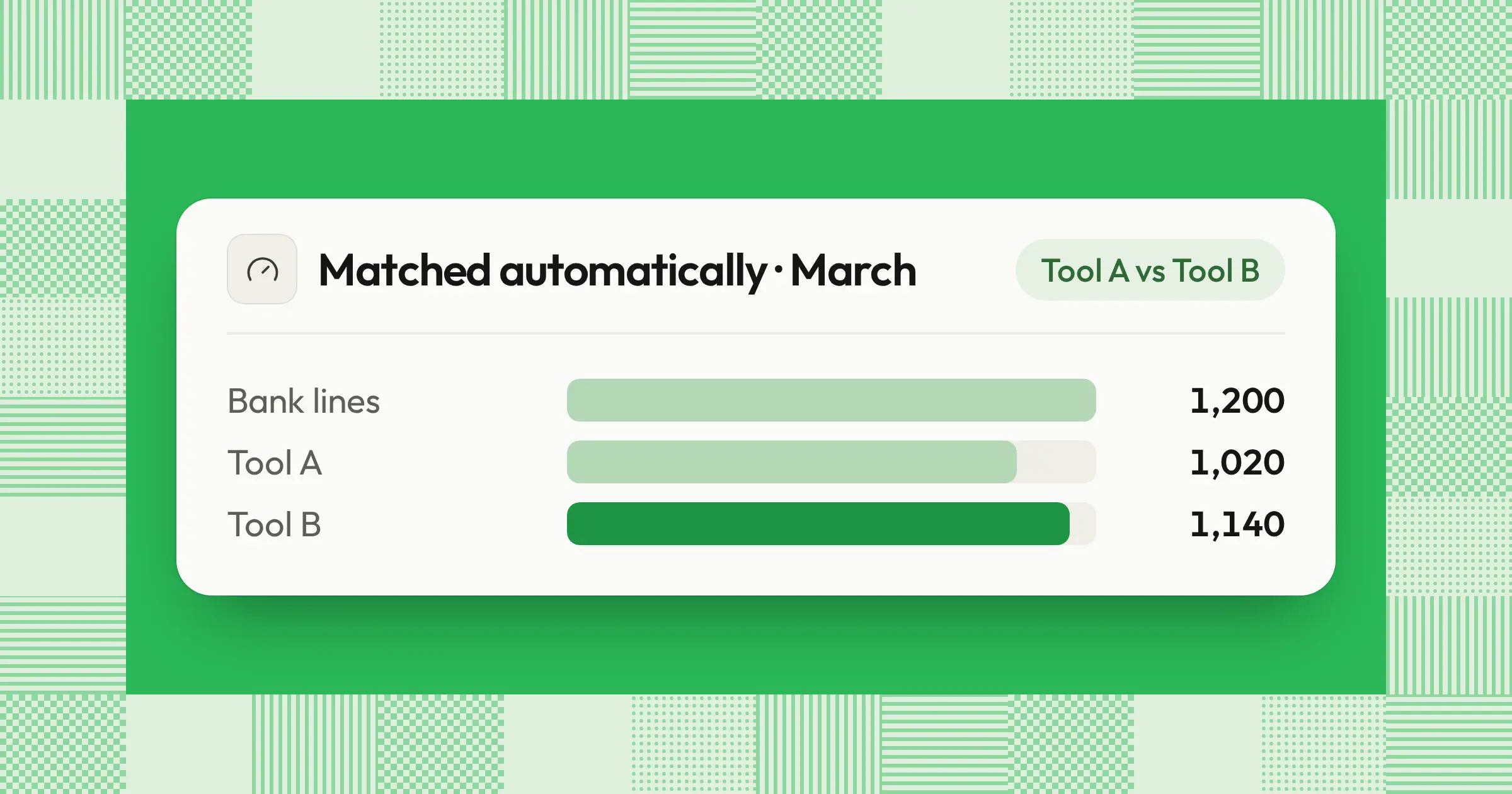
Example: Your bank account has 1,200 transactions in March. Tool A matches 1,020 automatically and leaves 180 for your team, while Tool B matches 1,140 and leaves 60. If each manual match takes two minutes, Tool A leaves 180 × 2 = 360 minutes, or 6 hours, of work. Tool B leaves 60 × 2 = 120 minutes, or 2 hours, for that one account each month.
A scripted demo shows you the product at its best, so treat it as a first filter only. Ask each finalist for a pilot on your own data, even a short one, and agree in advance what counts as success: the share of transactions matched, the time to resolve an exception, and whether the posted entry matches the approved one.
Get started with Empty Spaces
Empty Spaces runs the month-end close and accounts payable on one platform. Its agents work each close task, from reconciliations, intercompany, and multi-currency to prepaid schedules and reversing entries, process and check the invoices behind your AP accruals, tie the AP subledger to the GL, and post approved entries to NetSuite, Oracle, SAP S/4HANA, Dynamics 365, Business Central, or QuickBooks after a named approver signs off. It runs as single-tenant SaaS, in your own cloud, in a private cloud, or on-premises, and Empty Spaces has measured an 80% faster close with its agents doing the work.
See Empty Spaces close and Empty Spaces accounts payable, then book a working session to run the one-week test above on your own data.
Share this article