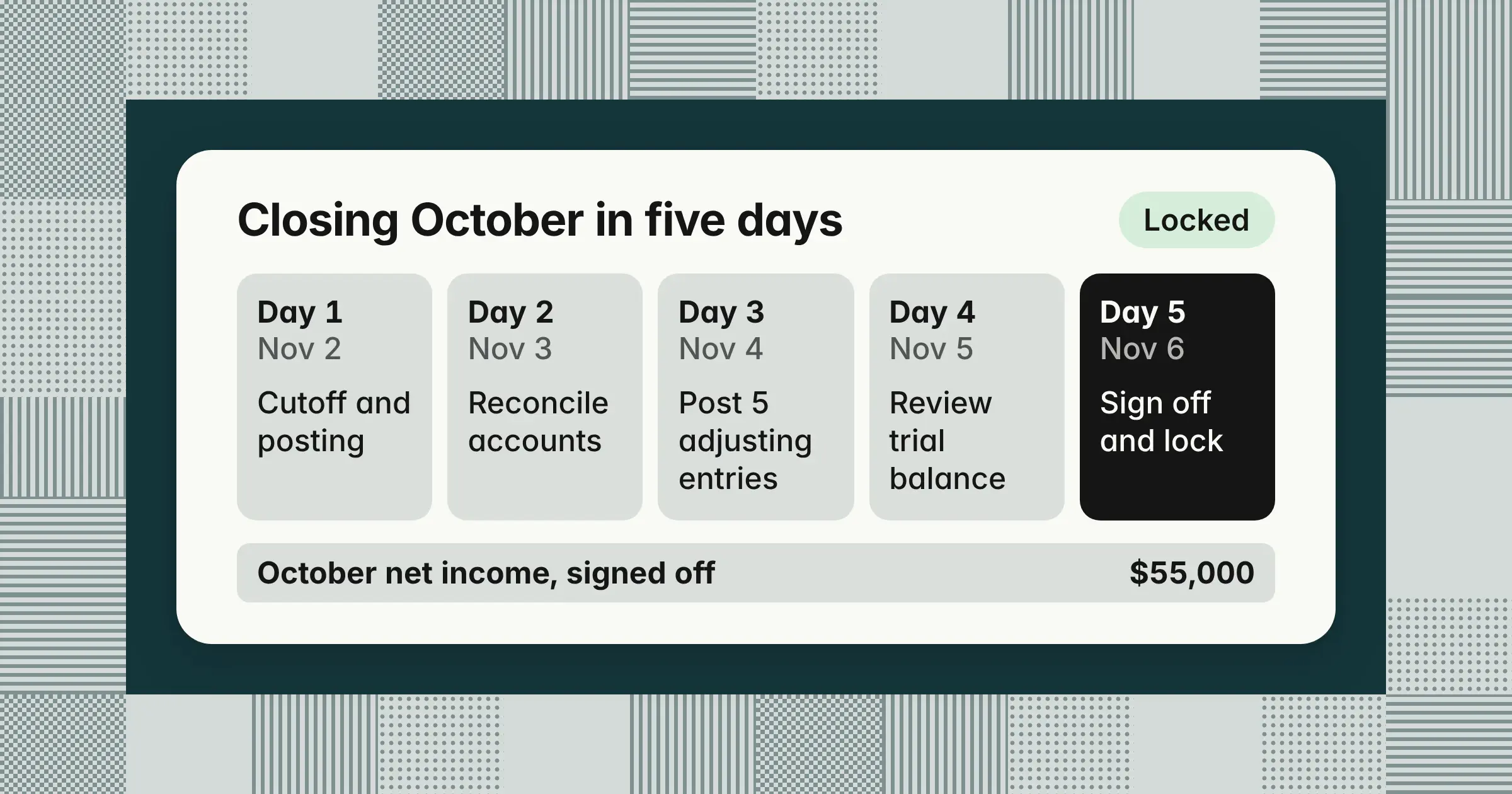
Key takeaways
- Closing the books means finalizing a period so its numbers stop changing: you record, reconcile, adjust, review, sign off, and lock, which the example's one-entity team does in five business days.
- You close the books every month, but revenue and expense accounts close into retained earnings only at fiscal year-end, so the example's $55,000 of October net income stays in year-to-date earnings until the December year-end close.
- After a month is locked, post small corrections in the next open month and reopen only for a material error, which is why the example's $2,400 October bill that arrives on November 9 is booked in November.
Closing the books in accounting means finishing a period's accounting so its numbers are final, reconciled, approved, and locked against changes. Getting it right gives you statements leadership can rely on, catches errors while they're small, and keeps reported numbers from changing. This guide covers what closing the books means for a month and a year, each step with an owner and a day, one month in numbers, and when to reopen.
What does closing the books mean in accounting?
Closing the books means finalizing a month, quarter, or year so its numbers stop changing, then locking that period in your accounting system. You close the books every month, and at fiscal year-end you also close revenue and expense accounts into retained earnings.
- Closing the booksThe full process of finalizing a period, from the cutoff through sign-off and the period lock. It's also called the book close or the period-end close.
- Closing entriesThe year-end journal entries that move revenue, expense, and dividend balances into retained earnings
- Period lockThe setting in your accounting system, such as a closing date, that stops anyone from posting into a closed period
In finance, the phrase means the same thing. The accounting team finalizes the period, the controller or CFO signs off, and finance reports to leadership, lenders, and investors on numbers that won't move. For how the monthly close fits together from start to finish, see What is month-end close?
Closing the books vs closing entries: Do you zero out revenue and expenses every month?
No: you close the books every month, but you zero out revenue and expense accounts only at fiscal year-end, when closing entries move the year's net income into retained earnings. During the year, revenue and expense accounts keep running year-to-date balances, so you can report any month, quarter, or year to date.
| Aspect | Month-end close | Year-end close |
|---|---|---|
| What you do | Record, reconcile, adjust, review, sign off, and lock | The same steps, plus closing entries |
| Revenue and expense accounts | Keep their year-to-date balances | Closed to zero for the new year |
| Retained earnings | Stays at its opening balance for the year | Rolled forward: opening balance + net income − dividends |
| Closing entries | None | Posted once, or generated by the accounting system |
| Last trial balance you run | Adjusted trial balance | Post-closing trial balance |
| Extra work | None beyond the monthly steps | Audit support, tax provision, physical inventory counts, and fuller disclosures |
| Who relies on it | Leadership and internal reporting | Auditors, tax authorities, lenders, and investors as well |
The accounts you close at year-end are temporary accounts: revenue, expenses, gains and losses, and dividends or owner's drawings. You close them so each new fiscal year's income statement starts at zero and the old year's earnings move into equity. Permanent accounts, which are assets, liabilities, and equity, carry their balances forward.
Financial statements come before closing entries. You build the statements from the adjusted trial balance. Then you post the closing entries and run a post-closing trial balance to confirm the new year can open.
Many accounting systems run the year-end step for you. "When a new fiscal year starts, QuickBooks Online moves last year's net income to the retained earnings account," according to Intuit's help article, updated September 15, 2026. In NetSuite, "an entry to close Profit or Loss to Retained Earnings is not required," according to a May 2021 article by NetSuite partner Sikich, because its reports calculate retained earnings for the period you run. For the entries you do post each month and at year-end, see month-end journal entries.
How do you close the books? The steps in order, with owner and day
To close the books, post every transaction up to the cutoff, reconcile every balance sheet account, post adjusting entries, review the adjusted trial balance, get sign-off, and lock the period. The first step is setting the cutoff, the date after which new documents belong to the next period.
Example
This schedule assumes one entity and a five-business-day close, where day 1 is the first business day after month-end. Set the days to fit your own team.
| Step | Owner | Business day | Done when |
|---|---|---|---|
| 1Set the cutoff and post the month's invoices, bills, payroll, and card charges | AP, AR, and payroll | Day 1 | Every transaction belonging to the month is posted, accrued, deferred, or prepaid as appropriate |
| 2Reconcile bank, card, and balance sheet accounts | Staff accountant | Days 1–2 | Each account ties to a statement, subledger, or schedule, and every difference is explained |
| 3Post adjusting entries: accruals, prepaids, deferred revenue, and depreciation | Senior accountant | Day 3 | Each entry has support and a named reviewer |
| 4Run the adjusted trial balance and review movements | Controller | Day 4 | Every change above your threshold is explained |
| 5Approve the financial statements | Controller, then CFO | Day 5 | The income statement and balance sheet are signed off |
| 6Year-end only: post closing entries and run the post-closing trial balance | Controller | After the December statements are approved | Revenue, expense, and dividend accounts are zero, and retained earnings is rolled forward |
| 7Lock the period | Controller | Day 5 | The accounting system rejects new postings dated in the period |
Reconciliations come before adjustments because they find what's missing, such as an unrecorded bank fee or a bill that never arrived. The statements follow the adjustments, and the lock comes last. For each step in more detail, see the month-end close process, and for how to tie out each account, see account reconciliation.
Three cutoffs move the income statement most. A retired finance director we spoke with in September 2026 named them. They are goods or services received but not invoiced, hourly labor from time and attendance data, and what you owe and are owed at month-end. Settle all three on day 1, because each one shifts revenue or expenses into the wrong month when it's missed.
Can you close the books before all the month's bills arrive?
Yes. Post every bill received by the cutoff, and accrue an estimate for costs you owe but haven't been billed for, such as contractor hours or hosting. Set each accrual to reverse on the first day of the next month. When the real bill posts, the cost then shows once, in the right month. For every task with its owner and reviewer, see the month-end close checklist.
Closing the books example: One month in numbers
In this example, a 25-person marketing agency closes October 2026 with five adjustments, signs off $55,000 of net income on day 5, and books a late bill in November.
Example
The agency has one entity and a calendar fiscal year, so January through September are already closed and locked. All amounts are illustrative.
Step 1: The trial balance before and after adjustments
Revenue and expense accounts show year-to-date balances from January 1, because nothing has been closed into retained earnings yet this year.
Trial balance, October 31, 2026 ($)
| Account | Unadjusted debit | Unadjusted credit | Adjusted debit | Adjusted credit |
|---|---|---|---|---|
| Cash | 496,650 | 496,500 | ||
| Accounts receivable | 286,000 | 286,000 | ||
| Prepaid insurance | 6,000 | 4,000 | ||
| Equipment | 96,000 | 96,000 | ||
| Accumulated depreciation | 38,400 | 40,000 | ||
| Accounts payable | 74,000 | 74,000 | ||
| Accrued expenses | 0 | 12,000 | ||
| Deferred revenue | 60,000 | 45,000 | ||
| Common stock | 50,000 | 50,000 | ||
| Retained earnings (January 1) | 310,000 | 310,000 | ||
| Revenue | 2,350,000 | 2,365,000 | ||
| Salaries expense | 1,520,000 | 1,520,000 | ||
| Rent expense | 150,000 | 150,000 | ||
| Software expense | 84,000 | 84,000 | ||
| Contractor expense | 210,000 | 222,000 | ||
| Insurance expense | 18,000 | 20,000 | ||
| Depreciation expense | 14,400 | 16,000 | ||
| Bank fees | 1,350 | 1,500 | ||
| Total | 2,882,400 | 2,882,400 | 2,896,000 | 2,896,000 |
Step 2: The five adjusting entries
Each adjustment comes from a reconciliation or a schedule, and each has an owner and a day.
| What the close found | Entry | Amount | Owner, day |
|---|---|---|---|
| 1Bank reconciliation: an October bank fee isn't in the books | Debit bank fees, credit cash | $150 | Staff accountant, day 2 |
| 2Cutoff: October contractor hours aren't invoiced yet | Debit contractor expense, credit accrued expenses, reversing November 1 | $12,000 | Senior accountant, day 3 |
| 3Prepaid schedule: one month of the annual insurance policy is used | Debit insurance expense, credit prepaid insurance | $2,000 | Senior accountant, day 3 |
| 4Fixed asset schedule: October depreciation | Debit depreciation expense, credit accumulated depreciation | $1,600 | Senior accountant, day 3 |
| 5Deferred revenue schedule: retainer work delivered in October | Debit deferred revenue, credit revenue | $15,000 | Senior accountant, day 3 |
The five entries total $30,750 on each side. Entries 2 and 4 add $13,600 to both sides of the trial balance, which is why the total grows from $2,882,400 to $2,896,000. For how each type is built and reviewed, see adjusting entries.
Step 3: What October's statements show
October's results are this year's results through October minus the results through September, which were closed and locked a month ago.
- Net income, year to date through October$2,365,000 revenue − $2,013,500 expenses = $351,500
- Net income, year to date through September (closed)$296,500
- October net income$351,500 − $296,500 = $55,000
- Balance sheetTotal assets of $842,500 ($496,500 + $286,000 + $4,000 + $96,000 − $40,000) equal liabilities of $131,000 plus equity of $711,500 ($50,000 common stock + $310,000 retained earnings + $351,500 current-year net income)
Retained earnings stays at $310,000, its January 1 balance, through every monthly close. The December close moves the full year's net income into retained earnings and starts 2027's revenue and expense accounts at zero.
Step 4: Sign-off and lock
The controller reviews the adjusted trial balance on day 4, Thursday, November 5. On day 5, Friday, November 6, the controller approves the statements and sends them to the CFO. The controller then sets the closing date in the accounting system to October 31.
Step 5: A late bill after the lock
On Monday, November 9, a $2,400 software bill dated October 28 arrives. Nobody accrued it, so October's expenses are $2,400 too low.
The agency's close policy sends any correction above $25,000 or above 5% of that month's net income to the controller to decide whether to reopen. Five percent of $55,000 is $2,750, so the $2,400 bill is below both triggers. It also isn't part of a pattern of errors and doesn't change a trend or a covenant, so AP posts it in November with a memo naming the October service date, and October's reported net income of $55,000 stays as it is. If the bill had been $30,000, the controller would review it and, if it's material to October, reopen the month and follow the reopen steps later in this guide.
The $12,000 contractor accrual needs no correction. It reverses on November 1, so the contractor's $12,000 invoice nets to zero in November and the cost stays in October.
Why is closing the books important?
Closing the books is essential for financial reporting accuracy because it's the point where every number for a period is checked and approved. Without a regular close, problems build up:
- Expenses land in the wrong monthProfit swings between periods for reasons that have nothing to do with the business
- Differences compoundAn unexplained $500 in March is much harder to trace in December, after nine months of transactions have posted on top of it
- Numbers change after you report themWithout a lock, edits to past months change reports that leadership has already used
- Errors and fraud go unnoticed longerDuplicate payments and unauthorized charges surface in the reconciliations
A closed month also gives you a fixed starting point for the next period. Leadership can compare actuals with the budget and adjust hiring and spending plans on numbers that won't be revised.
How often should you close the books: Monthly, quarterly, or yearly?
Close the books every month. Tax filing only forces an annual close, but a monthly close finds errors within weeks instead of at year-end and gives leadership, lenders, and investors timely numbers. Public companies also close each quarter for their Form 10-Q filings with the SEC. Every company closes the year for its tax return and any audit.
A small cash-basis business can run a lighter monthly close in five steps:
- Record and categorize every transaction
- Reconcile every bank and card account
- Review unpaid invoices and unpaid bills
- Review the profit and loss statement and the balance sheet
- Set a closing date in your accounting software
A cash-basis business doesn't accrue, so depreciation and other adjustments can wait for year-end, when an outside CPA can review them with the tax return.
Who closes the books: The bookkeeper, the controller, or the CPA?
At a small company, the bookkeeper closes the books each month, and an outside CPA reviews them at year-end and files the taxes. A controller, full-time or fractional, takes ownership once the business needs formal review and controls. In a larger team, staff accountants record and reconcile, and a senior accountant posts adjustments. The controller reviews, signs off, and locks the period, and the CFO receives the results.
Whoever closes, keep the preparer and the reviewer separate, so no one approves their own work.
What happens after you close the books, and can you reopen them?
After you close the books, the period is locked, its statements become the reported numbers, and its ending balances open the next period.
A signed-off checklist doesn't stop anyone from posting, so set the lock in the accounting system itself and limit who can change it. In QuickBooks Online, that's a closing date that shows a warning, or a warning and a password, before anyone changes a closed transaction, according to Intuit's help article updated September 15, 2026. Check that imports and integrations respect the lock too.
Can you reopen the books after closing the month?
Yes, but only with authorized access and a documented reason. In NetSuite, for example, you need the Manage Accounting Periods permission, and you record your reason in a Justification field, according to Oracle's NetSuite help. Reopening a period there also reopens every later closed period.
Set a threshold in your close policy that sends a correction to the controller for review, such as the example's $25,000 or 5% of the month's net income. The controller then judges materiality on more than size: qualitative factors such as whether the error hides a trend, affects a covenant or a bonus, or turns a loss into a profit; how it adds up with other uncorrected errors; and whether booking it in the current month would distort that month. The SEC's Staff Accounting Bulletin No. 108 (September 2006) also asks companies to measure an error by its effect on both the income statement and the balance sheet. If the correction isn't material, post it in the current open month with a memo naming the original period. If it is, reopen the month, post the correction, and rerun the affected reconciliations and statements. Then tell everyone who received the old numbers and lock the month again. For an error in a year you've already reported or filed taxes for, talk to your auditor or CPA, because issued statements may need restating.
Can software close the books for you?
Software can prepare much of the close work, but a person still reviews it, signs off, and locks the period. Close software falls into two groups. Some tools track the close with checklists, owners, and sign-offs. Others do part of the work, such as matching transactions, preparing reconciliations and recurring entries, and drafting variance explanations. To tell them apart, ask a vendor to take one unreconciled account and return a review-ready reconciliation without an accountant assembling it.
Two mistakes to avoid when closing the books
The two mistakes to avoid are zeroing revenue and expenses every month and running the close steps out of order, and both show up in the answers people see first for this search.
On November 7, 2026, Google AI Mode defined closing the books as resetting temporary accounts to zero "at the end of a specific period (such as a month, quarter, or year)." Four of the five AI tools tested that day (Gemini, Google AI Mode, Google AI Overviews, and Perplexity) gave at least one answer like it. A monthly close locks the period and leaves year-to-date balances in place, and closing entries wait for fiscal year-end.
The page ranked first on Google for "closing the books" on November 7, 2026, lists accruals before the bank reconciliation, inventory adjustments after the financial statements, and filing tax returns as a close step. Reconcile first, adjust second, and prepare the statements third, and treat tax returns as work that follows the year-end close.
How we approach it
Our Close Agent prepares the close for your team: it reconciles accounts, proposes accruals with support, and sends every task to a named reviewer. It posts approved entries to NetSuite, Oracle, SAP S/4HANA, Microsoft Dynamics 365, Business Central, and QuickBooks. The month can't lock until every task is signed off. If you want the prep work done before your team starts its review, explore our Close Agent.
Share this article