Key takeaways
- Adjusting entries are journal entries you record at the end of a period so revenue and expenses land in the month they were earned or incurred, not the month cash moved.
- In the October close example below, seven entries add $57,000 of revenue and $747,500 of expense, and only the three accruals need a reversal on November 1.
- Skipping the reversal on an $18,000 legal accrual books the same work twice, which overstates November expense by $18,000.
Adjusting entries are journal entries recorded at the end of an accounting period to update accounts for revenue earned and expenses incurred that the books haven't captured yet. Getting them right gives you an accurate income statement, catches accruals that would otherwise double count, and keeps your team audit-ready. This guide covers the types, a full month-end example, the accounts affected, reversals, how to write an entry, and the controls behind it.
What are adjusting entries?
In accounting, adjusting entries, also called adjusting journal entries, are the period-end entries that move your books from what was recorded during the month to what actually happened in it. You post them after the unadjusted trial balance and before you prepare financial statements.
- AccrualRecording revenue or expense before cash moves, such as wages earned but not yet paid
- DeferralMoving an amount paid or received earlier, such as a prepaid subscription or a customer's upfront payment, into expense or revenue as it's used or earned
- EstimateRecording an amount that depends on judgment, such as depreciation or expected credit losses
Every adjusting entry is a journal entry, but not every journal entry is an adjustment. A regular journal entry records a transaction when it happens, such as a vendor bill or a customer payment. An adjustment corrects timing at the end of the period, so you need them whenever you report on the accrual basis. For the full set of month-end entries and what to review in each, see Month-end journal entries: Examples and what to review.
What are the types of adjusting entries?
There are four core types: accrued revenue, accrued expenses, prepaid expenses, and deferred revenue. Lists that add depreciation, credit losses, and inventory or supplies give five, six, or seven types. Knowing the type tells you which accounts to use, what support to attach, and whether to reverse it.
| Type | What happened | Entry | Reverse next period? |
|---|---|---|---|
| Accrued revenue | You earned revenue you haven't billed | Debit accounts receivable or unbilled receivable, credit revenue | Yes, if an invoice will follow |
| Accrued expense | You incurred a cost you haven't been billed for or paid | Debit expense, credit accrued liabilities | Yes, if an invoice or payroll will follow |
| Prepaid expense | You paid in advance and used part of the benefit | Debit expense, credit prepaid asset | No |
| Deferred revenue | A customer paid in advance and you delivered part of it | Debit deferred revenue, credit revenue | No |
| Depreciation | A fixed asset was used for another month | Debit depreciation expense, credit accumulated depreciation | No |
| Credit losses | Expected uncollectible receivables changed | Debit bad debt expense, credit allowance for credit losses | No |
| Inventory or supplies | The count is lower than the book balance | Debit cost of goods sold or supplies expense, credit inventory or supplies | No |
The first four are the accrual and deferral types. Adjusting entries for depreciation work like a deferral: you paid for the asset up front, and you expense its cost over its useful life. So the answer to "what are the 7 adjusting entries?" is these four plus three common estimates and allocations.
For a deeper look at the two accrual types, see Accrued expenses and Accrued revenue: Definition, examples, and journal entry.
Adjusting entries examples: One month-end, every entry
Seeing every adjustment for one company in one month shows how they fit together and what they do to the income statement. Each amount below comes from a schedule or a calculation your team can attach as support.
Example
A software company with about 300 employees closes October 2026. All amounts are illustrative.
| Entry | Calculation | Amount |
|---|---|---|
| 1. Accrued wagesDr Wages expenseCr Accrued payroll | 5 unpaid workdays, October 26–30, × $140,000 a day | $700,000 |
| 2. Accrued legal feesDr Legal expenseCr Accrued liabilities | Firm's estimate for October work, invoice not yet received | $18,000 |
| 3. Accrued revenueDr Unbilled receivablesCr Services revenue | Implementation milestone delivered October 28, invoiced November 3 | $27,000 |
| 4. Prepaid softwareDr Software expenseCr Prepaid expenses | $120,000 annual subscription, July–June, ÷ 12 | $10,000 |
| 5. Deferred revenueDr Deferred revenueCr Subscription revenue | $360,000 annual contract starting October 1, ÷ 12 | $30,000 |
| 6. DepreciationDr Depreciation expenseCr Accumulated depreciation | $540,000 of laptops and servers over 36 months | $15,000 |
| 7. Credit lossesDr Bad debt expenseCr Allowance for credit losses | Allowance needed $62,000 per the aging, balance $57,500 | $4,500 |
The seven entries add $57,000 of revenue (entries 3 and 5) and $747,500 of expense (entries 1, 2, 4, 6, and 7). That's a $690,500 reduction to October's pretax income compared with the unadjusted books.
- EntryAmountReverses
- 1Accrued wages, Oct 26–30Wages expense · Accrued payroll700,000.00Reverses 1 Nov1 Nov
- 2Accrued legal feesLegal fees · Accrued liabilities18,000.00Reverses 1 Nov1 Nov
- 3Unbilled implementation milestoneUnbilled receivables · Services revenue27,000.00Reverses 1 Nov1 Nov
- 4Prepaid software, 1 of 12Software expense · Prepaid expenses10,000.00No
- 5Deferred revenue release, 1 of 12Deferred revenue · Subscription revenue30,000.00No
- 6Depreciation, laptops and serversDepreciation expense · Accumulated depreciation15,000.00No
- 7Allowance for credit lossesBad debt expense · Allowance4,500.00No
- Revenue added · entries 3 and 557,000.00
- Expense added · entries 1, 2, 4, 6 and 7(747,500.00)
- Change to pretax income(690,500.00)
Every entry above touches one income statement account and one balance sheet account, and none of them touches cash. Entries 1, 2, and 3 are accruals that the next payroll, vendor invoice, and customer invoice will settle, so they're the ones to reverse on November 1. Entries 4–7 stay, because no later transaction repeats them.
Which accounts do adjusting entries affect?
Adjusting entries affect at least one income statement account (revenue or expense) and at least one balance sheet account (an asset, a liability, or a contra-asset). Checking that pairing is a quick way to catch an entry coded to the wrong account. It's the first of three rules for adjusting entries:
- One income statement account and one balance sheet accountIn every entry
- Recorded at the end of the periodAfter the unadjusted trial balance and before the financial statements
- No cashBecause the cash side was already recorded when the money moved, or will be when it does
Do adjusting entries ever affect cash?
In the textbook definition, they never affect cash. In practice, the entries from your bank reconciliation do. Bank fees, interest earned, and returned customer payments appear on the bank statement first, so you record them in the books at month-end.
For example, $350 of October bank fees found during the reconciliation is booked as a debit to bank fees and a credit to cash. Whether you call it an adjustment or a reconciliation entry, it belongs in the same month-end review. For where these entries land before the statements, see Post-closing trial balance: Examples, types, and when to prepare it.
When should you reverse an adjusting entry?
Reverse the entry on the first day of the next period when a later transaction will record the same revenue or expense. That covers accruals that an invoice or payroll will settle. Reversing keeps the invoice or payroll from being counted twice, and it lets your team post that transaction normally without checking what was accrued.
| Entry | Reverse? | Why |
|---|---|---|
| Accrued wages, bonuses, and payroll taxes | Yes | The next payroll records the full expense |
| Accrued vendor expenses | Yes | The vendor invoice records the full expense |
| Accrued revenue that will be invoiced | Yes | The customer invoice records the full revenue |
| Prepaid expenses and deferred revenue recorded on the balance sheet | No | The schedule keeps releasing the balance |
| Depreciation and credit losses | No | No later transaction repeats the entry |
Example
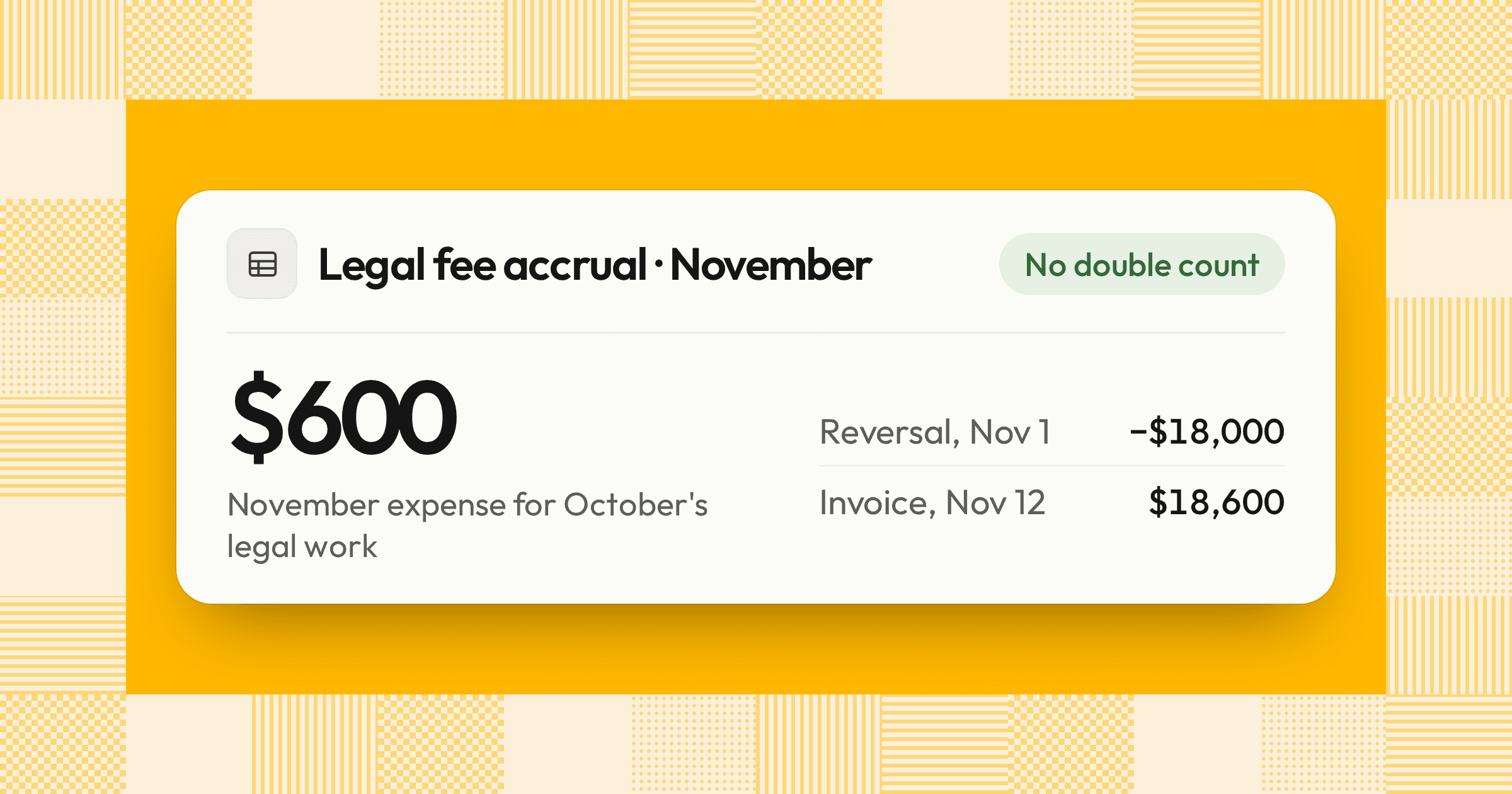
Your team accrues $18,000 of October legal fees on October 31. The invoice arrives on November 12 for $18,600 and is coded to legal expense.
| Account | Debit | Credit |
|---|---|---|
| October 31 · Accrue October legal fees | ||
| Legal expense | $18,000 | |
| Accrued liabilities | $18,000 | |
| November 1 · Reverse the accrual | ||
| Accrued liabilities | $18,000 | |
| Legal expense | $18,000 | |
| November 12 · Record the invoice | ||
| Legal expense | $18,600 | |
| Accounts payable | $18,600 | |
With the reversal, November shows $600 of legal expense for October's work, the difference between the estimate and the invoice. Without it, November shows the full $18,600 while the $18,000 accrual stays on the balance sheet. October's work is then expensed twice, and November expense is overstated by $18,000 until someone finds the stale accrual.
Outside counsel estimates 18,000.00 of October work. The invoice hasn't arrived, so the cost is accrued in October and reversed on November 1, when the invoice will post in full.
- Dr 62100 · Legal fees18,000.00
- Cr 21500 · Accrued liabilities18,000.00
Accruals workpaper, October 2026Reverses 1 Nov
Adjusting entries vs correcting, reversing, and closing entries
Adjusting, correcting, reversing, and closing entries are all journal entries, but each one has a different job and timing. Keeping them separate helps you review each one against the right support.
| Entry | Purpose | When | Example |
|---|---|---|---|
| Adjusting entry | Records revenue and expense in the right period | End of the period | Accrue October wages |
| Correcting entry | Fixes an error | When the error is found | Move a $500 laptop from supplies expense to equipment |
| Reversing entry | Cancels an accrual so the next transaction posts normally | First day of the next period | Reverse the wage accrual on November 1 |
| Closing entry | Moves revenue and expense balances to retained earnings | End of the fiscal year | Close income statement accounts |
A correcting entry for an earlier period needs extra care, and whether that period is closed in your ERP doesn't decide the treatment. First assess the error's materiality to both the prior and the current period. A material error in statements you've already issued requires a restatement. Even an immaterial prior-period error requires a revision of the prior period if correcting it now, or leaving it uncorrected, would be material to the current period, as Paul Munter, then the SEC's Acting Chief Accountant, explained in a March 2022 statement on assessing materiality. If neither applies, record the correction in the current period with a documented explanation.
How do you write an adjusting journal entry?
Write an adjusting journal entry by starting from the balance that's wrong, calculating the change, and recording it with its support and reversal date. Following the same steps every month keeps entries consistent and easy to review.
- Find what's missingUse reconciliations, open purchase orders, payroll calendars, contracts, and amortization schedules to find revenue or expense the books haven't captured.
- Calculate the amountUse the rule for that entry: unpaid workdays × daily payroll, contract value ÷ months of service, or the vendor's estimate for work performed.
- Record the entryDate it on the last day of the period, name both accounts, and write a description a reviewer can follow without asking.
- Attach the supportAdd the schedule, estimate, or calculation behind the number.
- Set the reversalFor accruals, enter a reversal date of the first day of the next period.
- Get it reviewedSomeone other than the preparer approves it before it posts.
How do you set up recurring and auto-reversing entries in NetSuite?
In NetSuite, you set up an auto-reversing entry on the journal itself and make it recur with a memorized transaction. Oracle's NetSuite documentation describes the steps:
- Enter the journalGo to Transactions > Financial > Make Journal Entries and enter the entry dated the last day of the month.
- Set the reversal dateEnter a Reversal Date, such as the first day of the next month. The reversal is the exact opposite of the original and stays linked to it.
- Choose when it's createdCheck Defer Entry to have NetSuite create the reversal automatically on the reversal date, or clear it to create the reversal immediately, dated on the reversal date.
- Memorize itSave, then memorize the journal to make it recur. You choose whether each one posts automatically or reminds your team to post it, and you manage them under Transactions > Management > Enter Memorized Transactions.
Use automatic posting for fixed amounts, such as a monthly allocation, and reminders for accruals that change every month, such as payroll. NetSuite never posts a memorized transaction into a closed period. It moves it to the next open period instead. In QuickBooks Online, you open the journal entry and select Reverse, which creates an offsetting entry.
What controls should cover adjusting entries?
These entries need tighter controls than routine transactions, because they rely on estimates and are posted by hand at the busiest point of the close. Auditors test them directly. PCAOB AS 2201 requires the auditor to evaluate the period-end financial reporting process. AS 2401 requires auditors to examine journal entries and other adjustments for evidence of possible material misstatement due to fraud.
For a company of about 300 people, a clear split of who prepares and who reviews each entry looks like this:
| Entry | Prepares | Reviews |
|---|---|---|
| Deferred and accrued revenue | Revenue accountant | Revenue manager, with the controller for contract changes |
| Payroll, bonus, and commission accruals | Payroll or senior accountant | Accounting manager |
| Vendor accruals | Staff or senior accountant | Accounting manager |
| Prepaid amortization and depreciation | Staff accountant | Senior accountant |
| Estimates, such as credit losses and legal reserves | Accounting manager | Controller |
Three different thresholds keep the review proportionate:
- Posting thresholdThe amount below which a routine difference isn't booked, such as $2,500
- Approval thresholdThe amount at which a more senior approver signs off, such as controller approval above $25,000
- Financial statement materialityThe level your auditors use to judge whether errors could change a reader's decision
Set these in a written policy and apply them consistently. No one should approve their own entry, and every manual entry needs support, even below the posting threshold. Splitting an entry to stay under a threshold should be prohibited. For where these tasks sit in the close and who owns them, see Month-end close checklist: Owners, inputs, and review.
Accruals
- Payroll accrualClose AgentIn reviewAWD 2
- Vendor and legal fee accrualsClose AgentIn reviewDWD 2
- Unbilled revenue accrualClose AgentIn reviewDWD 2
- November reversalsClose AgentNot startedAWD 3
Allocations and estimates
- Prepaid amortizationClose AgentIn reviewAWD 2
- Deferred revenue releaseClose AgentIn progressDWD 2
- DepreciationClose AgentIn reviewAWD 2
- Allowance for credit lossesClose AgentNot startedDWD 3
How we approach it
Our Close Agent prepares adjusting entries as tasks on your close checklist. It builds each accrual, prepaid amortization, and reversing entry as a balanced journal entry with its workpaper, and links every amount to its source. Nothing posts to your ERP until a named approver signs off. If you want your month-end adjustments prepared before your team starts the close, explore our Close Agent.
Share this article