Key takeaways
- Month-end journal entries are the adjusting entries that move revenue and expenses into the month they belong to, through accruals, deferrals, depreciation, estimates, and reclasses.
- The register below lists 25 common month-end journal entries, each with an example debit and credit, the support it needs, who should review it, and whether it reverses next month.
- Closing entries are a different, year-end step: they move revenue, expenses, and dividends into retained earnings, and most accounting systems now post or calculate them for you.
- Before you approve an entry, check its period, support, math, accounts, and preparer, because the PCAOB's January 2025 Audit Focus lists period-end entries with little explanation and round-number entries as possible fraud-risk indicators.
Month-end journal entries are the adjusting entries your team posts at the end of each month so revenue and expenses land in the period they were earned or incurred. Getting them right keeps each month's results accurate, catches double counting before it reaches the P&L, and gives your auditors a clear trail from every entry to its support. This guide gives you example entries with debits and credits, a full register of 25 month-end entries, worked accruals and prepaids, how year-end closing entries work, the review checklist, an approval matrix, and one company's month worked end to end.
What are month-end journal entries?
Month-end journal entries are adjusting entries recorded in the general ledger after the month's transactions are in, to recognize revenue earned and expenses incurred that invoices, bills, and payments haven't captured yet. They include accruals, deferral releases, depreciation, estimates, and reclasses, and most are prepared in the first days of the close.
You'll also see them called month-end closing entries, month-end adjusting entries, or month-end accounting entries. In teams organized by process, they sit inside record-to-report (R2R), the workflow from recording transactions to producing reports. They're one step inside the wider close, which What is month-end close? explains in full.
Month-end journal entry examples
The most common month-end journal entries are an accrued expense, prepaid amortization, depreciation, deferred revenue recognized, a payroll accrual, a bad debt reserve, and a reclassification. A closing entry is added once a year.
Example
All amounts below come from one illustrative 30-person software company closing September, the same company used in the register and the worked example later on this page.
| Entry | Example amount |
|---|---|
| Accrued expense: September consulting not yet billed, held in accrued expensesDrProfessional services expenseCrAccrued liabilities | $12,000 |
| Prepaid amortization: one month of a $24,000 annual insurance policyDrInsurance expenseCrPrepaid insurance | $2,000 |
| Depreciation: one month on the fixed asset registerDrDepreciation expenseCrAccumulated depreciation | $5,000 |
| Revenue recognized from deferred revenue: annual contracts billed up frontDrDeferred revenueCrRevenue | $40,000 |
| Payroll accrual: 4 of 10 working days in the next biweekly pay periodDrSalaries expenseCrAccrued payroll | $48,000 |
| Bad debt reserve: increase to the allowance from the AR agingDrCredit loss expenseCrAllowance for credit losses | $3,000 |
| Reclassification: software subscription coded to office suppliesDrSoftware expenseCrOffice supplies expense | $1,200 |
| Closing entry (December 31 only): the year's net income moved to equityDrIncome summaryCrRetained earnings | $1,800,000 |
The first seven are adjusting entries, and they change the month's net income. The closing entry is a year-end step, worked through in the closing entries section below.
What are the types of month-end adjusting entries?
The five main types of month-end adjusting entries are accrued expenses, accrued revenue, prepaid expenses, deferred (unearned) revenue, and depreciation. Most companies also post estimates, such as bad debt and inventory reserves, and reclasses that move amounts posted to the wrong account, which brings the list to seven.
| Type | What it records |
|---|---|
| Accrued expenses | Costs incurred but not yet billed |
| Accrued revenue | Revenue earned but not yet invoiced |
| Prepaid expenses | The month's share of a cost paid in advance |
| Deferred revenue | The month's share of cash received in advance |
| Depreciation and amortization | The month's share of an asset's cost |
| Estimates and reserves | Judgments such as expected bad debts |
| Reclasses | Corrections to the right account or department |
Each type shows up in the register below with an amount, its support, and its reviewer.
Month-end journal entries list, with examples
These are the journal entries done at month-end closing at most mid-sized companies, grouped by area so your team can check each one off. Not every company needs every entry, and some will already be generated by your ERP's subledgers, so use the register to find gaps rather than to post 25 entries by default.
All amounts are illustrative, for a 30-person software company closing September. You can copy the register into your close workbook as a template.
Revenue entries
| Entry | Debit and credit | Support | Reviewer | Reverses next month? |
|---|---|---|---|---|
| 1.Deferred revenue release$40,000 | DrDeferred revenueCrRevenue | Contracts, billing records, revenue schedule | Revenue accounting manager | No |
| 2.Accrued (unbilled) revenue$15,000 | DrUnbilled receivableCrRevenue | Contract, proof of delivery, billing schedule | Controller | Yes |
| 3.Refund or credit reserve$5,000 | DrRevenue (contra)CrRefund liability | Credit history, approved credits | Controller | No, true up monthly |
Expense accruals
| Entry | Debit and credit | Support | Reviewer | Reverses next month? |
|---|---|---|---|---|
| 4.Unbilled services$12,000 | DrProfessional services expenseCrAccrued liabilities | Contract, timesheets or vendor estimate | Accounting manager | Yes |
| 5.Goods received, not invoiced$8,000 | DrInventory or expenseCrAccrued liabilities | Purchase order, receiving report | Accounting manager | Yes |
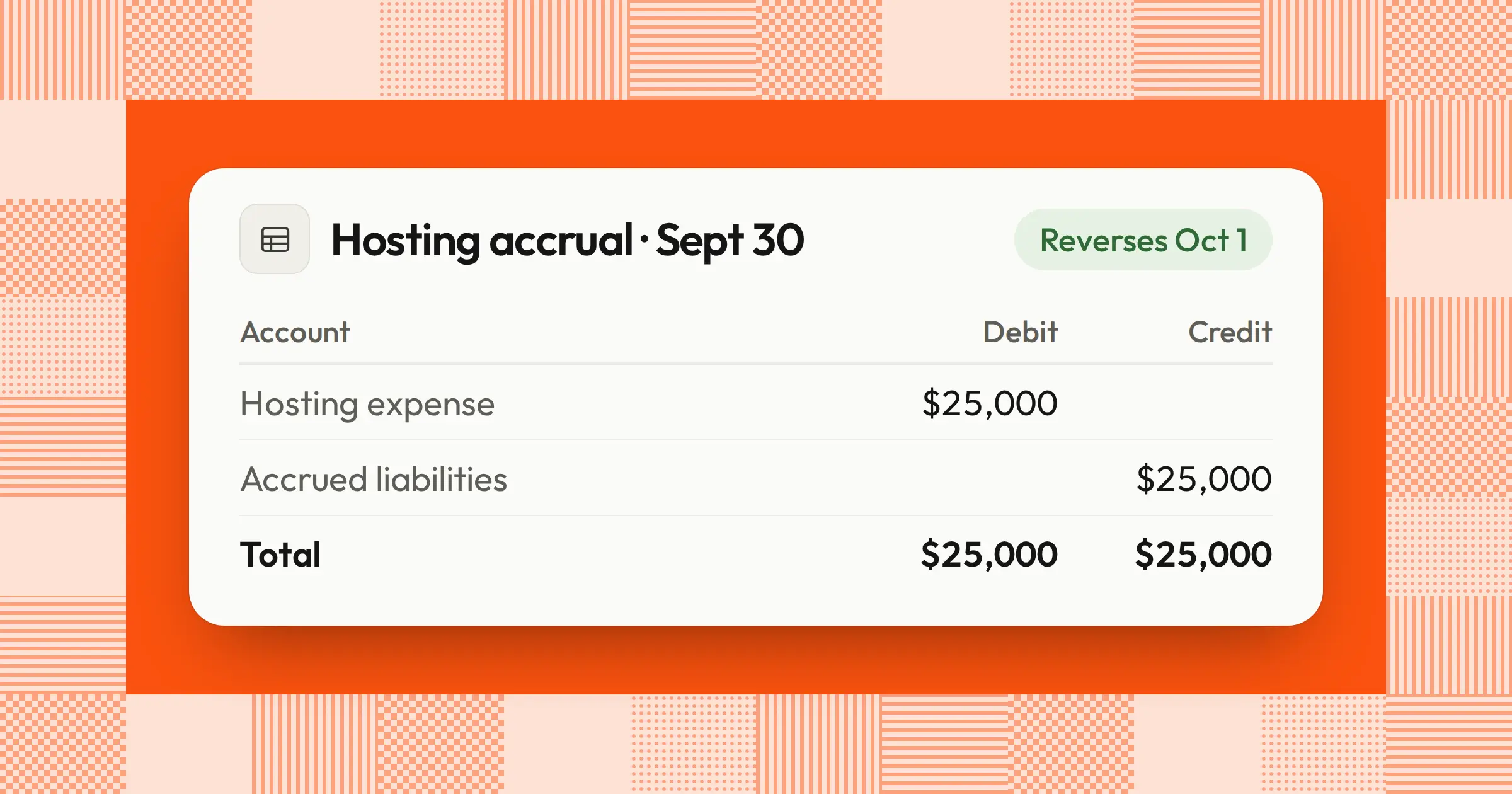
| 6.Usage-based costs (hosting, utilities)$25,000 | DrHosting or utilities expenseCrAccrued liabilities | Usage report, prior bills | Accounting manager | Yes |
| 7.Interest$600 | DrInterest expenseCrAccrued interest payable | Loan agreement, rate × balance × days | Accounting manager | Yes |
| 8.Legal and audit fees$9,000 | DrProfessional feesCrAccrued liabilities | Engagement letter, firm's estimate | Controller | Yes |
Prepaids and other deferrals
| Entry | Debit and credit | Support | Reviewer | Reverses next month? |
|---|---|---|---|---|
| 9.Prepaid insurance$2,000 | DrInsurance expenseCrPrepaid insurance | Policy, amortization schedule | Senior accountant | No |
| 10.Prepaid software$3,000 | DrSoftware expenseCrPrepaid software | Invoice, amortization schedule | Senior accountant | No |
| 11.Deferred commission amortization$4,000 | DrCommission expenseCrDeferred commissions | Commission asset roll-forward | Controller | No |
Payroll entries
| Entry | Debit and credit | Support | Reviewer | Reverses next month? |
|---|---|---|---|---|
| 12.Accrued wages$48,000 | DrSalaries expenseCrAccrued payroll | Payroll register, pay calendar | Accounting manager | Yes |
| 13.Employer payroll taxes$3,672 | DrPayroll tax expenseCrAccrued payroll taxes | Payroll register, tax rates | Accounting manager | Yes |
| 14.Bonus accrual$20,000 | DrBonus expenseCrAccrued bonus | Approved plan, attainment forecast | Controller | No, true up monthly |
| 15.Commission accrual$18,000 | DrCommission expense or deferred commissionsCrAccrued commissions | CRM bookings, commission plan | Controller | No, relieved when paid |
| 16.PTO accrual$6,000 | DrPTO expenseCrAccrued PTO | HR balances, PTO policy | Controller | No, true up monthly |
Fixed assets and estimates
| Entry | Debit and credit | Support | Reviewer | Reverses next month? |
|---|---|---|---|---|
| 17.Depreciation$5,000 | DrDepreciation expenseCrAccumulated depreciation | Fixed asset register | Senior accountant | No |
| 18.Amortization of intangibles or capitalized software$4,000 | DrAmortization expenseCrAccumulated amortization | Asset register, useful lives | Senior accountant | No |
| 19.Credit loss allowance$3,000 | DrCredit loss expenseCrAllowance for credit losses | AR aging, reserve policy | Controller | No |
| 20.Inventory reserve$2,500 | DrCost of goods soldCrInventory reserve | Count results, aging, obsolescence review | Controller | No |
Cash, intercompany, tax, and reclasses
| Entry | Debit and credit | Support | Reviewer | Reverses next month? |
|---|---|---|---|---|
| 21.Unrecorded bank fees$150 | DrBank feesCrCash | Bank statement | Senior accountant | No |
| 22.FX revaluation$1,800 | DrReceivable or payableCrUnrealized FX gain | Month-end rates, open balances | Accounting manager | Often, depending on your ERP's method |
| 23.Intercompany charge$10,000 | DrIntercompany receivableCrManagement fee income | Intercompany agreement, matching balance in the other entity | Controller | No |
| 24.Reclassification$1,200 | DrCorrect accountCrAccount posted in error | GL detail, original invoice | Accounting manager | No |
| 25.Income tax accrual$7,000 | DrIncome tax expenseCrIncome tax payable | Tax provision calculation | Controller | No |
Two checks keep the register honest. First, confirm whether a subledger already posts the entry, such as revenue schedules, fixed asset depreciation, or a payroll integration, so you don't post it twice. Second, the reviewer column is a starting point, and your own approval limits decide who signs off, as the approval matrix below shows.
Inventory companies add count adjustments and cost variances, and SaaS companies add commission capitalization under ASC 340-40, but the structure stays the same. For where these entries fall in the close calendar, see Month-end close process.
Month-end accruals journal entries, with examples
Month-end accruals record expenses incurred and revenue earned in the month before a bill or invoice exists, so the month's results match the activity. The double entry for an expense accrual is a debit to the expense and a credit to accrued liabilities, and it usually reverses on the first day of the next month.
Example
A consulting firm worked for you in September, and you expect a $12,000 invoice on October 12.
| Account | Debit | Credit |
|---|---|---|
| Sept 30 | ||
| Professional services expense | $12,000 | |
| Accrued liabilities | $12,000 | |
| Oct 1 | ||
| Accrued liabilities | $12,000 | |
| Professional services expense | $12,000 | |
| Oct 12 | ||
| Professional services expense | $12,000 | |
| Accounts payable | $12,000 | |
September carries the $12,000 expense. In October, the reversal (−$12,000) and the invoice (+$12,000) net to $0, so the cost is expensed once, in the right month.
How to estimate an accrual
Your accrual is only as good as its basis, so record how you got the number. These are the most common bases, from strongest to weakest:
- Vendor confirmationThe vendor tells you the amount it will bill
- Purchase order or contractAgreed rate × quantity received or hours worked
- Usage dataMetered usage from the provider's console, such as cloud hosting
- Run rateThe average of the last three bills, for stable recurring costs
When the actual invoice arrives, compare it with the accrual. A large gap means the basis needs to change next month.
Accrued payroll journal entry
Payroll accruals cover wages your employees earned in the month but will be paid for next month. The accrual is the share of the next pay period that falls in the current month.
Example
Your biweekly payroll is $120,000 for 10 working days. September ends with 4 working days not yet paid, so you accrue 4 ÷ 10 × $120,000 = $48,000. At an illustrative employer tax rate of 7.65%, employer payroll taxes are $48,000 × 7.65% = $3,672.
| Account | Debit | Credit |
|---|---|---|
| Salaries expense | $48,000 | |
| Payroll tax expense | $3,672 | |
| Accrued payroll | $48,000 | |
| Accrued payroll taxes | $3,672 |
Both lines reverse on October 1. If your payroll provider posts through an integration, make sure the reversal and the provider's posting don't double count.
Journal entry for accrued revenue
Accrued revenue records revenue you earned in the month but haven't invoiced. The entry debits an unbilled receivable (a contract asset) and credits revenue.
Example
You delivered $15,000 of implementation work in September and will invoice it on October 5.
| Account | Debit | Credit |
|---|---|---|
| Sept 30 | ||
| Unbilled receivable | $15,000 | |
| Revenue | $15,000 | |
| Oct 1 | ||
| Revenue | $15,000 | |
| Unbilled receivable | $15,000 | |
| Oct 5 | ||
| Accounts receivable | $15,000 | |
| Revenue | $15,000 | |
Revenue lands in September, and October nets to $0. The support is the contract and proof the work was delivered, such as a signed acceptance or time records.
Prepaid expense journal entry
Prepaid accounting journal entries move the cost of prepaid expenses, things you paid for in advance, into expense one month at a time. The month-end entry debits the expense and credits the prepaid asset, and it doesn't reverse.
Example
On September 1 you pay $24,000 for 12 months of insurance. You record the payment as an asset, then expense $24,000 ÷ 12 = $2,000 each month.
| Account | Debit | Credit |
|---|---|---|
| Sept 1 | ||
| Prepaid insurance | $24,000 | |
| Cash | $24,000 | |
| Sept 30 | ||
| Insurance expense | $2,000 | |
| Prepaid insurance | $2,000 | |
The amortization schedule shows the asset running down to zero:
| Month | Expense | Prepaid balance after entry |
|---|---|---|
| September | $2,000 | $22,000 |
| October | $2,000 | $20,000 |
| November | $2,000 | $18,000 |
| … | … | … |
| August | $2,000 | $0 |
Review the schedule against the prepaid account balance every month. If the account shows $20,500 after October instead of $20,000, a payment was coded to prepaids without a schedule.
Deferred revenue works the same way in reverse. If a customer prepays $60,000 for a year, you credit deferred revenue on receipt, then debit deferred revenue and credit revenue $60,000 ÷ 12 = $5,000 each month.
Depreciation journal entry
Depreciation spreads the cost of a fixed asset over its useful life. The entry debits depreciation expense and credits accumulated depreciation, and it never reverses.
Example
You buy $60,000 of equipment with a 5-year useful life and no salvage value. Straight-line depreciation is $60,000 ÷ 60 months = $1,000 a month, one part of the company's $5,000 monthly depreciation total.
| Account | Debit | Credit |
|---|---|---|
| Depreciation expense | $1,000 | |
| Accumulated depreciation | $1,000 |
Tie total depreciation to the fixed asset register each month, and check that assets bought in the month were added and disposals removed.
Month-end inventory journal entries
Companies that hold stock post two inventory entries most often at month-end: a count adjustment and a reserve for slow-moving or obsolete items. Both are judgment entries, so they go to the controller.
Example
Your cycle count shows $4,000 less inventory than the ledger, and your aging review finds $2,500 of items unlikely to sell.
| Account | Debit | Credit |
|---|---|---|
| Cost of goods sold (shrinkage) | $4,000 | |
| Inventory | $4,000 | |
| Cost of goods sold (reserve) | $2,500 | |
| Inventory reserve | $2,500 |
The support is the count sheets, the aging report, and your reserve policy. Neither entry reverses.
What are closing journal entries?
Closing journal entries are posted at the end of the fiscal year to move the balances of revenue, expense, and dividend accounts into retained earnings, so those accounts start the new year at zero.
Revenue, expense, and dividend accounts are temporary accounts: they measure one year's activity. Assets, liabilities, and equity accounts, including retained earnings, are permanent and carry their balances into the next year. Closing entries are the bridge between the two. Unlike month-end adjusting entries, they don't change net income. They only move the year's result into equity.
The four closing entries
- Close revenueDebit each revenue account for its balance, and credit income summary for the total.
- Close expensesDebit income summary for total expenses, and credit each expense account for its balance.
- Close income summaryDebit income summary and credit retained earnings for net income. For a net loss, the entry flips: debit retained earnings and credit income summary.
- Close dividendsDebit retained earnings and credit dividends. Dividends skip income summary because they're a distribution to owners, not an expense.
Income summary is a temporary clearing account that exists only during the close. You can skip it and close revenue and expenses directly to retained earnings, which combines the first three entries into one. The ending balances are the same either way.
Closing entries example
Example
The same 30-person software company ends its fiscal year on December 31 with $8,400,000 of revenue, $6,600,000 of expenses, and $200,000 of dividends declared. Net income is $8,400,000 − $6,600,000 = $1,800,000.
| Account | Debit | Credit |
|---|---|---|
| 1. Close revenue | ||
| Subscription revenue | $7,900,000 | |
| Services revenue | $500,000 | |
| Income summary | $8,400,000 | |
| 2. Close expenses | ||
| Income summary | $6,600,000 | |
| Salaries and payroll taxes | $4,200,000 | |
| Sales and marketing | $1,000,000 | |
| General and administrative | $956,000 | |
| Hosting | $300,000 | |
| Income tax expense | $84,000 | |
| Depreciation expense | $60,000 | |
| 3. Close income summary | ||
| Income summary | $1,800,000 | |
| Retained earnings | $1,800,000 | |
| 4. Close dividends | ||
| Retained earnings | $200,000 | |
| Dividends | $200,000 | |
After entry 3, income summary is back to $0 ($8,400,000 credited, $6,600,000 + $1,800,000 debited). Retained earnings rolls forward from a $3,100,000 opening balance: $3,100,000 + $1,800,000 − $200,000 = $4,700,000.
If you close directly to retained earnings instead, one entry debits both revenue accounts for $8,400,000, credits the six expense accounts for $6,600,000, and credits retained earnings for $1,800,000. Entry 4 stays the same.
Once the entries post, every revenue, expense, and dividend account reads $0. Run a post-closing trial balance to confirm that only permanent accounts remain and that debits still equal credits.
Do you post closing entries every month?
No. Each month you post adjusting entries and lock the period, and the transfer to retained earnings happens once, at fiscal year-end. Most modern accounting systems handle that transfer for you:
- NetSuiteOracle NetSuite's Year-End Closing help page (accessed November 2026) says that under its recommended Automatic Close, "NetSuite doesn't post the balance to retained earnings." It shows prior years' net income in retained earnings and the current year to date in a separate net income account, and it closes the year automatically once all periods are closed.
- QuickBooks OnlineA QuickBooks Team answer in Intuit's community forum (February 18, 2021) says QuickBooks "will automatically adjust your Income and Expense accounts at the end of the year," increasing retained earnings by the prior year's net income.
- Month-end period closeClosing a period in accounting software "prevents any further transactions from being recorded in the system for the period that has been closed," as AccountingTools explains in its March 4, 2026 article on closing entries.
Even when the system does the work, check it at year-end. The new year's opening retained earnings should equal last year's opening balance plus net income minus dividends. If it doesn't, an entry was posted to a closed year, or dividends were booked to the wrong account.
Month-end adjusting entries vs closing entries vs reversing entries
Adjusting entries put revenue and expenses in the right month, closing entries move the year's results into retained earnings, and reversing entries undo timing accruals on the first day of the next month.
| Compared | Adjusting entries | Closing entries | Reversing entries |
|---|---|---|---|
| What they do | Put revenue and expenses in the right month | Move revenue, expense, and dividend balances into retained earnings | Undo specific accruals on day 1 of the next month |
| When | End of each month | End of the fiscal year | First day of the next month |
| Effect on net income | Changes it | None | Offsets the prior month's accrual in the new month |
| Examples | Accruals, prepaid amortization, depreciation | Closing revenue and expense accounts | Reversing the wage accrual |
| Who posts them | Your team, or your ERP from a schedule | Usually your accounting system, automatically | Your ERP, from a reversal date on the original entry |
When someone says "month-end closing entries," they usually mean adjusting entries, not the year-end entries that zero out revenue and expenses.
Should month-end accruals be reversed?
Yes, month-end accruals for timing differences should usually reverse on the first day of the next month. The reversal stops the expense or revenue from being recorded twice when the real invoice or bill arrives and is posted the normal way.
Not every month-end entry should reverse, though:
Reverse on day 1
- Accrued expenses for bills not yet received
- Goods received, not invoiced
- Accrued wages and payroll taxes
- Accrued interest
- Accrued (unbilled) revenue
Don't reverse
- Depreciation and amortization
- Prepaid amortization
- Deferred revenue releases
- Bad debt and inventory reserves
- Bonus and PTO accruals that you true up each month
- Reclasses and corrections
The rule of thumb is simple. Reverse an entry when a later transaction will record the same amount, and don't reverse it when the entry is the only place the amount is ever recorded.
Set the reversal date on the original entry rather than posting reversals by hand. A forgotten manual reversal is one of the most common ways an expense gets double counted.
Which month-end journal entries can be recurring?
Fixed, predictable entries such as depreciation, prepaid amortization, and standing allocations can be recurring, while accruals, reserves, and reclasses need a fresh calculation each month. Month-end entries fall into three groups, and only one of them needs a person to build it from scratch each month. Sorting your register into these groups is the fastest way to cut the time the close takes.
| Group | What it is | Examples | Review |
|---|---|---|---|
| System-generated | Your ERP's subledgers post the entry from a schedule or module | Revenue schedules, fixed asset depreciation, prepaid amortization schedules | Tie the totals to the schedule |
| Recurring templates | A fixed amount you post on a schedule | Monthly rent allocation, a fixed management fee | Check the template's end date and amount each quarter |
| Manual | Amounts that change every month and need judgment | Accruals, bonus, reserves, reclasses | Full review: support, math, period, approval |
Post recurring entries as soon as the month opens, so they're reviewed and out of the way before the busy days of the close.
How to set up recurring and reversing entries in your ERP
Every major accounting system supports recurring and reversing entries, under different names:
- NetSuiteSave fixed entries as memorized transactions, and set a reversal date on a journal entry to have NetSuite post the reversal. Amortization schedules and Fixed Assets Management generate their own entries.
- Microsoft Dynamics 365 Business CentralUse recurring general journals. Reversing recurring methods post the entry and reverse it on the next day.
- Sage IntacctSet up recurring journal entries, and use a reversal date for entries that should reverse.
- QuickBooks OnlineCreate a recurring transaction as Scheduled for fixed amounts, or as a Reminder for amounts you need to check first.
Whatever the system, give every recurring template an end date and an owner. Templates that keep posting after a contract ends are a common source of small, persistent errors.
Month-end journal entries for a small business
A small business on QuickBooks Online usually needs only a handful of month-end entries: depreciation, prepaid amortization, accrued wages, accrued expenses for unbilled costs, and deferred revenue if customers pay in advance.
Set depreciation and prepaid amortization up as scheduled recurring entries, and use reminders for accruals, because their amounts change. If you report on a cash basis, you may not post accruals at all.
How to prepare month-end journal entries
Prepare month-end journal entries in six steps: close the subledgers, pull the register, calculate from source data, attach support, send for review, and post and tie out. Following the same order every month catches missing items before the review.
- Close the subledgers firstPost all invoices, bills, payments, and payroll for the month, and run the system-generated entries.
- Pull the registerStart from last month's list of entries and the close checklist, so nothing recurring is missed.
- Calculate each amount from source dataUse contracts, usage reports, payroll registers, and schedules, not last month's number.
- Build the entry with its supportAttach the calculation and source documents, write a description that explains why, and set a reversal date if it should reverse.
- Send it for reviewRoute it to a reviewer who didn't prepare it, under your approval limits.
- Post and tie outPost the approved entry, then check that the balance sheet accounts it touched reconcile to their support.
For the full order of close tasks, with owners and due days, see the Month-end close checklist.
What support does each month-end journal entry need?
Every entry needs enough support for someone who wasn't there to recalculate the amount and agree with the accounting. In practice that means a source document, a calculation, and a written reason.
| Entry type | Support to attach |
|---|---|
| Expense accruals | Contract or PO, timesheets or vendor estimate, the calculation, a check that no bill is already posted |
| Revenue accruals and deferrals | Contract, proof of delivery, revenue schedule |
| Prepaids | Original invoice, coverage dates, amortization schedule |
| Payroll | Payroll register, pay calendar, the days calculation |
| Depreciation and amortization | Fixed asset register, useful lives |
| Reserves and estimates | Aging report or count results, the policy, the calculation |
| Intercompany | Intercompany agreement, the matching balance in the other entity |
| Reclasses and corrections | GL detail showing the error, the original document |
"Same as last month" isn't support. If the amount was copied, the support should show why the prior basis still holds.
Who should approve month-end journal entries?
The person who prepares an entry should never approve it, and larger or riskier entries should go to more senior reviewers. Set the limits in a written policy based on your materiality, so every reviewer knows which entries they can sign off.
This is an example policy for a mid-sized company. Set your own thresholds from your materiality and risk.
| Example approver | Entry |
|---|---|
| Senior accountant | System-generated and recurring entries under $10,000 |
| Accounting manager | Manual entries of $10,000–$100,000, and all accruals |
| Controller | Manual entries over $100,000, revenue adjustments, reserves, and intercompany |
| CFO | Entries over $500,000, post-close entries, and anything non-standard |
Two rules apply at every level. The approver reviews the exact lines that will post, and any change after approval sends the entry back for approval again.
Journal entry review checklist
A journal entry review process checks that the entry is needed, correct, supported, and approved before it posts. Run these checks on every manual month-end entry:
- PeriodThe entry is dated in the month being closed, and that month is still open
- PurposeThe description explains what happened and why the entry is needed
- SupportSource documents and the calculation are attached and agree with the amount
- MathYou can recalculate the amount from the support, and debits equal credits
- AccountsThe accounts, entity, department, and currency are correct
- DuplicatesNo bill, invoice, or subledger entry already records the same amount
- ReversalThe entry reverses on day 1 if it should, and doesn't if it shouldn't
- Preparer and approverA different person prepared it, and the approver is within their limit
- Balance sheet effectThe accounts it touches still reconcile to their support after posting
A balanced entry isn't the same as a correct entry. Debits can equal credits while the entry sits in the wrong month or the wrong account.
Common month-end journal entry mistakes
The most common month-end journal entry mistakes are double-counted accruals, wrong periods, missing support, wrong accounts, stale recurring templates, plugs, self-approval, and edits after approval. Each one has a check that catches it.
| Mistake | Example | How to catch it |
|---|---|---|
| Accrual and invoice both recorded | $12,000 accrued, then the invoice posted, with no reversal | Reversal dates on every timing accrual |
| Wrong period | October services expensed in September | Check service dates against the posting period |
| Missing support | A $45,000 accrual with no contract or calculation | No approval without attached support |
| Wrong account | Equipment expensed as repairs | Review against the capitalization policy |
| Stale recurring template | Rent still posting after the lease ended | End dates and quarterly template review |
| Plugs | An unexplained amount to make a reconciliation tie | Investigate differences instead of booking them |
| Self-approval | An accountant posts and approves their own entry | System-enforced preparer and approver separation |
| Change after approval | Lines edited after sign-off | Changes send the entry back for approval |
What do auditors look for in journal entries?
Auditors look for journal entries that are unusual, posted at period end with little explanation, made by people who don't normally post entries, or recorded in round numbers, because that's where errors and management override show up. The PCAOB's staff publication Audit Focus: Journal Entries (January 2025) lists characteristics of journal entries that may indicate fraud risk:
- Unusual accountsEntries made to unrelated, unusual, or seldom-used accounts
- Unusual preparersEntries made by individuals who typically don't make journal entries
- Period-end timingEntries recorded at the end of the period, or post-closing entries, with little or no explanation
- Missing account numbersEntries made before or during preparation of the financial statements without account numbers
- Round numbersEntries containing round numbers or a consistent ending number
The same publication says auditors fall short when they don't test the completeness of the journal entry population or don't select the entries that meet their fraud-risk criteria.
For your team, the lesson is practical. A month-end entry with a clear description, attached support, a calculated rather than round amount, and a named approver is an entry your auditors can clear quickly.
A worked example: One company's September entries
In this example, eight September entries lower one company's pre-tax income by $60,672, from $210,000 on the preliminary trial balance to $149,328.
| Entry | Debit and credit | Amount | Effect on pre-tax income |
|---|---|---|---|
| Deferred revenue release | DrDeferred revenueCrRevenue | $40,000 | +$40,000 |
| Accrued revenue | DrUnbilled receivableCrRevenue | $15,000 | +$15,000 |
| Hosting accrual | DrHosting expenseCrAccrued liabilities | $25,000 | −$25,000 |
| Consulting accrual | DrProfessional services expenseCrAccrued liabilities | $12,000 | −$12,000 |
| Wages and payroll taxes | DrSalaries and payroll tax expenseCrAccrued payroll and taxes | $51,672 | −$51,672 |
| Prepaid insurance | DrInsurance expenseCrPrepaid insurance | $2,000 | −$2,000 |
| Depreciation | DrDepreciation expenseCrAccumulated depreciation | $5,000 | −$5,000 |
| Bonus accrual | DrBonus expenseCrAccrued bonus | $20,000 | −$20,000 |
| Total | $170,672 | −$60,672 |
Total debits and total credits are both $170,672, so the entries balance. Revenue rises by $40,000 + $15,000 = $55,000, and expenses rise by $25,000 + $12,000 + $51,672 + $2,000 + $5,000 + $20,000 = $115,672, so pre-tax income falls by $55,000 − $115,672 = −$60,672. That takes September from $210,000 to $210,000 − $60,672 = $149,328, the number your September results should report.
On October 1, four of these entries reverse: the hosting accrual, the consulting accrual, the accrued revenue, and the wage and tax accrual. The other four stay, because no later transaction will record them.
For benchmarks on how long this part of the close should take, see How long should month-end close take?
Can month-end journal entries be automated?
Yes, most month-end journal entries can be automated in stages, starting with the predictable ones. System-generated and recurring entries come first, and then agents can prepare the judgment entries for a person to approve.
- Subledgers and schedulesRevenue schedules, depreciation, and prepaid amortization generated by your ERP
- Recurring templatesFixed entries posted on a schedule, with end dates
- AI-prepared entriesAccruals, reclasses, and true-ups calculated from POs, usage data, contracts, and prior bills, then drafted with their workpaper
AI-prepared entries need the same controls as entries your team prepares, plus a few more. Before any tool posts to your ERP, check that:
- A named person approves each entry, and nothing posts without that approval
- The approved entry is the posted entry, and any change sends it back
- Every amount links to its source, such as the PO, contract, or usage report behind it
- The entry history is kept: who prepared it, who approved it, why it was made, and every change
- Wrong entries are reversed, not deleted, so the audit trail stays intact
For a comparison of tools that prepare and post entries this way, see Best month-end close software (2026).
If you want your accruals, prepaids, and reclasses prepared with their workpapers and sent to a named approver before anything posts to your ERP, explore our Close Agent.
Share this article