BlogGuide
Month-end close calendar: A day-by-day schedule with owners, cutoff times, and 2026–2027 dates
17 min read
Key takeaways
- Day 0 is the last calendar day of the month, even on a weekend. Business day 1 is the first working day after it, and every close day counts working days only.
- From November 2026 to December 2027, holidays push business day 5 to the 8th of the month three times: for the December 2026, June 2027, and August 2027 closes.
- A missed submission deadline never moves an expense to next month on its own. If your cutoff, recognition, and materiality policies place the cost in the month, you accrue it.
A month-end close calendar puts every close task on a numbered business day, with one owner, one reviewer, a cutoff time, and the tasks it waits for. With one in place, everyone knows what's due today, a late input shows up the day it's missed, and sign-off lands on the same business day each month. This guide covers a five-day calendar, one rule for counting close days, dates for every close through December 2027, department deadlines, three team sizes, and what to move when a day slips.
What is a month-end close calendar?
A month-end close calendar is the schedule that assigns each close task to a business day after month end, names who prepares and reviews it, sets a cutoff time, and lists what has to finish first.
- Close dayThe task's position relative to month end, such as BD2, so the schedule repeats every month while the dates change.
- Owner and reviewerOne person prepares the task and a different person approves it.
- Depends onThe task or input that must be done before this one can start.
You'll also see it called a month-end close schedule, financial close calendar, or monthly close calendar.
The calendar is one of three views of the same work. Most teams keep all three in one sheet or close tool.
| View | Question it answers | Example row |
|---|---|---|
| Month-end close checklist | What has to be done? | Reconcile the operating bank account |
| Close calendar | Who finishes it, by when, and after what? | BD2, 12 PM, staff accountant, reviewed by the accounting manager, after BD1 bank imports |
| Close timeline | How long does the close run, and where is it today? | Day 0 to sign-off on BD5, currently on BD3 |
Universities such as the University of Arizona also publish "close calendars," but theirs list the date each month's ledger closes for campus departments. This page covers the finance team's working schedule for the month-end close.
Month-end close calendar example: A five-business-day close, day by day
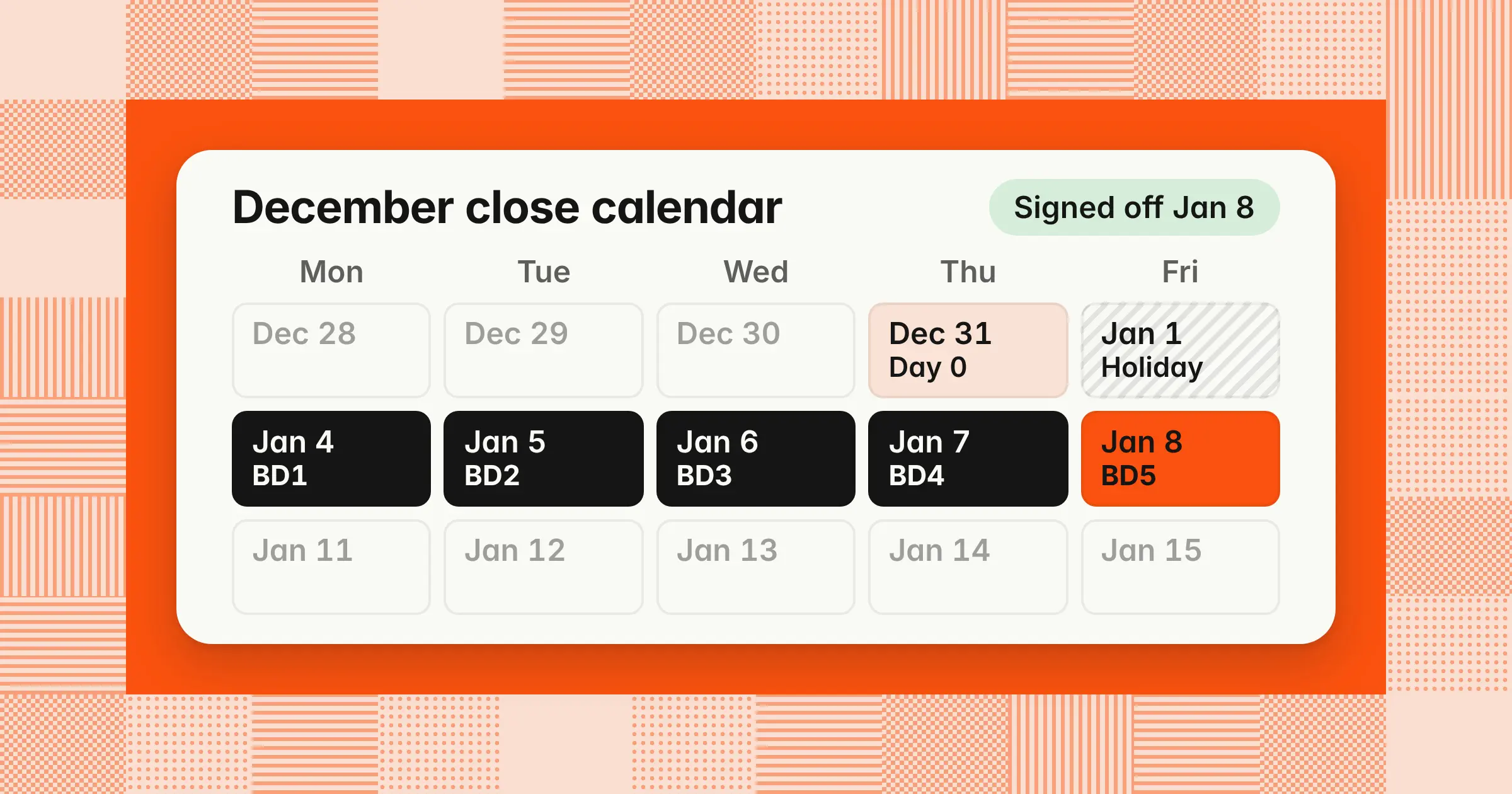
A five-business-day close calendar runs pre-close from BD-3 to BD-1, posts transactions on BD1, reconciles on BD2, books accruals and adjustments on BD3, reviews the trial balance and flux on BD4, and signs off and locks on BD5. This example closes December 2026 in five business days with a five-person team: controller, accounting manager, senior accountant, AP accountant, and staff accountant. Each row is one handoff, so a miss is visible by its cutoff time, not at review.
| Day (December 2026 close) | Cutoff | Task | Owner and reviewer | Depends on |
|---|---|---|---|---|
| BD-7Tue, Dec 22 | 12 PM | Publish the dated calendar and department deadlines | ControllerReviewer: CFO | Last month's retrospective |
| BD-3Tue, Dec 29 | 12 PM | Reconcile bank and card accounts through Dec 28 | Staff accountantReviewer: Accounting manager | Bank feeds current |
| BD-3Tue, Dec 29 | 5 PM | Draft recurring entries and roll forward reconciliation templates | Senior accountantReviewer: Accounting manager | November signed off |
| BD-2Wed, Dec 30 | 5 PM | Collect expense reports and department accrual confirmations | AP accountantReviewer: Controller | Deadline notice sent |
| BD-2Wed, Dec 30 | 5 PM | Freeze new accounts, departments, and vendors until BD5 | Controller | None |
| BD-1Thu, Dec 31 | 5 PM | Run the final December billing | Accounting managerReviewer: Controller | Contracts and usage loaded |
| Day 0Thu, Dec 31 | 11:59 PM | Reporting period ends; record transactions in the proper period under your cutoff, recognition, and materiality policies | None | None |
| BD1Mon, Jan 4 | 5 PM | Enter December vendor invoices and build the received-not-invoiced list | AP accountantReviewer: Accounting manager | Vendor invoices, PO receipts |
| BD1Mon, Jan 4 | 5 PM | Import and match the final bank and card activity | Staff accountantReviewer: Senior accountant | December statements available |
| BD2Tue, Jan 5 | 12 PM | Finish bank, card, and cash reconciliations | Staff accountantReviewer: Accounting manager | BD1 imports |
| BD2Tue, Jan 5 | 5 PM | Tie AP, AR, payroll, and deferred revenue subledgers to the GL | Senior accountantReviewer: Controller | BD1 invoice entry, payroll register |
| BD3Wed, Jan 6 | 12 PM | Post accruals for unbilled costs, payroll, and bonuses | AP accountantReviewer: Controller | Received-not-invoiced list, confirmations |
| BD3Wed, Jan 6 | 5 PM | Post depreciation, prepaid, revenue, and intercompany entries | Senior accountantReviewer: Controller | BD2 subledger tie-outs |
| BD4Thu, Jan 7 | 10 AM | Prepare the remaining balance sheet reconciliations | Staff accountantReviewer: Accounting manager | BD3 entries posted |
| BD4Thu, Jan 7 | 12 PM | Run the preliminary trial balance and explain flux over threshold | Accounting managerReviewer: Controller | All BD3 entries |
| BD4Thu, Jan 7 | 5 PM | Review reconciliations and flux, and return notes to preparers | ControllerReviewer: CFO | Flux explanations |
| BD5Fri, Jan 8 | 12 PM | Clear review notes, post final entries, draft statements | Accounting managerReviewer: Controller | Controller notes |
| BD5Fri, Jan 8 | 3 PM | Approve the financial statements | ControllerReviewer: CFO | Notes cleared |
| BD5Fri, Jan 8 | 5 PM | Lock the period and send the reporting pack | ControllerReviewer: CFO | Sign-off |
Cash and subledger reconciliations come before accruals and adjusting entries, and the lock comes after review, never before it. The order matters more than the exact clock times, which you set to fit your team. Your month-end close checklist template holds the full task list; add a close day, cutoff time, and depends-on column to turn it into this calendar.
How do you count close days? Business day 1, WD1, T+1, and Day 0
Day 0 is the last calendar day of the month, even when it falls on a weekend. Business day 1 is the first working day after Day 0. Every later close day counts working days only, skipping weekends and the holidays your company observes.
- BD1, WD1, T+1Three names for the same day. "Workday" here means working day, not the Workday ERP.
- BD-1The last business day of the month. When the month ends on a weekday, BD-1 and Day 0 are the same date. BD-2 and BD-3 count back from there on working days.
- Weekend month endTransactions dated that Saturday or Sunday still belong to the month. October 2026 ends on a Saturday, so BD1 is Monday, November 2.
- Holiday on BD1Business day 1 moves to the next working day, and every later deadline moves with it. The close keeps all five business days, so the sign-off date moves, not the workload.
The close starts with pre-close on BD-3 and ends when the controller signs off and locks the period. A five-business-day close is a common target, which for the November 2026 close means Monday, December 7. "Three business days" means three working days, not three calendar days. Store each month's period end once and let a formula turn close days into dates in Excel or Google Sheets, where WORKDAY.INTL works the same way.
| Close day | Formula | December 2026 result |
|---|---|---|
| Day 0 | =EOMONTH(MonthStart, 0) | Thu, Dec 31, 2026 |
| BD1 to BDn | =WORKDAY.INTL(PeriodEnd, n, 1, Holidays) | BD1 Mon, Jan 4; BD5 Fri, Jan 8 |
| BD-1 to BD-n | =WORKDAY.INTL(PeriodEnd + 1, -n, 1, Holidays) | BD-1 Thu, Dec 31; BD-3 Tue, Dec 29 |
The weekend code 1 means Saturday and Sunday off, and Holidays is a range listing every day your company is closed, including next January's. The "+ 1" in the pre-close formula makes BD-1 land on Day 0 when Day 0 is a working day.
Month-end close calendar 2026 and 2027: Business day 1 and 5 for every month
From November 2026 to December 2027, business day 5 falls between the 5th and the 8th of the following month. Holidays push it to the 8th for the December 2026, June 2027, and August 2027 closes. Dates below use the observed US federal holidays published by the U.S. Office of Personnel Management (OPM), checked November 7, 2026. Columbus Day, Veterans Day, and Juneteenth don't change any date below, so the table holds if your company works them.
| Month closed | Day 0 | Pre-close, BD-3 to BD-1 | BD1 | BD5 | Calendar days, Day 0 to BD5 |
|---|---|---|---|---|---|
| November 2026 | Mon, Nov 30 | Wed, Nov 25 to Mon, Nov 30 | Tue, Dec 1 | Mon, Dec 7 | 7 |
| December 2026 | Thu, Dec 31 | Tue, Dec 29 to Thu, Dec 31 | Mon, Jan 4, 2027 | Fri, Jan 8, 2027 | 8 |
| January 2027 | Sun, Jan 31 | Wed, Jan 27 to Fri, Jan 29 | Mon, Feb 1 | Fri, Feb 5 | 5 |
| February 2027 | Sun, Feb 28 | Wed, Feb 24 to Fri, Feb 26 | Mon, Mar 1 | Fri, Mar 5 | 5 |
| March 2027 | Wed, Mar 31 | Mon, Mar 29 to Wed, Mar 31 | Thu, Apr 1 | Wed, Apr 7 | 7 |
| April 2027 | Fri, Apr 30 | Wed, Apr 28 to Fri, Apr 30 | Mon, May 3 | Fri, May 7 | 7 |
| May 2027 | Mon, May 31 | Wed, May 26 to Fri, May 28 | Tue, Jun 1 | Mon, Jun 7 | 7 |
| June 2027 | Wed, Jun 30 | Mon, Jun 28 to Wed, Jun 30 | Thu, Jul 1 | Thu, Jul 8 | 8 |
| July 2027 | Sat, Jul 31 | Wed, Jul 28 to Fri, Jul 30 | Mon, Aug 2 | Fri, Aug 6 | 6 |
| August 2027 | Tue, Aug 31 | Fri, Aug 27 to Tue, Aug 31 | Wed, Sep 1 | Wed, Sep 8 | 8 |
| September 2027 | Thu, Sep 30 | Tue, Sep 28 to Thu, Sep 30 | Fri, Oct 1 | Thu, Oct 7 | 7 |
| October 2027 | Sun, Oct 31 | Wed, Oct 27 to Fri, Oct 29 | Mon, Nov 1 | Fri, Nov 5 | 5 |
| November 2027 | Tue, Nov 30 | Fri, Nov 26 to Tue, Nov 30 | Wed, Dec 1 | Tue, Dec 7 | 7 |
| December 2027 | Fri, Dec 31 | Tue, Dec 28 to Thu, Dec 30 | Mon, Jan 3, 2028 | Fri, Jan 7, 2028 | 7 |
What moves each close's dates:
| Month closed | What moves it |
|---|---|
| November 2026 | Thanksgiving (Nov 26) cuts pre-close. If you also close Nov 27, BD-3 is Tue, Nov 24 |
| December 2026 | New Year's Day (Fri, Jan 1) pushes BD1 to Monday, on top of year-end work |
| January 2027 | Weekend month end leaves the fewest calendar days |
| February 2027 | Weekend month end |
| March 2027 | Quarter-end |
| April 2027 | None |
| May 2027 | Memorial Day falls on Day 0, so BD-1 is Fri, May 28 |
| June 2027 | Independence Day observed Mon, Jul 5; quarter-end |
| July 2027 | Weekend month end |
| August 2027 | Labor Day (Mon, Sep 6) |
| September 2027 | Quarter-end; BD1 is a Friday |
| October 2027 | Weekend month end |
| November 2027 | Thanksgiving (Nov 25). If you also close Nov 26, BD-3 is Wed, Nov 24 |
| December 2027 | Dec 31 is the observed New Year's Day 2028 holiday, which many private employers work. If you work it, pre-close is Wed, Dec 29 to Fri, Dec 31; year-end |
Three patterns matter when you plan. Holidays inside BD1 to BD5 move your sign-off date, so tell report readers in advance. Holidays just before month end, like Thanksgiving week and Christmas week, squeeze pre-close work instead, so send deadline notices before the holiday. A Sunday month end gives you all five business days in only five calendar days (a Saturday month end leaves six), so expect weekend bank and card activity to land in BD1.
Add your company's own closures, such as the Friday after Thanksgiving or December 24, to the Holidays range and recompute. A multi-country group needs one holiday list per country, so BD3 in Germany and BD3 in the US can fall on different dates. Companies on a 4-4-5 fiscal calendar use their own period-end dates as Day 0 and count from there.
What deadlines should the rest of the company get?
Give every team that feeds the close a submission deadline: expense reports and department accrual confirmations by BD-2, sales and payroll inputs by noon on BD1, and vendor invoices by 5 PM on BD1.
| Team | What they send | Deadline | December 2026 close |
|---|---|---|---|
| All employees | Expense reports and receipts for spend to date | BD-2, 5 PM | Wed, Dec 30 |
| Department heads | Accrual confirmation: unbilled work, open purchases, new contracts, or "complete" | BD-2, 5 PM | Wed, Dec 30 |
| Billing | Final invoices for the month | BD-1, 5 PM | Thu, Dec 31 |
| Sales operations | Bookings, contract changes, credits, and commission data | BD1, 12 PM | Mon, Jan 4 |
| HR and payroll | Payroll register, bonuses, and benefits changes | BD1, 12 PM | Mon, Jan 4 |
| AP and procurement | Vendor invoices entered and the received-not-invoiced list | BD1, 5 PM | Mon, Jan 4 |
| FP&A | Budget and forecast loaded for the flux review | BD3, 5 PM | Wed, Jan 6 |
Send the dated deadlines on BD-7, a reminder on the morning of BD-3, and a chase list of missing items at 9 AM on BD1. In December, BD-7 is Tuesday, December 22, so the notice goes out before Christmas week.
A submission deadline decides when accounting gets the information, not which month the cost belongs to. The reporting period ends December 31, and you record transactions in the proper period under your cutoff, recognition, and materiality policies. An invoice that arrives after the AP cutoff for work done in December is usually still a December expense, so you book an accrual for it. Moving it into January to keep the calendar on time understates December.
Example
A contractor's $6,500 invoice for December work arrives Wednesday, January 6, which is BD3 and two days after the AP cutoff. The department head didn't list it on the BD-2 confirmation. The AP accountant books it as a December accrual before the BD4 trial balance:
| Account | Debit | Credit |
|---|---|---|
| Dec 31. Memo: December services, invoice received Jan 6 | ||
| Contractor expense | 6,500 | |
| Accrued expenses | 6,500 | |
The entry reverses on January 1, and the invoice posts to accounts payable in January, so the cost is recorded once, in December. The guide to accrued expenses covers how to estimate items when no invoice exists yet. Add a line to the next confirmation form asking department heads about contractors.
Who owns each day? The close calendar by team size
Split the work by area, not by day: each preparer owns a set of accounts across BD1 to BD3, and the reviewer checks each handoff the same day. Here's the same calendar staffed three ways.
| Close day | Owner, part-time bookkeeper, and outside CPA (QuickBooks Online) | Controller and two staff accountants | Five-person team |
|---|---|---|---|
| Pre-close | Owner chases receipts; bookkeeper clears bank feeds on their last working day of the month | Staff A reconciles cash and cards to date; Staff B drafts recurring entries; controller sends notices | As in the calendar above |
| BD1 | Bookkeeper imports, categorizes, and enters bills | Staff A: bank imports, billing, AR. Staff B: AP cutoff, payroll inputs | AP accountant: invoices. Staff accountant: bank. Accounting manager: sales and payroll inputs |
| BD2 | Bookkeeper reconciles bank, card, and payment processor accounts | Staff A: cash and AR reconciliations. Staff B: AP and payroll tie-outs. Controller reviews both | Reconciliations and subledger tie-outs |
| BD3 | Bookkeeper posts accruals, prepaids, and depreciation | Staff B: accruals. Staff A: revenue and prepaid entries. Controller reviews | Accruals and adjusting entries |
| BD4 | CPA reviews | Controller: trial balance and flux | Accounting manager: flux. Controller: review |
| BD5 | Bookkeeper posts CPA corrections | Controller: sign-off and lock | Sign-off, lock, reporting pack |
| BD6 to BD8 | Owner approves; bookkeeper sets the closing date and sends reports | Buffer for review notes | Not needed |
| Realistic sign-off | BD7 or BD8 at first | BD5 or BD6 | BD5 |
| Main risk | Bookkeeper hours | The controller reviews everything | Handoffs between five people |
A part-time bookkeeper's calendar runs on their working days, not company business days. If they work Mondays, Wednesdays, and Fridays and BD1 is a Monday, their three days of BD1 to BD3 work run through BD5, so the CPA review moves to BD6. On a three-person team, the controller is the bottleneck on BD2 to BD5, so schedule reviews in the afternoon of the day the work is due. Every team should name a backup for each BD2 and BD3 task, so one person out in close week doesn't stop the close. At a SaaS company or startup, give the BD-1 billing run and the BD2 deferred revenue tie-out to the same person each month, since usage, upgrades, and contract changes all flow through them.
A multi-entity group adds one layer: each entity closes locally by BD3, intercompany balances are matched on BD3, and group finance consolidates on BD4. Publish month-end exchange rates on BD-1. The guide to intercompany accounting covers the matching and elimination entries.
How to build a month-end close calendar
Start from the day leadership needs the statements, work backward through review, entries, and reconciliations, and give every task one close day, owner, reviewer, and dependency.
- Set the sign-off dayPick the business day your report readers need, such as BD5, and put the controller's review on the day before
- List the real workPull every task from your last three closes, including the ones nobody wrote down
- Assign one owner and one reviewerNo one reviews their own work, and every task has a named backup
- Map dependenciesNote what each task waits for, and put reconciliations before the entries that rely on them
- Add close days and cutoff timesUse business-day offsets, not dates, so the calendar repeats
- Publish dates a month aheadConvert close days to dates with your holiday list and send them with the department deadlines
The controller owns the calendar. Update statuses daily during the close, keep planned dates visible next to actual ones, and change next month's version only after a 15-minute review of what ran late. The month-end close process explains each step the calendar schedules.
What happens when a close task is late?
When a task on the critical path is late, mark every task that depends on it as blocked, move their dates by the length of the delay, and keep working on tasks off the path. Never shorten review to win the time back.
The critical path is the chain that sets your earliest sign-off: subledger posting, reconciliations, adjusting entries, trial balance review, sign-off, and lock. Bank reconciliations, fixed assets, and prepaids usually run alongside it. Revenue and controller review are where most five-day calendars slip.
Example
On BD2, Tuesday, January 5, the senior accountant finds that the general ledger shows $1,280,000 of deferred revenue while the revenue schedule supports $1,240,000. The $40,000 difference is December services under a December 15 contract amendment that was never loaded into billing, so the ledger still holds them in deferred revenue. Sales operations is out until Thursday and confirms the amendment that afternoon.
| Task | Planned | Actual | Why it moved |
|---|---|---|---|
| Deferred revenue reconciliation | BD2, Tue, Jan 5 | BD4, Thu, Jan 7 | Waiting on sales operations to confirm the amendment |
| Revenue adjusting entry | BD3, Wed, Jan 6 | BD5, Fri, Jan 8 | Depends on the reconciliation |
| Trial balance, flux, and controller review | BD4, Thu, Jan 7 | BD6, Mon, Jan 11 | Revenue is the largest flux line |
| Sign-off, lock, and reporting pack | BD5, Fri, Jan 8 | BD7, Tue, Jan 12 | End of the critical path |
| Bank, card, and AP reconciliations; accruals | BD2 and BD3 | On time | Off the critical path |
The entry on BD5 recognizes the revenue earned in December:
| Account | Debit | Credit |
|---|---|---|
| Dec 31 | ||
| Deferred revenue | 40,000 | |
| Subscription revenue | 40,000 | |
A two-day delay on one reconciliation moved sign-off two business days, from Friday, January 8 to Tuesday, January 12. The controller told the CFO the new date on BD2, the day the gap appeared. If waiting isn't an option, the controller can approve an estimate with documented support and a true-up the next month, but only when the estimate is reliable. Lock evidence and the full review stay in place either way.
Run a 15-minute check each close morning that covers only four things: tasks due today, blocked tasks, reviews waiting, and any change to the sign-off date. How long your close should take overall is a separate question, covered in the guide to month-end close time.
How do quarter-end and year-end change the close calendar?
Keep one master calendar and switch on extra task groups at quarter-end and year-end, rather than running three separate calendars. Tag each task monthly, quarterly, or annual, and filter by the period you're closing.
| Close | Extra task groups | Example sign-off |
|---|---|---|
| Month-end | The calendar above | BD5 |
| Quarter-end | Flux against the prior quarter and prior year, reserve and estimate reviews, quarterly tax estimates, board pack | BD7 |
| Year-end | Physical counts, fixed asset review, annual tax provision, audit schedules, closing entries to retained earnings | BD10, with audit fieldwork after |
The example sign-off days are planning placeholders, not benchmarks. Set yours from how long these task groups took last time.
Close calendars in QuickBooks Online, NetSuite, and Excel
Many accounting systems lock a period without scheduling the people who close it, so the calendar often lives in a spreadsheet or close tool next to the ledger.
- QuickBooks OnlineIntuit's help on closing the books covers the closing date, not task scheduling, so keep the calendar in a sheet. On sign-off day, set the closing date with the password option under Settings › Account and settings › Advanced › Accounting › Close the books (Intuit, "Lock your books in QuickBooks Online," updated September 2026).
- NetSuiteThe Period Close Checklist runs the system steps, from Lock A/R and Lock A/P to closing the period. If Intelligent Close Manager is enabled and your role has the right permissions, Close Manager task records let you assign work, set due dates, and update status (Oracle NetSuite Help, "Close Manager Task Record Overview" and "Enabling the Intelligent Close Manager Feature," accessed November 7, 2026). The help page doesn't describe business-day offsets or holiday calendars, so compute due dates with the formulas above and load them each month.
- Excel or Google SheetsThe sheet is the calendar. Add a status column (not started, in progress, blocked, in review, approved) so a filter shows blocked tasks and waiting reviews each morning.
What software runs a month-end close calendar?
A spreadsheet with formula dates covers a team of one to three people. Close management tools add business-day due dates, holiday calendars, dependencies, reminders, and reviewer sign-off.
Those features track the work. When you compare tools, ask which tasks the tool completes itself, such as the BD2 reconciliations or BD3 accruals, and which it only reminds someone to do. Moving work out of the close window entirely is covered in the guide to the zero-day close.
How we approach it
Our Close Agent works the BD1 to BD4 rows of your calendar: it reconciles accounts, investigates exceptions, and proposes accruals and adjusting entries with support, then sends each task to a named reviewer. It posts approved entries to NetSuite, Oracle, SAP S/4HANA, Microsoft Dynamics 365, Business Central, and QuickBooks, and the period can't lock until every task is signed off. To see how it fits your close days, explore our Close Agent.
Share this article