BlogGuide
Claude, ChatGPT, and Copilot for month-end close: What each can read, write, and prove in 2026
26 min read
Key takeaways
- Claude, ChatGPT, and Microsoft Copilot can all draft close work in Excel, including flux commentary, accruals, journal entries, and reconciliation workpapers, but their documented close features don't post to your ERP on their own.
- What each assistant can reach depends on your ERP: Oracle documents NetSuite connectors for Claude and ChatGPT, Intuit's QuickBooks connections are US-only and don't list journal entries, and Dynamics 365 posts only when a user acts.
- In a chat workflow you capture audit evidence by hand, so the reconciliations and accruals that repeat every month are where an agent that reads the ERP, waits for a named approver, and logs each step takes over.
You can use Claude for month-end close work, and ChatGPT and Microsoft Copilot too, as long as you treat each one as a preparer whose work a person checks, approves, and posts. Used that way, they take hours of drafting off your team without loosening your controls. This guide compares the three as of November 8, 2026, from the vendors' own pages: what each can read, write, and prove to an auditor in NetSuite, QuickBooks, Dynamics 365, and other ERPs. It also tests three common failures with checked numbers, gives you five prompts with a check step for each, and shows where an approval-gated close agent takes over.
Can you use Claude, ChatGPT, or Copilot for month-end close?
Yes, for preparation work. Claude, ChatGPT, and Microsoft Copilot can draft flux commentary, accrual estimates, journal entries, and reconciliation workpapers from the files you give them. They don't run the close. Their documented close features don't post to your ERP on their own, so your team still reviews, approves, and posts every entry.
- Where they helpText and drafts, such as variance explanations, accrual schedules, draft entries, reconciliation write-ups, close status summaries, and Excel formulas
- Where they stopCompleteness and control, such as proving every account was reconciled, posting to the right period, separating preparer from reviewer, and keeping a record an auditor can test
- What stays with peopleApproving and posting entries, locking the period, and signing off the statements
The interest is real. On November 8, 2026, Google autocomplete suggested “how to use claude for month end close” and “claude cowork month end close.” Google's results for the same search included YouTube videos of creators running a month-end close in Claude Cowork. Those demos show one set of books. The answer changes once you add entities, an ERP such as NetSuite or SAP, and auditors who test your controls. For the wider question of whether AI improves close accuracy at all, see Does AI make the month-end close more accurate?
ChatGPT vs Claude vs Copilot for accounting: What can each do for the close as of November 2026?
All three now draft close work inside Excel, and none of their documented close features posts to your ERP on its own. Copilot adds Excel accounting skills such as @reconciliation and @journal-entry, and Microsoft says general availability starts rolling out on November 13, 2026. Claude offers a Month-end closer agent template, and ChatGPT for Excel is on all plans.
ChatGPT, Claude, and Copilot for the close, as of November 8, 2026
| Feature | ChatGPT | Claude | Microsoft Copilot |
|---|---|---|---|
| Spreadsheet add-in | ChatGPT for Excel and Google Sheets, generally available on all plans since May 5, 2026 | Claude for Excel, generally available on Pro, Max, Team, and Enterprise plans | Copilot in Excel, with a Microsoft Copilot license |
| Close-specific features | None close-specific; market data apps and custom apps built on MCP | Month-end closer and General ledger reconciler agent templates, released May 5, 2026, as plugins for Claude Cowork and Claude Code on paid plans | Nine accounting skills, including @close-management, @reconciliation, @journal-entry, @variance-analysis, and @audit-support, in Frontier preview since late October 2026 |
| Shows its work | Links answers to the exact cells it used | Cell-level citations | The journal-entry skill documents calculations and reconciles entries to source records |
| Before it changes your file | Asks permission first | Warns before overwriting data and asks you to confirm risky operations | An optional audit trail records what Copilot changed and why, in the user's chat history |
| ERP connections documented by the ERP vendor | NetSuite AI Connector (Oracle), and Intuit's QuickBooks plugin for ChatGPT (US), which answers questions and handles sales work such as estimates, invoices, reminders, and payment links; custom MCP apps are possible | NetSuite AI Connector (Oracle; Pro plan or higher) and QuickBooks connector (Intuit; US only) | AI features inside Dynamics 365 Finance, and Copilot in Business Central |
| Posts to your ERP on its own | Not a documented feature | Anthropic doesn't say any template posts entries | Not a documented feature; Microsoft says to review output before you post to a system of record |
| Known limits | “Complex formulas or edge cases may still require manual refinement,” per OpenAI | No data tables, macros, or VBA, and not recommended for audit-critical calculations without verification | Doesn't replace your internal controls, review, or approval processes, per Microsoft |
The table draws on OpenAI's ChatGPT for Excel announcement (dated March 5, 2026, with the May 5, 2026 general availability update), Anthropic's Claude for Excel help page and its May 5, 2026 announcement “Agents for financial services,” Microsoft's Copilot in Excel built-in skills support page and Microsoft 365 message center post MC1536053 (November 3, 2026), Oracle's NetSuite AI Connector Service help, and Intuit's QuickBooks connector article (updated October 28, 2026), its “Connect QuickBooks Online to ChatGPT” article (updated August 26, 2026), and its July 2026 announcement of new sales features in ChatGPT and Claude. All were read on November 8, 2026.
Anthropic's Month-end closer is one of ten finance agent templates Anthropic released on May 5, 2026. It runs the close checklist, prepares journal entries, and produces close reports, as a plugin in Claude Cowork or Claude Code on paid plans. Anthropic's announcement names no ERP connector and doesn't say the template posts entries. It says users stay in the loop, reviewing and approving Claude's work.
Copilot's accounting skills need a Microsoft Copilot license, according to message center post MC1536053. During the preview, users also had to enroll in the Frontier program, and Microsoft says Frontier enrollment isn't required from general availability. Third-party accounting connectors may need separate licensing or admin enablement. Microsoft expects the rollout to finish in late November 2026, so check what your tenant shows before you plan a close around it.
If you're choosing between ChatGPT and Claude for accounting, neither wins on evidence: no vendor page checked for this guide publishes a controlled accuracy test for close work. Both add-ins cite the cells they used, and both companies keep their business plans out of the training terms that apply to personal accounts. Pick by where your files live and which add-in your IT team will approve. Then run both on last month's close with the same files, prompts, and checks. The same goes for which model to pick inside either tool: the checks you run matter more than the model.
Gemini in Google Sheets fills the same drafting role for teams on Google Workspace, such as writing XLOOKUP and SUMIFS formulas and summarizing variances on a tab. Google's own pages weren't checked for this guide, so test Gemini on the same file and with the same checks as the other three.
Which close tasks work well in an AI assistant, and which don't?
Assistants do best where the output is text or a draft, such as flux commentary, accrual estimates from schedules, journal entry drafts, and checklist summaries. They do worst where the close needs completeness and control: proving every account is reconciled, posting to the right period, and showing who approved what. Keep posting and the period lock with people.
| Close task | Fit for an assistant | What you check |
|---|---|---|
| Flux commentary | Good fit | The threshold you set, and that each explanation matches a driver in the detail |
| Accrual estimates | Good fit, with checks | The estimation method, the evidence for each line, and your reversal policy |
| Journal entry drafts | Good fit, with checks | Accounts, period, and that debits equal credits before anyone imports the entry |
| Bank reconciliation matching | Works when it runs code on the data | Opening balance plus movements equals closing balance, and transaction counts tie |
| Balance sheet reconciliations | Drafts one workpaper at a time | That every account in scope has a reconciliation, which one file can't show |
| Intercompany matching | Weak fit | That both entities' data is in the file, and that eliminations wait for final balances |
| Close checklist status | Good fit for summaries | That statuses come from your current task list, not an old export |
| Posting to the ERP | Not a documented feature | The approver and the ERP's own controls |
| Period lock and sign-off | Not a fit | Your ERP's lock setting and your sign-off process |
| Audit evidence | Captured by hand | That you saved source files, output, and approvals yourself |
Flux commentary is the task assistants handle best, as long as you set the rule for what gets explained.
Example
You ask an assistant for October flux commentary with the rule “flag any line where the change is at least $10,000 or at least 10%.” The figures are illustrative.
| Line | September ($) | October ($) | Change ($) | Change (%) | Flagged? |
|---|---|---|---|---|---|
| Hosting | 20,300 | 23,900 | 3,600 | 17.7% | Yes, on % |
| Payroll | 412,000 | 419,500 | 7,500 | 1.8% | No |
| Travel | 8,200 | 14,100 | 5,900 | 72.0% | Yes, on % |
| Software | 31,000 | 33,400 | 2,400 | 7.7% | No |
| Legal | 6,000 | 6,300 | 300 | 5.0% | No |
Payroll moved $7,500 and isn't flagged, while travel moved $5,900 and is. Without an explicit rule, the assistant picks its own, and the lines it explains can change from one month to the next. A threshold like this is a review trigger your policy sets, not a materiality conclusion, so you can still look at payroll if you expected it to fall. For how to set thresholds and write explanations, see flux analysis, and for tying out each balance sheet account, see account reconciliation.
How accurate is ChatGPT for accounting, then? Accurate enough to draft, not to sign. Arithmetic is more dependable when the assistant runs code on your file than when it reads a pasted table, but any assistant can apply the wrong treatment with confidence. Microsoft's support page for Copilot in Excel, read November 8, 2026, tells you to verify calculations, account mappings, and tax treatments before you post entries to a system of record. That advice applies to all three tools.
Can ChatGPT or Claude do a bank reconciliation?
Yes, they can match a bank file against a GL cash export and list the reconciling items, especially when they run code on the data. The common failures are flipped debit and credit signs, one deposit that matches several receipts, and ignored opening balances. Tie opening balance plus movements to closing balance before you trust any match.
Example
A company reconciles its operating account at October 31, 2026. All amounts are illustrative.
| Bank reconciliation, October 31, 2026 | Amount ($) |
|---|---|
| Balance per bank statement | 248,350.00 |
| Add: deposit in transit | 6,000.00 |
| Less: outstanding check 2214 | (4,200.00) |
| Less: outstanding check 2219 | (1,150.00) |
| Adjusted bank balance | 249,000.00 |
| Balance per general ledger | 249,045.00 |
| Less: bank fee not yet recorded | (45.00) |
| Adjusted book balance | 249,000.00 |
| Difference | 0.00 |
The only entry the reconciliation needs is the bank fee, which the bank has already deducted and the ledger hasn't recorded.
| Account | Debit ($) | Credit ($) |
|---|---|---|
| Bank fees | 45.00 | |
| Cash | 45.00 | |
| Total | 45.00 | 45.00 |
Here's how the same reconciliation goes wrong in an assistant:
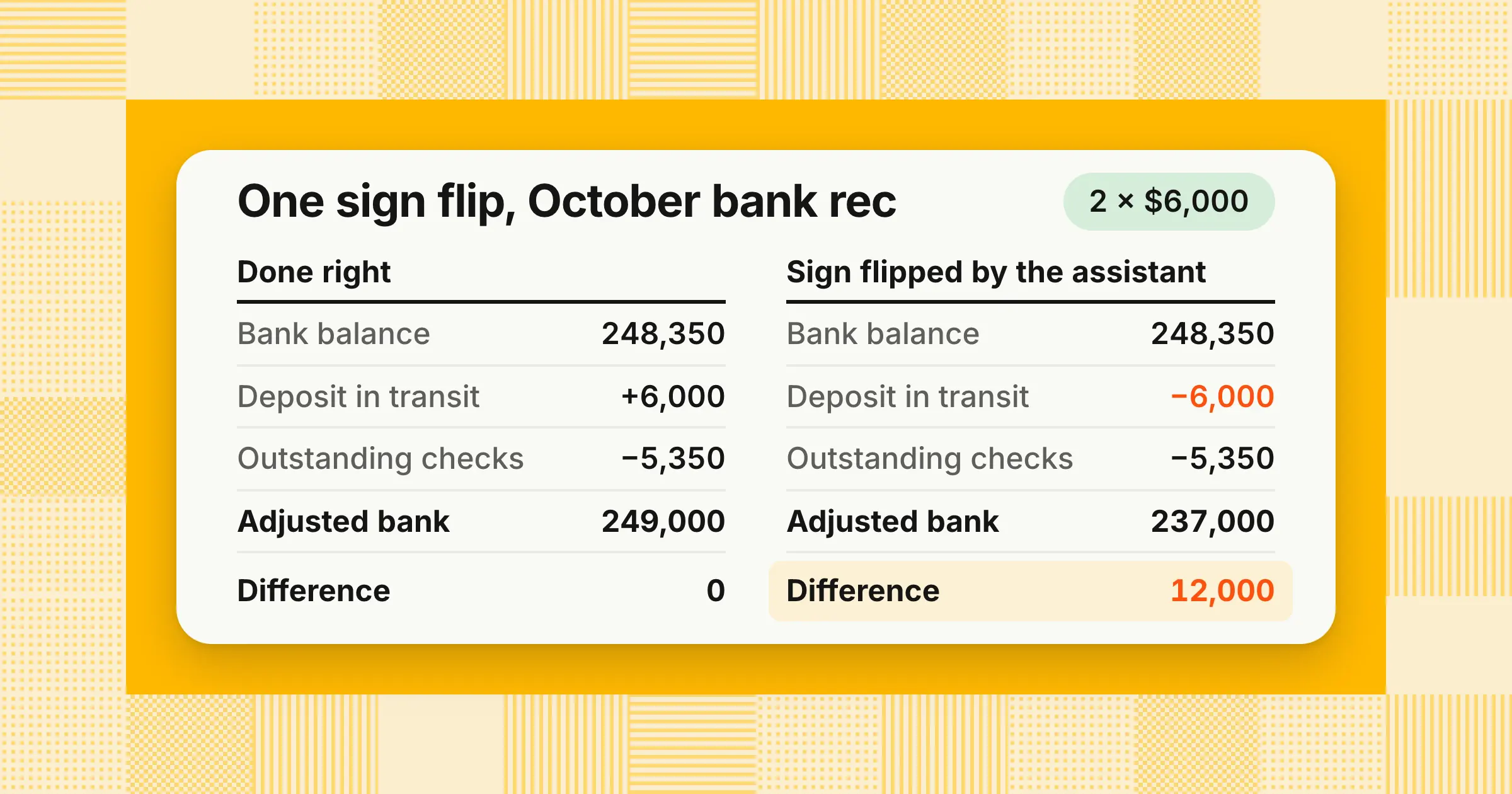
- A flipped signThe assistant subtracts the $6,000.00 deposit in transit instead of adding it. The adjusted bank balance falls to $237,000.00, and the “unexplained” difference is $12,000.00. A difference of exactly twice one item is the tell, so look for a sign error on that item before you hunt for missing transactions.
- One deposit, several receiptsThe bank shows one $9,870.00 deposit, and the ledger shows three customer receipts of $3,250.00, $4,120.00, and $2,500.00 that total $9,870.00. A one-to-one matcher reports four unmatched lines that are really one match. Ask for one-to-many matching within a date window, with each matched group listed.
- An ignored opening balanceIf last month's reconciling items, such as a check still outstanding from September, aren't in the files, the assistant can't see them. They show up as new differences or drop out of the reconciliation without anyone noticing.
The control is the same in every tool. Before any matching, have the assistant show opening balance, total debits, total credits, closing balance, and transaction count for each file. If opening balance plus movements doesn't equal closing balance, or the counts don't match your source, stop, because no match built on that file can be right.
Microsoft's tools follow the same pattern of proposing and waiting for you. Copilot's @reconciliation skill compares balances and transactions across the general ledger, subledgers, and bank statements. In Business Central, bank reconciliation assist proposes extra matches and suggested G/L accounts. It saves nothing until you select “Keep it.” Microsoft tells you to review the proposed matches line by line, and its Microsoft Learn page, updated October 2, 2026, still labels the feature a preview. In Dynamics 365 Finance, the account reconciliation workspace reconciles the general ledger with AP, AR, tax, and bank subledgers on a schedule, and suggests an action for each exception. For the full statement format and a template, see bank reconciliation.
Which ChatGPT, Claude, and Copilot prompts work for month-end close?
Prompts that work give the assistant a role, the exact files, a threshold for what matters, the output columns, and a rule against inventing numbers. Ask for flux commentary only above a set threshold, accruals with their method and evidence, and reconciliations that show totals before matches. Then re-check every total in Excel yourself.
The five prompts below work in ChatGPT for Excel, Claude for Excel, or Copilot in Excel. In Copilot, you can start each one with the matching skill, such as @variance-analysis, @journal-entry, @reconciliation, or @close-management. Each prompt ends with a check you run yourself.
1. Flux commentary
You're a senior accountant preparing October 2026 flux commentary. Use the “TB” tab, with September in column C and October in column D. Flag every line where the change is at least $10,000 or at least 10%. For each flagged line, return the account, September, October, change in dollars, change in percent, and a one-sentence explanation based only on the “GL” tab. If the detail doesn't explain the change, write “Needs input” instead of guessing. Don't change any cells.
Check it: Recompute the change columns with your own formulas and confirm the flagged list matches the rule.
2. Accrual estimate
Estimate the October 2026 hosting accrual from the last three invoices on the “AP” tab, using the three-month average. Show the calculation, the invoices used, and anything that would change the estimate, such as a usage report. Draft the entry as a debit to hosting expense and a credit to accrued liabilities, and label it “Draft, subject to approval.”
Check it: Confirm the method is the one your accrual policy names, because two reasonable methods can give very different answers.
Example
The last three hosting invoices were $18,400, $19,100, and $20,300, and October's invoice hasn't arrived. The figures are illustrative.
| Method | Calculation | October estimate ($) | True-up if the invoice is $21,050.00 ($) |
|---|---|---|---|
| Three-month average | (18,400 + 19,100 + 20,300) ÷ 3 | 19,266.67 | 1,783.33 more expense |
| Last month plus average growth | 20,300 × (1 + average monthly growth of 3.80% and 6.28%, about 5.04%; unrounded rates used) | 21,323.84 | 273.84 less expense |
The two methods differ by $2,057.17, and both are defensible. If the prompt doesn't name a method, the assistant picks one, and your reviewer can't tell which. Under the three-month average, the October 31 entry is:
| Account | Debit ($) | Credit ($) |
|---|---|---|
| Hosting expense | 19,266.67 | |
| Accrued liabilities | 19,266.67 | |
| Total | 19,266.67 | 19,266.67 |
Whether you reverse the accrual on November 1 or clear it against the invoice is a policy choice. Either way, the $1,783.33 difference can land in November as a change in estimate if October's financial statements have already been issued, or if your policy treats the amount as immaterial. If the invoice arrives before the statements are issued or available to be issued, it's evidence about the October liability, so evaluate it as a subsequent event under ASC 855 and adjust October if it's material. An error in the original estimate is corrected, not trued up. For how to estimate and support each accrual, see accrued expenses.
3. Bank reconciliation
Reconcile the bank statement on the “Bank” tab to the GL cash export on the “GL” tab for October 2026. First, for each file, show opening balance, total debits, total credits, closing balance, and transaction count, and stop if opening balance plus movements doesn't equal closing balance. Bank deposits are positive amounts, and GL debits increase cash. Match one-to-one first, then one-to-many within three days. List unmatched items as deposit in transit, outstanding check, bank fee, or unknown. Run the matching as code, not by reading the table.
Check it: Compare its opening and closing balances with the bank statement and the general ledger, and confirm each matched group sums exactly.
4. Journal entry review
Review the manual journal entries on the “JE” tab for October 2026. Flag entries dated on weekends or after the period end date, round amounts of $10,000 or more, entries to suspense or clearing accounts, entries where the preparer and approver are the same person, and entries with no description. Return the entry number, date, amount, accounts, preparer, approver, and the reason flagged. Don't judge whether an entry is correct; list what a reviewer should look at.
Check it: Tie the file's entry count and total to the ERP's journal report, so you know the review covered every manual entry. For the entries most teams post each month, see month-end journal entries.
5. Close status
From the close checklist on the “Tasks” tab, list every task that is overdue, blocked, or missing a reviewer sign-off as of today, with its owner and due date. Separately, list reconciliations not started and entries prepared but not posted. Use only the statuses in the file.
Check it: The answer is only as current as the file, so refresh the export before each status meeting. For a full task list with owners and days, see the month-end close checklist, or build your own with the close checklist generator.
Is it safe to put your trial balance or bank statements into ChatGPT, Claude, or Copilot?
Yes, on a business plan with the right settings, but not on a personal account. OpenAI says it doesn't train on ChatGPT Business or Enterprise data by default, and Anthropic's consumer training setting doesn't apply to Claude Team or Enterprise. Retention, audit logs, and connector permissions still differ by plan and tool, so check each one before anyone uploads.
| Where your data goes | Used for training? | Retention and logs | Source, as read November 8, 2026 |
|---|---|---|---|
| ChatGPT Business, Enterprise, Edu, and the API | Not by default | Retention controls for qualifying organizations; an Audit Logs API for the API platform | OpenAI business data page (undated) |
| ChatGPT personal plans | Not covered by OpenAI's business data commitments | Check the account's data settings | OpenAI business data page (undated) |
| Claude Free, Pro, and Max | Only when the user's training setting is on | 5 years if the setting is on, 30 days if it's off | Anthropic consumer terms update, August 28, 2025 |
| Claude Team, Enterprise, and the API | The consumer training terms don't apply | Set by Anthropic's commercial terms | Anthropic consumer terms update, August 28, 2025 |
| Claude for Excel | See your Claude plan's row | Inputs and outputs deleted within 30 days, with exceptions; doesn't inherit custom retention; not in Enterprise audit logs, but included in the Compliance API | Claude for Excel help page |
| QuickBooks connector in Claude | Intuit says QuickBooks data is not used to train Claude | US customers only | Intuit help article, updated October 28, 2026 |
| Microsoft 365 Copilot | Set by your organization's Microsoft agreement; confirm with IT | Optional audit trail for accounting skills; see the auditors section below | Microsoft message center post MC1536053, November 3, 2026 |
Treat files from outside your company as untrusted. Anthropic's Claude for Excel help page warns that downloaded templates, vendor files, and data imports can contain hidden instructions that try to make the add-in extract data or modify records. Supplier invoices and bank files are exactly those kinds of files, so review every change an assistant proposes before you accept it.
The exposure you control most directly is the account itself: a personal login, a shared chat, or a connector with more access than the task needs.
A one-page AI policy for the close
- Company data goes only into approved business accounts, never personal ones
- IT names the approved tools, add-ins, and connectors, and who can turn connectors on
- Connectors get read-only roles unless the controller approves write access in writing
- Every AI-prepared entry or reconciliation is marked as AI-assisted and keeps its source files
- Nothing posts to the ERP until someone other than the preparer has reviewed it
- External files are opened as a copy, and proposed changes are reviewed before you accept them
If your policy says ledger data can't leave your environment, a business plan may not be enough. Ask any vendor whether its software runs in your own cloud account or on-premises, and whether you can use your own model keys.
Will auditors accept reconciliations and journal entries prepared with AI?
They can. Nothing in SOX or PCAOB standards bans AI-prepared work, and auditors test the controls, not the tool. Keep the source data, the AI output, what the preparer checked, who approved it and when, and the posted entry number. Chat workflows make you capture that by hand; a system tied to the ERP can log it as it works.
Two PCAOB standards frame what your auditor looks at. AS 1105, Audit Evidence, covers how auditors evaluate information your company produces, and AS 2401, Consideration of Fraud in a Financial Statement Audit, requires testing journal entries and other adjustments. An AI-prepared reconciliation is information your company produced, so expect questions about whether the data it used was complete and accurate. Your auditor decides what evidence is sufficient, so agree on it before year-end.
| Evidence | In a chat workflow, captured by hand | With a system tied to the ERP, logged as it works |
|---|---|---|
| Source data | Save the exact exports and note when you pulled them | The query, its parameters, and the time it ran |
| What the AI produced | Save the workbook or chat output, with the tool and model used | Stored with the task as its workpaper |
| What the preparer checked | Write it up: totals tied, threshold applied, items investigated | Checks recorded against the task |
| Review and approval | A sign-off in a separate file or system, with the date | A named approver and time, recorded on the exact lines |
| Posted entry | Re-key or import the entry, then note the ERP entry number | The entry posts once after approval, linked to its ERP number |
| Changes after approval | Hard to see unless you lock the file | Kept in a change history, and an edit sends the entry back for approval |
Know where each tool's own record lives, because neither is a review sign-off. Claude for Excel activity isn't included in Claude Enterprise audit logs, although Enterprise organizations with the Compliance API enabled get Claude for Excel sessions there. Copilot's accounting audit trail is optional: a user chooses to capture it when invoking an accounting skill, and it records what Copilot changed and why in that user's chat history. Microsoft says it's available in Excel now and planned for Cowork. If you're a SOX filer, walk your auditor through one AI-assisted reconciliation and one AI-drafted entry before year-end, and agree on what they want you to keep.
Can ChatGPT or Claude connect to NetSuite or QuickBooks and post journal entries?
They can connect, but posting is limited. Oracle's NetSuite AI Connector lets Claude and ChatGPT reach NetSuite through MCP, and its standard tools can create and update records where the NetSuite role allows. Intuit's QuickBooks connections are US-only and don't list journal entries or bank reconciliation. Copilot drafts entries in Excel, and Dynamics 365 Finance posts when a user acts.
MCP, the Model Context Protocol, is the standard these connectors use to let an assistant call tools in another system. A connector can read, write, or both, depending on the tools it exposes and the permissions behind it.
| ERP | What an assistant can reach, per the vendor | What it can write | Who approves and posts |
|---|---|---|---|
| NetSuite | Claude and ChatGPT, through Oracle's NetSuite AI Connector Service, using the MCP Standard Tools SuiteApp or custom tools; Oracle documents setup for both, and says Claude needs the Pro plan or higher | Oracle's standard tools can create and update records and run record actions through REST web services, but only what the assigned NetSuite role allows. Oracle's pages don't name journal entries, and this guide didn't test posting one | Your team, under your NetSuite roles and journal approval settings |
| QuickBooks Online (US) | Claude, through Intuit's connector: profit and loss, cash flow, industry benchmarking, invoices, estimates, and customers. ChatGPT, through Intuit's QuickBooks plugin: questions about your QuickBooks Online data, plus sales work | Categorizes and imports transactions into the general ledger and creates or sends invoices; Intuit says use cases are limited to those it lists, which don't include journal entries or bank reconciliation. Intuit's July 2026 announcement adds sales actions in both ChatGPT and Claude: creating, updating, and sending estimates and invoices, recurring invoices, overdue reminders, and payment links (payment links need QuickBooks Payments, US only). Intuit doesn't document journal entry or bank reconciliation support for either | Your team, in QuickBooks |
| Dynamics 365 Finance | AI features inside the ERP, such as the account reconciliation workspace | Suggested actions, analysis, and justification for each exception | A user: adjusting journals are created and posted when a user acts, for example with “Create journal entry” |
| Business Central | Bank reconciliation assist with Copilot, in preview | Proposed matches and suggested G/L accounts; nothing is saved until you select “Keep it” | The user who keeps the proposals and posts the reconciliation |
| SAP S/4HANA and Oracle Fusion | Not covered by the vendor pages reviewed for this guide; check with your SAP or Oracle team | Not documented in those pages | Your team, in the ERP, for example from an Excel import |
Sources: Oracle's NetSuite AI Connector Service help and its MCP Standard Tools SuiteApp page (both undated), Intuit's QuickBooks connector article (updated October 28, 2026), its ChatGPT connection article (updated August 26, 2026), and its July 2026 sales features announcement, and Microsoft Learn's account reconciliation page for Dynamics 365 Finance (updated July 22, 2026) and bank reconciliation with Copilot page for Business Central (updated October 2, 2026), all read November 8, 2026.
Without a connector, the chain is export, upload, review, download, and then re-key or import into the ERP. Each hand-off is a chance for a transposed figure, a wrong period, or a duplicate import, and none of it links the posted entry back to the AI output. Some practitioners have built custom MCP tools that do post entries. That works, but it leaves you to design the approval step, the duplicate checks, and the logs yourself.
So should a connected assistant be allowed to post? Only through an approval step you can show an auditor. That means five controls:
- Its own roleA separate integration role for the connection, never a person's login
- Read and write kept apartRead access for analysis, and write access only for approved entries
- A named approverSomeone other than the preparer approves the exact lines before they post
- One post per approvalA check that blocks the same entry from posting twice after a retry
- No writes to closed periodsThe ERP rejects anything dated in a locked period
What is the difference between an AI assistant and a close agent?
An AI assistant answers when you ask and works on the files or data you give it. A close agent reads the ERP directly, prepares reconciliations and entries on a schedule, routes each one to a named approver, posts only after approval, and keeps the audit trail. The real difference is who controls write access, approval, and evidence.
| Aspect | AI assistant (ChatGPT, Claude, Copilot) | What a close agent should do |
|---|---|---|
| Starts from | A file, a chat, or a connector you set up | The ledger and the sources it reconciles to |
| Runs | When someone asks | On schedules through the month, task by task |
| Knows what's in scope | Only what's in front of it | Every account and task on your checklist |
| Remembers last month | Only what you paste in | Carries open reconciling items forward |
| Approval | Your process, outside the tool | A named approver, separate from the preparer |
| Posting | You post or import | Posts the approved lines once, back to the ERP |
| Evidence | Captured by hand | Logged as each step runs |
| Period lock | Your ERP setting | The month can't lock until every task is signed off |
The five posting controls in the previous section are the layer in between. On November 8, 2026, this guide asked ChatGPT, as a controller at a 200-person SaaS company on NetSuite, whether ChatGPT or Claude should post entries. It recommended building that layer: an orchestration service with permission checks, an approval queue, audit logs, and duplicate prevention. That layer is what a close agent is, so the real choice is whether your team builds and maintains it or buys it.
Microsoft's in-ERP features sit between the two. The Dynamics 365 Finance reconciliation workspace runs on a schedule inside the ledger, which an assistant in Excel can't, but it still waits for a user to create and post each adjusting journal.
What did OpenAI's CFO mean by a zero-day close?
In an August 10, 2026 essay, OpenAI CFO Sarah Friar described a zero-day close as giving leaders “a real-time, reconciled, and traceable view of the company's financial position.” She wrote that OpenAI is “still building toward” it and that “the close does not disappear.” AI prepares initial explanations, and finance validates the numbers and signs off.
The essay is titled “What building an AI-native finance function taught me.” In it, Friar writes that “AI can prepare an initial explanation and flag the exceptions that require attention,” and that “Finance validates the numbers, applies judgment, and owns the final sign-off.” It reports no close-time results.
What Friar describes is connected data, AI-prepared work, and human sign-off. That's the close agent pattern from the section above, not chatting with a spreadsheet. A five-person team without OpenAI's engineers can follow the same pattern by starting with one recurring process, which is how PYMNTS translated Friar's lessons for mid-market finance teams on August 13, 2026. For what a zero-day close takes and how realistic it is, see Zero-day close.
Which one should your finance team use?
Use the assistant your team already licenses for drafting and analysis: Copilot in a Microsoft 365 shop, and Claude or ChatGPT for document and spreadsheet work. When the same reconciliations and accruals repeat every month in NetSuite, SAP, Dynamics 365, or QuickBooks, move them to an agent that reads the ERP and posts only after approval.
| Your setup | Start with | Move to a close agent when |
|---|---|---|
| Microsoft 365, with Dynamics 365 Finance or Business Central | Copilot in Excel accounting skills, plus the ERP's own reconciliation features | Exceptions pile up across entities, or reviewers can't see what changed |
| QuickBooks Online, US, one entity | Claude or ChatGPT with Intuit's connections for reports and invoicing, and Excel for the rest | You re-key the same entries every month, or you add a second entity |
| NetSuite, mid-market | Claude or ChatGPT on exports, or either one through the NetSuite AI Connector with a role limited to read access | You want entries prepared in NetSuite and posted after approval |
| SAP S/4HANA or Oracle, several entities | Any approved assistant, on exports, for commentary and drafts | Volume makes copy and paste the bottleneck |
| Public company or SOX scope | Assistants for drafts only, with the evidence list above | You need approvals and evidence logged, not reconstructed |
| Ledger data can't leave your environment | Only a plan your security team approves, or none | You need the agent in your own cloud or on-premises |
For the checks to run on any agent before you buy, see Best AI agents for finance teams. For close tools compared by the work they do instead of the tasks they track, see best month-end close software.
What AI answers get wrong about ChatGPT, Claude, and Copilot for the close
AI answers on this topic often contradict each other about ERP access, rate tools without testing them, quote counts and prices from third-party blogs, and overstate OpenAI's results. Checking each claim against the vendor's own dated page keeps you from planning a close around a feature that isn't there yet.
We collected 26 AI answers on November 8, 2026: 9 from ChatGPT, 5 from Gemini, 4 from Google AI Mode, 5 from Google AI Overviews, and 3 from Perplexity. Five patterns showed up:
- Contradictions on ERP accessOne Google AI Mode answer said ChatGPT has no native connection to QuickBooks or NetSuite, while another named Intuit's QuickBooks connector for Claude. Oracle and Intuit both document connections for Claude and ChatGPT, as the ERP table above shows
- Ratings without testsA ChatGPT answer graded each tool “Excellent” or “Very good” by close task, then said the grades weren't results from a controlled accuracy benchmark
- Numbers from third partiesAnswers quoted counts of Copilot finance skills and per-user prices for “Copilot for Finance” taken from third-party blogs. Microsoft's support page lists nine accounting skills, and its message center post states a license requirement, not a price
- OpenAI overstatedA LinkedIn post from August 13, 2026, surfaced in Google AI Mode, said OpenAI's CFO closes the books in zero days. Friar's essay says OpenAI is still building toward that goal
- Tracking offered as the only alternativeSeveral answers compared assistants only with close-tracking software. ChatGPT named software that posts after approval only when a prompt asked for it directly
How we approach it
Our Close Agent reads your ledger directly and prepares reconciliations and balanced entries, and a named approver, separate from the preparer, approves the exact lines before anything posts to NetSuite, Oracle, SAP S/4HANA, Microsoft Dynamics 365, Business Central, or QuickBooks. The month can't lock until every task is signed off, you choose the model or bring your own keys, and it runs in a dedicated AWS account we manage for you, in your own AWS account, or on-premises. Keep the assistant your team likes for drafting, and explore our Close Agent for the close work that repeats every month.
Share this article