BlogGuide
Closing entries in accounting: Examples, the four steps, and what your software does at year-end
20 min read
Key takeaways
- Closing entries move a year's revenue, expense, and dividend balances into retained earnings and reset those accounts to zero, in four entries dated the last day of the fiscal year.
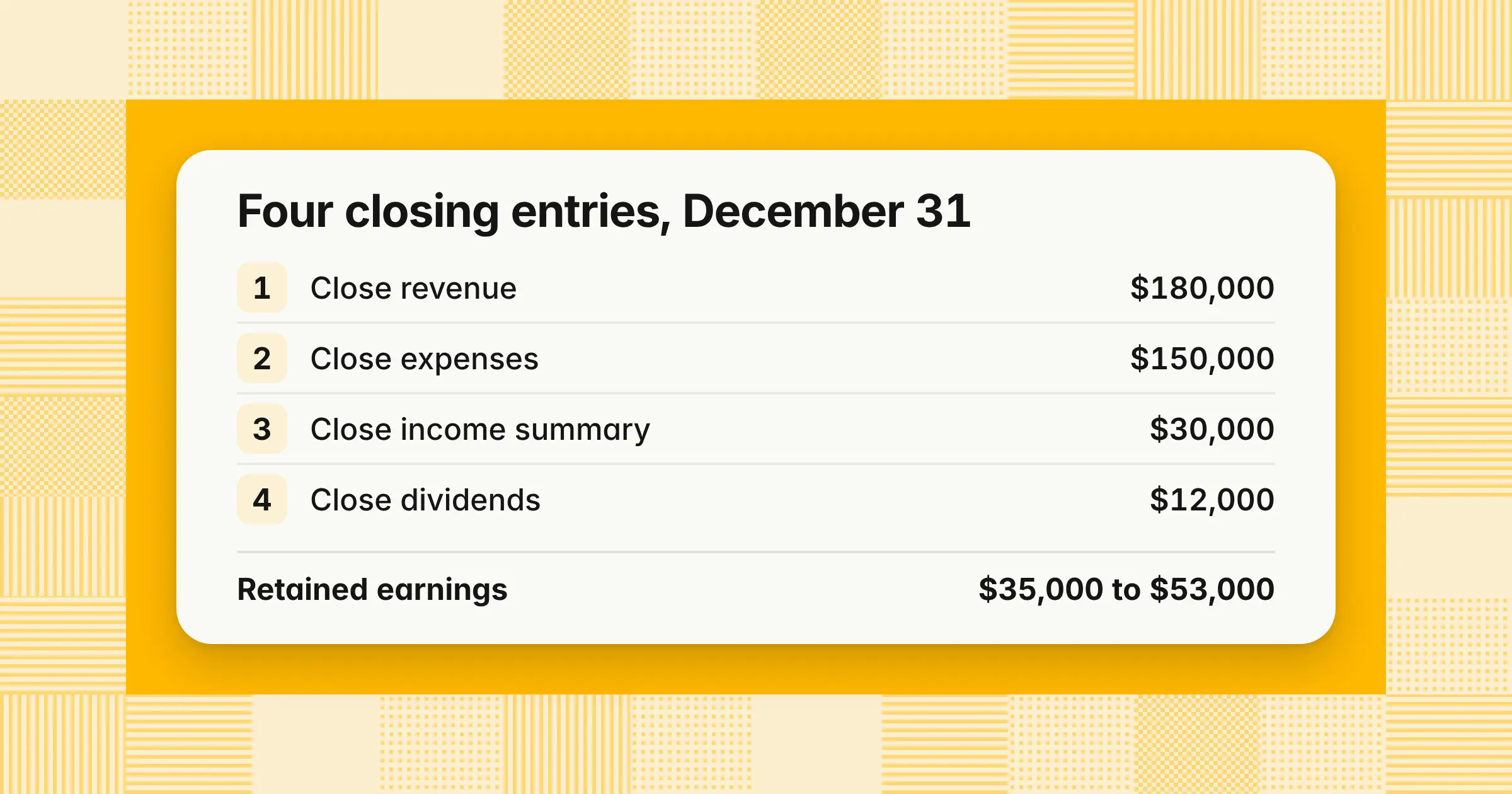
- In the worked example, $180,000 of revenue, $150,000 of expenses, and $12,000 of dividends take retained earnings from $35,000 to $53,000, and closing directly to retained earnings gives the same result in two entries.
- QuickBooks Online, NetSuite, and Sage Intacct post no closing entry by default, Xero says no year-end rollover is needed, Business Central creates one for you to post, and SAP carries balances forward, so your job is to check retained earnings, not to write the entry twice.
Closing entries are the journal entries you make at the end of the fiscal year to move revenue, expense, and dividend balances into retained earnings and start the new year's income statement at zero. Getting them right, or knowing that your system makes them for you, keeps one year's profit out of the next and gives you a retained earnings balance that ties to your statements. This guide closes one company's year both ways, through income summary and directly to retained earnings, in a profit year and a loss year. It also shows what six accounting systems actually do at year-end and the checks that catch a double close.
What are closing entries in accounting?
Closing journal entries in accounting are the last entries of the fiscal year: they move the year's net income or net loss, and its dividends, into retained earnings and leave every revenue and expense account at zero. They don't change net income. They move it from the income statement to the balance sheet.
Three terms come up in every closing entry:
- Temporary accountsRevenue, expense, gain, loss, and dividend or owner's drawing accounts. They measure one year, so they start each year at zero.
- Permanent accountsAsset, liability, and equity accounts. Their balances carry into the next year.
- Income summaryA temporary clearing account used only during closing. Once revenue and expenses close into it, its balance equals net income or net loss.
Closing entries are necessary for three reasons. They keep each year's results separate, so this year's income statement never includes last year's sales. They bring retained earnings up to date, so the balance sheet shows the profit the business has kept. They also tie the statement of retained earnings to the balance sheet. Put simply, closing empties the year's scoreboard into the savings account and resets the scoreboard for next year.
An opening entry is a different thing: it records the starting balances when a business begins keeping books or moves to a new system.
What are the four closing entries, and in what order?
The four closing entries are: close revenue to income summary, close expenses to income summary, close income summary to retained earnings, and close dividends to retained earnings. Income summary must close after revenue and expenses, but those two can go in either order.
| Closing entry | Debit | Credit |
|---|---|---|
| 1. Close revenue | Each revenue account, for its balance | Income summary, for total revenue |
| 2. Close expenses | Income summary, for total expenses | Each expense account, for its balance |
| 3. Close income summary | Income summary, for net income | Retained earnings, for net income |
| 4. Close dividends | Retained earnings, for total dividends | Dividends, for its balance |
Each entry reverses the normal balance of the accounts it closes. Revenue carries a credit balance, so you debit it, and expenses carry debit balances, so you credit them. Dividends never touch income summary, so you can close them before or after the other three. Some instructors teach the order as REID: revenue, expenses, income summary, and dividends. In a net-loss year, entry 3 runs the other way.
Closing entries example
This closing entries example takes one company from its adjusted trial balance to zeroed temporary accounts in four entries, so you can check your own work line by line. Use it as a closing entries sample for the journal format, the T-accounts, and the trial balance before and after.
Example
Cedar Ridge Landscaping, Inc. closes its fiscal year on December 31, 2026. All amounts are illustrative. Its adjusted trial balance shows these temporary accounts:
| Temporary account | Debit | Credit |
|---|---|---|
| Service revenue | 176,000 | |
| Interest income | 4,000 | |
| Wages expense | 96,000 | |
| Rent expense | 18,000 | |
| Fuel and vehicle expense | 16,000 | |
| Supplies expense | 9,000 | |
| Depreciation expense | 6,000 | |
| Utilities expense | 5,000 | |
| Dividends | 12,000 |
Revenue totals $180,000 ($176,000 + $4,000). Expenses total $150,000 ($96,000 + $18,000 + $16,000 + $9,000 + $6,000 + $5,000). Net income is $30,000, and opening retained earnings is $35,000.
The four closing journal entries
Cedar Ridge records these entries in its general journal, dated December 31, 2026, and posts them to the general ledger:
| Account | Debit | Credit |
|---|---|---|
| Dec 31 · Entry 1: Close revenue | ||
| Service revenue | 176,000 | |
| Interest income | 4,000 | |
| Income summary | 180,000 | |
| Dec 31 · Entry 2: Close expenses | ||
| Income summary | 150,000 | |
| Wages expense | 96,000 | |
| Rent expense | 18,000 | |
| Fuel and vehicle expense | 16,000 | |
| Supplies expense | 9,000 | |
| Depreciation expense | 6,000 | |
| Utilities expense | 5,000 | |
| Dec 31 · Entry 3: Close income summary | ||
| Income summary | 30,000 | |
| Retained earnings | 30,000 | |
| Dec 31 · Entry 4: Close dividends | ||
| Retained earnings | 12,000 | |
| Dividends | 12,000 | |
Each entry balances on its own: $180,000, $150,000, $30,000, and $12,000 on each side. Entry 3 matches net income on the income statement, and entry 4 uses the dividends declared, not the retained earnings balance.
Closing entries in T-accounts
The income summary and retained earnings T-accounts show where the year's profit goes. Income summary should end at zero, and retained earnings should end at its opening balance plus net income minus dividends.
| Debit | Credit |
|---|---|
| Entry 2150,000 | Entry 1180,000 |
| Entry 330,000 | |
| Total180,000 | Total180,000 |
| Ending balance0 |
| Debit | Credit |
|---|---|
| Entry 412,000 | Opening balance35,000 |
| Entry 330,000 | |
| Ending balance53,000 |
Retained earnings proof: $35,000 + $30,000 − $12,000 = $53,000.
Trial balance before and after closing entries
Comparing every account before and after closing confirms that only temporary accounts and retained earnings changed.
| Account | Before closing (adjusted) | Closing entries | After closing |
|---|---|---|---|
| Cash | 41,000 Dr | 41,000 Dr | |
| Accounts receivable | 22,000 Dr | 22,000 Dr | |
| Equipment | 60,000 Dr | 60,000 Dr | |
| Accumulated depreciation | 18,000 Cr | 18,000 Cr | |
| Accounts payable | 9,000 Cr | 9,000 Cr | |
| Accrued wages | 3,000 Cr | 3,000 Cr | |
| Common stock | 40,000 Cr | 40,000 Cr | |
| Retained earnings | 35,000 Cr | 30,000 Cr 12,000 Dr | 53,000 Cr |
| Dividends | 12,000 Dr | 12,000 Cr | 0 |
| Service revenue | 176,000 Cr | 176,000 Dr | 0 |
| Interest income | 4,000 Cr | 4,000 Dr | 0 |
| Wages expense | 96,000 Dr | 96,000 Cr | 0 |
| Rent expense | 18,000 Dr | 18,000 Cr | 0 |
| Fuel and vehicle expense | 16,000 Dr | 16,000 Cr | 0 |
| Supplies expense | 9,000 Dr | 9,000 Cr | 0 |
| Depreciation expense | 6,000 Dr | 6,000 Cr | 0 |
| Utilities expense | 5,000 Dr | 5,000 Cr | 0 |
| Income summary | 0 | 180,000 Cr 180,000 Dr | 0 |
| Total debits = total credits | 285,000 | 123,000 |
Before closing, debits are $41,000 + $22,000 + $60,000 + $12,000 + $150,000 = $285,000, and credits are $18,000 + $9,000 + $3,000 + $40,000 + $35,000 + $180,000 = $285,000. After closing, debits are $41,000 + $22,000 + $60,000 = $123,000, and credits are $18,000 + $9,000 + $3,000 + $40,000 + $53,000 = $123,000. The after-closing column is what your post-closing trial balance should show.
How to prepare closing entries from the adjusted trial balance
You prepare closing entries from the final adjusted trial balance after the financial statements are built: list every temporary balance, write the four entries dated the last day of the year, post them, and prove the result. The statements come first because closing zeroes the accounts the income statement reads.
- Finish the adjustmentsPost every accrual, deferral, and depreciation entry, including accrued expenses that haven't been billed, then rerun the adjusted trial balance
- Prepare the financial statementsBuild the income statement, statement of retained earnings, and balance sheet from the adjusted trial balance
- List the temporary accountsCopy every revenue, contra revenue, expense, gain, loss, and dividend balance, including small ones
- Write the four entriesDate them the last day of the fiscal year, not the first day of the new one
- Check entry 3 before postingIt should equal net income or net loss on the income statement to the dollar
- Post and run the post-closing trial balanceDebits must equal credits, and no temporary account should have a balance
- Prove retained earningsOpening balance plus net income minus dividends should equal the ending balance, $35,000 + $30,000 − $12,000 = $53,000 for Cedar Ridge
- Lock the yearSet a closing date so no one posts to the closed year without approval
Each closing entry must balance on its own, and so must the trial balance after all four post. The rest of the year-end work, such as inventory counts, the tax provision, and 1099 filings, belongs on a year-end close checklist.
Closing entries for a net loss, with dividends
In a net-loss year, income summary ends with a debit balance after revenue and expenses close, so entry 3 debits retained earnings and credits income summary for the loss. Dividends still close separately, so retained earnings falls by both the loss and the dividends.
Example
Suppose Cedar Ridge's service revenue had been $134,000 instead of $176,000, with the same $150,000 of expenses and $12,000 of dividends. Total revenue is $138,000 ($134,000 + $4,000), so the company has a net loss of $12,000.
| Account | Debit | Credit |
|---|---|---|
| 1. Close revenue | ||
| Service revenue | 134,000 | |
| Interest income | 4,000 | |
| Income summary | 138,000 | |
| 2. Close expenses | ||
| Income summary | 150,000 | |
| Expense accounts (the same six as above) | 150,000 | |
| 3. Close the net loss | ||
| Retained earnings | 12,000 | |
| Income summary | 12,000 | |
| 4. Close dividends | ||
| Retained earnings | 12,000 | |
| Dividends | 12,000 | |
After entry 2, income summary shows a $12,000 debit balance ($150,000 − $138,000), and entry 3 clears it. Retained earnings ends at $11,000: $35,000 − $12,000 net loss − $12,000 dividends. If losses and dividends push retained earnings below zero, the balance sheet labels the negative balance an accumulated deficit.
Income summary vs closing directly to retained earnings
Both methods leave the same ending balances. The income summary method uses four entries and shows net income as one figure before it reaches retained earnings, while the direct method closes every revenue and expense account to retained earnings in one compound entry.
Example
Here is Cedar Ridge's 2026 close done the direct way, in the profit year and in the loss year. Dividends close with the same entry 4 in both.
Profit year, direct closing entry, December 31, 2026
| Account | Debit | Credit |
|---|---|---|
| Service revenue | 176,000 | |
| Interest income | 4,000 | |
| Wages expense | 96,000 | |
| Rent expense | 18,000 | |
| Fuel and vehicle expense | 16,000 | |
| Supplies expense | 9,000 | |
| Depreciation expense | 6,000 | |
| Utilities expense | 5,000 | |
| Retained earnings | 30,000 | |
| Total | 180,000 | 180,000 |
Loss year, direct closing entry, December 31, 2026
| Account | Debit | Credit |
|---|---|---|
| Service revenue | 134,000 | |
| Interest income | 4,000 | |
| Retained earnings | 12,000 | |
| Expense accounts (the same six) | 150,000 | |
| Total | 150,000 | 150,000 |
In the direct method, retained earnings is the balancing figure: a credit equal to net income in a profit year, and a debit equal to the net loss in a loss year.
| Aspect | Income summary method | Direct method |
|---|---|---|
| Entries, including dividends | 4 | 2 |
| Net income shown as one figure | Yes, income summary's balance before entry 3 | No, it's the balancing line in the compound entry |
| Ending retained earnings, profit year | $53,000 | $53,000 |
| Ending retained earnings, loss year | $11,000 | $11,000 |
| Best for | Manual ledgers and reviewers who want net income on its own line | Small companies that close by hand and want fewer entries |
What is the income summary account?
The income summary account is a temporary equity account that collects all revenue and expense balances during closing, so its balance shows net income or net loss as one figure before it moves to retained earnings. It exists only during the closing process.
| Income summary after entries 1 and 2 | What it means | Entry 3 |
|---|---|---|
| Credit balance | Net income | Debit income summary, credit retained earnings |
| Debit balance | Net loss | Debit retained earnings, credit income summary |
| Zero | Revenue equals expenses | No entry needed |
Income summary never appears on the financial statements.
Closing entries for dividends and owner's drawings
Dividends close directly to retained earnings with a debit to retained earnings and a credit to dividends for the total declared during the year. They're a distribution to owners, not an expense, so they never pass through income summary or reduce net income.
The equity account you close into depends on how the business is organized:
| Business type | Distribution account | Profit or loss closes to | Distribution entry |
|---|---|---|---|
| Corporation | Dividends | Retained earnings | Debit retained earnings, credit dividends |
| S corporation | Shareholder distributions | Retained earnings | Debit retained earnings, credit distributions |
| Sole proprietorship | Owner's drawings | Owner's capital | Debit owner's capital, credit owner's drawings |
| Partnership | Each partner's drawings | Each partner's capital, split by the partnership agreement | Debit each partner's capital, credit that partner's drawings |
Example
If Cedar Ridge were a sole proprietorship, entry 3 would credit owner's capital for $30,000, and entry 4 would debit owner's capital and credit owner's drawings for $12,000. Owner's capital would rise by a net $18,000.
Most accounting systems close only income statement accounts at year-end. A dividends, distributions, or owner's draw account set up as equity keeps its balance after an automatic year-end close. If your policy is to clear it each year, post one entry dated the last day of the year: debit retained earnings or owner's capital, and credit the distribution account.
Which accounts are closed at year-end?
Only temporary accounts are closed: revenue, expenses, gains, losses, dividends or drawings, and income summary. Permanent accounts (assets, liabilities, and equity) stay open and carry their balances into the next year. Closing entries change only one permanent account: retained earnings, or the owner's or partners' capital accounts.
| Aspect | Temporary accounts | Permanent accounts |
|---|---|---|
| Also called | Nominal accounts | Real accounts |
| Examples | Sales revenue, service revenue, interest income, cost of goods sold, wages, rent, depreciation expense, gain or loss on sale, dividends, owner's drawings, income summary | Cash, accounts receivable, inventory, prepaid expenses, equipment, accumulated depreciation, accounts payable, accrued liabilities, deferred revenue, loans, common stock, retained earnings, owner's capital |
| Where they appear | Income statement, plus dividends on the statement of retained earnings | Balance sheet |
| At year-end | Closed to zero | Carried forward |
| Opening balance next year | Zero | Prior year's ending balance |
Contra accounts follow the account they offset:
| Contra account | Offsets | Type | At year-end |
|---|---|---|---|
| Sales returns and allowances | Revenue | Temporary | Credited in entry 1, so income summary receives net revenue |
| Sales discounts | Revenue | Temporary | Credited in entry 1 |
| Accumulated depreciation | Equipment | Permanent | Carried forward |
| Allowance for doubtful accounts | Accounts receivable | Permanent | Carried forward |
Cost of goods sold is an expense, so it closes in entry 2 like any other expense. If you use a periodic inventory system, the usual approach is to record the ending inventory count and cost of goods sold before you close, so entry 2 picks up the right expense. Unearned revenue is a liability, so it's never closed: it moves into revenue through an adjusting entry as you earn it, as the guide to deferred revenue shows.
When are closing entries made: every month or only at year-end?
Closing entries are made at the end of each fiscal year, dated its last day, after the year's adjusting entries post and the annual statements are prepared. Most companies close only then, though a manual ledger or a textbook exercise may close every month. A monthly close in most systems locks the period without zeroing revenue and expenses, so those accounts keep year-to-date balances until the year closes.
The entries you post every month are adjusting entries for accruals, deferrals, and reclassifications, and you'll find them in the guide to month-end journal entries. Until the year closes, most systems show the current year's profit on the balance sheet as net income or current-year earnings. The year-end close is the last month-end close of the year, with closing entries added at the end.
How do closing entries work in QuickBooks, Xero, NetSuite, Business Central, Sage Intacct, and SAP?
Most systems don't need a closing entry from you: QuickBooks Online, NetSuite, and Sage Intacct calculate retained earnings, Xero says no year-end rollover is needed, Business Central creates closing lines you review and post, and SAP carries balances forward. Knowing which one you have keeps you from closing the year twice.
Some guides say accounting software “posts” closing entries automatically. For QuickBooks Online, NetSuite, and Sage Intacct, that isn't accurate: there's no closing entry in the journal to find, because the balance sheet calculates retained earnings from prior years' net income.
- QuickBooks OnlinePosts a closing entry? NoWhat happens to retained earnings: “When a new fiscal year starts, QuickBooks Online moves last year's net income to the retained earnings account”What you still do: Close dividends or draws if your policy requires it, then set a closing date under Close the books in Advanced settingsVendor source (date): Intuit, “Lock your books in QuickBooks Online” (updated September 15, 2026)
- XeroPosts a closing entry? Not stated; no rollover is neededWhat happens to retained earnings: Xero's checklist doesn't describe how retained earnings is calculated. It says “There is no need to roll over your Xero file for the new year”What you still do: Record year-end adjustment journals, such as declared dividends, then set a lock dateVendor source (date): Xero, “Checklist: Complete your financial year end in Xero” (its Australian edition, undated, accessed November 7, 2026)
- NetSuitePosts a closing entry? No, by defaultWhat happens to retained earnings: Calculated for reporting from cumulative prior-year net income. Oracle says NetSuite “doesn't post the balance to retained earnings because doing so would zero the past income statements”What you still do: Close every period in the year. On OneWorld accounts, subsidiaries with statutory rules can turn on Period End Journal Entries, which post an income statement closing journalVendor source (date): Oracle NetSuite Help, “Year-End Closing” and “Setup for Period End Journal Entries” (undated, accessed November 7, 2026)
- Business CentralPosts a closing entry? Creates the lines, and you post themWhat happens to retained earnings: The Close Income Statement batch job “creates entries that cancel out” each income statement account's balance, against the retained earnings account you chooseWhat you still do: Review and post the journal yourself. The job posts directly only when an additional reporting currency is usedVendor source (date): Microsoft Learn, “Close income statement accounts” (updated August 21, 2025)
- Sage IntacctPosts a closing entry? NoWhat happens to retained earnings: A “virtual close” calculates retained earnings as the sum of income statement accounts. Closing the books doesn't “zero out income and expense accounts for the period being closed”What you still do: Close the books to stop posting to the old period, and don't book manual entries to retained earnings, which Sage advises againstVendor source (date): Sage Intacct Help, “Retained earnings calculation during virtual close” and “Close books” (last modified October 23, 2026)
- SAP S/4HANAPosts a closing entry? You don't post one; you run the balance carryforward program. SAP's course doesn't say whether the program posts journal entriesWhat happens to retained earnings: Balance sheet balances carry forward, and “the P&L accounts are carried forward to a G/L retained earnings account”What you still do: Schedule the balance carryforward job and check its status. Later postings to the prior year update the carryforward automaticallyVendor source (date): SAP Learning, “Running the Balance Carryforward Program” (undated, accessed November 7, 2026)
Two details matter at NetSuite companies. Oracle says “the manual close method isn't recommended” and points teams that must record general ledger entries to Period End Journal Entries. Its income statement closing journal “moves net income into retained earnings” at the end of the last period of each enabled subsidiary's fiscal year.
What to check after an automatic year-end close
After your system closes the year, confirm that opening retained earnings ties to last year's issued statements, that no one posted a manual closing entry on top of the automatic one, and that the closed year is locked.
| Check | How to run it | Cedar Ridge result |
|---|---|---|
| Retained earnings tie-out | Compare the new year's opening retained earnings with the issued balance sheet and the tax return | $35,000 + $30,000 = $65,000 in retained earnings, less $12,000 of open dividends = $53,000 |
| Prior year still intact | Rerun the closed year's income statement and match net income to the issued figure | $30,000 net income for 2026 |
| New year starts at zero | Run an income statement for the first day of the new year | No 2026 revenue or expense balances |
| Distribution accounts | Confirm dividends, distributions, or draws were closed if your policy requires it | $12,000 of dividends closed to retained earnings |
| Period lock | Confirm the closing date is set and only approved users can post to the closed year | Closing date of December 31, 2026 |
How to catch a double close
A double close happens when someone posts a manual closing entry in a system that already closes the year. The damage depends on the date of the manual entry.
Example
Cedar Ridge uses software that closes the year automatically, but a bookkeeper also posts the $30,000 direct closing entry from the section above.
| Manual entry dated | What you'll see | How to fix it |
|---|---|---|
| December 31, 2026 (closed year) | The 2026 income statement shows $0 of net income instead of $30,000, though retained earnings looks right at $65,000 before dividends | Remove the entry, or reverse it with an entry dated December 31, 2026, so the system's calculation stands |
| January 1, 2027 (new year) | Retained earnings shows $95,000 ($35,000 + $30,000 + $30,000) instead of $65,000, and 2027 opens with a $30,000 net loss | Remove the entry, or reverse it with an entry dated January 1, 2027 |
In both cases total equity still balances, which is why a double close survives a quick review. The tie-out and the prior-year income statement check catch it.
What if an audit adjustment comes after closing entries?
Post the adjustment to the revenue or expense account it belongs to, dated in the audited year, and let the close carry it to retained earnings. Don't post it straight to retained earnings while the audited statements are still unissued.
Example
After Cedar Ridge closes 2026, but before its statements are issued, the auditors find $4,000 of December wages that were never accrued. The adjustment, dated December 31, 2026, debits wages expense $4,000 and credits accrued wages $4,000, so net income falls to $26,000.
- In a system that closes automaticallyRetained earnings recalculates to $35,000 + $26,000 − $12,000 = $49,000 with no further entry
- In a ledger where you posted closing entriesPost one more closing entry, debiting retained earnings $4,000 and crediting wages expense $4,000, which takes retained earnings from $53,000 to $49,000 and wages expense back to zero
A material error found after the statements are issued is corrected under ASC 250 by restating the prior-period statements presented, adjusting the affected assets and liabilities, and adjusting opening retained earnings for the earliest period presented to capture the effect on earlier periods. Who can reopen a closed year to post a late adjustment, and who approves it, belongs in your close policy.
Common closing entry mistakes
The most common closing entry mistakes are closing dividends through income summary, closing a permanent account, closing too early, dating entries in the new year, and closing twice in software that already closes the year.
| Mistake | What happens | How to catch it |
|---|---|---|
| Closing dividends to income summary | Net income in the journal is understated by the dividend amount | Entry 3 doesn't match net income on the income statement |
| Closing a permanent account | An asset, liability, or equity balance disappears from the balance sheet | The post-closing trial balance is missing an account |
| Closing before adjustments are final | Late adjustments put balances back in closed accounts, and retained earnings misses them | Temporary accounts show balances after closing |
| Dating closing entries in the new year | The old year's accounts keep their balances, and the new year opens with last year's profit reversed | The first day's income statement isn't zero |
| Using the retained earnings balance in entry 4 | Retained earnings is misstated | Entry 4 doesn't match dividends declared |
| Posting a manual close in software that closes automatically | Net income moves to retained earnings twice, or the closed year's profit disappears | The retained earnings tie-out fails |
| Posting into the closed year after the statements are issued | Retained earnings no longer matches last year's balance sheet or tax return | Run a report of entries dated in the closed year and entered after the issue date |
Adjusting vs closing vs reversing entries
Adjusting entries put revenue and expenses in the right period before the statements, closing entries move the year's results into retained earnings after the statements, and reversing entries cancel selected accruals on the first day of the next period.
| Aspect | Adjusting entries | Closing entries | Reversing entries |
|---|---|---|---|
| Purpose | Record revenue and expenses in the right period | Move net income and dividends into retained earnings | Cancel an accrual so the later invoice or payment posts normally |
| When you post them | End of each period, before the statements | End of the fiscal year, after the statements | First day of the next period |
| Effect on net income | Changes it | None | None once the related invoice or payment posts |
| Required? | Yes, under accrual accounting | Yes, unless your system closes the year for you | No, they're optional |
| Cedar Ridge example | Dec 31: Debit wages expense $3,000, credit accrued wages $3,000 | Dec 31: The four entries above | Jan 1, 2027: Debit accrued wages $3,000, credit wages expense $3,000 |
For how each adjustment type is built and reviewed, see the guide to adjusting entries.
Closing entries template
Use this closing entries template with the balances from your adjusted trial balance, replacing each bracketed item with your own accounts and amounts.
| Account | Debit | Credit |
|---|---|---|
| [Year-end date] · 1. Close revenue | ||
| [Each revenue account] | [Its balance] | |
| [Each contra revenue account] | [Its balance] | |
| Income summary | [Net revenue] | |
| [Year-end date] · 2. Close expenses | ||
| Income summary | [Total expenses] | |
| [Each expense account] | [Its balance] | |
| [Year-end date] · 3. Close income summary | ||
| Income summary (net income) or Retained earnings (net loss) | [Net income or net loss] | |
| Retained earnings (net income) or Income summary (net loss) | [Net income or net loss] | |
| [Year-end date] · 4. Close dividends | ||
| Retained earnings | [Total dividends declared] | |
| Dividends | [Total dividends declared] | |
Check two numbers before you post: entry 3 equals net income on your income statement, and entry 4 equals the dividends on your statement of retained earnings.
Which software automates closing entries?
Your accounting system or ERP usually handles or calculates the year-end transfer itself, though the mechanism varies by system, so the software decision is about the work before it: reconciliations, accruals, adjustments, and the review that makes the year's net income right. A separate tool that only transfers net income to retained earnings adds little.
When you compare tools, ask each vendor to show one unreconciled account, the investigation behind it, the proposed correcting entry with its support, and the approval before anything posts. The guide to best month-end close software compares the options.
How we approach it
Your ERP closes the year, and the work that decides whether that closing number is right comes before it. Our Close Agent reconciles accounts, investigates exceptions, and prepares adjusting entries, then posts approved entries to NetSuite, Oracle, SAP S/4HANA, Microsoft Dynamics 365, Business Central, and QuickBooks only after a named reviewer signs off. The period can't lock until every task is signed off, and once it's locked, agents can't change it, so you can explore our Close Agent to see that review prepared before your team starts.
Share this article