Key takeaways
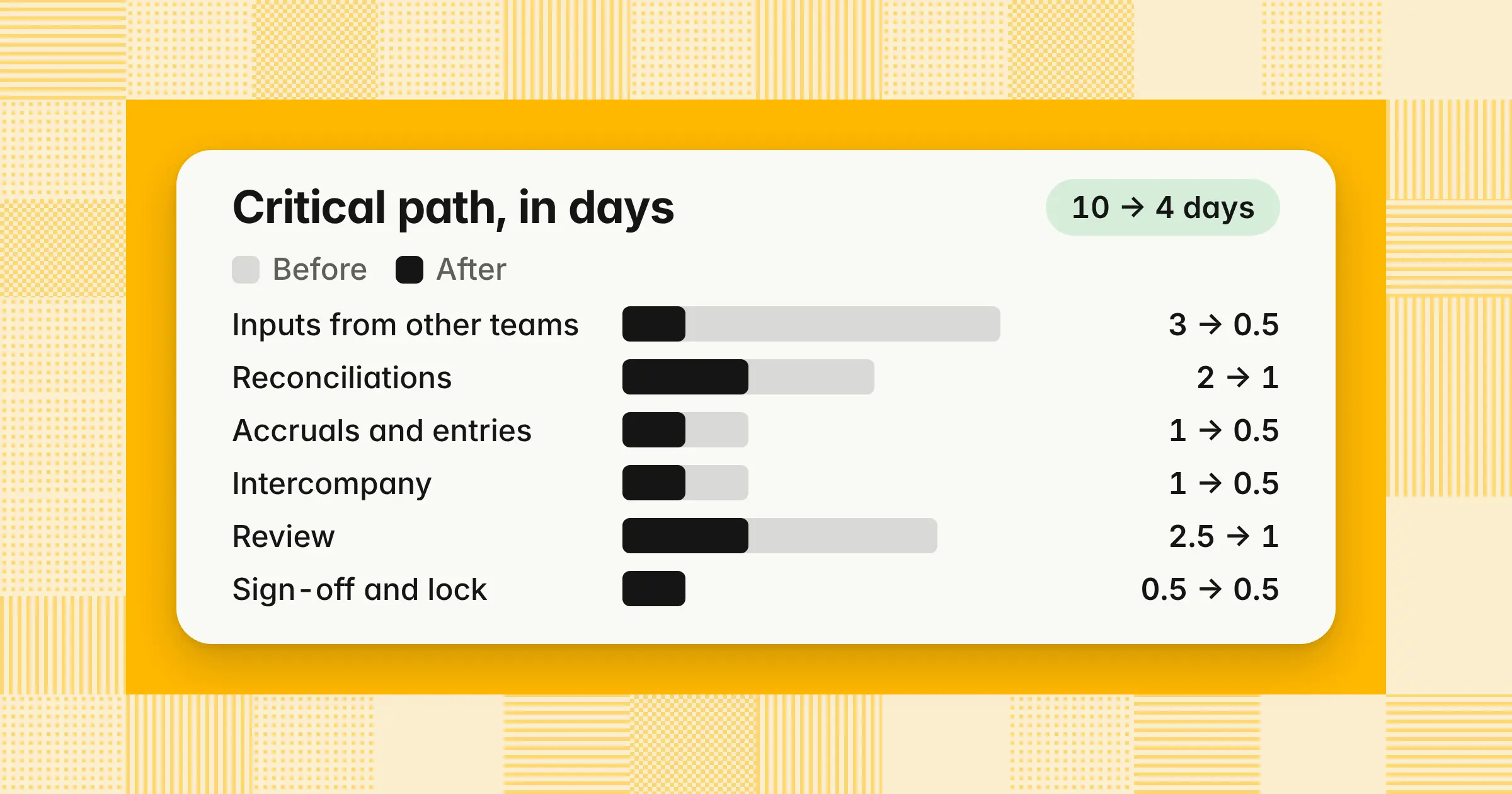
- A faster month-end close comes from removing waiting, not adding hours. In the worked example below, a 10-day close spends 3.5 days waiting on inputs and 2.5 days on review that can't start until BD8.
- Five business days beats today's survey averages. Vena's October 2026 survey puts the average close at 6.2 business days, and half the teams in Ledge's 2025 survey take more than five.
- Two changes deliver 4 of the 6 days saved in the example: requesting inputs on BD-3 with firm cutoff times, and tiering review so the controller reviews 5.5 hours of high-risk work instead of 15 hours of everything.
A faster month-end close comes from taking waiting off the critical path, not from adding hours. You request inputs before month-end, set cutoff times, reconcile through the month, and stop routing every item through one reviewer at the end. Getting this right gives leadership numbers days earlier, reduces late adjustments, and keeps your controls intact. This guide covers 2026 benchmarks, eight levers, a materiality policy, review math, a five-day calendar, a worked example, and a 90-day plan.
What is a fast close in accounting?
A fast close signs off the financial statements within about five business days of month-end, with every reconciliation, review, and approval still in place. In Ledge's 2025 survey, 3–5 business days was the answer finance teams gave most often when asked what a good close looks like.
- Day 0 and business day 1 (BD1)Day 0 is the last calendar day of the month, even on a weekend. BD1 is the first working day after it, and every close day counts working days only. Pre-close days count back the same way: BD-1 is the last business day of the month, and BD-3 is two working days before it.
- Days to closeBusiness days from Day 0 until the controller signs off the statements and locks the period.
- Days to reportBusiness days from Day 0 until the management pack reaches the CFO. It can run days behind sign-off, so track it separately.
A fast close shortens the close window, while a zero-day close aims to remove it. You do nearly all reconciliation and entry work during the month, so the books are ready on day one. Continuous accounting, which means reconciling and posting through the month, is the practice behind both. Getting from 10 business days to 5 is the first step.
How to speed up month-end close
To speed up month-end close, move input requests to BD-3, publish cutoff times, and reconcile high-volume accounts weekly. Then pre-draft recurring entries, match intercompany balances mid-month, and review by risk so no single reviewer holds every item at the end.
The table shows eight levers, who owns each one, and when it happens. The days-saved column is our planning estimate for a team starting from about 10 business days, not a survey result.
| Lever | Owner | When | Days saved (our planning estimate) |
|---|---|---|---|
| 1Send input requests to department heads, HR, and sales operations | Controller | BD-3 | 1–2 |
| 2Publish cutoff times and accrue late items from estimates under a written materiality policy | Controller and AP | BD-2 to BD1 | 0.5–1 |
| 3Reconcile bank, card, and other high-volume accounts weekly | Staff accountant | Every week | 0.5–1 |
| 4Tie billing, the revenue schedule, and deferred revenue to the ledger daily | Accounting manager or revenue accountant | Daily | 0.5–1 |
| 5Pre-draft recurring and reversing entries as templates | Senior accountant | BD-2 | 0.5 |
| 6Match intercompany balances mid-month and set an entity cutoff | Senior accountant | Day 15 and BD2 | 0.5–1 |
| 7Tier review by risk and start it on BD2 | Controller and accounting manager | BD2–BD4 | 1–1.5 |
| 8Draft flux commentary and the management pack on BD3 numbers | FP&A or accounting manager | BD3–BD6 | 0 to close; 1–2 to report |
The ranges overlap, because two levers can remove the same waiting day, so don't add up the column. Start with levers 1, 2, and 7, since they target the two biggest delays in the worked example: waiting on inputs and end-loaded review.
Faster month-end close benchmarks for 2026: Calendar or business days?
A faster month-end close in 2026 means five business days or fewer. Vena's October 23, 2026 survey puts the average close at 6.2 business days. APQC's median, from 2022 data, is 6 calendar days from the first trial balance to consolidated statements.
| Source | Date | Unit and what it measures | Result |
|---|---|---|---|
| Vena survey by Centiment (624 US finance and accounting professionals) | Published October 23, 2026; fielded August 20–24, 2026 | Business days, start to finish of the month-end close | Average 6.2; single-entity teams 4.7; more than 10 entities 8.3 |
| APQC Open Standards Benchmarking (10,201 organizations) | 2022 data; page updated in 2026 | Calendar days, weekends included, from the first monthly trial balance to completed consolidated statements | Top performers 5, median 6, bottom performers 10 |
| Ledge survey (100 finance professionals) | Published April 2025, updated August 2026 | Business days to close | 18% in 1–3, 32% in 4–5, 23% in 6–7, 27% in more than 7 |
APQC counts calendar days and starts its clock at the first trial balance, after some close work is already done. Vena and Ledge count business days. Older pages still quote APQC figures of 4.8, 6.4, and 10 days, but APQC's current page shows 5, 6, and 10.
Example
November 2026 ends on Monday, November 30. BD1 is Tuesday, December 1, and BD5 is Monday, December 7, which is 7 calendar days after Day 0. A five-business-day close and a seven-calendar-day close can describe the same close.
Read all three as directional: Vena and Ledge both sell finance software, and APQC's figures come from 2022 data. For the breakdown by company size and the signs your close runs too long, see how long month-end close should take.
Where do the 10 days actually go?
In a 10-day close, the time that isn't work goes to waiting: for inputs from other teams, and for one reviewer at the end. Map one close task by task, mark work and waiting, and follow the longest chain of dependent tasks.
That chain is the critical path, and only shortening it moves your sign-off date. Waiting on other teams is the delay finance teams name most often: in Ledge's 2025 survey, 56% said dependence on other departments slows their close. In Vena's 2026 survey, 34% named chasing information from other departments as their top close challenge.
To find your own critical path, log every task for one close with these columns:
- Task and ownerWhat the work is and who prepares it
- ReviewerWho approves it, separate from the preparer
- Depends onThe input or task that must finish first
- Planned and actual daysPlanned finish, actual start, and actual finish
- Hours workedTime spent on the task itself
- Waited forWhat held it up, if anything
Example
A 200-person SaaS company with two entities on NetSuite signs off on BD10. Its five-person team has a controller, an accounting manager, a senior accountant, a staff accountant, and an AP specialist. Here's its critical path for one close, split into work and waiting:
| Step on the critical path | Elapsed days | Work | Waiting | What it waited for | Finishes |
|---|---|---|---|---|---|
| Inputs from other teams | 3.0 | 0.5 | 2.5 | Vendor invoices, expense reports, payroll and commission data | BD3 |
| Reconciliations and subledger tie-outs | 2.0 | 1.5 | 0.5 | Billing export and card statements | BD5 |
| Accruals and adjusting entries | 1.0 | 1.0 | 0 | Nothing | BD6 |
| Intercompany and consolidation | 1.0 | 0.5 | 0.5 | The second entity's trial balance | BD7 |
| Controller review of every reconciliation and entry | 2.5 | 2.5 | 0 | Nothing, but it couldn't start before BD8 | BD10 morning |
| Review notes, sign-off, and lock | 0.5 | 0.5 | 0 | Nothing | BD10 |
| Total | 10.0 | 6.5 | 3.5 |
Waiting takes 3.5 days, and review that starts only after everything else takes another 2.5. Neither problem needs more people: in Vena's survey, 19% picked additional staff as a fix, compared with 32% who picked better system integration.
Move anything off the critical path that doesn't change the signed-off numbers. Deep-dive reporting and quarterly-only analysis can run after sign-off. Required account reconciliations stay inside the close: reconcile low-risk accounts weekly during the month so the BD2 check is quick, but don't defer any of them past sign-off.
What should you move before month-end?
Move everything that doesn't depend on the final days' transactions into the month itself. That includes input requests, bank and card reconciliations, recurring and reversing entries, intercompany matching, and billing tie-outs. By Day 0, only the last few days of activity should be left to process.
- Input requests (BD-3)Ask department heads for unbilled work and open purchases, HR for hires, exits, and bonus changes, and sales operations for contract changes and commission data.
- Bank and card reconciliations (weekly)Reconcile to date every week, so BD1 covers only the final days of activity. The guide to bank reconciliation covers the steps.
- Recurring and reversing entries (BD-2)Draft depreciation, prepaid amortization, rent, and payroll accruals as templates, set each accrual to reverse on the first day of the next month, then post them on BD2 after a quick check.
- Intercompany (day 15)Match intercompany balances mid-month, then confirm them on BD3 once the second entity's BD2 trial balance is in, so most differences are fixed before consolidation.
- Billing to ledger (daily)At a SaaS company, tie billing, the revenue schedule, and deferred revenue each day, so BD2 isn't the first time anyone checks them.
To reduce manual journal entries, turn every repeating entry into a template, combine small allocations into one monthly entry, and replace spreadsheet uploads with direct integrations. Vena's survey shows why integration matters: it found that teams pulling close data from email and shared documents averaged 6.8 business days, against 5.9 for everyone else.
Example
Your company pays $36,000 in January for a 12-month software subscription. You set up a recurring entry for $36,000 / 12 = $3,000 a month, and it posts on schedule without anyone rebuilding it at month-end:
| Account | Debit | Credit |
|---|---|---|
| Software expense | 3,000 | |
| Prepaid expenses | 3,000 |
The guide to prepaid expenses shows the full amortization schedule.
What cutoffs and materiality thresholds speed up the close?
Publish a cutoff time for every input, plus a written materiality policy. The policy says which late items you accrue, which you record when they arrive, and which variances you investigate. Management approves the policy, and you discuss it with your auditor before the close where you first use it.
| Input | From | Cutoff |
|---|---|---|
| Expense reports and receipts | All employees | BD-2, 5 PM |
| Department accrual confirmations | Department heads | BD-2, 5 PM |
| Final invoices for the month | Billing | BD-1, 5 PM |
| Payroll register, bonuses, and commission data | HR and sales operations | BD1, 12 PM |
| Vendor invoices entered | AP | BD1, 5 PM |
| Second entity's trial balance | Entity accountant | BD2, 5 PM |
A missed cutoff changes how you record an item, not which month it belongs to. You record transactions in the proper period under your cutoff, recognition, and materiality policies, so a large late invoice for November work becomes a November accrual. When an accrual is an estimate, reverse it when the invoice posts, so any difference is trued up in the month the actual arrives.
The thresholds below are an example starting policy, not a standard. Management sets and approves your own numbers after discussing them with your auditor, and you treat them as review triggers rather than bright lines. An item below the line that's unusual, related-party, or sensitive still gets a look.
The account-level triggers decide what you book, not what's immaterial overall. Before sign-off, list every item you didn't record on a passed-adjustments schedule, also called a summary of unadjusted differences, including any carried over from prior periods. Then evaluate them together against the statements as a whole, because several small items can add up to a material amount. If they do, book them.
| Annual operating expenses | Accrue each late item at or above | Accrue small items in total when one account reaches | Investigate flux above |
|---|---|---|---|
| Under $5 million | $1,000 | $3,000 | 10% and $5,000 |
| $5 million–$25 million | $5,000 | $10,000 | 10% and $10,000 |
| Over $25 million | $10,000 | $25,000 | 10% and $25,000 |
Example
A company with $15 million in annual operating expenses uses the middle row. On BD3, three invoices for November professional services arrive: $14,500, $3,200, and $1,800. The $14,500 invoice is above $5,000, so you accrue it in November. The other two total $3,200 + $1,800 = $5,000, below the $10,000 aggregate trigger, so the policy lets you record them in December when they post. The cost still belongs to November, so the $5,000 goes on your passed-adjustments schedule and is evaluated with every other unrecorded item before sign-off. The guide to accrued expenses covers how to estimate a cost when no invoice exists yet.
How do you speed up review without weakening controls?
Sort every reconciliation and entry into risk tiers, and give the lower tiers to a second reviewer with a checklist. Start review on BD2 as work finishes. The controller then reviews only high-risk items, and every item still has a named reviewer who isn't its preparer.
| Tier | What's in it | Who reviews | When |
|---|---|---|---|
| High | Cash, revenue, judgment-based accruals, intercompany, entries above your approval threshold, and accounts with flux above your trigger | Controller | BD4 |
| Medium | Subledger tie-outs, payroll, prepaids, fixed assets, and routine accruals | Accounting manager | BD2–BD3 |
| Low | Reconciliations that tie to zero with evidence attached, and recurring entries from approved templates | Accounting manager, by checklist | BD2–BD3 |
Example
In the 10-day close above, the controller reviews 40 reconciliations at 15 minutes each, which is 10 hours. Add 60 journal entries at 3 minutes each (3 hours) and flux and statements (2 hours), and that's 15 hours. At 6 focused review hours a day, it takes 2.5 days, and none of it starts until BD8. After tiering, the same 40 reconciliations and 60 entries split like this:
| Reviewer | Items reviewed | Hours | When |
|---|---|---|---|
| Controller | 12 high-risk reconciliations at 15 minutes (3.0), 10 entries above $25,000 at 3 minutes (0.5), flux and statements (2.0) | 5.5 | BD4 |
| Accounting manager | 20 medium-risk reconciliations at 15 minutes (5.0), 30 entries at 3 minutes (1.5), 8 low-risk reconciliations at 5 minutes and 20 recurring entries at 1 minute (1.0) | 7.5 | BD2–BD3 |
| Total | 40 reconciliations and 60 entries | 13.0 |
The controller's review drops from 15 hours to 5.5, which fits in one day. Total review time falls only from 15 hours to 13, but most of it now runs alongside the close instead of after it. Revenue sits in the high tier, so the accounting manager, who prepares it, never reviews it.
A faster close doesn't have to mean more errors, as long as the time comes from waiting rather than review. In Vena's 2026 survey, 78% of respondents had restated or corrected numbers in the past year after a close was marked complete. The top causes were manual errors (28%) and late or missing information from another department (27%), and earlier inputs and earlier review target both.
Close tools that support exception-based review check each item against rules and route only failures to a person. Keep a named reviewer on every tier, even when software clears the item. Your flux trigger decides which accounts reach the controller, and the guide to flux analysis covers thresholds and explanations.
What does a 5-day close calendar look like?
A five-day close calendar starts pre-close on BD-3 and posts inputs on BD1. Reconciliations and accruals finish on BD2, entities and intercompany close on BD3, controller review happens on BD4, and sign-off and lock come on BD5, with the management pack on BD6. Each day ends with a check that proves it's done.
| Day | Work | Done when | 4-person team, one entity (QuickBooks Online) | 5-person team, two entities (NetSuite) |
|---|---|---|---|---|
| BD-3 | Send input requests; reconcile bank and cards to date | Requests sent; cash reconciled through BD-4 | Controller; AR accountant | Controller; staff accountant |
| BD-2 | Draft recurring and reversing entries; expense reports due at 5 PM | Templates drafted, not posted | Senior accountant; AP accountant | Senior accountant; AP specialist |
| BD-1 to Day 0 | Run final billing; confirm intercompany balances; publish month-end exchange rates | Billing complete; intercompany differences listed | AR accountant (billing only) | Accounting manager; senior accountant |
| BD1 | Payroll and sales inputs by noon; vendor invoices by 5 PM; import final bank activity | No unreviewed bank feed items; AP cutoff list complete | AP accountant; AR accountant | AP specialist; staff accountant |
| BD2 | Finish reconciliations; post accruals and recurring entries; start medium and low-tier review | Every reconciliation ties, with evidence attached | Senior accountant; controller reviews as items finish | Staff accountant; senior accountant; accounting manager reviews |
| BD3 | Post adjusting entries; close the second entity; match intercompany; consolidate | Trial balance ties to subledgers; intercompany nets to zero | Senior accountant (no consolidation) | Senior accountant; accounting manager |
| BD4 | Review high-risk items and flux above trigger; draft commentary | Review notes returned to preparers | Controller | Controller; FP&A |
| BD5 | Clear notes, review the passed-adjustments schedule, approve statements, and lock the period | Period locked; no open review notes | Controller | Controller |
| BD6 | Send the management pack | Pack sent to the CFO | Controller | Controller; FP&A |
On a four-person team, the controller is the only senior reviewer, so the review tiers matter even more. Give low-tier checks to the senior accountant and keep the controller's BD4 review under one day. To lock the period, set a password-protected closing date in QuickBooks Online. In NetSuite, lock A/R and A/P and close the period through the Period Close Checklist.
To build your own version, start from the free month-end close checklist template and add a close day, cutoff time, and done-when column to each task.
Is a 5-day close realistic for a 200-person SaaS company with two entities?
Yes, it's a realistic target. Vena's survey puts single-entity teams at 4.7 business days on average and teams with more than 10 entities at 8.3, so a two-entity company starts near the faster end. The SaaS-specific risk is revenue, because billing changes, usage, and deferred revenue all land on BD2. Start with the daily billing tie-out (lever 4), and use the guide to intercompany accounting to set up mid-month matching between the two entities.
Example: Cutting a 10-day close to 5, lever by lever
Applying the levers to the SaaS company above takes its critical path from 10 days to 4. The team plans sign-off on BD5, which keeps one day of slack for the waiting it can't remove.
| Step on the critical path | Before (days) | After (days) | What changed | Days saved |
|---|---|---|---|---|
| Inputs from other teams | 3.0 | 0.5 | BD-3 requests, cutoff times, and estimates for late items (levers 1–2) | 2.5 |
| Reconciliations and subledger tie-outs | 2.0 | 1.0 | Weekly bank and card reconciliations and a daily billing tie-out (levers 3–4) | 1.0 |
| Accruals and adjusting entries | 1.0 | 0.5 | Recurring and reversing templates (lever 5) | 0.5 |
| Intercompany and consolidation | 1.0 | 0.5 | Mid-month matching and a BD2 entity cutoff (lever 6) | 0.5 |
| Review | 2.5 | 1.0 | Risk tiers, with 5.5 hours of controller review (lever 7) | 1.5 |
| Review notes, sign-off, and lock | 0.5 | 0.5 | No change | 0 |
| Total | 10.0 | 4.0 | 6.0 |
Two changes deliver 4 of the 6 days: the BD-3 requests with firm cutoffs, and tiered review. Neither needs new headcount or software, which is why they come first in the 90-day plan below.
The slack day is deliberate, because a late bank statement, a reviewer out sick, or a contract amendment nobody loaded can cost half a day, and the slack absorbs it without moving BD5. With lever 8, the team also drafts commentary on preliminary BD3 numbers for the CFO. Its reporting lag falls from 2 days to 1, so the pack reaches the CFO on BD6, the day after sign-off, instead of BD12.
Which software can reduce close time from 10 days to 5?
Software reduces close time only when it removes work or waiting from your critical path. Tools that track tasks show where the close is stuck. Tools that do the work, such as matching transactions or preparing reconciliations and entries for approval, take days off it.
Map your critical path before you buy anything, because a tool that automates a step off the path won't move your sign-off date. The four categories below cover what's on the market today, from the features already in your ERP to AI agents:
| Category | What it does | Where it saves time | What stays with your team |
|---|---|---|---|
| ERP features: recurring entries, bank rules, and period locks | Posts repeat entries and matches routine bank lines | Accruals and reconciliations | Setting up rules and reviewing exceptions |
| Close management and checklist tools | Track tasks, owners, due dates, and sign-offs | Makes waiting visible and cuts status meetings | All preparation and review |
| Reconciliation and matching tools | Match high-volume transactions and flag exceptions | Reconciliations | Investigating exceptions and review |
| AI agents for the close | Prepare reconciliations, entries with workpapers, and exception lists for a person to approve | Reconciliations, accruals, and review preparation | Approving every entry and making judgment calls |
The room to automate is wide: in Ledge's 2025 survey, most teams had automated less than 40% of their close, and 50% said Excel slows their close down. If you're asking which cloud accounting system closes fastest, start with the one you already run. QuickBooks Online and NetSuite both offer recurring transactions, bank matching rules, and a period lock, though QuickBooks Online's recurring transactions need the Essentials plan or higher.
AI tools help with repeatable preparation: matching transactions, drafting entries from schedules, and writing first-pass flux explanations. They don't replace approval, so pick a tool that keeps a named person approving each entry before it posts. For what the evidence says about AI and close accuracy, see AI in the month-end close. To compare tools by the work they do, see the best month-end close software.
How do you get month-end close from 10 business days to 5? A 90-day plan
Plan three closes to reach five days and a fourth to prove it. Target 8 business days on the first close, 6 on the second, and 5 on the third. Call it done after two consecutive five-day closes with no material post-close adjustments.
| When | What you do | Target close | Owner |
|---|---|---|---|
| Weeks 1–2 | Log the last close task by task, find the critical path, and approve the materiality policy after discussing it with your auditor | Baseline: 10 business days | Controller |
| First close | Send BD-3 requests, publish cutoff times, and pre-draft recurring entries | 8 business days | Controller and senior accountant |
| Second close | Reconcile bank and cards weekly, tie billing daily, match intercompany mid-month, and launch review tiers | 6 business days | Staff accountant and accounting manager |
| Third close | Start review on BD2, draft the pack on BD3 numbers, and automate one high-volume reconciliation | 5 business days | Controller and FP&A |
| Fourth close | Hold the calendar and fix the one task that ran late | 5 business days again | Controller |
Track three numbers every close: days to close, days to report, and the count of post-close adjustments above your materiality threshold. If adjustments rise as days fall, the work has moved into next month rather than disappeared. After each close, spend 15 minutes on what ran late and change one thing.
If your close takes weeks rather than 10 days, run the same plan with a longer first stage. Target 10 business days first, then follow the steps above.
How we approach it
Our Close Agent works your close checklist through the month on the schedules you set, reconciling the ledger to bank statements and subledgers and preparing balanced entries with their workpapers. A named approver approves the exact lines before anything posts to NetSuite, Oracle, SAP S/4HANA, Microsoft Dynamics 365, Business Central, or QuickBooks, and the month can't lock until every task is signed off. To see how it fits your critical path, explore our Close Agent.
Share this article