BlogWorked example
Reversing entries in accounting: Examples, rules, and how to set them up in your ERP
23 min read
Key takeaways
- A reversing entry is the exact opposite of a selected prior-period adjusting entry, usually an accrual, dated the first day of the new period, and it's optional: each month's totals come out the same with or without it.
- Reverse accruals that a routine invoice, bill, or payroll run will record again in full, true up running balances such as bonuses and PTO, and reverse prepaid or deferred revenue adjustments only when the original payment went to expense or revenue.
- NetSuite and Business Central can schedule the reversal when you book the accrual, SAP S/4HANA can carry a planned reversal date, and QuickBooks reverses only on request, so the control that matters is an exception check for reversals that never posted or posted twice.
Reversing entries are journal entries, dated the first day of a new period, that exactly undo selected adjusting entries from the period before, usually accruals, so the next invoice or payroll run can post the normal way. This guide covers an accrued wages example, which entries to reverse, true up, or leave alone, the failures and controls, and the reversal settings in NetSuite, QuickBooks, SAP S/4HANA, and Business Central.
What are reversing entries in accounting?
A reversing entry is the exact opposite of a selected prior-period adjusting entry, posted on the first day of the new period. It's used mostly for accruals, and also for deferral adjustments booked under the expense or income method. It swaps the debits and credits to clear that entry's amount, not necessarily the whole balance sheet account, so the real invoice or payroll can post in full. Each month's totals are the same with or without it; only the bookkeeping changes.
- Reversal dateThe date the opposite entry posts, normally the first day of the next month
- Auto-reversing entryAn accrual saved with a reversal date, so the accounting system creates the reversal for you
- Re-accrualA fresh accrual at the next month-end for an item that still hasn't been invoiced
- True-upAn entry that adjusts a running balance, such as a bonus accrual, to the amount owed, with no reversal
Reversing entries aren't required. No US GAAP standard calls for them: GAAP cares that revenue and expense land in the right period, not how you clear the accrual afterward. Textbooks list them as the optional last step of the accounting cycle.
Date the reversal the first day of the next period, never in the period you accrued, or the accrual disappears from that month's statements. Delaying a revenue accrual reversal to later in the month doesn't avoid distortion: once the invoice posts, revenue and receivables are counted twice until the reversal runs, so interim reports overstate both. Day one is the safer default.
"Journal entry reversal" has a second meaning: undoing a posted entry that was wrong. That's a correction rather than a planned reversal, and the comparison of reversing, correcting, and voiding below covers when to use each.
Reversing entries example: Accrued wages with and without the reversal
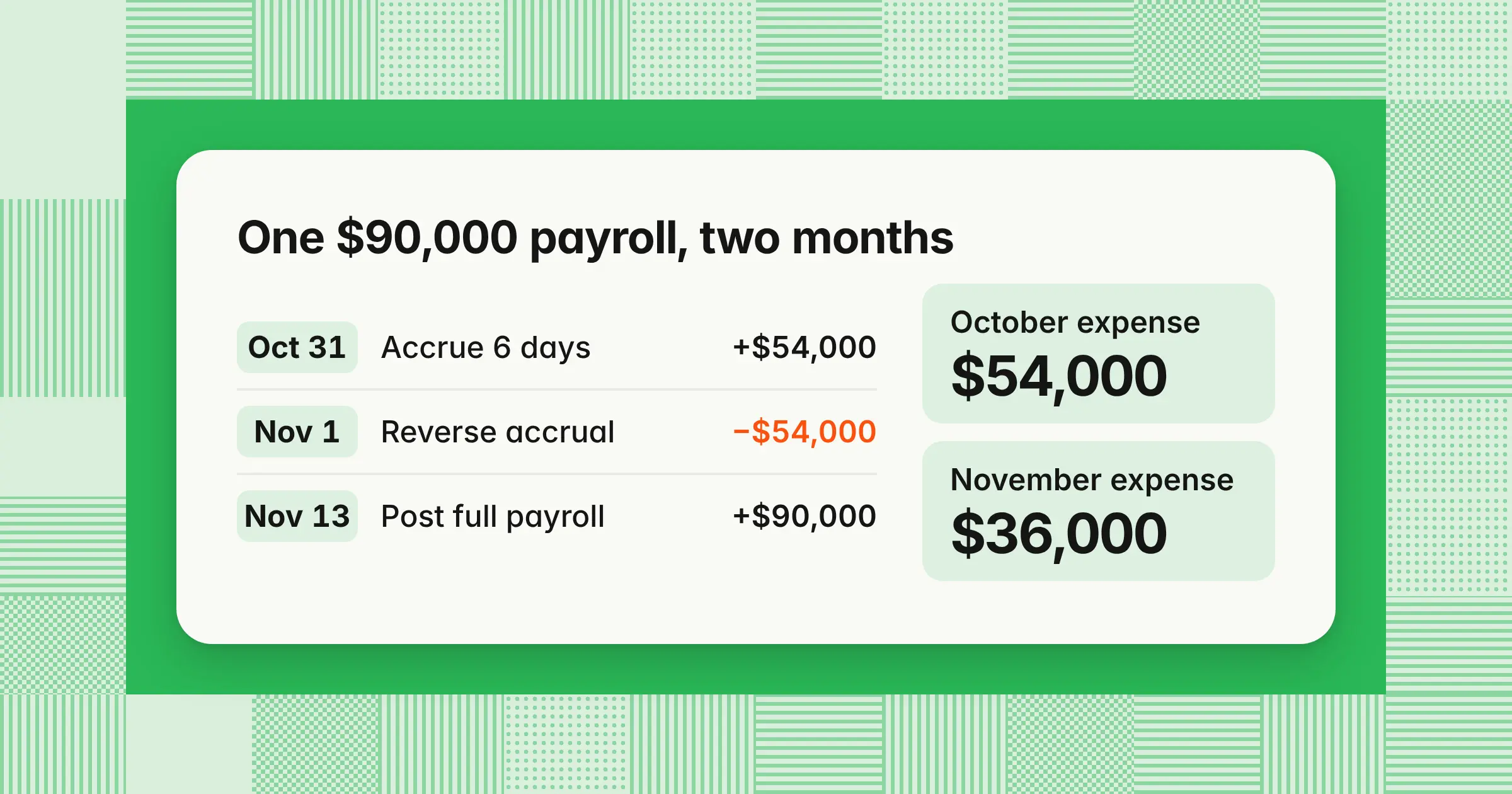
Say biweekly payroll is $90,000 and six of ten working days fall in October. Accrue $54,000 on October 31, reverse it on November 1, and post the full $90,000 payroll on payday. November nets to $36,000, the same result as splitting the paycheck by hand, but payroll posts one standard entry.
Example
A company runs biweekly payroll of $90,000 for 10 working days, or $9,000 a day. The pay period runs from Friday, October 23 through Thursday, November 5, 2026, and is paid on Friday, November 13. Six of the 10 working days fall in October, so the October 31 accrual is 6 × $9,000 = $54,000. All amounts are illustrative.
| Date | With a reversing entry | Without a reversing entry |
|---|---|---|
| October 31 | Debit wages expense $54,000Credit accrued wages $54,000 | Same entry |
| November 1 | Debit accrued wages $54,000Credit wages expense $54,000 | No entry |
| November 13 (payday) | Debit wages expense $90,000Credit cash and payroll liabilities $90,000 | Debit accrued wages $54,000Debit wages expense $36,000Credit cash and payroll liabilities $90,000 |
| Result for this pay period | With a reversing entry | Without a reversing entry |
|---|---|---|
| October wages expense | $54,000 | $54,000 |
| November wages expense | −$54,000 + $90,000 = $36,000 | $36,000 |
| Total wages expense | $90,000 | $90,000 |
| Accrued wages after payday | $54,000 − $54,000 = $0 | $54,000 − $54,000 = $0 |
| What payroll needs to know | Nothing: post the payroll register as usual | How much of the check was accrued, and how to split it |
The statements are identical either way; only the payday entry changes. Accrue employer payroll taxes and benefits the same way, on their own lines.
Which entries should be reversed, and which never?
Reverse accruals that a routine transaction will record again in full next month: accrued wages and payroll taxes, unbilled vendor expenses, unbilled revenue, and interest paid in arrears when the payment posts to expense. Don't reverse depreciation, amortization, bad debt allowances, closing entries, reclasses, or deferrals booked to a prepaid asset or deferred revenue liability, because nothing will post those amounts again.
| Entry | Reverse it? | Why |
|---|---|---|
| Accrued wages and payroll taxes | Yes | The payroll run records the full pay period, including the days you accrued |
| Accrued expenses for bills not yet received | Yes | The vendor bill posts the full amount through AP when it arrives |
| Accrued revenue for work not yet invoiced | Yes, if billing posts the full invoice to revenue | If your billing system relieves the unbilled receivable directly, the invoice clears the accrual and a reversal would double it |
| Accrued interest paid in arrears | Yes, if the payment posts to interest expense | If the loan payment is coded straight to accrued interest payable, the payment clears the accrual instead |
| Prepaid expense or deferred revenue, recorded to the balance sheet | No | The amortization schedule releases the balance each month, and nothing would record the reversed amount again |
| Prepaid expense or deferred revenue, recorded to expense or revenue when paid | Yes | The month-end adjustment parks the unused portion on the balance sheet, and day one puts it back so the next adjustment can rebuild it |
| Depreciation and amortization | No | No later transaction records the same expense, so a reversal would erase the month's depreciation |
| Bad debt allowance | No | You adjust the allowance to its required balance, and write-offs reduce it directly |
| Bonus, PTO, and commission accruals kept at a running balance | No | Each month trues the balance up to what's owed, as the next section shows |
| Closing entries | No | They reset revenue and expense accounts for the new year, and reversing them would bring last year's balances back |
| Reclasses and error corrections | Usually not | They're meant to be permanent, unless a reclass was made only for the month-end statements |
One test covers every row. If payroll, AP, billing, or the bank will post the full amount next month without knowing about your accrual, reverse it. If nothing will post that amount again, keep the entry. For accrued interest, $1,200,000 at 6.5% accrues $1,200,000 × 6.5% ÷ 12 = $6,500 a month, and the test turns on how your loan payment is coded.
Can prepaid expenses and deferred revenue be reversed?
It depends on how the original payment was booked. If a prepayment was expensed when paid (the expense method), or a customer receipt went straight to revenue (the income method), the month-end adjustment can be reversed on day one. If it was booked to a prepaid asset or deferred revenue liability, don't reverse it: the amortization schedule keeps releasing the balance.
Example
On October 1, 2026, a company pays a $36,000 annual insurance premium covering October 2026 through September 2027, or $3,000 a month.
| Step | Asset method (recorded as a prepaid) | Expense method (recorded as expense) |
|---|---|---|
| October 1 payment | Debit prepaid insurance $36,000Credit cash $36,000 | Debit insurance expense $36,000Credit cash $36,000 |
| October 31 adjustment | Debit insurance expense $3,000Credit prepaid insurance $3,000 | Debit prepaid insurance $33,000Credit insurance expense $33,000 |
| October result | Expense $3,000, prepaid $33,000 | Expense $36,000 − $33,000 = $3,000, prepaid $33,000 |
| November 1 | No reversal | Debit insurance expense $33,000Credit prepaid insurance $33,000 |
| November 30 adjustment | Debit insurance expense $3,000Credit prepaid insurance $3,000 | Debit prepaid insurance $30,000Credit insurance expense $30,000 |
| November result | Expense $3,000, prepaid $30,000 | Expense $33,000 − $30,000 = $3,000, prepaid $30,000 |
| If you get it wrong | Reversing the $3,000 on November 1 leaves November expense at $0 and prepaid at $33,000 | Skipping the reversal but still booking the $30,000 adjustment leaves November expense at −$30,000 and prepaid at $63,000 |
Both methods land on $3,000 a month and the same balance sheet, so the choice is about workflow, not results. Deferred revenue follows the same rule: a $60,000 annual contract billed on October 1 releases $5,000 a month from the liability under the liability method, with no reversal. Under the income method, the October 31 adjustment moves $55,000 out of revenue into deferred revenue, reverses on November 1, and is rebuilt at $50,000 on November 30. Most teams that keep an amortization schedule use the balance sheet method, which the guides to prepaid expenses and deferred revenue walk through.
Reverse, true up, or re-accrue: What to do when the invoice is late or the accrual is a balance
Reverse on day one any accrual the next invoice or payroll run will replace, so the actual document posts in full without double counting. Accruals that are a running balance, such as bonuses, PTO, or commissions, should be trued up to the amount owed instead, and receipt accruals in a purchasing module clear when the bill is matched.
| Accrual | Treatment | Why |
|---|---|---|
| Unpaid payroll days and payroll taxes | Reverse on day one | The payroll run posts the full period |
| Hosting, usage, contractor, and professional fee bills | Reverse on day one, and re-accrue at month-end if the bill is still missing | The vendor bill posts the full amount through AP |
| Goods or services received but not invoiced, booked as receipt accruals in a purchasing module | Clear on match, no manual reversal | Matching the vendor bill to the receipt relieves the accrual, so a reversal on top would double the credit |
| Sales commissions earned but unpaid | True up to the commission report | The balance builds and pays down on its own schedule |
| Commissions capitalized as contract costs under ASC 340-40 | Amortize, never reverse | They're an asset with a schedule, like a prepaid |
| Annual bonus pool | True up to the year-to-date amount owed | The liability grows all year and pays out once |
| PTO | True up to the PTO balance report | The liability moves with accruals and time taken, not with an invoice |
| Legal, warranty, and other judgment estimates | Adjust when the estimate changes | No routine document will replace them |
Only the first two rows reverse every month. For a 200-person SaaS company, that means auto-reversing unpaid payroll days, payroll taxes, hosting and usage bills, contractors, and professional fees, and truing up commissions, the bonus pool, and PTO, because reversing those every month swings expense and makes the liability harder to reconcile.
Example
A company's annual bonus pool is budgeted at $480,000, or $40,000 a month, so the accrual stands at $400,000 on October 31 after 10 months. In November the forecast payout rises to 110%, or $528,000, so the amount owed through November is $528,000 × 11 ÷ 12 = $484,000. The true-up is one entry: debit bonus expense $84,000 and credit accrued bonus $84,000. Reversing $400,000 on November 1 and re-accruing $484,000 on November 30 gives the same $84,000 of November expense. But it drops the liability to zero for most of the month and puts a $400,000 credit in bonus expense. The same logic applies to PTO: if the PTO report shows $219,500 owed on November 30 and the ledger shows $212,000, book a $7,500 true-up.
What if the invoice still hasn't arrived a month later?
Let it reverse on day one and book a fresh accrual at the next month-end if the work was done and the invoice still hasn't arrived. Re-accruing forces a monthly check that the liability is still valid. Track how many months each item has been re-accrued, and escalate anything past an age limit your policy sets, such as 90 days.
Example
A consulting firm does $25,000 of work each month and is slow to bill.
| Date | Entry | Consulting expense for the month | Accrued balance after the entry |
|---|---|---|---|
| October 31 | Accrue October work, $25,000 | $25,000 | $25,000 |
| November 1 | Reverse, −$25,000 | $0 | |
| November 30 | No invoice yet: re-accrue October and November work, $50,000 | −$25,000 + $50,000 = $25,000 | $50,000 |
| December 1 | Reverse, −$50,000 | $0 | |
| December 9 | Both invoices arrive and post to expense, $50,000 | ||
| December 31 | Accrue December work, $25,000 | −$50,000 + $50,000 + $25,000 = $25,000 | $25,000 |
Every month shows $25,000, and the accrual never holds more than the unbilled work. Carrying an accrual forward without a reversal also works for a specific, contracted liability, but it needs the same monthly review, or it goes stale.
Should year-end accruals be reversed in January?
Yes, if the January invoice or payroll will record the full amount. Year-end accruals reverse on the first day of the new fiscal year like any month-end accrual. Finalize audit adjustments to those accruals before the reversal runs, or the reversal will clear a different amount than the one in the final statements.
If the auditors raise a December accrual after the January 1 reversal has posted, post a matching adjustment to the reversal in January, so the two still offset. Year-end closing entries are never reversed.
How do you reverse an accrual journal entry?
To reverse an accrued expense, debit the accrued liability and credit the expense account for the same amount, dated the first day of the next period, with the original entry number in the memo. Then record the vendor bill normally: debit the expense, credit accounts payable. If the invoice arrives while the accrued month is still open, it's better evidence of that month's liability, so update the accrual there. Once the month is closed, the difference lands in the new month, and a material one goes through your review process.
Example
On October 31, a marketing agency's October retainer hasn't been billed. You estimate it at $30,000. The invoice arrives on November 12 for $31,200.
| Account | Debit | Credit |
|---|---|---|
| October 31 · Accrual | ||
| Marketing expense | $30,000 | |
| Accrued expenses | $30,000 | |
| November 1 · Reversal | ||
| Accrued expenses | $30,000 | |
| Marketing expense | $30,000 | |
| November 12 · Vendor bill | ||
| Marketing expense | $31,200 | |
| Accounts payable | $31,200 | |
- Book the accrual with its reversal dateRecord the October 31 entry with support for the estimate, and set November 1 as the reversal date if your system allows it
- Post the reversal on day oneDate it November 1 and reference the original entry number in the memo
- Code the actual bill the same wayThe invoice must hit the same expense account and the same department, class, or location as the accrual, or the reversal and the bill land in different places
- Check the resultWith October already closed when the invoice arrives, November's net expense for October's work is $31,200 − $30,000 = $1,200, and the accrual for this item is back to $0
- Re-accrue anything still missingIf there's still no bill on November 30, book a new accrual rather than skipping the reversal
Track estimate differences like this $1,200 every month: a pattern of large gaps means the accrual method needs better inputs.
Why use reversing entries in the month-end close?
The purpose of reversing entries is to let next month's invoices, payroll runs, and customer bills post the normal way without anyone checking what was accrued. That prevents double counting the accrued amount, keeps AP and payroll workflows identical every month, and leaves accrual accounts holding only the new month-end's accruals, which shortens reconciliations.
Wages, recurring vendor bills, and interest that posts to expense follow the same pattern every month, so they work well as saved entries with a reversal date, and each reversal is a separate, dated entry tied to the original rather than an edit to a posted entry.
Reversals also make flux analysis easier to read. A day-one reversal plus a full invoice nets to the true monthly cost, so big swings usually come from estimate differences, missed reversals, or re-accruals piling up. Explain variances net of the reversal, and look first at any expense line that doubles or drops to zero month over month. For the full set of entries you post each month, see month-end journal entries.
Reversing vs correcting entries vs voiding: Which should you use?
A reversing entry undoes a correct accrual in the next period. A correcting entry fixes a wrong amount, account, or period. Voiding cancels a transaction that shouldn't exist and keeps the record. Delete only drafts and test entries: once an entry is posted, reverse or correct it so the audit trail shows what changed and why.
| Aspect | Reversing entry | Correcting entry | Voiding |
|---|---|---|---|
| Purpose | Clear a planned accrual so the actual transaction can post | Fix a wrong amount, account, or period | Cancel a transaction that shouldn't exist, such as a duplicate |
| Was the original right? | Yes | No | No, it shouldn't exist |
| Date | First day of the next period | The error's period if it's still open, or the current period if it's closed | System- and period-dependent |
| Effect on the original period | None, the accrued period keeps its amount | Changes the period you post it in | System- and period-dependent |
| Planned in advance? | Yes, when you book the accrual | No | No |
| What's left in the ledger | The original and a linked reversal | The original and a correction with an explanation | The original record, with zero amounts in systems that keep voided records |
Example
A $4,800 rent payment was posted to utilities expense in an open month. You can reverse the wrong entry and post a new one to rent, or post one correcting entry: debit rent expense $4,800 and credit utilities expense $4,800. Both leave the ledger correct. The single entry is shorter, and the reversal-and-repost pair is easier to trace. If the error sits in a period you've already reported, follow your company's policy on prior-period errors before you post.
Two related entries often get confused with reversals. Adjusting entries create the accrual in the first place, as the guide to adjusting entries explains, and closing entries move the year's results into retained earnings and stay put.
What goes wrong with reversing entries?
If you forget to reverse an accrual, the next invoice or payroll posts in full on top of it, so the new month's expense is overstated by the accrued amount and the accrued liability stays on the balance sheet. You catch it when the accrual rollforward doesn't tie, or an expense line doubles in the flux review.
| Mistake | Effect | What you see in the ledger |
|---|---|---|
| Forgot to reverse | November shows $90,000 instead of $36,000, overstated by $54,000 | Accrued wages still shows a $54,000 credit after payday |
| Reversed twice | November shows −$54,000 − $54,000 + $90,000 = −$18,000, understated by $54,000 | Accrued wages shows a $54,000 debit balance |
| Reversal dated October 31 | October shows $0 instead of $54,000, and November shows $90,000 instead of $36,000 | The October 31 balance sheet shows no accrued wages |
| Reversed an entry that shouldn't reverse | An $8,000 depreciation entry reversed on November 1 leaves November depreciation at $0 instead of $8,000 | Accumulated depreciation is $8,000 too low |
| Edited the accrual after the reversal posted, in a system that doesn't link them | Raising the accrual to $57,000 while the reversal stays at $54,000 puts $93,000 of expense on a $90,000 payroll | Accrued wages keeps a $3,000 credit after payday |
| Accrual and payroll coded to different departments | The G&A department shows −$54,000 in November and Engineering shows $90,000, though the total is right | Department P&Ls swing in opposite directions |
| Re-accrued without letting the old accrual reverse | In the consulting example, November shows $50,000 instead of $25,000, and the extra $25,000 sits in the accrual until someone clears it | The November 30 accrual holds $75,000 for $50,000 of unbilled work |
Each of these errors keeps debits equal to credits, so the trial balance still balances. You find them in the account reconciliation and the flux review, not in the totals.
Why does an expense account show a credit balance early in the month?
A credit balance in an expense account early in the month is usually a day-one reversal waiting for its invoice or payroll run, and it clears when the actual posts. If it's still there at month-end, the reversal ran twice, the bill hit a different account, or the accrual was for something that never arrived. In the wage example, wages expense shows −$54,000 from November 1 until payroll posts on November 13, so note open reversals on any interim report you pull in that window.
What controls catch a missed or duplicate reversal?
Book every reversing accrual with its reversal date, keep a register of accrual and reversal entry numbers, and on day two run an exception report for accruals whose reversal date has passed with no linked reversal. Then reconcile each accrual account with a rollforward: the closing balance should equal only the new month's accruals.
- Run a day-two exception checkList accruals whose reversal date has passed with no reversal entry number, and accruals with more than one reversal, using the register template below
- Use a dedicated account for auto-reversing accrualsIf every auto-reversing accrual posts to one account, it should read $0 on day two, after the reversals and before any new accrual, so one number tells you whether everything reversed
- Check the period before you lock itA reversal created while its target period is closed or not yet open can be rejected or land in a later period, so confirm each reversal posted in the period of its reversal date
- Flag wrong-way balancesAn expense account with a credit balance at month-end, or an accrued liability with a debit balance, points to a double reversal or a coding mismatch
- Age re-accrued itemsFor example, review items re-accrued for 31–60 days, confirm 61–90 days with the vendor, and escalate anything older, with limits set by your materiality policy
- Separate preparer and reviewerThe person who books the accrual shouldn't be the only person who confirms it reversed
Accrual reversal register template
Track each accrual from booking to invoice in a register with the columns below. Review it on day one and again before close.
| Accrual entry | Account and department | Amount | Basis | Owner |
|---|---|---|---|---|
| JE-1031 | Wages expense, all departments | $54,000 | 6 of 10 days of the November 13 payroll | Payroll lead |
| JE-1032 | Marketing expense, Marketing | $30,000 | Agency retainer estimate | Marketing ops |
| JE-1033 | Consulting expense, Finance | $25,000 | October statement of work | Controller |
| Accrual entry | Reversal date | Reversal entry | Actual invoice and amount | Difference | Status |
|---|---|---|---|---|---|
| JE-1031 | November 1 | JE-1031R | Payroll register, $90,000 | Not applicable | Reversed |
| JE-1032 | November 1 | JE-1032R | INV-5520, $31,200 | $1,200 | Reversed, invoiced |
| JE-1033 | November 1 | None | Not received | Open | Exception |
Accrual rollforward
Example
The accrued wages rollforward for November, continuing the payroll example. On November 30, you accrue $63,000 for the 7 paid weekdays of the November 20 to December 3 pay period that fall in November (Thanksgiving, November 26, counts as a paid holiday), at $9,000 a day.
| Accrued wages, November 2026 | Amount |
|---|---|
| Opening balance, October 31 | $54,000 |
| November 1 reversal | −$54,000 |
| November 30 accrual | $63,000 |
| Closing balance, November 30 | $63,000 |
The closing balance equals the November 30 accrual and nothing else. If it showed $117,000 instead, the October accrual never reversed.
What auditors look for
Auditors select journal entries with characteristics linked to fraud risk. The PCAOB's fraud standard, AS 2401 (paragraph .61, restated in the PCAOB's January 2025 Audit Focus on journal entries), lists entries recorded at the end of the period or as post-closing entries "that have little or no explanation or description" among them. A reversal that cites the original entry number, is dated the first day of the period, and matches the original amount is easy to clear; an unexplained manual reversal isn't.
How do you set up auto-reversing entries in NetSuite, QuickBooks, SAP, and Business Central?
NetSuite and Business Central let you set the reversal when you book the accrual, and SAP S/4HANA can carry a planned reversal date on the entry. QuickBooks Online and QuickBooks Desktop are the exceptions: you reverse a saved entry by hand.
| System | Schedule the reversal when you book the accrual? | Where | Reversal is dated | Vendor help, read November 2026 |
|---|---|---|---|---|
| NetSuite | Yes | Reversal Date field, with Defer Entry checked | The Reversal Date you enter | Oracle's NetSuite help, "Reversing Journal Entries" (undated) |
| QuickBooks Online | No | Reverse, on a saved journal entry | First day of the month after the original | Intuit, "Reverse or delete a journal entry in QuickBooks Online" (August 5, 2026) |
| QuickBooks Desktop | No | Reverse, on an existing journal entry | First day of the next month | Intuit, "Create a journal entry in QuickBooks Desktop for Windows or Mac" (updated August 4, 2026) |
| SAP S/4HANA | Documented for journal entry uploads in Cloud Public Edition | Planned Reversal Date and Reversal Reason fields | The reversal date on the original document | SAP Learning, "Posting Accruals and Deferrals," and SAP Knowledge Base article 3591371 (both undated) |
| Business Central | Yes, on recurring journals | Recurring Method field: Reversing Fixed, Reversing Variable, or Reversing Balance | The next day, or the Reversal Date Calculation you set | Microsoft Learn, "Work with general journals" (updated April 7, 2026) |
NetSuite
In NetSuite, go to Transactions > Financial > Make Journal Entries, enter the accrual dated the last day of the month, set a Reversal Date of the first day of the next month, and check Defer Entry so the reversal is created on that date. Oracle's help says to build saved searches with the Reversal Date, Reversal Number, or Is Reversal fields; one for journals whose Reversal Date has passed with no Reversal Number can flag a reversal that didn't generate.
Oracle's NetSuite help topic "Reversing Journal Entries" (read November 2026) adds these details:
- Defer EntryChecked, the reversal becomes a memorized transaction created on the reversal date. Cleared, NetSuite enters the reversal immediately, dated on the reversal date.
- Posting periodNetSuite sets the reversal's posting period from the reversal date, and you can't select a closed period
- Linked entriesThe reversal is permanently linked to the original. Any change to the original flows through to the reversal, and you can't edit the reversal directly.
- Foreign currencyThe reversal uses the original entry's exchange rate, regardless of the current rate
- ApprovalsWhen journal approvals are required, an entry that isn't approved doesn't post, so clear pending approvals on accruals before month-end
QuickBooks Online and QuickBooks Desktop
Intuit's help doesn't describe a QuickBooks Online setting that schedules a reversal when you create the accrual. Its article "Reverse or delete a journal entry in QuickBooks Online" (August 5, 2026) describes only a manual path. Go to Accounting > Chart of accounts and open the account history for an account on the entry. Find and expand the journal entry, select Edit, and then select Reverse.
QuickBooks dates the new entry the first day of the month after the original and keeps the original journal number with an "R" added. Intuit's QuickBooks Desktop article (updated August 4, 2026), for Pro Plus, Premier Plus, and Mac Plus, works the same way: select Reverse on the existing entry, and the new one is dated the first day of the next month with an "R" next to its number. In both products, the reversal is a manual task, so put it on your day-one close checklist and tick it off against your accrual register.
SAP S/4HANA
SAP Learning's lesson "Posting Accruals and Deferrals" for S/4HANA (read November 2026) explains that the reversal date of the original accrual document becomes the posting date of the reversal document. SAP's Knowledge Base article 3591371, for S/4HANA Cloud Public Edition, names the two fields that set up an auto-reverse posting when you upload journal entries: Planned Reversal Date and Reversal Reason. A second SAP Learning lesson, "Identifying How to Reverse Journal Entries" (undated, read November 2026), says every reversal needs a reversal reason and a document with cleared items must be reset first. None of these pages says whether the reversal then posts on its own or through a separate reversal run, so check how your system is configured.
Business Central
Microsoft Learn's "Work with general journals" page (updated April 7, 2026) lists three reversing methods for recurring general journals. Reversing Fixed keeps the line's amount for the next run, Reversing Variable deletes it after posting, and Reversing Balance allocates an account's balance, and each posts a balancing entry the next day. To post the reversal on a different date, add the Reversal Date Calculation field to the page and enter a date formula. To reverse a posted mistake, Microsoft describes copying the posted lines back to a journal with opposite signs.
Can software or AI agents book and reverse accruals automatically?
If you're on NetSuite or use Business Central recurring journals, your ERP can already create the reversal from the original entry. What to evaluate in close software is exception handling: alerts for missed, duplicate, wrong-period, or wrong-amount reversals, matching the actual bill to the accrual, and a linked audit trail. Ask vendors to demo those, not just auto-reversal.
| Capability | What to ask the vendor to show |
|---|---|
| Missed reversal alert | An accrual whose reversal date passed with no reversal, flagged before close |
| Duplicate reversal detection | One accrual reversed twice, caught before the month locks |
| Wrong-period and wrong-amount checks | A reversal dated in the accrued month, or for a different amount than the accrual |
| Bill-to-accrual matching | The actual invoice tied to the accrual it replaces, with the difference shown |
| Same-account check | A bill coded to a different account or department than its reversal |
| Linked audit trail | The accrual, its reversal, the invoice, the preparer, and the approver on one record |
AI agents can draft accruals and their reversals from invoices, contracts, and payroll data, but they shouldn't post on their own. Limit the agent to defined accrual types, require a named approver before anything posts, log the inputs and the reversal entry number, and run exception checks after posting for reversals that didn't post or posted twice.
- ScopeStart with the accruals that follow a formula, such as payroll days, and keep judgment estimates with your team
- ApprovalThe approver sees the calculation, the support, the accounts and dimensions, the period, and the reversal date before anything posts
- PilotRun one close with the agent proposing entries only, and compare its accruals with your team's before you let anything post
How we approach it
Reversing entries are a live feature of our Close Agent, which prepares each accrual as a balanced entry with its workpaper and posts to NetSuite, Oracle, SAP S/4HANA, Microsoft Dynamics 365, Business Central, or QuickBooks only after a named approver signs off on the exact lines. It reconciles accrual accounts to their sources, raises exceptions by severity and category, including accrual, duplicate, and missing document, and blocks ERP writes to closed months. To see that review prepared before your team starts the close, explore our Close Agent.
Share this article