Key takeaways
- A continuous close moves matching, reconciliations, scheduled entries, and reviews into the month, while cutoff, final estimates, consolidation, sign-off, and the period lock still happen after month-end.
- Close tasks fall into three groups: work that moves into the month, work you prepare early and finalize at cutoff, such as accruals, and work that has to wait for period end.
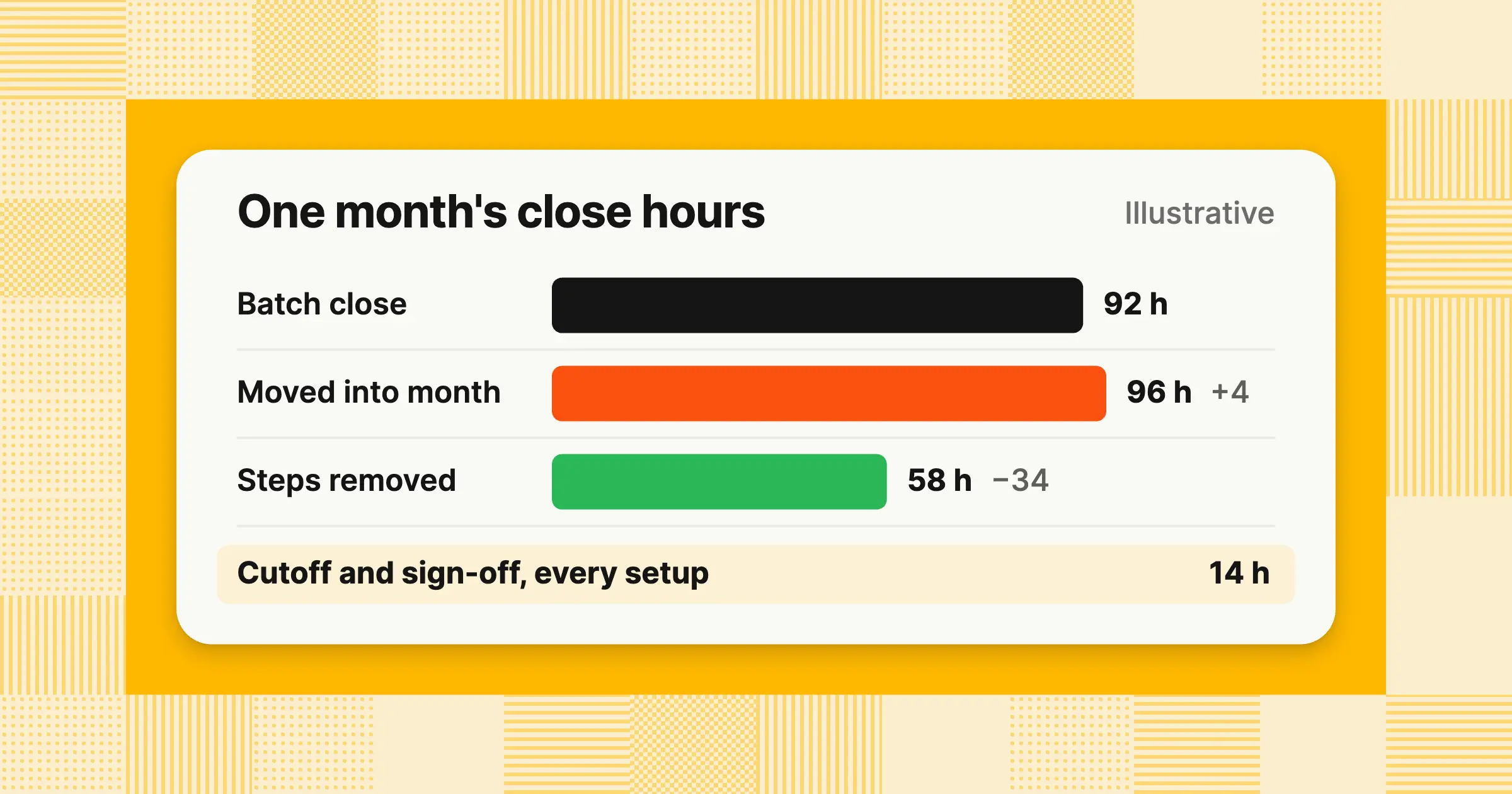
- A continuous close saves hours only where steps disappear: in this guide's illustrative example, moving tasks alone takes a month's close from 92 to 96 hours, while removing steps cuts it to 58.
A continuous close means doing the work of the month-end close, such as matching, reconciliations, recurring entries, and reviews, throughout the month rather than in a sprint after it. This guide covers what a continuous close is, which tasks move and which wait, and what happens to hours. It also gives you a week-by-week calendar, an accrual example, the controls that stay fixed, what your ERP already does, and how to make the move.
What is a continuous close in accounting?
A continuous close is a way of running the month-end close where reconciliations, matching, recurring entries, and reviews happen during the month instead of after it. The period still ends with cutoff, final estimates, review, sign-off, and a locked period, but those last steps take less time because most of the books are already checked.
- Continuous closeClose tasks run daily or weekly during the month, and only work that depends on the period's final day waits for month-end
- Rolling closeAnother name for the same practice, used in some ERP marketing, such as NetSuite's financial close product page
- Continuous financial closeThe longer form Gartner uses, for example in its June 17, 2026, Hype Cycle for Autonomous Accounting
It matters because a batch close leaves 30 days of transactions to check at once. A mistake made on the 3rd surfaces weeks later, when the details are harder to recover. A continuous close gives you numbers you can rely on before the month ends and a shorter, calmer close after it. For how the monthly close fits together from start to finish, see What is month-end close?
How is a continuous close different from continuous accounting, a soft close, and a zero-day close?
Continuous accounting is the habit of recording and checking transactions as they happen, and a continuous close applies that habit to your close checklist. A soft close is a lighter interim close with more estimates. A zero-day close is a target: books reconciled and ready on the period's last day, and a continuous close is the usual route there.
| Term | What it means | When the work happens | Are the numbers final? |
|---|---|---|---|
| Continuous accounting | An operating model where transactions are recorded, matched, and checked as they occur | All month, across accounting | Not on its own; it feeds the close |
| Continuous close | Continuous accounting applied to the close checklist, ending in a short period-end close | During the month, plus a short close after month-end | Yes, after sign-off and the lock |
| Soft close | An interim close with more estimates and fewer reconciliations, often used for months that aren't a quarter-end | After month-end, with less work | Mostly; some balances are estimated |
| Hard close | A full close: every account reconciled and every adjustment posted, reviewed, signed off, and locked | After month-end | Yes |
| Fast close | Any close shortened by automation, reordering, or tighter deadlines, with no rule about when the work happens | After month-end, in fewer days | Yes |
| Zero-day close | A target: books reconciled, reviewed, and ready to report on the period's last day | During the month | Yes, on the last day |
Quarter-ends and year-ends usually still run as hard closes, with auditor review or audit work and tax work on top, even when your monthly closes are continuous. For who has reached a zero-day close, how realistic it is, and a worked example in close hours, see Zero-day close.
Gartner frames the move as a choice. Its research note “How AI Enables the Continuous Accounting Close” was published September 1, 2026, by analyst David Condon. Its public summary asks whether organizations should refine the traditional close or redesign the process so the traditional close is no longer needed. Its June 17, 2026, Hype Cycle for Autonomous Accounting describes these technologies as helping CFOs move to a continuous financial close while keeping reporting accurate.
Which close tasks can move into the month, and which have to wait for period end?
Tasks that need only transaction data can move into the month, accruals and balance sheet reconciliations can be prepared early and finalized at cutoff, and cutoff, final estimates, consolidation, sign-off, and the lock wait for period end. Sorting your checklist into these three groups shows you which hours can leave the close window.
Move into the month
| Task | When | Preparer, then reviewer | Why |
|---|---|---|---|
| Bank, card, and payment processor matching | Daily | Staff accountant, then senior accountant | Needs only bank data and ledger entries |
| Clearing account reconciliations | Weekly | Staff accountant, then senior accountant | Balances should clear as payments settle |
| AP and AR subledger tie-outs to the general ledger | Weekly | Staff accountant, then senior accountant | Both sides are in the system as transactions post |
| Intercompany matching | Weekly | Each entity's accountant, then controller | Both entities' entries exist; only eliminations wait |
| Prepaid amortization and depreciation | Posted from schedules | Senior accountant, then controller | Amounts are known in advance; only new assets, disposals, or new prepaids need a change |
| Flux review on month-to-date numbers | Weekly from mid-month | Senior accountant, then controller | Explains movements while the reasons are fresh |
Prepare, then finalize
| Task | When | Preparer, then reviewer | Why |
|---|---|---|---|
| Accruals | Register updated weekly, finalized at cutoff | Senior accountant, then controller | The final amount depends on what was received by the last day |
| Balance sheet reconciliations | Rolled forward weekly, finalized after month-end | Staff accountant, then senior accountant | The ending balance exists only after the period closes |
| Payroll accrual | Built from the pay calendar, finalized with the final payroll file | Payroll accountant, then controller | Hours and pay for the last days arrive after month-end |
| Deferred revenue roll-forward | Weekly, finalized with the final billing data | Revenue accountant, then controller | New contracts and changes post until the last day |
Wait for period end
| Task | When | Preparer, then reviewer | Why |
|---|---|---|---|
| Revenue and expense cutoff | Business day 1 | Senior accountant, then controller | Cutoff is tested against the period's last day |
| FX revaluation at closing rates | Business day 1 or 2 | Senior accountant, then controller | The closing rate exists only at period end |
| Consolidation and intercompany eliminations | After entity closes | Controller, then CFO | Eliminations need every entity's final balances |
| Final estimates, such as bad debt, bonuses, and tax provision | After month-end | Controller, then CFO | Each depends on final period results |
| Final review, sign-off, and the period lock | Last close day | Controller, then CFO | Signs off the whole period at once |
Intercompany is the task teams most often split wrong. You can match both sides of each intercompany transaction weekly, across 5 entities or 50, and settle differences as they appear. Eliminations are a consolidation step, so they run once, at period end, on final balances. For both steps in detail, see intercompany accounting.
A reconciliation is one task inside a continuous close, so the two aren't alternatives. A continuous close changes when you reconcile and how often. For how to tie out each account, see account reconciliation and bank reconciliation. For schedules you can post ahead, see prepaid expenses, and for explaining movements mid-month, see flux analysis.
Does a continuous close save hours? What gets removed, moved, and added
A continuous close saves hours task by task, not across the board: matching and exception work get shorter when rules clear routine lines and items are days old, reconciliations and reviews mostly keep their hours, and accruals and weekly review slots add a few. Splitting your hours this way shows you whether a continuous close will lighten the load or only reshape it.
- RemovedMatching that clears against rules without a person, and investigations that take less time because the transaction is days old instead of weeks
- MovedReconciliations and reviews that run weekly instead of monthly, with the same steps
- AddedA weekly review slot, and accruals estimated during the month and then trued up at cutoff
Example
A company with two entities logs its close hours for one month under three setups. The figures are illustrative, not a benchmark.
| Task | Batch close (hours) | Moved into the month only (hours) | Moved, with steps removed (hours) |
|---|---|---|---|
| Bank and card matching | 30 | 30 | 12 |
| Accruals: estimate and true-up | 16 | 18 | 14 |
| Intercompany matching | 12 | 12 | 6 |
| Exception investigation | 20 | 14 | 8 |
| Weekly review slots | 0 | 8 | 4 |
| Cutoff, final review, and sign-off | 14 | 14 | 14 |
| Total | 92 | 96 | 58 |
Moving the work alone takes the month from 92 to 96 hours. The weekly review slots add 8 hours and the second touch on accruals adds 2, while fresher exceptions save 6. Removing steps, through matching rules, scheduled entries, and shorter reviews of only what changed, takes the total to 58 hours, 34 fewer than the batch close. Cutoff and sign-off stay at 14 hours in every setup, because that work can't start until the period ends.
To see which column your team is in, compare it with your own hours by task (the baseline in the first step of the move below), then start with the task that uses the most hours and has the cleanest data. If your close is already fast but you still find missed accruals or supplier advances never matched to an invoice after sign-off, the work has moved later instead of earlier. A weekly accrual register and weekly matching bring those items back into the month.
What does a continuous close look like week by week?
A continuous close runs on a fixed rhythm: cash and card matching every day, subledgers, intercompany, and accruals every week, schedules and flux in the last week, and only cutoff through sign-off after month-end. A written calendar keeps the rhythm from slipping when the month gets busy.
Example
This calendar fits a company with one to five entities and a five-person finance team on NetSuite, Dynamics 365, or a similar ERP. SaaS-specific rows are marked. Use it as a template and change the owners to fit your team.
| When | Task | Preparer | Reviewer | Evidence |
|---|---|---|---|---|
| Daily | Match bank, card, and payment processor lines to the ledger | Staff accountant | Senior accountant | Match report |
| Daily | Log each exception with its amount, date, source, and reference | Staff accountant | Senior accountant | Exception log |
| Weekly | Tie out AP and AR subledgers to the general ledger | Staff accountant | Senior accountant | Tie-out workpaper |
| Weekly | Match intercompany balances and settle differences | Each entity's accountant | Controller | Intercompany match report |
| Weekly | Update the accrual register from purchase orders, contracts, and recurring suppliers | Senior accountant | Controller | Accrual register |
| Weekly (SaaS) | Tie billing system revenue and deferred revenue to the general ledger | Revenue accountant | Controller | Billing-to-ledger tie-out |
| Weekly | Review slot: sign off the week's reconciliations and clear aged exceptions | Senior accountant | Controller | Dated sign-offs |
| Last week of the month | Post prepaid amortization, depreciation, and recurring entries from schedules | Senior accountant | Controller | Schedules and entries |
| Last week of the month | Review flux on month-to-date numbers and draft explanations | Senior accountant | Controller | Draft flux commentary |
| Last week of the month (SaaS) | Estimate hosting and usage-based costs from supplier dashboards | Senior accountant | Controller | Accrual register |
| Business days 1–2 | Cutoff, final bank statement days, accrual true-ups, payroll accrual, and FX revaluation | Senior accountant | Controller | Final reconciliations and entries |
| Business days 2–3 | Consolidation, eliminations, final flux, statements, sign-off, and the period lock | Controller | CFO | Signed statements and lock date |
The controller's month changes most. Instead of reviewing everything in the first week after month-end, the controller signs off reconciliations in a fixed weekly slot. After month-end, only the true-ups, FX, consolidation, final flux, and the statements are left to review. For every task with its owner and day, see the month-end close checklist, or build your own with the close checklist generator.
How do accruals work in a continuous close when invoices arrive after month-end?
In a continuous close, you identify accruals during the month and track them in a register, finalize the estimates at cutoff, and clear each accrual against its invoice when the invoice arrives. The difference from a batch close is when you find them: on the day the commitment is made, instead of during the close.
Example
A company closes October 2026 and signs off on Wednesday, November 4, business day 3. All amounts are illustrative. On the accrual basis, each expense belongs to October, the month the service was received, whatever the invoice date.
Accrual register, October 2026 ($)
| Supplier | Estimate during October | Final estimate, October 31 | Invoice received | Difference |
|---|---|---|---|---|
| Hosting | 12,400 | 12,400 | 12,950 | 550 |
| Contractor | 15,000 | 15,000 | 15,000 | 0 |
| Legal | 6,000 | 8,500 | 8,500 | 0 |
| Total | 33,400 | 35,900 | 36,450 | 550 |
Where each accrual came from, with the day it was identified and the day its invoice arrived:
| Supplier | Identified | Invoice received |
|---|---|---|
| HostingRecurring supplier, usage dashboard | October 1 | November 6 |
| ContractorStatement of work | October 5 | November 9 |
| LegalEngagement letter | October 14 | November 10 |
The legal accrual shows the second touch. The senior accountant estimated $6,000 on October 14 and raised it to $8,500 at cutoff, after the firm confirmed its October hours. That extra step is the added accrual time in the hours table above.
| Account | Debit | Credit |
|---|---|---|
| Entry 1: October 31, posted at cutoff on business day 1 ($) | ||
| Hosting expense | 12,400 | |
| Contractor expense | 15,000 | |
| Legal expense | 8,500 | |
| Accrued expenses | 35,900 | |
| Total | 35,900 | 35,900 |
| Account | Debit | Credit |
|---|---|---|
| Entry 2: November, as the three invoices post ($) | ||
| Accrued expenses | 35,900 | |
| Hosting expense | 550 | |
| Accounts payable | 36,450 | |
| Total | 36,450 | 36,450 |
The $550 hosting difference posts to November under the company's close policy, because it's immaterial. Locking October on November 4 doesn't settle the accounting on its own. Under US GAAP (ASC 855, subsequent events), an invoice that arrives before October's financial statements are issued or available to be issued, and that gives evidence about the October 31 liability, is a recognized subsequent event. So a material difference is adjusted in October, even after the internal lock. Once those statements are issued, a true-up of a reasonable estimate is a change in estimate, booked in the period you learn the actual amount, unless it comes from an error in the original estimate. In this example, the close policy sends differences above $2,500 to the controller, who judges whether a difference is material to October. That threshold is a review trigger set by policy, not a bright line. If your team uses reversing accruals instead, Entry 1 reverses on November 1 and each invoice posts in full to expense. November still shows $550 of extra hosting expense, so the result is the same.
For how to estimate and support each accrual, see accrued expenses, and for the other entries you post each month, see month-end journal entries.
What is an exception-based close?
An exception-based close is one where routine items clear automatically against rules you set, and people review only the exceptions: unmatched lines, differences above a threshold, missing documents, and unusual entries. It keeps a continuous close manageable, because reviewers look at what broke each day instead of rechecking every line at month-end.
Every line is still checked. The rules do the checking, and people handle what the rules can't clear. The approach covers the whole close, including bank and card matching, subledger tie-outs, intercompany, accruals, and manual journal review. Audit testing remains your auditor's own work. As for platforms, NetSuite's close product matches bank lines and flags unusual transactions, and dedicated close tools add rule-based matching and exception queues on top of an ERP. The ERP section below covers what each system ships.
| Exception | Example | Who resolves it | When |
|---|---|---|---|
| Unmatched bank or card line | A $1,250 card charge with no receipt and no ledger entry | Staff accountant | Within 2 business days |
| Difference above threshold | A $3,200 gap between the AR subledger and the general ledger | Senior accountant | Same week |
| Missing document | A $9,000 supplier payment with no invoice | AP owner | Before the weekly review |
| Duplicate | The same supplier invoice entered twice | AP owner | Same week |
| Unusual entry | A manual journal posted to revenue on a weekend | Controller | Before the weekly review |
| Intercompany break | One entity records a $40,000 charge the other entity hasn't booked | Both entities' accountants | Same week |
Continuous close monitoring means tracking open exceptions every day: how many there are, how old they are, and how much money they involve. Have the controller approve each matching rule and threshold in writing, so the rules themselves are part of your controls.
Does a continuous close change controls, cutoff testing, or the audit?
No, your controls stay the same but run more often: every reconciliation and entry still needs a preparer and a separate reviewer, cutoff is tested at period end, and the period locks after sign-off. Keeping these fixed is how you move a 10-day close into the month without losing control of it.
- Segregation of dutiesThe preparer and the reviewer are different people, and nobody approves their own entry
- Approval before postingAn entry posts only after a named approver approves its exact lines
- Cutoff at period endRevenue and expense cutoff is still tested against the period's last day
- The period lockAfter sign-off, the period locks, and reopening it needs authorization and a documented reason
A continuous close doesn't mean opening and closing the period every week. The period stays open for posting until sign-off, and weekly reviews sign off reconciliations, not the period.
What changes for the audit is the evidence. Reviews leave a dated trail through the month instead of a stack of sign-offs on the last close day. Expect your auditors, and your SOX testing if you're a public company, to also ask how matching rules and thresholds are set, who can change them, and how you know they worked. Keep a log of each rule, who approved it, and when it changed, and audit prep becomes a matter of exporting what you already have.
Can NetSuite, SAP, Oracle, or Dynamics 365 run a continuous close?
Partly: NetSuite markets continuous close features, while SAP, Oracle, and Microsoft mainly schedule and track close tasks around the period end date. In each, the ledger and task plan are there, but exception follow-up, accrual prep, and in-month reviews still need people, a close tool, or an agent.
| ERP | Close feature, as the vendor names it | What it does | Uses continuous close language? |
|---|---|---|---|
| NetSuite | Financial Close Management (product page, checked November 8, 2026) | Turns a checklist into a close plan with owners and due dates, offers a balance sheet reconciliation workspace, matches bank transactions automatically, flags unusual transactions, drafts variance explanations, and consolidates subsidiaries | Yes: “Support a Continuous Close” and a “rolling” close process |
| SAP | SAP Advanced Financial Closing (product page, checked November 8, 2026) | Provides reusable closing templates, automation routines, real-time monitoring of the close, critical path analysis, and cross-system closing | Only as “continuous closing optimization,” meaning ongoing improvement of the close |
| Oracle | Close Monitor in Oracle Fusion Cloud Financials, Release 26D (Oracle help, checked November 8, 2026) | Shows period close status by ledger and by module, such as General Ledger, Payables, Receivables, and Assets, across a ledger set, with high-level income statement results per entity | No |
| Microsoft Dynamics 365 Finance | Financial period close workspace (Microsoft Learn, updated April 3, 2026) | Builds closing schedules from templates, sets task due dates relative to the period end date, blocks tasks until the tasks they depend on are done, and assigns tasks by person and company | No |
| QuickBooks Online | Closing date (Intuit help article, updated September 15, 2026) | Sets a closing date, after which changes to earlier transactions show a warning or need a password, and lists reconciling your accounts as a step before you set the date | No |
In NetSuite, you can run much of the in-month matching and reconciliation inside the ERP. The product page doesn't describe accrual preparation or a weekly review routine, so plan those yourself. If bank reconciliations and accruals are your close-week bottleneck on any of these systems, start with the ERP's own matching and a weekly accrual register, since neither depends on a new system.
You have two routes to a continuous close. One is to replace your general ledger with a newer, real-time ledger that some vendors pitch as continuous by design. The other is to keep the ERP you run today and add a close layer on top that does the matching, reconciliations, and entry prep and posts approved entries back to it. The first changes your system of record, and the second changes how the work around it gets done.
If you're choosing a close tool, check three things:
- It does the workIt prepares matches, reconciliations, and draft entries with support, beyond tracking tasks
- It keeps approval in your handsNothing posts to your ERP until a named approver approves the exact lines
- It shows its exceptionsEach one comes with an amount, date, source, and reference, and the period can't lock while tasks are open
For tools compared by the work they do, see best month-end close software.
How do you move to a continuous close, and is it realistic for your team?
Start with one close instead of a big switch: log hours by task, move the tasks that need only transaction data into a weekly rhythm, and add a named reviewer and a weekly review slot. Each later step moves one more group of tasks.
- Set a baselineLog hours by task for one full close, including pre-close work and anything finished after sign-off
- Move cash firstMatch bank, card, and payment processor lines weekly, then daily if volume justifies it
- Book a weekly review slotPick one fixed time each week when the reviewer signs off that week's reconciliations
- Schedule recurring entriesPost prepaid amortization, depreciation, and recurring accruals from schedules
- Start the accrual registerRecord each accrual from purchase orders, contracts, and recurring suppliers as it arises
- Move subledgers and intercompanyTie out AP, AR, and intercompany balances weekly
- Keep the period endLeave cutoff, true-ups, FX revaluation, consolidation, sign-off, and the lock after month-end
Plan the move in closes, not weeks, because each change needs one full close to prove it works. At one step per close, the baseline plus steps 2–6 above take about six closes. For the order of the period-end steps that remain, see the month-end close process.
For most mid-market teams, a weekly rhythm is realistic, and daily work is worth it mainly for cash. Daily matching pays off where volume is high and data arrives every day, such as bank, card, and payment processor feeds. For a startup or a small team, weekly is enough for everything else. Your team is ready to start when these are true:
- Bank, card, and processor data reach your ledger daily, not in month-end exports
- Each close task has a named preparer and a separate reviewer
- Recurring entries already post from schedules
- You know your close hours by task
The common mistakes are predictable:
- Moving tasks without removing stepsReview time grows, as in the 92-to-96-hour column above
- Running daily where weekly would doMore frequent work adds hand-offs without adding accuracy
How do you know a continuous close is working?
Track four numbers every month: business days from month-end to sign-off, total close hours including pre-close work, the share of reconciliations finished before month-end, and adjustments booked after sign-off. If days fall but hours stay flat, you moved the work. If hours and late adjustments fall too, your continuous close is working.
- Days to sign-offBusiness days from the period's last day until the statements are signed off
- Total close hoursEvery hour logged to close tasks in the month, before and after month-end
- Reconciliations done earlyReconciliations finished before month-end ÷ all reconciliations
- Adjustments after sign-offThe count and dollar value of entries booked to a period after it was signed off
To work out the return, use hours instead of a borrowed percentage.
Example
In the hours table above, steps removed save 92 − 58 = 34 hours a month, or 34 × 12 = 408 hours a year. At an illustrative loaded cost of $75 an hour, that's 408 × $75 = $30,600 a year, before the cost of any tool.
For days-to-close benchmarks by company size, see How long should month-end close take?
What most continuous close answers get wrong
Many continuous close answers mix it up with continuous accounting or a zero-day close, sort tasks into only two groups, and quote speed gains without an independent source. Knowing these errors helps you check any guide or AI answer before you act on it.
We tested 25 AI answers on November 7, 2026, across ChatGPT, Gemini, Google AI Mode, Google AI Overviews, and Perplexity. Four patterns showed up:
- Conflicting definitionsThree of the five Google AI Overviews tested that day described continuous close and continuous accounting as the same thing, while a fourth treated them as method and outcome
- Two groups instead of threeGoogle AI Mode listed expense accruals and depreciation as work with nothing to do during the month. Accruals belong in the prepare-then-finalize group, and depreciation posts from a schedule you know in advance
- Eliminations in the wrong placeA Gemini calendar eliminated intercompany balances weekly, although eliminations are a consolidation step that runs on final balances
- Numbers without studiesNone of the answers cited an independent measurement of continuous close hours. Their speed and hours figures were unsourced, vendor claims, or illustrative examples
When you do see a figure, check whether it's a measurement or a prediction. Gartner published one prediction in a February 24, 2026, press release. It predicts that “finance organizations using cloud ERP applications with embedded AI assistants will see a 30% faster financial close by 2028.” That's a forecast about close speed in general, not a measured result for continuous close, so measure your own hours with the four numbers above.
How we approach it
Our Close Agent works your close checklist through the month on the schedules you set, reconciling the ledger to bank statements, subledgers, and invoices and listing each difference with its amount, date, source, and reference. A named approver approves every entry before it posts to NetSuite, Oracle, SAP S/4HANA, Microsoft Dynamics 365, Business Central, or QuickBooks, and the month can't lock until every task is signed off. If you want a continuous close on the ERP you already run, explore our Close Agent.
Share this article