Key takeaways
- A SaaS month-end close is the standard close plus subscription work, because billings, cash, and recognized revenue are three different numbers that each have to tie to the general ledger.
- Five business days is a realistic target for a 100–300 person SaaS company. In Ledge's 2025 survey of 100 finance professionals, only 18% closed in 3 days or less, and half took more than five business days.
- In the October 2026 worked example, billings of $3,021,000 equal revenue of $2,555,100 plus the $475,000 rise in deferred revenue, minus the $9,100 rise in unbilled usage, which proves billing, the revenue schedule, and the ledger agree.
A SaaS month-end close is the standard close plus the subscription work: tying Stripe or your billing system to the ledger, rolling forward deferred revenue, accruing unbilled usage, and reconciling ARR to GAAP revenue. Getting it right gives leadership reliable numbers within five business days, catches billing and revenue discrepancies before your auditors do, and keeps your SaaS metrics consistent with the financial statements. This guide covers how long the close should take, an honest zero-day verdict, and a day-by-day checklist for the October 2026 close. It also covers the SaaS-specific entries under current US GAAP and one worked month that ties from Stripe to ARR.
What is a SaaS month-end close?
A SaaS month-end close is how a subscription software company records, reconciles, reviews, and locks a month's books, then publishes its SaaS metrics.
Three terms come up in every section below, so it helps to pin them down first:
- Days to closeBusiness days from month-end (Day 0) until the controller signs off the statements and locks the period. For the October 2026 close, Day 0 is Saturday, October 31, and business day 1 (BD1) is Monday, November 2.
- Billings, cash, and revenueBillings are the invoices you issue, cash is what customers pay, and revenue is what you've earned under ASC 606 by delivering the service. At a SaaS company, the three differ every month.
- ARRAnnual recurring revenue, the annualized value of the subscription contracts your policy counts at month-end. It's an operating metric rather than GAAP revenue, so you reconcile the two every month.
The steps every company follows are covered in what is month-end close.
What's different about month-end close for a SaaS company?
A SaaS close adds subscription revenue work to the standard close. Billings, cash, and recognized revenue are three different numbers that must each reconcile. Deferred revenue, usage, payment processor payouts, commission assets, stock compensation, hosting costs, and SaaS metrics each need their own month-end step.
The table shows where a SaaS close departs from a general checklist, so you can see which tasks need SaaS-specific owners and data.
| Area | Standard close | What a SaaS close adds |
|---|---|---|
| Revenue | Invoice-based revenue and accounts receivable | Ratable subscription revenue under ASC 606, a deferred revenue roll-forward, and unbilled usage |
| Cash | Bank reconciliation | Stripe or processor payouts net of refunds, disputes, and fees, run through a clearing account |
| Cost of revenue | Vendor accruals | Hosting and AI model API accruals booked before the invoice arrives |
| Sales costs | Commission expense | Capitalized commissions under ASC 340-40, amortized every month |
| People costs | Payroll and bonus accruals | Stock compensation under ASC 718 by department, and capitalized engineering time under ASC 350-40 |
| Reporting | Financial statements and flux review | ARR, MRR, NRR, and billings, reconciled to GAAP revenue |
The SaaS close is harder for one reason: revenue depends on data that lives outside the ledger. Contract terms sit in Salesforce, invoices in the billing system, usage in a product database, and payments in Stripe. The revenue work waits on every one of those exports.
How many days should month-end close take for a 100–300 person SaaS company?
Aim for five business days, counted from month-end to signed-off statements, with three to four as a stretch goal. In Ledge's 2025 survey of 100 finance professionals, only 18% closed in 3 days or less, and half took more than five business days. Past seven, look first at late inputs and manual revenue schedules.
Counting in business days with a fixed end point helps you compare your close with published benchmarks and with your own prior months.
| Business days to close | Share of teams in Ledge's 2025 survey |
|---|---|
| 1–3 | 18% |
| 4–5 | 32% |
| 6–7 | 23% |
| More than 7 | 27% |
Ledge published the survey in April 2025 and updated it in August 2026. It has no company-size or SaaS split, and Ledge sells close software, so read it as directional. APQC's median close is quoted by other sites at 6 to 6.4 calendar days, and calendar days include weekends, so that figure isn't directly comparable.
Example
October 2026 ends on Saturday, October 31. BD1 is Monday, November 2, and BD5 is Friday, November 6, which is six calendar days after Day 0. A five-business-day close and a six-calendar-day close describe the same October close.
A best-in-class SaaS close runs 3–5 business days. Reconciliations happen during the month, revenue schedules run from the billing system instead of a spreadsheet, and the management pack and ARR bridge go out the business day after sign-off.
When a SaaS close runs long, check these bottlenecks first:
- Billing and usage exportsFinal invoices, credit notes, and usage data arrive after month-end, so revenue can't start.
- Stripe payout breaksRefunds, disputes, and fees netted inside payouts leave differences nobody has explained.
- Commission dataSales operations sends the commission statement late, which holds up the ASC 340-40 entry.
- Hosting and AI costsThe team waits for the cloud invoice instead of accruing from the usage dashboard.
- A second entityIntercompany charges and the subsidiary trial balance land on BD4 or later.
- End-loaded reviewOne reviewer checks everything after the last reconciliation finishes.
Team size sets how much review you can run in parallel. The staffing below is an example plan, not survey data.
| Company size | Example accounting team | Example target |
|---|---|---|
| About 100 people, one entity | Controller, senior accountant, staff accountant | 5 business days |
| About 150–200 people, two entities | Controller, accounting manager, senior accountant, staff accountant, AP specialist | 5 business days |
| About 300 people, three or more entities | The team above plus a revenue accountant and a second staff accountant | 5–6 business days |
For benchmarks by company size, see how long month-end close should take. To score your own close against published surveys, use the free close benchmark checker.
Zero-day close vs month-end close: Which is realistic for a 150-person SaaS company?
For a 150-person SaaS company, a true zero-day close is rarely realistic, because vendor bills, hosting invoices, usage data, and commission inputs arrive after month-end. A 3–5 business-day close is realistic: reconcile cash, Stripe, and deferred revenue during the month, accrue what's missing, and keep the first business days for review and sign-off.
A zero-day close means the books are ready to sign off on Day 0 or BD1, because the reconciliation and entry work ran through the month. The practice behind it is continuous close, and the steps to shorten your close are in faster month-end close. Comparing what each target requires helps you pick the one your systems can support today.
| Close target | What has to be true | Fit for a 150-person SaaS company |
|---|---|---|
| Zero-day (Day 0 to BD1) | Billing, usage, and processor data post to the ledger daily; accruals are estimated automatically; review happens during the month | Rare; needs near-complete automation and very few judgment items |
| 3 business days | Daily billing tie-out, weekly bank and Stripe reconciliations, BD1 accruals from usage dashboards, and review by risk tier | A stretch goal after two clean five-day closes |
| 5 business days | Input requests before month-end, published cutoff times, a revenue subledger tied to the ledger, and review starting on BD2 | The realistic target |
| 10 business days | Inputs chased after month-end, a manual revenue spreadsheet, and one reviewer at the end | The baseline to fix first |
To move a SaaS close from 10 days to 5, take waiting off the critical path rather than adding hours. These SaaS close best practices target the waiting:
- Set a hard billing and contract cutoffFinal invoices, credit notes, and Salesforce amendments for the month are loaded by 5 PM on BD-1.
- Reconcile Stripe and the bank weeklyBD1 then covers only the last few days of activity.
- Tie billing to deferred revenue dailyVariances surface during the month, not on BD2.
- Accrue from dashboards on BD1Book hosting, AI API, and usage estimates from provider and product data instead of waiting for invoices.
- Write a materiality policyManagement approves it after discussing it with your auditor. It sets the size at which you accrue small late items, and its thresholds are review triggers, not bright lines.
- Review by riskThe controller reviews revenue, cash, and judgment-based accruals, while the accounting manager reviews routine work as it finishes.
Under a materiality policy, a late item still belongs to the month it relates to. List anything you don't book on a passed-adjustments schedule, and evaluate those items together before sign-off. Several small items can add up to a material amount.
SaaS month-end close checklist: Day by day, with owner, reviewer, and dependencies
A SaaS month-end close checklist adds billing cutoff, the Stripe payout reconciliation, the deferred revenue roll-forward, the usage accrual, hosting and AI API accruals, the commission asset, stock compensation, and the ARR bridge to the standard close. Each task needs an owner, a reviewer who isn't the preparer, a business day, and the input it depends on.
The checklist runs the October 2026 close for a fictional 180-person SaaS company with $30.24 million in ARR. It's a US parent on NetSuite with a UK subsidiary, Stripe for card payments, Salesforce for contracts, and a five-person accounting team. FP&A and revenue operations (RevOps) sit outside accounting.
Before month-end: BD-3 to BD-1 (Wednesday, October 28 to Friday, October 30)
Request contract changes and commission data from sales operations, hires and exits from HR, and open purchases from department heads. Owner: Controller. Reviewer: Accounting manager. Day: BD-3.
Depends on
Request list
Evidence
Requests sent and logged
Reconcile the bank and the Stripe balance through October 27. Owner: Staff accountant. Reviewer: Accounting manager. Day: BD-3.
Depends on
Bank feed and Stripe balance report
Evidence
Reconciliation with no unexplained difference
Draft recurring entries: prepaid amortization, depreciation, commission amortization, and stock compensation. Owner: Senior accountant. Reviewer: Accounting manager. Day: BD-2.
Depends on
Approved templates and equity schedule
Evidence
Entries drafted, not posted
Billing cutoff: load final October invoices, credit notes, and Salesforce amendments by 5 PM. Owner: RevOps and senior accountant. Reviewer: Controller. Day: BD-1.
Depends on
Signed contracts in Salesforce
Evidence
Billing register and amendment log
The close: BD1 to BD5 (Monday, November 2 to Friday, November 6)
Import final bank and Stripe activity, then bridge Stripe gross charges to payouts. Owner: Staff accountant. Reviewer: Accounting manager. Day: BD1.
Depends on
October payouts and Stripe payout reconciliation report
Evidence
Payout bridge tied to bank and clearing account
Pull usage through 11:59 PM on October 31, rate it at contract prices, and accrue unbilled usage. Owner: Senior accountant. Reviewer: Controller. Day: BD1.
Depends on
Usage export from the product database
Evidence
Usage file, rated summary, and entry
Accrue hosting and AI model API costs from provider usage dashboards. Owner: AP specialist. Reviewer: Accounting manager. Day: BD1.
Depends on
Cost and usage exports
Evidence
Exports and entry
Run the revenue schedule, post recognition, and roll forward deferred revenue, split current and non-current. Owner: Senior accountant. Reviewer: Controller. Day: BD2.
Depends on
Billing cutoff and Stripe bridge
Evidence
Roll-forward tied to the general ledger
Capitalize new commissions, post amortization, and roll forward the commission asset. Owner: Senior accountant. Reviewer: Accounting manager. Day: BD2.
Depends on
Commission statement from sales operations
Evidence
Asset roll-forward by cohort
Post payroll, stock compensation by department, and capitalized software costs. Owner: Staff accountant. Reviewer: Accounting manager. Day: BD2.
Depends on
Payroll register, equity report, and engineering time by project
Evidence
Payroll reconciliation, stock compensation schedule, and project roll-forward
Reconcile AR and the allowance, prepaids, accruals, fixed assets, and AP. Owner: Staff accountant and AP specialist. Reviewer: Accounting manager. Day: BD3.
Depends on
BD2 entries
Evidence
Signed reconciliations
Revalue foreign-currency balances, match intercompany, translate the UK subsidiary, and consolidate. Owner: Accounting manager. Reviewer: Controller. Day: BD3.
Depends on
UK trial balance by 5 PM on BD2
Evidence
Intercompany nets to zero; translation schedule
Run flux review against last month and budget, draft commentary, and draft the ARR bridge. Owner: FP&A and accounting manager. Reviewer: Controller. Day: BD4.
Depends on
Consolidated trial balance
Evidence
Flux file with explanations above the trigger
Clear review notes, review the passed-adjustments schedule, sign off, and lock October in NetSuite. Owner: Controller. Reviewer: CFO. Day: BD5.
Depends on
Every task signed off
Evidence
Signed statements and locked period
After the lock: BD6 (Monday, November 9)
Send the management pack with certified ARR. Owner: Controller. Reviewer: CFO. Day: BD6.
Depends on
Signed statements and locked period
Evidence
Pack sent with certified ARR
Read top to bottom, the checklist is the SaaS month-end close process in order. The senior accountant prepares revenue, so the controller reviews it, and no one reviews their own work. In NetSuite, you close October through the Period Close Checklist after locking AR and AP. The guide to locking an accounting period covers who can still post after the lock.
To build your own SaaS month-end close template, start from the free month-end close checklist generator and add the SaaS rows above. It exports to Excel. The month-end close checklist covers the standard tasks, and the month-end close calendar sets cutoff times by day.
How do you tie out Stripe, Chargebee, Zuora, or Maxio to the general ledger?
Run three reconciliations each month. Tie the billing system to the general ledger, so invoices and credit notes match AR and deferred revenue. Tie the processor to the bank, so gross charges minus refunds, disputes, and fees equal payouts. Then tie the revenue subledger to GL revenue, and explain every remaining difference.
Splitting the work into three tie-outs helps you find which system caused a difference instead of searching all of them at once.
| Reconciliation | What you compare | It ties when |
|---|---|---|
| Billing system to ledger | Invoices, credit notes, and write-offs in the billing system against AR and deferred revenue postings | Every invoice and credit note in the register appears once in the ledger |
| Processor to bank | Gross charges, refunds, disputes, and fees against payouts received in the bank | The processor's ending balance equals the clearing account in the ledger |
| Revenue subledger to ledger | Revenue recognized by contract line against revenue accounts | Subledger revenue by stream equals GL revenue by stream |
Stripe nets refunds, disputes, and fees inside each payout. Match each payout to the bank first, then match the charges inside it, rather than trying to match payouts to invoices. Stripe's payout reconciliation report lists the charges, refunds, disputes, and fees inside each automatic payout. On manual payouts, Stripe points you to its balance report instead.
Example
The October Stripe bridge for the example company.
| Line | Amount ($) |
|---|---|
| Stripe balance, September 30 | 41,200 |
| Plus gross charges in October | 612,400 |
| Less refunds | (8,150) |
| Less disputes | (2,300) |
| Less processing fees | (17,760) |
| Net October activity | 584,190 |
| Less payouts received in the bank in October | (579,850) |
| Stripe balance, October 31 (in transit and pending) | 45,540 |
The $45,540 still at Stripe pays out in November, so the Stripe clearing account in NetSuite must also show $45,540 on October 31. Gross charges credit AR, and fees post as an expense:
| Account | Debit ($) | Credit ($) |
|---|---|---|
| Payment processing fees | 17,760 | |
| Stripe clearing | 17,760 |
Refunds and disputes post against the credit notes and dispute records behind them, so they move AR rather than revenue directly. Cash received in Stripe is not revenue: revenue comes from the revenue schedule.
Chargebee, Zuora, and Maxio follow the same three tie-outs, using each system's invoice, credit note, and revenue schedule or roll-forward reports. If the billing system syncs to NetSuite, check the sync error log too. A failed sync leaves an invoice in billing that never reached the ledger. Tools for this work range from the billing system's own reports to revenue subledgers and AI agents that prepare the match for review, compared in the software section below. For the matching steps on the cash side, see the guide to account reconciliation.
How do you reconcile deferred revenue and unbilled revenue at SaaS month-end?
Tie the general ledger's deferred revenue balance to your revenue subledger's ending balance. The roll-forward starts with the opening balance, adds billings, subtracts revenue recognized, and adjusts for cancellations, credits, and FX to reach the closing balance, split current and non-current. Accrue unbilled usage separately, then reverse it when the invoice runs.
Running deferred revenue and usage as two schedules helps you see whether a variance came from billing or from usage.
Revenue recognition in SaaS means recording subscription revenue ratably over the service period as you deliver access, and usage revenue in the month it's consumed. When you bill or collect doesn't change the month the revenue belongs to.
Example
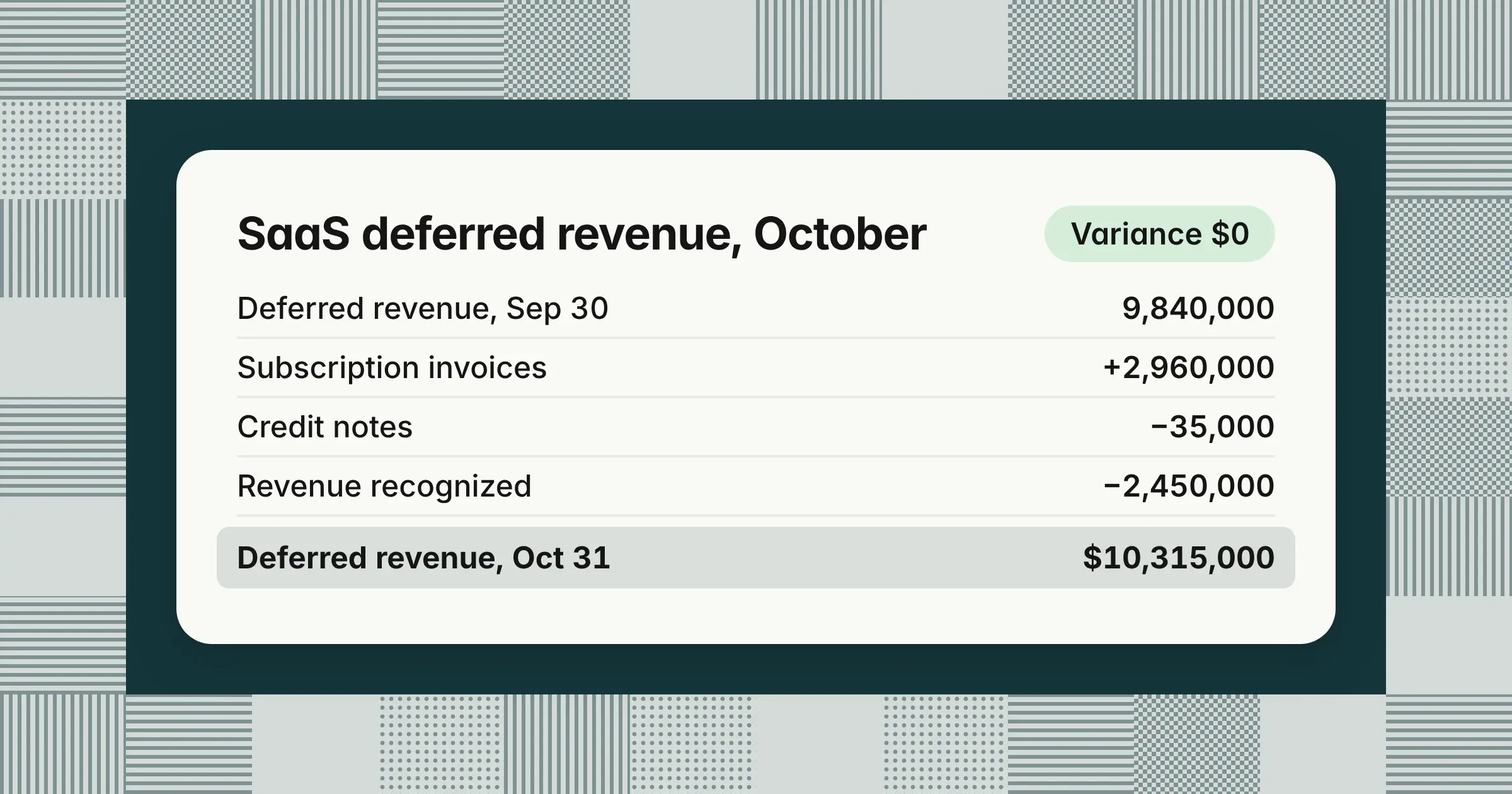
The October 2026 deferred revenue roll-forward for subscription revenue.
| Line | Amount ($) |
|---|---|
| Deferred revenue, September 30 | 9,840,000 |
| Plus subscription invoices issued in October | 2,960,000 |
| Less credit notes on unearned periods | (35,000) |
| Less subscription revenue recognized in October | (2,450,000) |
| Deferred revenue, October 31 | 10,315,000 |
| Of which current (earned within 12 months) | 9,605,000 |
| Of which non-current | 710,000 |
| General ledger balance | 10,315,000 |
| Variance | 0 |
The roll-forward proves the billings identity. Billings equal revenue plus the change in deferred revenue: $2,925,000 of net subscription billings equals $2,450,000 of revenue plus the $475,000 increase in deferred revenue. When you also accrue unbilled usage, subtract the change in unbilled receivables, as the worked example below shows.
Your policy should say when an invoice enters deferred revenue. Under ASC 606, you record a contract liability when the customer pays or payment is due, whichever comes first. For a non-cancellable contract, an invoice that's due puts the same amount in AR and deferred revenue. An unpaid invoice for a future term the customer can still cancel may stay off the balance sheet until then.
To accrue unbilled usage, pull usage through the last minute of the month, rate it at contract prices, and book it to the month the customer used the service. The example company bills usage in arrears early the following month.
Example
October usage rated at contract prices is $104,300. You accrue it on October 31 and reverse it on November 1:
| Account | Debit ($) | Credit ($) |
|---|---|---|
| October 31 | ||
| Unbilled receivables | 104,300 | |
| Usage revenue | 104,300 | |
| November 1 | ||
| Usage revenue | 104,300 | |
| Unbilled receivables | 104,300 | |
When the November invoice for October usage runs, it debits AR and credits usage revenue. If that invoice runs before you sign off October, update the October accrual to the invoice amount instead. If it runs after the lock, the difference is a change in estimate that stays in November, as long as it's immaterial under your policy. September worked that way in October, because the September usage invoice ran after September was locked. The $95,200 September accrual reversed on October 1, the September usage invoice posted at $96,000, and the October accrual added $104,300. October usage revenue is $104,300 + ($96,000 − $95,200) = $105,100, including an $800 true-up.
Record an unbilled receivable when your right to the usage fee depends only on time passing. If it depends on something else, such as an annual overage you can bill only if full-year usage passes a threshold, it's a contract asset. The guides to deferred revenue and accrued revenue cover the entries in more detail.
When the deferred revenue roll-forward doesn't tie, look for four causes:
- Mid-month amendmentsUpgrades, downgrades, and co-terms loaded with the wrong start or end dates
- Manual entriesJournal entries posted straight to the deferred revenue account outside the subledger
- Sync gapsCredit notes or invoices that failed to sync from billing to the ledger
- FXForeign-currency deferred revenue held at historical rates in the subledger but revalued in the ledger
Each month, ASC 606 compliance comes down to a few checks on new and changed contracts. Review amendments for contract modifications, allocate bundles by standalone selling price, confirm service start dates, and estimate variable consideration such as usage and service credits. Running revenue schedules from the billing system or a revenue subledger, rather than a spreadsheet, keeps those checks repeatable and leaves an audit trail.
Which month-end entries are specific to SaaS?
Beyond revenue, a SaaS company books four recurring entries that a general checklist doesn't cover. These are commission capitalization and amortization under ASC 340-40, stock compensation under ASC 718, capitalized internal-use software under ASC 350-40, and accruals for hosting and AI model API costs that arrive after month-end.
Keeping each entry on its own schedule helps you post it the same way every month and hand your auditors one support file per balance.
| Entry | Standard | Source data | Entry in the example |
|---|---|---|---|
| Commission asset and amortization | ASC 340-40 | Commission statement by contract | Dr Capitalized commissions, Cr Commissions payable; Dr Commission expense, Cr Capitalized commissions |
| Hosting and AI API accrual | Accrual basis | Cloud and API usage dashboards | Dr Hosting and AI costs (cost of revenue), Cr Accrued expenses |
| Stock compensation | ASC 718 | Equity system expense report | Dr Stock compensation by department, Cr Additional paid-in capital |
| Capitalized software | ASC 350-40 | Engineering time and contractor invoices by project | Dr Software in development, Cr Payroll and contractor expense |
Capitalized commissions under ASC 340-40
Capitalize commissions that are incremental to winning a contract, such as a rep's commission on a new or expansion deal. Amortize them over the period the contract benefits you, which includes expected renewals when renewal commissions aren't commensurate with the initial one. If that period is one year or less, the practical expedient lets you expense the commission as incurred.
Example
A rep earns a $36,000 commission on a new three-year contract, and renewal commissions are much smaller. The company estimates a 48-month benefit period, so it amortizes $36,000 / 48 = $750 a month.
| Commission asset roll-forward, October 2026 | Amount ($) |
|---|---|
| Balance, September 30 | 1,860,000 |
| Plus commissions capitalized in October | 142,000 |
| Less October amortization | (61,500) |
| Less write-off for churned contracts | (4,800) |
| Balance, October 31 | 1,935,700 |
Salaries and bonuses that don't depend on winning a specific contract stay in expense. The guide to accrued expenses covers the commissions payable side.
Hosting and AI model API accruals
Accrue cloud hosting and AI model API costs on BD1 from the providers' usage data, because the invoices arrive after the period ends. Book costs that serve customers in cost of revenue, so gross margin is right, and book internal engineering use in R&D.
Example
On BD1, AWS Cost Explorer shows $181,500 for October 1–30. At $181,500 / 30 = $6,050 a day, the estimate for October 31 is $6,050, so the hosting accrual is $187,550 after checking credits and savings plans. The AI model provider dashboards show another $42,800 of October API usage. The final AWS invoice reaches AP on BD2 (Tuesday, November 3) at $188,940, so you raise the accrual by $1,390 before the lock. When an invoice arrives after the lock, reverse the accrual on November 1 and let the invoice true it up.
Stock-based compensation under ASC 718
Book stock compensation each month from your equity system's expense report, which spreads each equity-classified award's grant-date fair value over its requisite service period. Allocate it by department and apply your forfeiture policy, since ASC 718 lets you estimate forfeitures or account for them as they occur.
Example
October stock compensation is $410,000: $38,000 cost of revenue, $176,000 R&D, $112,000 sales and marketing, and $84,000 general and administrative. Of the R&D amount, $22,000 relates to engineers on a qualifying software project, so it's capitalized, leaving $154,000 in R&D expense.
Capitalized internal-use software under ASC 350-40
Hosted SaaS that customers access without taking the software is internal-use software under ASC 350-40, not software to be sold under ASC 985-20. Under the current guidance, you capitalize qualifying payroll, stock compensation, and contractor costs during the application development stage. You amortize them once the software is ready for its intended use.
FASB's ASU 2025-06, issued September 18, 2025, removes the project stages. You'll capitalize once management authorizes and commits to funding the project and it's probable the project will be completed. It's effective for annual periods beginning after December 15, 2027, and early adoption is permitted.
Example
October qualifying costs are $96,000 of engineering payroll, $22,000 of stock compensation, and $18,000 of contractors, which totals $136,000. Software in development moves from $412,000 + $136,000 − $280,000 placed in service = $268,000. Amortization on the $280,000 starts in the month it's ready for use.
For the full list of entries with debits and credits, see month-end journal entries.
When should ARR, MRR, NRR, and billings be reported after the close?
Publish preliminary ARR and MRR around BD3, then finance-certified metrics with the management pack once deferred revenue and billings tie out, which is BD6 in a five-day close, the day after sign-off. ARR is an operating metric, so reconcile it to GAAP revenue each month with a bridge for timing, usage, services, and credits.
Releasing metrics on the close calendar helps leadership and the board trust that ARR and revenue come from the same contracts.
| Metric | Preliminary | Certified | Owner |
|---|---|---|---|
| ARR and MRR | BD3 | BD6 | RevOps prepares; controller certifies |
| Billings | BD2 | BD6 | Senior accountant |
| NRR and GRR | BD4 | BD6 | FP&A |
| GAAP revenue and deferred revenue | BD2 | BD6 | Controller |
Example
The October 2026 ARR bridge to GAAP revenue. This company counts signed contracts in ARR from signing. If yours counts them from the start date, the second line moves to a contracted ARR (CARR) bridge.
| Line | Amount ($) |
|---|---|
| ARR, October 31, divided by 12 ($30,240,000 / 12) | 2,520,000 |
| Less contracts signed in October that start in November ($600,000 ARR) | (50,000) |
| Less mid-month starts and expansions recognized for part of October | (18,000) |
| Plus contracts that ended October 31 (in revenue, out of ARR) | 12,000 |
| Less service credits recognized in October | (14,000) |
| Subscription revenue, GAAP | 2,450,000 |
| Plus usage revenue (not in ARR) | 105,100 |
| Total revenue, GAAP | 2,555,100 |
NRR measures how much ARR a customer cohort keeps after expansion, contraction, and churn over 12 months. Divide the cohort's ARR today by its ARR a year ago. GRR uses the same base but leaves out expansion.
Example
Customers active on October 31, 2025, had $24.0 million of ARR. A year later they have $24.0 million + $3.6 million expansion − $0.4 million contraction − $0.8 million churn = $26.4 million, so NRR is $26.4 million / $24.0 million = 110%. GRR is ($24.0 million − $0.4 million − $0.8 million) / $24.0 million = 95%.
In the month-end review, track the metrics that show whether the close and the business held up. These are days to close, post-close adjustments, gross margin after hosting accruals, billings, deferred revenue, NRR and GRR, and burn. The guide to month-end close KPIs has formulas for the close metrics.
Example: How one SaaS month ties out, from Stripe to ARR
In the October 2026 example, six checks tie before the controller signs off on Friday, November 6. Stripe ties to the bank, deferred revenue to the ledger, billings to revenue, usage to its reversal, the commission asset to its schedule, and ARR to GAAP revenue.
Seeing the checks side by side helps you find a break fast, because each one isolates a single source of data.
| Check | Calculation ($) | Result | If it doesn't tie, check |
|---|---|---|---|
| Stripe to bank and clearing account | 41,200 + 612,400 − 8,150 − 2,300 − 17,760 − 579,850 = 45,540 | Equals Stripe clearing | Payouts in transit, or a refund or dispute not posted |
| Deferred revenue to ledger | 9,840,000 + 2,925,000 − 2,450,000 = 10,315,000 | Equals GL deferred revenue | Manual entries to the account, or a failed billing sync |
| Billings to revenue | 2,555,100 + 475,000 − 9,100 = 3,021,000 | Equals the billing register | An invoice missing from billing or the ledger |
| Usage accrual and reversal | −95,200 + 96,000 + 104,300 = 105,100 | Equals GL usage revenue | A reversal that didn't post, or usage rated at list price |
| Commission asset to schedule | 1,860,000 + 142,000 − 61,500 − 4,800 = 1,935,700 | Equals GL capitalized commissions | Churned contracts not written off, or a late commission statement |
| ARR to GAAP revenue | 2,520,000 − 50,000 − 18,000 + 12,000 − 14,000 + 105,100 = 2,555,100 | Equals GL revenue | Contract dates in Salesforce that don't match billing |
The billings check uses all three revenue balances at once. Net billings of $2,925,000 for subscriptions plus $96,000 for September usage give total billings of $3,021,000. Revenue of $2,555,100 plus the $475,000 rise in deferred revenue, minus the $9,100 rise in unbilled receivables ($104,300 − $95,200), gives the same $3,021,000.
What changes for a multi-entity SaaS close?
A second entity adds three steps: revalue foreign-currency balances at the month-end rate, match and eliminate intercompany charges, and translate the subsidiary's results into the parent's currency. In the example, the UK subsidiary's trial balance is due by 5 PM on BD2, so intercompany can tie on BD3.
Fixing the order of these steps helps you avoid consolidating before both sides of intercompany agree.
- RatesPublish month-end and average exchange rates on Day 0, so every entity uses the same ones.
- RemeasurementUnder ASC 830, revalue monetary balances held in a currency other than the entity's functional currency at the month-end rate, with the gain or loss in the income statement.
- IntercompanyThe UK subsidiary bills the US parent a cost-plus service fee. Both entities book it by BD2, and the balances must net to zero before elimination.
- TranslationTranslate the UK subsidiary's assets and liabilities at the month-end rate, equity at historical rates, and its income statement at the average rate, with the difference in cumulative translation adjustment within other comprehensive income.
- Deferred revenue in foreign currencyDeferred revenue is nonmonetary, so contracts the US parent bills in pounds stay at historical rates in both the subledger and the ledger, and month-end revaluation shouldn't touch them.
The guide to intercompany accounting covers matching, eliminations, and settlement entries.
Which software automates the SaaS month-end close?
Choose by the work you need done. A close tracker helps when coordination is the problem, a revenue subledger helps when deferred revenue lives in spreadsheets, and automation or AI agents on your ERP help when preparing reconciliations and entries takes the time. Before you buy, confirm ERP write-back, approval before posting, and SOC 2.
Sorting tools by the work they do helps you buy for the bottleneck you found in your own close.
| Category | What it does | Examples | Use it when |
|---|---|---|---|
| Close management and checklist tools | Track tasks, owners, due dates, and sign-offs | FloQast, BlackLine | The close stalls on coordination and status chasing |
| Revenue and billing subledgers | Run revenue schedules and deferred revenue, and some rate usage | NetSuite revenue management, Zuora, Maxio | Deferred revenue is rebuilt in spreadsheets |
| AI-native general ledgers | Replace the ERP with a ledger built for SaaS | Rillet | You're ready to change your ERP |
| Automation and AI agents on your ERP | Prepare reconciliations, entries, or flux drafts for review; capabilities vary by vendor | BlackLine, Numeric, Ledge, and other AI agent vendors | Preparation work takes most of your close days |
Many vendors span more than one category. BlackLine, for example, also matches transactions and creates journal entries and reconciling items automatically, so use the table to name the job you need done, then check which vendors do it.
If you need a tool that supports Salesforce data, ask whether it reads opportunities and contract dates. It should tie bookings to billing and GAAP revenue, not only store a checklist.
Close software can cut audit prep when every reconciliation, entry, and sign-off keeps its support and reviewer in one place. You then hand auditors the deferred revenue roll-forward, the Stripe tie-out, and the commission schedule instead of rebuilding them. Treat any fixed percentage claim with caution unless the vendor shows its data.
AI agents can prepare much of a SaaS close today, including matching, reconciliations, accruals, deferred revenue schedules, and first-draft flux commentary. Your team keeps judgment calls, revenue policy, approval of every entry, and sign-off. For what the evidence shows, see AI in the month-end close.
Before you sign, ask every vendor five questions:
- ERP write-backWhich ERPs does it post to, and does it post entries or only suggest them?
- Approval before postingDoes a named person approve the exact lines before anything posts?
- SegregationDoes every task need a reviewer separate from the preparer?
- SecurityDoes it hold a SOC 2 Type II report?
- DataDoes it read Stripe, your billing system, and Salesforce directly?
For a full comparison, see the best month-end close software. For how to automate step by step, see month-end close automation.
How we approach it
Our Close Agent works your close checklist through the month, reconciling the ledger to bank statements, subledgers, and invoices, and preparing balanced entries with workpapers for accruals, prepaids, revenue, and intercompany. It connects to Salesforce, Snowflake, and PostgreSQL, and a named approver approves the exact lines before anything posts to NetSuite, Oracle, SAP S/4HANA, Microsoft Dynamics 365, Business Central, or QuickBooks. To see how it fits your SaaS close, explore our Close Agent.
Share this article